

Workspaces
Workspaces are at the heart of Remote Desktop Manager, acting as containers for entries.
Use Ctrl+Space to easily search through vaults, entries, tabs, and workspaces.
Settings
A workspace can be a local file or a database (either local or shared). Multiple workspaces can be managed at the same time as seen below.
Create a workspace
Please consult Create a workspace for more information.
Multiple workspaces
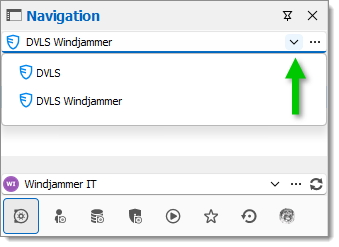
Multiple workspaces can be configured, but there can only be one workspace active at a time. Switch from one workspace to another by using the workspace drop-down list.
Startup workspace
You may assign a workspace to open automatically when Remote Desktop Manager starts.
Use default workspace
Select the workspace to connect to when the application starts.
Last used workspace
Connect to the last used workspace.
Prompt for workspace
Prompt the user to for a workspace to connect to.
System settings
Devolutions workspaces can manage a lot more settings related to the database and security. Those settings are saved directly in the database. For more information, please consult System settings.
Workspaces are at the heart of Remote Desktop Manager, acting as containers for entries.
Settings
A workspace can be a local file or a database (either local or shared). Multiple workspaces can be managed at the same time as seen below.
Create a workspace
Please consult Create a workspace for more information.
Multiple workspaces
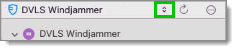
Multiple workspaces can be configured, but there can only be one workspace active at a time. Switch from one workspace to another by using the workspace drop-down list.
Startup workspace
You may assign a workspace to open automatically when Remote Desktop Manager starts.
Use default workspace
Select the workspace to connect to when the application starts.
Last used workspace
Connect to the last used workspace.
Prompt for workspace
Prompt the user to for a workspace to connect to.
System settings
Devolutions workspaces can manage a lot more settings related to the database and security. Those settings are saved directly in the database. For more information, please consult System settings.
See also
Last updated
Was this helpful?
