
Download Docuo – AI‑Powered Documentation Tool for Fast, Secure Knowledge Base Creation
Introduction: Modern Documentation Needs a Smarter Solution
In today’s hyper‑connected software landscape, documentation is no longer a static afterthought; it is a living product that customers and internal teams rely on daily. Traditional wiki‑style tools often force writers to juggle markdown, HTML, and endless formatting rules, slowing down releases and increasing the risk of outdated information. Docuo arrives as a fresh answer to these challenges, blending an intuitive visual editor with a powerful AI Copilot that can draft, refine, and even translate technical content at the click of a button. Whether you are a solo developer, a growing startup, or an enterprise with strict compliance requirements, Docuo’s cloud‑native architecture delivers a secure, collaborative environment that scales with your documentation needs. By leveraging AI‑assisted writing, built‑in version control, and seamless integrations with the tools you already use, Docuo helps you cut the time spent on manual formatting by up to 70 % while keeping your knowledge base searchable, accessible, and consistently on brand. This review walks through the core capabilities, installation flow, compatibility matrix, and real‑world pros and cons, giving you a clear picture of why Docuo might be the next essential tool in your software stack.
Overview: What Docuo Brings to the Table
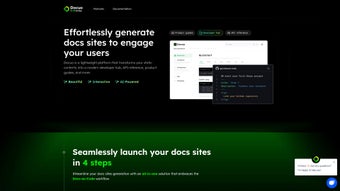
Docuo is a modern, AI‑driven knowledge‑base platform that transforms the often‑tedious task of writing and maintaining online documentation into a streamlined, enjoyable experience. Built for developers, technical writers, and support teams, Docuo eliminates the need for hand‑coding HTML or wrestling with complex CMS interfaces. Instead, users can create professional‑looking knowledge bases, manuals, API references, and how‑to guides with a visual editor that supports drag‑and‑drop content blocks, multimedia embedding, and instant publishing. The standout feature, Docuo Copilot, leverages large‑language‑model AI to suggest content, auto‑complete sections, and even generate entire pages from a brief prompt, allowing teams to focus on problem‑solving rather than formatting.
Beyond the core editor, Docuo offers a secure, cloud‑hosted environment with granular role‑based permissions, version history, and compliance‑ready data residency options. Its responsive design ensures documentation looks great on desktop, tablet, and mobile browsers, while built‑in SEO tools automatically generate meta‑tags, sitemaps, and schema markup to boost discoverability. Integration hubs connect Docuo to GitHub, GitLab, Slack, and Zapier, enabling automated publishing pipelines that keep your docs in sync with code changes. Whether you are documenting a SaaS product, an internal tool, or an open‑source library, Docuo provides the flexibility and control needed to keep knowledge current, searchable, and secure.
Key Features, Installation Process, and Compatibility
Feature Highlights
- Docuo Copilot AI – Generates draft content, suggests headings, and auto‑fills code snippets based on natural‑language prompts.
- Visual Block Editor – Drag‑and‑drop modules for text, tables, call‑outs, images, videos, and interactive code examples.
- Multimedia Support – Embed YouTube videos, GIFs, SVGs, and high‑resolution images directly into documentation pages.
- Version History & Rollback – Track changes, compare revisions, and revert to previous versions with a single click.
- Role‑Based Access Control – Assign editors, reviewers, and viewers to keep the knowledge base secure.
- Customizable Themes – Choose from built‑in light/dark themes or create a brand‑aligned style using CSS variables.
- SEO Automation – Automatic meta‑tags, sitemap generation, and schema markup for better discoverability.
- Integration Hub – Connect with GitHub, GitLab, Bitbucket, Slack, and Zapier for automated publishing workflows.
- Analytics Dashboard – Monitor page views, search queries, and user feedback to continuously improve content.
- Export & Import – Export documentation as PDF, Markdown, or HTML, and import existing docs with a simple wizard.
Installation & First‑Time Use
Docuo is delivered as a cloud‑based SaaS solution, so there is no traditional software download or local installation required. To get started, navigate to the official website, click Start Free Trial, and register using an email address or single‑sign‑on (SSO) via Google, Microsoft Azure AD, or Okta. After confirming your email, an onboarding wizard guides you through creating your first knowledge base, selecting a template, and configuring language, time‑zone, and default theme settings. Because the platform runs entirely in the browser, you can begin authoring documentation within minutes—no plugins or server setup needed.
Using the Visual Editor and AI Copilot
The editor loads instantly in any modern browser. To create a new page, click New Document on the dashboard, then choose from pre‑built block categories such as Header, Paragraph, Code, Image, Video, and Call‑out. Each block offers contextual menus for alignment, spacing, and custom CSS classes. When you need to generate content, hit the AI Assist button, type a brief description (e.g., “Explain OAuth 2.0 flow for mobile apps”), and let Docuo produce a draft that you can edit, approve, or discard. The AI learns from your existing style, ensuring consistency across the knowledge base. Markdown import is also supported—paste markdown into a code block and Docuo will render it instantly.
Compatibility and System Requirements
Docuo follows web standards and works flawlessly on the latest versions of Chrome, Firefox, Edge, and Safari. Its responsive design adapts to any screen size, making the editing experience smooth on Windows, macOS, Linux desktops, as well as Android and iOS tablets. Because the service is cloud‑hosted, the only client‑side requirement is a stable internet connection and a modern browser. For organizations with strict data‑residency policies, Docuo offers regional data centers in North America, Europe, and Asia‑Pacific, ensuring compliance with GDPR, CCPA, and other regulations.
Updates, Security, and Compliance
All updates are delivered automatically, with zero downtime for users. Security is a top priority: Docuo enforces TLS 1.3 encryption for data in transit and AES‑256 encryption at rest. Two‑factor authentication (2FA) is optional but recommended for admin accounts. The platform undergoes regular third‑party security audits and maintains SOC 2 Type II compliance, providing enterprises with confidence that their documentation remains protected against unauthorized access.
Pros, Cons, and Frequently Asked Questions
Pros
- AI‑driven content creation speeds up documentation by up to 70 %.
- Zero‑code visual editor makes authoring accessible to non‑technical writers.
- Robust version control and role‑based permissions ensure content integrity.
- Responsive design provides a seamless experience across desktop and mobile.
- Extensive integration options keep docs in sync with development pipelines.
- Built‑in SEO automation improves discoverability on search engines.
- Regional data centers help meet global compliance requirements.
Cons
- Being a SaaS product, it requires an internet connection; offline editing is not supported.
- Advanced customization beyond theme variables may need custom CSS or developer assistance.
- Pricing tiers can become costly for very large teams with many collaborators.
- AI Copilot may occasionally suggest content that needs manual verification for technical accuracy.
FAQ
Is there a free version of Docuo?
Docuo offers a 14‑day free trial with full feature access. After the trial, a limited free‑tier plan remains available, but it caps the number of knowledge bases and total storage.
Can I import existing documentation?
Yes. Docuo provides an import wizard that accepts Markdown, HTML, and PDF files, automatically converting them into editable blocks within the visual editor.
How does Docuo Copilot handle confidential information?
All AI processing occurs within your selected data region, and prompts are not stored long‑term. For highly sensitive projects you can disable the AI assistance feature entirely.
What browsers are supported?
Docuo works with the latest versions of Chrome, Firefox, Edge, and Safari. Mobile browsers on iOS and Android are fully supported as well.
Can I export my knowledge base?
Yes. Docs can be exported as PDF, HTML, or Markdown bundles, making it easy to archive, share, or migrate content to another platform.
Overall Review: Docuo stands out as a forward‑thinking documentation platform that blends AI convenience with enterprise‑grade controls. While the pricing may be a hurdle for small startups, the time savings and quality boost are compelling for any organization that treats documentation as a core product.
Conclusion – Why You Should Download Docuo Today
In a world where software releases happen faster than ever, keeping documentation up‑to‑date is a competitive advantage. Docuo eliminates the friction of manual formatting, reduces the learning curve for new writers, and ensures that every page is searchable, secure, and SEO‑friendly. Its AI Copilot drafts content in seconds, while the visual block editor lets anyone—from seasoned developers to novice technical writers—produce polished, multimedia‑rich pages without writing a single line of code. Integrated version control, role‑based permissions, and regional data centers give enterprises the governance they need, and the broad ecosystem of connectors (GitHub, Slack, Zapier, etc.) guarantees that your docs stay in sync with the rest of your toolchain.
Whether you are looking for a free tier to test the waters, a scalable solution for a growing team, or an enterprise‑grade platform that meets strict compliance standards, Docuo adapts to your requirements. The combination of AI‑assisted writing, robust security, and flexible deployment makes it a standout choice in the crowded documentation market. Ready to experience faster, smarter, and more secure documentation? Download Docuo now and start your free trial—your users, your support staff, and your development velocity will thank you.



.png)




