
Download Dollarbird – Personal Finance Calendar, Money Tracker, Budgeting Tool
Overview
Dollarbird is a personal finance calendar designed to simplify financial management through a calendar-based interface. The software enables users to track and forecast their income and expenses in a format that mirrors daily scheduling, making budgeting more intuitive and accessible. Unlike traditional finance apps that rely on spreadsheets or transaction lists, Dollarbird integrates financial planning with calendar functionality, allowing users to visualize their financial health over time. This approach is particularly useful for individuals who prefer a visual, timeline-oriented method to manage their money.
Target users include individuals seeking better control over their personal finances, couples managing shared budgets, and families coordinating household expenses. The platform supports collaborative financial planning, allowing users to share access with partners or family members to maintain transparency and alignment on financial goals. While the app is available on Android, details about compatibility with other platforms were not specified. The developer did not provide additional information about the app’s background or organizational structure.
Real-world usage scenarios include tracking monthly bills, planning for large purchases, monitoring savings goals, and reviewing spending patterns over time. The app’s ability to auto-categorize transactions with a hint of AI suggests an effort to reduce manual input, though specific technical details were not disclosed. Cloud storage ensures data accessibility across devices, supporting a seamless experience for users who switch between platforms.
Key Features & Capabilities
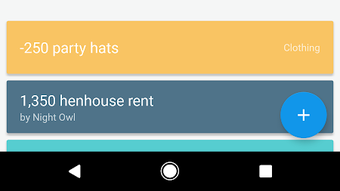
- Calendar-Based Financial Tracking – Users can add financial events such as income, expenses, and transfers directly to a daily calendar view, enabling a visual timeline of their financial activity.
- Auto-Categorization with AI – Transactions are automatically classified into categories like groceries, utilities, or entertainment, reducing the need for manual entry and improving consistency.
- Real-Time Balance Calculation – The app calculates daily and monthly balances automatically, providing an up-to-date snapshot of financial status at a glance.
- Transparent Transaction Breakdown – Users can view a clear, chronological breakdown of past and planned transactions, aiding in financial forecasting and decision-making.
- Collaborative Finance Management – The app supports shared access, allowing users to invite partners, family members, or friends to view and manage joint financial plans.
- Cloud-Based Data Sync – All financial data is stored securely in the cloud, enabling access across multiple devices regardless of operating system.
These features are particularly effective for users who want to plan ahead and avoid overspending. For example, a couple can use the calendar to schedule monthly rent payments and grocery expenses, while also setting aside funds for vacations. The auto-categorization helps identify spending trends, such as recurring subscriptions or seasonal expenses. The collaborative aspect supports shared financial goals, such as saving for a home or managing joint household bills.
User Interface, Workflow & Performance
The user interface of Dollarbird is built around a clean, calendar-centric layout, emphasizing visual clarity and ease of navigation. Users can access their financial data by scrolling through days, weeks, or months, with transactions displayed as events on the calendar. The design prioritizes simplicity, minimizing clutter and focusing on essential financial actions like adding a new transaction or viewing a balance summary.
Navigation appears to be intuitive, with key functions accessible through a bottom menu or quick-action buttons. The workflow is streamlined, allowing users to input transactions with minimal steps—likely through a form or voice input. The app’s performance is expected to be responsive, given its lightweight size of 20.5 MB, though exact performance details were not specified.
Stability and responsiveness are critical for financial tools, and while the developer did not provide specific information about CPU or RAM usage, the app’s design suggests efficient resource management. The use of cloud storage implies background sync operations, which may affect performance on slower connections. However, the developer did not disclose any known issues or performance bottlenecks. General software behavior patterns suggest consistent operation under normal conditions.
Compatibility & System Requirements
Dollarbird is designed for Android devices, with a current version of 1.0.1. The app has a file size of 20.5 MB, indicating a lightweight installation that should not strain device storage. The developer did not specify minimum hardware requirements such as RAM, processor speed, or available storage beyond the app size.
Platform compatibility information is limited to Android. While the app supports cloud storage and cross-device access, the developer did not confirm whether the software is available on iOS, Windows, or Mac. Users are advised to check the Google Play Store for current compatibility details. The absence of explicit system requirements means users should ensure their Android device meets general app installation standards.
Pros and Cons
Pros
- Intuitive calendar-based interface for financial tracking
- Auto-categorization of transactions using AI
- Real-time daily and monthly balance calculations
- Support for collaborative financial planning with family or partners
- Cloud sync enables access across multiple devices
- Visual breakdown of past and future transactions
Cons
- Full functionality requires a paid subscription ($4.99/month)
- Compatibility limited to Android; no confirmation of iOS or desktop availability
- Exact system requirements not provided
- Performance under low network conditions not disclosed
- Developer background and company details not publicly available
FAQ Section
Is Dollarbird available for iOS or Windows?
The app is currently available on Android. The developer did not provide information about iOS or desktop versions.
Is the app secure for storing financial data?
Dollarbird uses cloud storage to protect user data. However, specific security protocols such as encryption standards or third-party audits were not disclosed.
How often does the app update?
Version 1.0.1 was released on November 1, 2023. The developer did not specify a release schedule for future updates.
Can I use Dollarbird offline?
While the app supports cloud sync, the developer did not confirm whether full functionality is available without an internet connection.
What type of license does Dollarbird use?
Dollarbird operates on a subscription model. A monthly fee of $4.99 is required for full access to all features.
Final Thoughts
Dollarbird presents a fresh and visually engaging approach to personal finance management by integrating budgeting with a calendar interface. Its auto-categorization and collaborative features make it particularly valuable for individuals and families aiming to maintain financial transparency and discipline. The clean design and intuitive workflow reduce the learning curve, enabling users to start tracking their finances quickly.
While the app’s exclusive Android availability and subscription pricing may limit its accessibility, the core functionality offers strong value for users who prioritize visual planning and teamwork in their financial habits. For those seeking a modern, calendar-driven tool to manage money with clarity and foresight, Dollarbird stands out as a compelling option.
Download Dollarbird now




.png)



