
Screenshots
App details
- Updated
- Mar 1, 2012
- Language
- Spanish,English
- Developer
- MGTEK.
- Category
- Mobile
About Dopisp
Download Dopisp – iPod sync, Windows Media Player, iTunes alternative, music sync, drag and drop, digital rights management
Overview
Dopisp is a utility plugin designed to streamline the process of syncing iPod devices with computers running Windows. Its primary purpose is to eliminate the dependency on iTunes for music transfer, offering a direct integration path with Windows Media Player. This solution is particularly beneficial for users who prefer managing their music library through Microsoft’s native media application rather than Apple’s software ecosystem. The app addresses a common pain point for Windows users: the lack of native support for iPod synchronization without relying on iTunes, which is often perceived as complex or resource-heavy.
Target users include individuals who maintain large music collections in Windows Media Player and wish to transfer those files to their iPods without switching platforms or software. The tool is especially useful for users seeking a lightweight, no-frills alternative to iTunes. While the developer did not provide additional background on the origin or development team behind Dopisp, the app’s focused functionality suggests a niche-oriented approach to solving a specific technical limitation. Real-world use cases include transferring personal music files, managing playlists, and organizing content across devices without the need for Apple’s ecosystem.
Within the broader software ecosystem, Dopisp fills a gap in cross-platform media management, particularly for users committed to the Windows environment. Despite its age, the app remains relevant for legacy systems where newer tools are not compatible. The developer did not specify minimum OS requirements, but compatibility with Windows Media Player 11 is explicitly required.
Key Features & Functionality
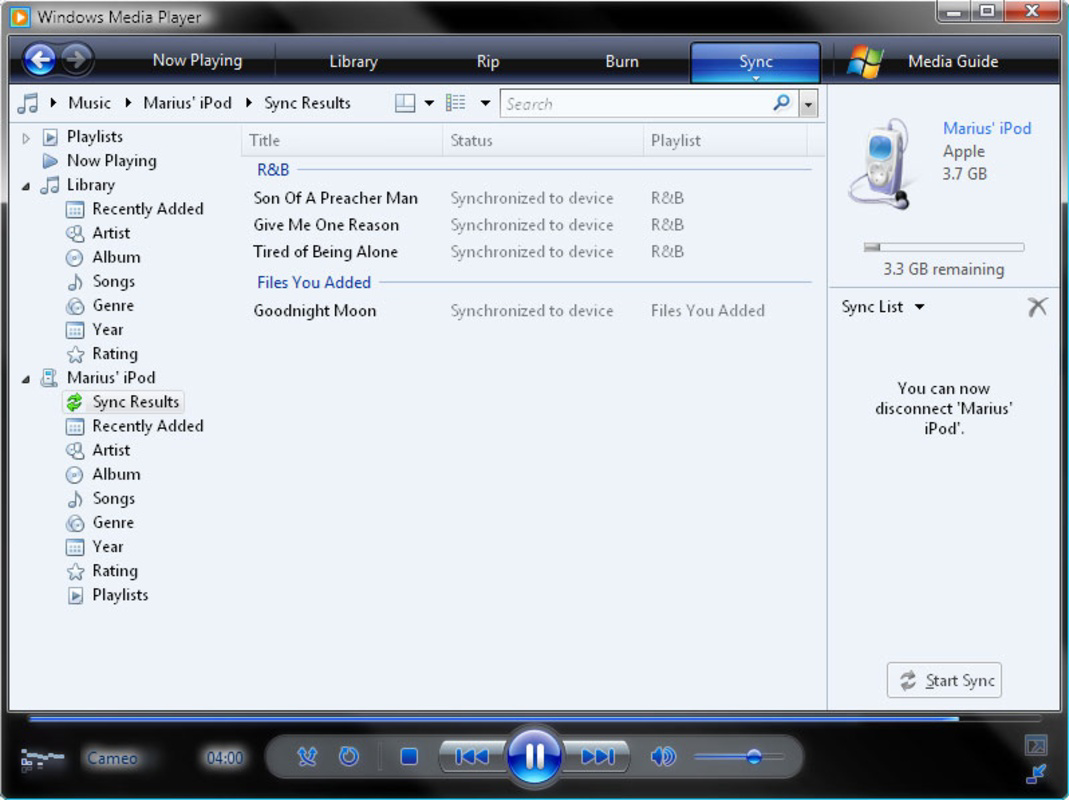
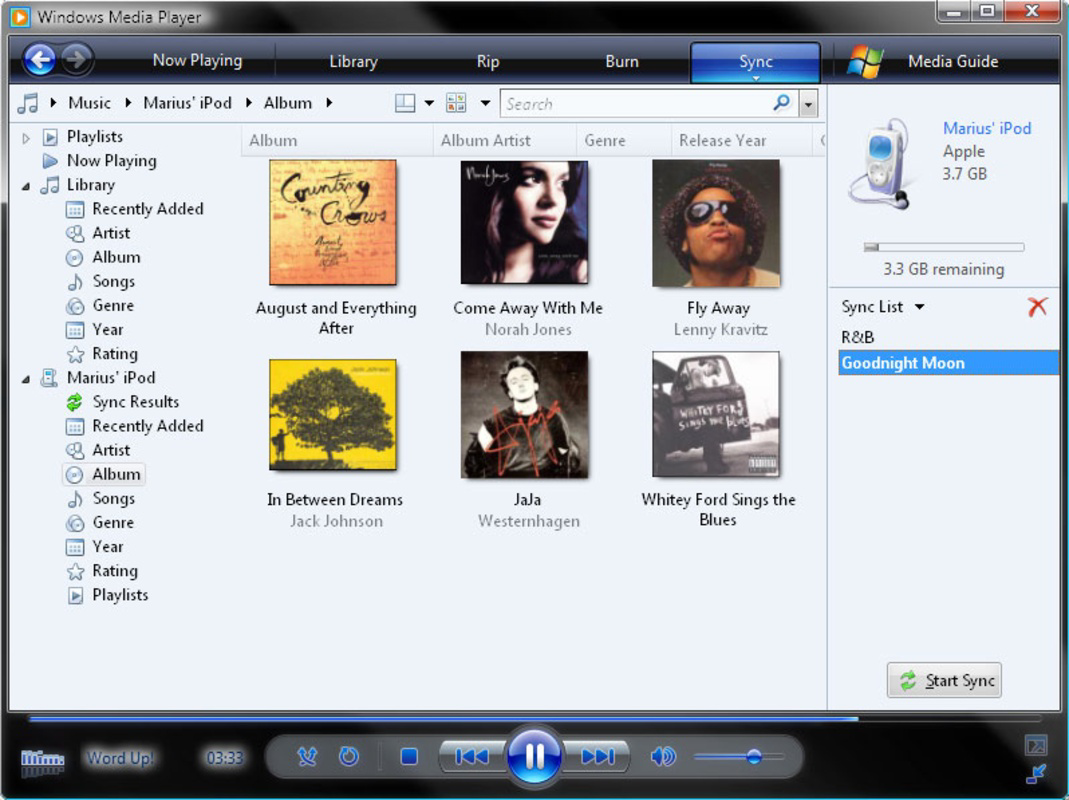
- Direct Integration with Windows Media Player: Dopisp operates as a plugin, extending the functionality of Windows Media Player to support iPod synchronization. This seamless integration allows users to manage their iPods directly from a familiar interface without launching external applications.
- Drag-and-Drop Syncing Interface: Users can add music files to the sync queue by simply dragging them from Windows Media Player into the Dopisp interface. This intuitive method reduces the learning curve and enhances usability for non-technical users.
- One-Click Sync Process: After selecting the desired tracks, users can initiate the transfer with a single click of the 'Sync' button. This simplifies the workflow and minimizes the risk of user error during the transfer process.
- Alternative to iTunes: Dopisp provides a viable workaround for users who find iTunes overly complex or intrusive. By removing the need to install and manage Apple’s software, it promotes a more streamlined media management experience.
- Compatibility with Non-Restricted Files: The plugin supports the transfer of music files that are not protected by digital rights management (DRM), enabling users to sync their personal music library without restrictions.
For example, a user with a collection of MP3s stored in Windows Media Player can drag them into Dopisp and sync them to their iPod in under a minute. This is ideal for individuals who create their own music, convert files from CDs, or download music from non-DRM sources. However, the app does not support songs purchased from the iTunes Store or other DRM-protected content, which limits its use in certain scenarios.
Interface, UX & Performance
The interface of Dopisp is designed with simplicity and efficiency in mind. It features a minimalistic layout that integrates directly into the Windows Media Player environment, avoiding unnecessary visual clutter. The primary interaction points—drag-and-drop zones and the 'Sync' button—are clearly labeled and positioned for optimal accessibility.
Navigating through the app is straightforward, with a linear flow from file selection to synchronization. Users are not required to configure complex settings, making the experience accessible even to those with limited technical knowledge. The plugin maintains a consistent visual style that aligns with the Windows Media Player aesthetic, ensuring a cohesive user experience.
Although the developer did not list formal performance metrics, the app’s lightweight nature—2.1 MB in size—suggests minimal impact on system resources. It is expected to function smoothly on devices with moderate hardware capabilities, though performance may vary depending on the number of files being synced and the speed of the connected iPod. Stability is likely maintained through its focused scope, as it performs a single task without additional background processes.
Platform Compatibility & Technical Requirements
Dopisp is designed exclusively for the Windows platform. It requires Windows Media Player 11 to operate, which limits its compatibility to older versions of Windows, including Windows XP, Vista, and 7. The app’s file size is 2.1 MB, indicating a lightweight installation with minimal storage impact.
The developer did not specify minimum OS requirements or compatibility with newer versions of Windows Media Player. As such, users running Windows 8 or later may encounter issues, as Microsoft discontinued support for Windows Media Player 11 in those operating systems. Additionally, the app is not available for macOS, iOS, or Android, restricting its use to a narrow technical environment.
Pros and Cons
Pros
- Provides a streamlined alternative to iTunes for iPod syncing.
- Features a simple drag-and-drop interface that enhances usability.
- Operates within Windows Media Player, reducing the need for additional software.
- Lightweight at 2.1 MB, minimizing system resource usage.
- Free to download and use, with no in-app purchases or subscriptions.
Cons
- Requires Windows Media Player 11, limiting compatibility with modern systems.
- Does not support DRM-protected music, including iTunes Store purchases.
- Not compatible with newer versions of Windows or Windows Media Player.
- Development appears to have ceased, with no recent updates or official support.
- Limited to Windows, with no support for macOS, iOS, or Android.
FAQ
Is Dopisp safe to download and install?
Yes, Dopisp is a free utility that does not contain malware or intrusive ads. However, users should only download it from trusted sources to ensure integrity.
Can I use Dopisp on Windows 10 or Windows 11?
While the developer did not confirm compatibility, Dopisp requires Windows Media Player 11, which is not available by default on Windows 10 or 11. Users may need to install legacy components, but success is not guaranteed.
Does Dopisp support songs from the iTunes Store?
No. Dopisp does not support syncing music that is protected by digital rights management (DRM), including tracks purchased from the iTunes Store.
Is Dopisp still being updated?
The app was released in 2012, and the developer has not released any updates since. It is considered a legacy tool with no active development.
Can I sync my iPod without installing iTunes?
Yes, Dopisp allows users to sync their iPods directly through Windows Media Player without needing to install iTunes, provided the music files are not DRM-protected.
Final Thoughts
Dopisp remains a niche but functional tool for Windows users who wish to avoid iTunes and manage their iPods through Windows Media Player. Its drag-and-drop interface and minimal setup make it a practical choice for transferring non-DRM music files. While its age and lack of modern compatibility are notable drawbacks, the app continues to serve its original purpose effectively for users on older systems.
Those who rely on Windows Media Player for music management and own an iPod will find the most value in this tool. It offers a secure, free, and efficient way to sync content without the overhead of Apple’s software. However, users on newer operating systems or those with DRM-protected libraries should consider alternative solutions.
Download Dopisp now
Guides & Tutorials
How to install Dopisp
- Click the Download button above.
- Once redirected, accept the terms and click Install.
- Wait for the Dopisp download to finish on your device.
How to use Dopisp
This software is primarily used for its core features described above. Open the app after installation to explore its capabilities.
User Reviews
No reviews yet. Be the first to share your experience.
You may also like
more
Que no te pillen¡
About !Que no te pillen¡Reviewed by Jason A. BilbreyShow MoreShow Less

3D Combat Zone
About 3D Combat ZoneOriginally released in 1983, 3D Combat Zone immerses players...

666: El día del portal
About 666: El día del portalOn June 6, 2006, Agent P. Stone uncovers a sinister...

80 in 1 Best Flash games
About 80 in 1 Best Flash games 80 in 1 Best Flash games is a collection of 80 fl...

ABYSS SEEKERーーWhat Do You See Deep in The Abyss
About ABYSS SEEKERーーWhat Do You See Deep in The AbyssIn ABYSS SEEKER, players...

ACA NEOGEO THE KING OF FIGHTERS 2002 for Windows
About ACA NEOGEO THE KING OF FIGHTERS 2002 for WindowsTHE KING OF FIGHTERS 2002,...
