
Download Double Commander – File Manager, Productivity Tool, Utility App
Overview
Double Commander is a specialized file management application designed to enhance the efficiency and functionality of file handling tasks on desktop operating systems. Built with a dual-panel interface inspired by classic file managers like Norton Commander, it offers a powerful alternative to standard file explorers, particularly for users who manage large volumes of files or require advanced file manipulation tools. The app is especially tailored for developers, system administrators, and power users who demand greater control and customization over their file workflows.
Its core purpose lies in streamlining file operations such as copying, moving, renaming, and organizing across multiple directories with minimal effort. The dual-panel layout allows for side-by-side comparison and transfer of files, significantly improving workflow efficiency. This makes it ideal for tasks like project setup, batch file processing, and cross-system file synchronization.
Double Commander supports both Windows and Linux environments, offering a consistent experience across platforms. This cross-platform compatibility ensures that users can maintain familiar workflows regardless of their operating system. While the developer did not provide additional technical details about the app’s background or development history, its long-standing presence in the open-source community suggests a dedicated user base and ongoing maintenance.
Real-world use cases include managing source code repositories, organizing multimedia assets, and preparing software deployment packages. In the broader app ecosystem, Double Commander fills a niche for users seeking a lightweight yet feature-rich file manager that goes beyond basic file browsing, providing tools that boost productivity and reduce repetitive tasks.
Key Features & Functionality
- Customizable Columns: Users can tailor the display of file information in each panel, choosing which attributes to show—such as file size, permissions, creation date, or custom metadata. This is particularly useful when working with UNIX-based systems where file permissions and ownership are critical.
- Mask-Based File Selection: The app allows users to select files using pattern matching (masks), enabling quick filtering of files by name, extension, or other criteria. This feature is ideal for batch operations, such as selecting all .log files or .tmp files for deletion or archiving.
- Integrated Compression Tools: Double Commander includes built-in support for creating and extracting ZIP and TAR archives. Selected files can be compressed with a single action, reducing the need to switch between multiple applications.
- Familiar Toolbar and Keyboard Shortcuts: The interface mimics the layout of the classic Norton Commander, making it intuitive for experienced users. Common actions like copy, move, and delete are accessible via keyboard shortcuts, minimizing mouse dependency and increasing speed.
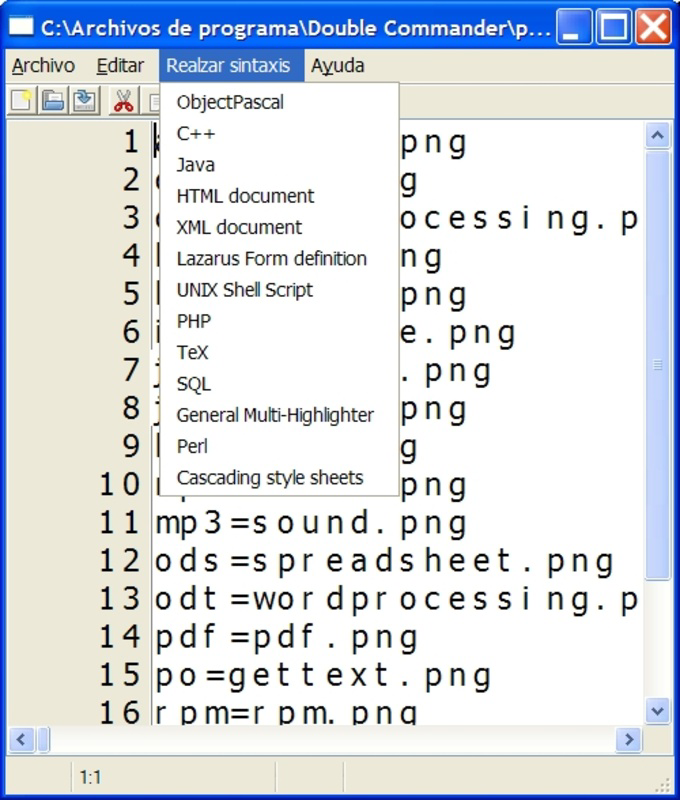
- Advanced File Viewer/Editor: The built-in editor supports viewing and editing files in text, binary, and hexadecimal modes. It also features syntax highlighting for programming languages such as HTML, CSS, Java, and JavaScript, making it a valuable tool for web and software developers.
These features collectively enhance productivity by reducing the number of steps required for common file management tasks. For example, a developer can compare two project folders side-by-side, identify differences, select files using a mask, compress them into a ZIP archive, and deploy them—all within a single interface.
Interface, UX & Performance
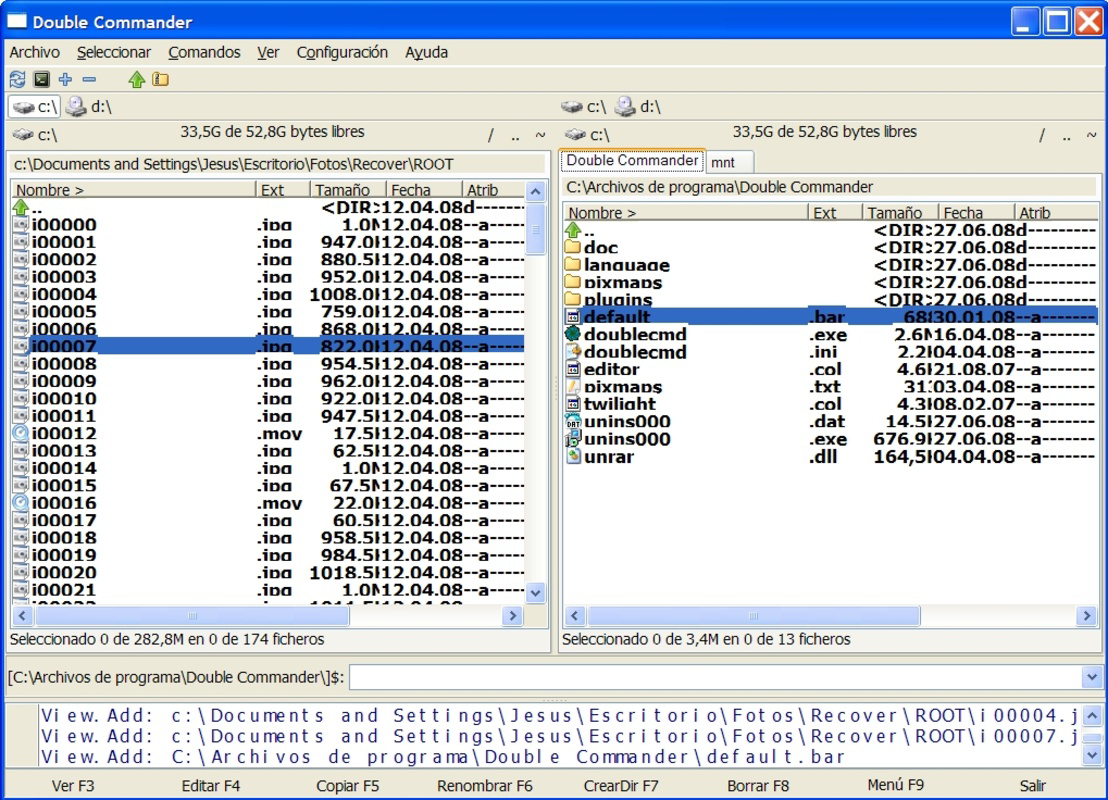
Double Commander features a clean, two-pane layout that emphasizes functionality over visual flair. The interface is structured around two file panels, each displaying the contents of a different directory. This layout enables users to easily compare, copy, and move files between locations without navigating back and forth.
Navigation is straightforward, with a consistent toolbar, menu bar, and status bar. The app supports keyboard-driven workflows, allowing users to perform actions quickly without relying on mouse input. This design benefits users who prefer efficiency and speed over graphical interactivity.
Although the developer did not list formal performance metrics, the app is known for its lightweight footprint and responsiveness, even when handling large directories. It operates smoothly on mid-range systems and maintains stability during extended use. The interface remains responsive during file operations, with minimal lag or freezing.
Users can customize the appearance through themes and font settings, though no built-in dark mode was specified. The app does not appear to include animations or transitions, which contributes to its fast performance. Overall, the user experience is optimized for productivity, with minimal distractions and a focus on core file management tasks.
Platform Compatibility & Technical Requirements
Double Commander is available for both Windows and Linux operating systems. The application supports multiple versions of these platforms, though specific OS requirements were not listed. The app’s file size is 28.5 MB, indicating a lightweight installation that does not burden system resources.
The software version is 2025.08.11, reflecting a recent update. This suggests ongoing development and maintenance, which is important for security and compatibility with evolving system environments. The release date was August 11, 2025.
The developer did not specify minimum OS requirements, so users should ensure their system meets the general standards for running desktop applications. Compatibility information was not fully disclosed, so users are advised to consult official sources for system-specific details.
Pros and Cons
Pros
- Efficient dual-panel interface for fast file comparison and transfer
- Highly customizable columns and file display options
- Powerful mask-based file selection for batch operations
- Integrated support for ZIP and TAR compression
- Advanced file viewer with syntax highlighting for developers
- Lightweight and responsive performance
- Available on both Windows and Linux platforms
Cons
- Interface may feel outdated to users accustomed to modern UI designs
- No built-in dark mode or advanced visual themes
- Developer did not provide detailed system requirements
- Not available on mobile platforms (Android or iOS)
- Limited graphical feedback during file operations
FAQ
Is Double Commander free to download and use?
Yes, Double Commander is available at no cost. It is distributed under an open-source license, allowing users to download, install, and use it freely across supported platforms.
Can I install Double Commander on Android or iOS?
Currently, Double Commander is only available for Windows and Linux desktop operating systems. There is no official mobile version for Android or iOS devices.
Does Double Commander support file compression?
Yes, the app includes built-in tools for creating and extracting ZIP and TAR archives, allowing users to manage compressed files directly within the interface.
Is Double Commander secure to use?
As an open-source application, Double Commander’s code is publicly available for review. This transparency enhances trust and allows security experts to audit the software. Users should always download it from official sources to ensure integrity.
How often is Double Commander updated?
The latest version was released on August 11, 2025. While the update frequency is not specified, the recent release indicates active development and ongoing improvements.
Final Thoughts
Double Commander stands out as a robust, no-frills file manager designed for users who prioritize efficiency and control. Its dual-panel layout, customizable interface, and advanced file manipulation tools make it a powerful utility for developers, system administrators, and anyone managing complex file workflows. While it may lack modern visual polish, its focus on functionality delivers tangible productivity gains.
For users seeking a reliable, lightweight, and cross-platform alternative to default file explorers, Double Commander offers a compelling value proposition. It’s not just a tool—it’s a workflow enhancer for power users who demand more from their file management experience.
Download Double Commander now


