
Live Race Timing for iPhone Drivers
Overview
DriverMonitor is a specialized desktop application designed for motorsports enthusiasts who require real-time race tracking and scoring data. The software provides an in-car glanceable display of live timing and scoring information, enabling drivers to monitor their position, elapsed time, lap counts, and split times relative to the class leader and other competitors. This functionality is particularly valuable during sprint and endurance racing events, where split-second decisions can influence race outcomes. The app is tailored for drivers participating in competitive motorsports, offering a streamlined interface that delivers critical race data without distraction.
Target users include amateur and professional racers, track-day participants, and motorsports event organizers who need a reliable tool for race monitoring. While the application is available for iPhone, it is not designed for desktop use. The developer did not provide additional details about the company or development background. Real-world usage scenarios include qualifying sessions, where drivers can assess whether they’ve been overtaken for pole position, and race sessions, where live updates help inform strategic decisions such as pit stops or overtaking attempts. The app supports both SPRINT and ENDURANCE racing formats, with dedicated timing feeds for each.
Key Features & Capabilities
- Live Timing and Scoring Display – Provides real-time updates on race position, elapsed time, completed laps, and split times compared to the class leader and other vehicles in the same class.
- In-Car Glanceable Interface – Designed for quick visual reference during high-speed driving, minimizing the need for prolonged screen interaction.
- Qualifying Session Monitoring – Enables drivers to track their standing relative to the pole position and determine if there’s time for another flying lap.
- Class-Based Performance Tracking – Compares a driver’s performance against others in the same class, ensuring accurate and relevant race data.
- Subscription-Based Live Feed Access – Offers access to live timing feeds through tiered subscription plans, including monthly, weekly, and annual options for both SPRINT and ENDURANCE racing.
These features are ideal for drivers who need immediate access to race progress data while on track. For example, during a qualifying session, a driver can assess whether they’ve been pipped from the top spot and decide whether to attempt another lap. In endurance racing, split time comparisons help drivers maintain optimal pace without overexerting. The app supports both short sprint events and longer endurance races, making it adaptable to various motorsports formats. The subscription model ensures continuous access to live data feeds, though users must manage renewals through iTunes Account Settings.
User Interface, Workflow & Performance
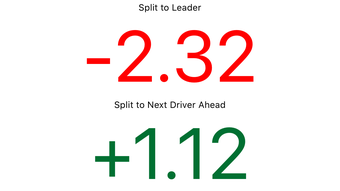
DriverMonitor features a clean, minimalist interface optimized for quick readability during high-speed driving. The layout emphasizes critical data points—such as race position, lap count, and split times—using large, high-contrast text and intuitive visual cues. Navigation is straightforward, with minimal on-screen controls to reduce driver distraction. The workflow is designed around immediate access to live timing data, allowing users to view essential race information with a single glance.
Performance details were not specified by the developer. However, the app’s lightweight nature—46.5 MB in size—suggests efficient resource usage. The developer did not provide additional system requirements or information on CPU or RAM behavior. Stability and responsiveness are expected to be consistent with standard iOS applications, though exact performance observations are based on general software behavior patterns. The app is designed to function in real-time, requiring a stable internet connection to receive live timing feeds. Offline functionality is not supported, as the core features depend on continuous data streaming.
Compatibility & System Requirements
DriverMonitor is designed exclusively for iPhone devices and is compatible with iOS versions supported by the app. The current version is 2.2.0, released on April 15, 2024. The installation size is 46.5 MB, which is relatively compact for a feature-rich application. The developer did not specify exact hardware requirements or additional system prerequisites. Compatibility information was partially provided, with no mention of iPad or Mac support.
Users should ensure their iPhone meets the minimum iOS version required by the app. While specific details were not listed, the app’s functionality relies on access to live timing feeds, which may require a stable internet connection and a compatible device for optimal performance. The app is not available for desktop platforms, limiting its use to mobile devices. For users considering installation, it is recommended to verify compatibility with their current device and iOS version.
Pros and Cons
Pros
- Real-time, glanceable race timing and scoring data
- Optimized interface for in-car use during high-speed driving
- Supports both sprint and endurance racing formats
- Provides accurate class-based performance comparisons
- Available at no cost with subscription-based live feed access
Cons
- Requires a paid subscription for live timing feed access
- Not available for desktop or Mac platforms
- Subscription cancellations are not permitted during active periods
- Relies on stable internet connectivity for real-time updates
- Limited to iPhone devices; no iPad or cross-platform support
FAQ Section
Is DriverMonitor available for desktop or Mac?
DriverMonitor is designed exclusively for iPhone and is not available for desktop or Mac platforms. The application is optimized for mobile use and does not support Windows, Mac, or other desktop operating systems.
Can I use DriverMonitor without a subscription?
The app is free to download and install, but access to live timing and scoring feeds requires a paid subscription. Without a subscription, the app cannot provide real-time race data.
What subscription plans are available?
Subscription options include monthly ($19.99 for SPRINT, $34.99 for ENDURANCE), weekly ($11.99 for SPRINT, $24.99 for ENDURANCE), and annual ($39.99) plans. Each plan offers varying hours of live timing feed access based on race type.
How do I manage or cancel my subscription?
Subscription management, including turning off auto-renewal, must be done through the iTunes Account Settings after purchase. Cancellations are not allowed during the active subscription period.
Does DriverMonitor work offline?
No, DriverMonitor requires a continuous internet connection to receive live timing feeds. The app does not support offline mode or cached data playback.
Final Thoughts + CTA
DriverMonitor delivers a focused, high-impact solution for motorsports drivers who need real-time race tracking and scoring. Its glanceable interface, class-based performance tracking, and support for both sprint and endurance racing make it a valuable tool for competitive drivers. While the need for a subscription limits full access, the app’s core design and functionality are well-suited for on-track use. The lack of desktop support and limited cross-platform availability are notable constraints, but the app excels within its intended scope.
For drivers seeking reliable, real-time race data on iPhone, DriverMonitor stands out as a specialized tool. Its streamlined interface and timely updates enhance race strategy and performance. Download DriverMonitor now to elevate your motorsports experience with live timing and scoring at your fingertips.








