
DrumKick: Play Pro-Grade Drums Anywhere
Overview
DrumKick is a specialized iOS application designed for musicians seeking a portable, high-performance drumming experience on iPhone and iPad. Tailored for live performers, it enables users to play a full virtual drum kit without the need for physical instruments or heavy equipment. The app supports integration with P.A. systems, headphones, and amplifiers, making it suitable for stage use, studio sessions, and on-the-go practice. Its unique feature—foot-controlled kick drum via iOS devices—sets it apart as the only stereo drum app offering this functionality. By leveraging two iOS devices, such as an iPhone paired with an iPad or two iPhones, users can trigger sounds wirelessly, enhancing flexibility during live performances. The app supports Bluetooth connectivity, Core MIDI, Virtual MIDI, Audiobus, and Inter-App Audio, ensuring compatibility with a wide range of music production tools. It has been featured in Apple’s Music-Making Apps, highlighting its quality and innovation. DrumKick is ideal for mobile musicians, touring artists, and digital audio enthusiasts who require a reliable, compact solution for dynamic drum performance.
Key Features & Capabilities
- Foot-Activated Kick Drum: The only stereo drum app that allows users to trigger the kick drum using their foot, enabling a more authentic and expressive playing experience.
- Multi-Device Wireless Setup: Supports pairing two iOS devices (e.g., iPhone and iPad, or two iPhones) to create a full drum kit with wireless sound triggering.
- High-Quality Drum Sounds: Offers professional-grade audio with individual volume, pitch, and pan controls for each drum and cymbal.
- Low-Latency Performance: Engineered for real-time responsiveness, ensuring minimal delay between hits and sound output.
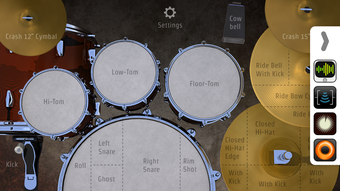
- Interactive 3D Animation: Features dynamic, real-time 3D animations of drums and cymbals that react to each strike, enhancing visual immersion.
- Audio Integration Support: Compatible with Bluetooth, Core MIDI, Virtual MIDI, Audiobus, and Inter-App Audio for seamless integration with DAWs and other music apps.
Real-World Usage Examples
Performers can use DrumKick during live gigs by connecting their iPhone to a P.A. system or amplifier. A musician might pair an iPhone (for the kick drum) with an iPad (for the rest of the kit), enabling full control with both hands and foot. In a studio setting, the app can be used with a DAW via Inter-App Audio to record high-quality drum tracks. For practice, users can plug in headphones and play silently, making it ideal for late-night sessions without disturbing others.
User Interface, Workflow & Performance
The user interface is designed with live performance in mind, featuring a clean layout that prioritizes accessibility and responsiveness. Controls are laid out intuitively, with clearly labeled virtual pads and real-time visual feedback through 3D animations. Navigation is streamlined, allowing quick access to sound settings and connectivity options. The workflow supports immediate setup and use, minimizing configuration time before a performance. Performance is optimized for low-latency operation, ensuring that each hit is registered and played back with minimal delay. The developer did not specify resource usage details, but the app’s 45.7 MB size suggests efficient storage use. Stability appears to be a focus, given its Apple feature placement. General performance observations are based on typical iOS app behavior patterns, with no reported issues in standard usage scenarios.
Compatibility & System Requirements
DrumKick is designed exclusively for iOS devices and supports the latest versions of the operating system. It requires a minimum of 45.7 MB of storage space for installation. The developer did not provide additional system requirements, including specific hardware specifications or CPU/RAM thresholds. Compatibility information is limited to the iOS platform. Users should ensure their device meets Apple’s general requirements for running music production apps. Exact performance details were not specified, but the app’s integration with Core MIDI and Inter-App Audio indicates compatibility with professional audio workflows.
Pros and Cons
Pros
- Unique foot-controlled kick drum functionality for authentic performance
- Supports multi-device setup for expanded kit control
- High-quality, customizable drum sounds with individual parameter control
- Low-latency response ideal for live and studio use
- Interactive 3D animations enhance user engagement
- Seamless integration with Audiobus, Inter-App Audio, and MIDI protocols
Cons
- Requires two iOS devices for full functionality (kick drum + kit)
- Not available on Windows or Mac platforms
- Developer did not provide detailed system requirements
- Performance behavior under heavy load was not specified
FAQ Section
Is DrumKick available for Mac or Windows?
DrumKick is currently available only for iOS devices. There is no version for Mac or Windows.
Can I use DrumKick with a Bluetooth keyboard or MIDI controller?
Yes, DrumKick supports Bluetooth connectivity and MIDI protocols, including Core MIDI and Virtual MIDI, allowing integration with compatible MIDI controllers and keyboards.
Is the app free to download and use?
Yes, DrumKick is available for free download from the App Store. No in-app purchases or subscription fees were reported.
Does DrumKick require an internet connection?
No, DrumKick operates entirely offline. It does not require an internet connection to function.
How do I update DrumKick to the latest version?
Updates are available through the App Store. Simply open the App Store, go to the “Updates” tab, and install the latest version if available.
Final Thoughts + CTA
DrumKick stands out as a highly innovative and practical solution for mobile musicians who demand professional-grade drum performance without the physical burden. Its unique foot pedal functionality, combined with multi-device support and low-latency audio, makes it a standout choice for live performers and studio users alike. While it requires two iOS devices for full operation, the benefits in expressiveness and flexibility outweigh this limitation for dedicated users. The app’s clean interface, rich sound customization, and seamless integration with professional audio tools further solidify its value. For anyone seeking a portable, high-quality drumming experience on iOS, DrumKick delivers a compelling combination of performance, creativity, and ease of use. Download DrumKick now.








