
Download DXF Editor – Free, Secure CAD Tool for Windows & macOS
Overview
DXF Editor is a lightweight yet powerful CAD program built specifically for opening, viewing, and editing drawings in the Drawing eXchange Format (DXF). Unlike generic graphics editors, DXF Editor works directly with the native DXF structure, guaranteeing zero data loss when you import or export files. Whether you are a hobbyist creating simple stencils or a professional needing to fine‑tune an AutoCAD export, the application offers a familiar drawing canvas, a set of precise geometric tools, and a layer manager that mirrors the workflow of larger CAD suites. The interface resembles a modern paint program, but every tool is engineered for CAD‑grade accuracy, supporting lines, polylines, B‑splines, ellipses, dimensions, and free‑hand sketches. Users can also assign colors, line weights, and custom line styles (dotted, dashed, etc.) to any object, making the final file ready for laser cutting, CNC machining, or further refinement in higher‑end CAD software. While DXF Editor does not replace full‑featured packages like AutoCAD or SolidWorks, it fills a crucial niche: a fast, free, and secure way to manipulate DXF files without the overhead of expensive licences or complex installation steps.
Core Features & Tools
- Native DXF support – open, edit, and save without any intermediate conversion.
- Comprehensive geometric primitives: lines, rays, polylines, polygons, B‑splines, ellipses.
- Text handling with unlimited fonts, layer‑based colour, and thickness control.
- Free‑hand drawing for quick concept sketches that can be converted to vector objects.
- Layer manager – create, rename, toggle visibility, and lock layers for organized designs.
- Dimension tools – add linear, angular, and radial dimensions directly onto the canvas.
- Object manipulation – resize, rotate, mirror, offset, and array (exponential multiplication).
- Custom line styles – dotted, dashed, dash‑dot, with user‑defined patterns.
- Undo/redo stack – unlimited steps for safe experimentation.
- Export options – save back to DXF or export as SVG for web‑friendly use.
Beyond the basic drawing capabilities, DXF Editor integrates a context‑sensitive properties panel that updates in real time as you select objects. This panel lets you edit coordinates, radius, angles, and layer attributes without leaving the workspace. While the toolset is intentionally streamlined, the application still provides advanced operations such as boolean trimming and extending of lines, which are often missing from free CAD viewers. The inclusion of a simple yet effective raster‑to‑vector trace (available in the free version) means you can import scanned sketches, convert them into editable DXF geometry, and continue refining the design. For users who need to maintain strict tolerances, the numeric entry fields allow you to type exact measurements, ensuring the final drawing matches production specifications. Although a dedicated ruler or grid snapping is not part of the free edition, the application compensates with snap‑to‑object and incremental move options that help keep elements aligned during complex edits.
Installation, Usage & Compatibility
Step‑by‑Step Installation
- Visit the official DXF Editor download page and click the “Download for Windows” or “Download for macOS” button.
- Run the installer (DXFEditorSetup.exe for Windows or DXFEditor.dmg for macOS).
- Follow the on‑screen prompts: accept the licence agreement, choose the installation folder, and select optional shortcuts.
- When the installation finishes, launch DXF Editor from the desktop shortcut or the Start Menu / Applications folder.
- The first launch will display a brief tutorial overlay; click “Got it” to start working.
Getting Started Quickly
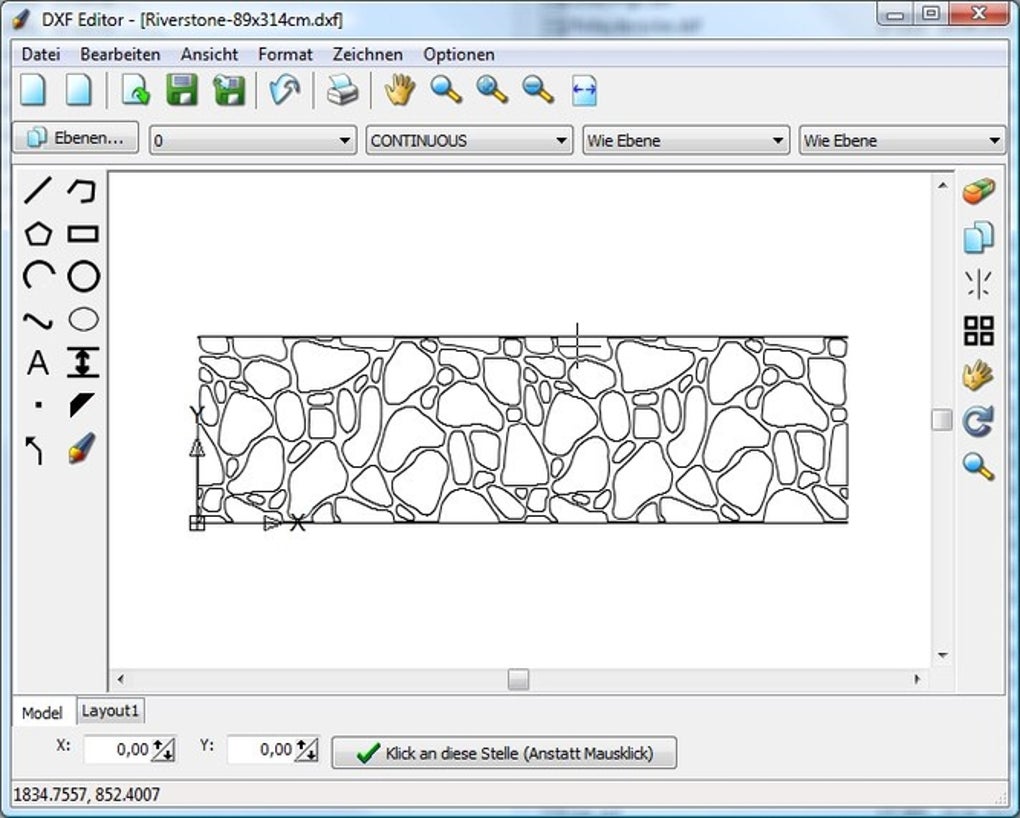
After launching the program, you’ll see a clean canvas flanked by a vertical toolbar on the left and a properties panel on the right. To open an existing DXF file, choose File → Open or drag‑and‑drop the file onto the canvas. The file loads instantly because DXF Editor reads the native structure without conversion. For new designs, click the New icon, set your drawing units (mm, cm, inches) in the settings dialog, and start adding objects from the toolbar. Every tool works with mouse clicks and keyboard shortcuts (e.g., “L” for line, “P” for polyline, “T” for text). When you need to adjust an object, simply click it to reveal its editable parameters in the right‑hand panel—enter exact coordinates, change line weight, or switch the colour swatch. Layers can be managed via the Layers tab: create a new layer, assign a colour, and then draw directly on it. When you’re satisfied, save your work by selecting File → Save (overwrites the current file) or Save As to create a new version.
Operating System Support
DXF Editor runs on 64‑bit Windows 10, 11, and macOS 10.15 (Catalina) or later. The installer includes all required runtime libraries, so no additional dependencies are needed. A portable version is also available for Windows, allowing you to run the program from a USB stick without installing it on the host machine. While there is no official mobile app, the file format can be transferred to Android or iOS devices and viewed with compatible CAD viewers.
System requirements are modest: a dual‑core CPU, 2 GB RAM, and 150 MB of free disk space. The application launches in under five seconds on typical consumer laptops, making it ideal for quick edits on the go. Regular updates are delivered automatically (if you enable the “Check for updates” option), ensuring you receive bug fixes and minor feature enhancements without manual intervention.
Pros, Cons & Frequently Asked Questions
Pros
- True native DXF handling – zero data loss during import/export.
- Free, no‑ads interface with a straightforward learning curve.
- Rich set of geometric tools suitable for both simple sketches and detailed CAD work.
- Layer manager and property panel streamline organization and precision editing.
- Lightweight installer and low system requirements make it fast on older hardware.
Cons
- Lacks a built‑in ruler or grid‑snapping feature for exact placement.
- Layer manipulation can be unintuitive when switching between visibility states.
- Advanced CAD functions (e.g., parametric constraints, 3D modeling) are not available.
- Customization options are limited to colour, line weight, and basic line styles.
- Free version does not include batch processing or scripting capabilities.
FAQ
Can DXF Editor open DWG files directly?
No. DXF Editor is purpose‑built for DXF files only. To work with DWG files you must first convert them to DXF using a dedicated converter or a full‑featured CAD program.
Is there a way to measure distances without a ruler?
While a visual ruler is not included, you can use the dimension tool to place linear or angular measurements on the canvas. You can also type exact coordinate values in the properties panel for precise distance entry.
Does the free version limit the number of layers?
No. The free edition allows unlimited layers; however, layer management UI is basic, and some advanced layer‑filtering features are reserved for the paid Pro version.
Can I export my design as an SVG for web use?
Yes. DXF Editor includes an “Export as SVG” option under the File menu, which converts vector geometry while preserving line styles and colours.
Is the software safe to download and install?
Absolutely. The installer is digitally signed, and the program does not contain adware or telemetry. All updates are delivered through a secure HTTPS channel.
Conclusion & Call to Action
DXF Editor stands out as a practical, free solution for anyone who needs to open, edit, or create DXF files without the overhead of a full‑scale CAD suite. Its native handling guarantees that geometry, layers, and line styles remain intact, which is essential for professionals who must preserve design intent when sharing files with collaborators. Although the lack of a built‑in ruler and a more sophisticated layer workflow may frustrate power users, the application’s simplicity, low system footprint, and comprehensive set of drawing tools make it an excellent first‑stop CAD editor for students, hobbyists, and small workshops. If you regularly exchange DXF files with manufacturers, laser‑cutting services, or CNC operators, installing DXF Editor can streamline your workflow and eliminate the need for costly licences. Click the download button below, install the program, and start tweaking your designs today—securely, quickly, and completely for free.








