
Download Easy Thumbnails – Free Thumbnail Creator for Windows
Overview
Easy Thumbnails is a lightweight, free design and photography tool created by Fookes that specializes in creating high‑quality image thumbnails on Windows platforms. First introduced in 2005, the software has amassed more than 100,000 installations worldwide and continues to attract users in India, the United States, and the Netherlands. The latest stable release, version 3.0, arrived on 27 November 2008 and brings improved compatibility with Windows Vista while polishing minor glitches reported by the community. Because it targets the “Retouching & Optimization” sub‑category—specifically thumbnail creators—Easy Thumbnails offers a focused set of features that let photographers, web designers, and content managers generate uniform, web‑ready preview images in seconds. The program occupies a fraction of the disk space required by most design suites, making it an ideal choice for older machines still running Windows 95 or earlier. Its interface is English‑only, straightforward, and deliberately uncluttered, allowing even beginners to start producing thumbnails without a steep learning curve. Whether you need to batch‑process a folder of photos for an online gallery, create consistent icons for a software package, or simply shrink large pictures for faster loading, Easy Thumbnails delivers a secure, fast, and cost‑free solution that integrates seamlessly into Windows workflows.
Key Features and Benefits
Feature List
- Batch thumbnail generation for unlimited images.
- Customizable thumbnail size, aspect ratio, and output format (JPG, PNG, BMP).
- Built‑in watermarking to protect intellectual property.
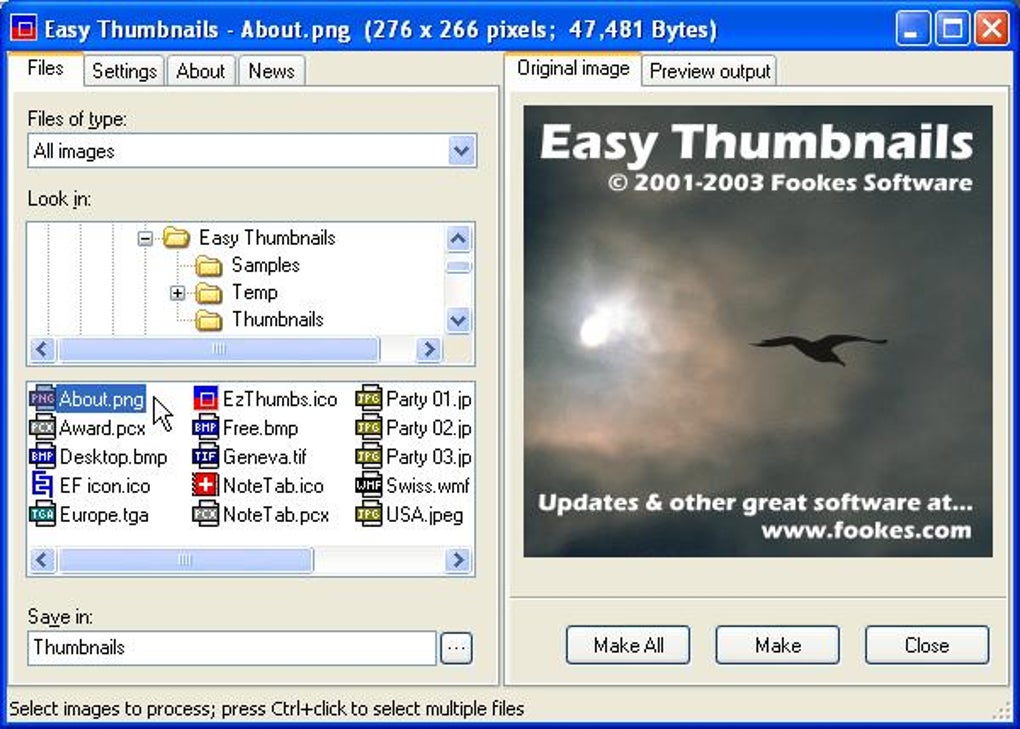
- Drag‑and‑drop interface for rapid folder selection.
- Automatic naming conventions with sequential numbering.
- Support for Windows 95 through Windows Vista (and later via compatibility mode).
- Low‑memory footprint – runs comfortably on legacy hardware.
- Free updates and community‑driven bug fixes.
Beyond the raw list, each feature translates into tangible benefits for everyday users. Batch processing eliminates the tedious manual resizing of each image, saving hours for professionals who handle large photo libraries. The ability to choose output formats ensures that thumbnails meet the exact specifications of web platforms, CMS tools, or e‑commerce sites. Watermarking is a subtle yet powerful way to embed branding or copyright information directly into every preview, discouraging unauthorized reuse. Because the program leverages the native Windows API, there is no need for additional runtimes or plug‑ins, which reduces the risk of security vulnerabilities. The lightweight design also means the application launches instantly, even on computers with limited RAM, making it a reliable companion for older workstations that cannot afford heavyweight graphics suites. Overall, Easy Thumbnails provides a balanced mix of simplicity, flexibility, and performance that aligns perfectly with the needs of designers, photographers, and marketers alike.
Installation, Compatibility, and Real‑World Use
Step‑by‑Step Installation
Downloading Easy Thumbnails is straightforward. Visit the official download page, click the “Download” button, and save the small installer (under 5 MB) to your PC. Run the .exe file, and the wizard will guide you through a three‑step process: accept the license agreement, choose the installation folder (the default C:\Program Files\Easy Thumbnails works for most users), and click “Install.” The installer automatically creates a desktop shortcut and registers file associations for common image types, allowing you to open pictures directly from Windows Explorer. After installation, a quick restart of the computer ensures all system paths are refreshed, though this is optional for most modern Windows versions.
Operating System Compatibility
Easy Thumbnails officially supports Windows 95, Windows 98, Windows ME, Windows 2000, Windows XP, and Windows Vista. Users on newer versions such as Windows 7, 8, or 10 can still run the program in compatibility mode—simply right‑click the shortcut, select “Properties,” navigate to the “Compatibility” tab, and choose the appropriate older Windows version. Because the software is built on standard Win32 libraries, it does not rely on .NET Framework or Visual C++ redistributables, which further simplifies deployment on legacy machines.
Pros and Cons
- Pros:
- Completely free with no hidden fees or trial limitations.
- Extremely low system requirements – runs on machines as old as Windows 95.
- Intuitive drag‑and‑drop workflow reduces the learning curve.
- Batch processing and automatic naming boost productivity.
- Built‑in watermarking adds a layer of copyright protection.
- Cons:
- Lacks advanced editing tools such as color correction or filters.
- No native support for macOS, Linux, Android, or iOS platforms.
- Interface looks dated compared to modern design software.
- Updates have not been released since 2008, so newer Windows features are not fully leveraged.
In real‑world scenarios, users typically launch Easy Thumbnails, point it at a folder containing raw photos, select a target size (e.g., 150 × 150 px for web galleries), enable watermarking if desired, and hit “Generate.” The program then creates a sub‑folder with all thumbnails, preserving the original filenames and folder hierarchy. This workflow is especially valuable for e‑commerce sites that need consistent product image previews, or for photographers who must upload thumbnail sets to portfolio platforms quickly.
FAQ and Final Thoughts
Is Easy Thumbnails safe to download?
Yes. The installer is digitally signed by Fookes and distributed through reputable software directories. It contains no adware, spyware, or hidden fees.
Can I use Easy Thumbnails on Windows 10?
While the official support list stops at Windows Vista, the program runs smoothly on Windows 10 when launched in compatibility mode for Windows XP or Vista.
What image formats does Easy Thumbnails support?
It handles the most common raster formats: JPEG, PNG, BMP, and GIF. Users can select the desired output format before generating thumbnails.
Is there a limit to how many images I can process at once?
There is no hard‑coded limit. The only restriction is the available RAM and disk space on your computer. Because the app uses a streaming approach, it can handle thousands of files without crashing.
Can I add my own custom watermark?
Yes. The watermark panel lets you import a PNG logo, adjust opacity, position, and size, then apply it automatically to every generated thumbnail.
Conclusion – Why You Should Download Easy Thumbnails Today
For anyone who needs a reliable, no‑cost solution to create consistent thumbnails on a Windows machine, Easy Thumbnails remains a surprisingly capable tool despite its age. Its minimal system requirements, batch processing capabilities, and built‑in watermarking make it a practical addition to any photographer’s or web designer’s toolkit. While it lacks the flash of modern UI designs and does not run natively on macOS or mobile platforms, its core functionality is still relevant for day‑to‑day thumbnail generation tasks. If you’re looking for a secure, free download that won’t bloat your hard drive, give Easy Thumbnails a try. Click the download button below, install in minutes, and start producing polished thumbnails instantly.
Download Easy Thumbnails – Free Easy Thumbnails delivers exactly what its name promises: a straightforward, free way to generate image thumbnails on Windows. Its low resource usage, batch capabilities, and optional watermarking make it a solid choice for small‑scale designers and photographers. The main drawbacks are its dated interface and lack of updates since 2008, which may deter users seeking modern aesthetics or cross‑platform support. Overall, the pros outweigh the cons for its intended niche.







