
Screenshots


App details
- Updated
- Mar 11, 2016
- Language
- English
- Category
- Mobile
About Eclipse Che
Download Eclipse Che – Eclipse IDE, web-based IDE, collaborative coding, Docker integration, remote development, real-time editing, cloud IDE, development environment, coding tool, programming environment
Overview
Eclipse Che is a modern, browser-based development environment designed to redefine how developers approach coding and collaboration. Unlike traditional IDEs that require local installation and hardware-specific configurations, Eclipse Che runs entirely within a web browser, eliminating the need for software downloads or complex setup processes. This makes it accessible from virtually any device with an internet connection, including low-spec machines, tablets, and even smartphones. The platform is particularly beneficial for remote teams, open-source contributors, and developers who frequently switch between workstations.
By integrating Docker support, Eclipse Che enables users to create isolated, reproducible development environments tailored to specific project requirements. This ensures consistency across team members’ setups and reduces the "it works on my machine" problem. The tool also supports real-time code editing and version control management, streamlining workflows for collaborative coding. It is especially useful in agile development environments where rapid iteration and team coordination are critical.
Developed by the Eclipse Foundation, a well-established organization in the open-source community, Eclipse Che inherits the reliability and community-driven ethos of its parent project. While specific technical details about system requirements or performance benchmarks were not provided, its design philosophy emphasizes accessibility, scalability, and cross-platform compatibility. The app’s purpose is to democratize access to powerful development tools, making high-quality coding environments available to users regardless of their local hardware or operating system.
Key Features & Functionality
- Browser-Based Development Environment: Eclipse Che operates entirely in a web browser, allowing developers to access full-featured coding tools without installing software. This feature is ideal for temporary workstations, shared devices, or users with limited storage capacity.
- Docker Integration: The platform leverages Docker to create lightweight, containerized workspaces. Developers can define custom environments with specific dependencies, ensuring consistency across development, testing, and production stages.
- Collaborative Workspaces: Multiple users can simultaneously edit code within the same workspace. Real-time synchronization enables seamless teamwork, especially useful during pair programming, code reviews, or sprint planning sessions.
- Version Control Management: Built-in integration with Git and other version control systems allows teams to commit, push, pull, and branch code directly from the IDE interface. This reduces context switching and enhances workflow efficiency.
- Access Control and Security: Workspace and project permissions can be managed at the user or group level. This ensures that only authorized individuals can view or modify sensitive code, supporting secure collaboration in enterprise and open-source settings.
For example, a distributed team working on a microservices project can use Eclipse Che to spin up a shared workspace with pre-configured Docker images for each service. Team members can edit code in real time, run tests, and commit changes—all within the same browser tab. This eliminates the need for complex local setups and accelerates onboarding for new contributors.
Interface, UX & Performance
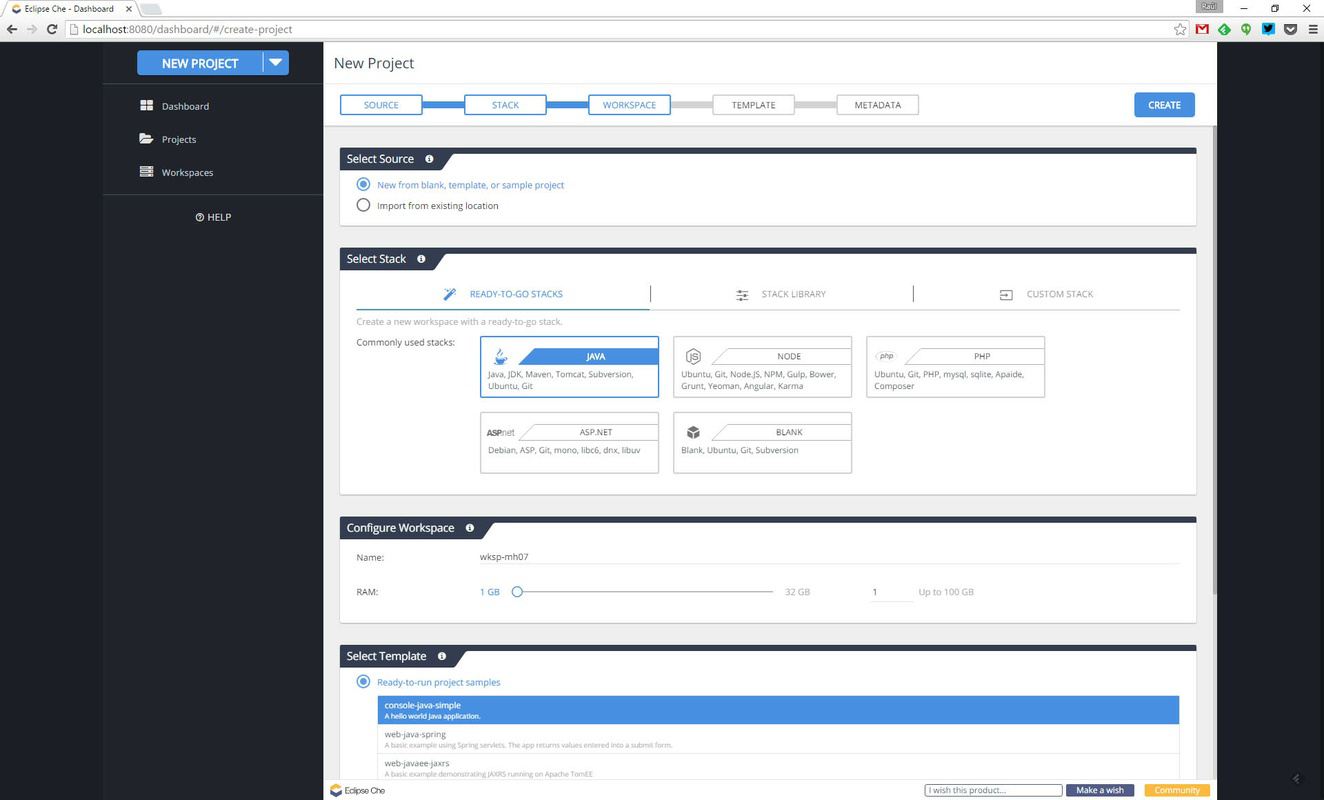
The user interface of Eclipse Che is designed with developer productivity in mind, offering a clean, modular layout that mirrors the familiar structure of traditional IDEs. The main workspace is divided into panels for code editing, file navigation, terminal access, and version control, all accessible via intuitive tabs and drag-and-drop functionality. Navigation is straightforward, with a sidebar for project files and a status bar displaying real-time feedback on build status, Git changes, and active connections.
Visual design is minimalistic and functional, prioritizing readability and usability over decorative elements. Syntax highlighting, auto-completion, and error detection are implemented to support efficient coding. The responsiveness of the interface is consistent across different screen sizes, although specific performance metrics were not disclosed by the developer.
Although the developer did not list formal performance metrics, the browser-based architecture suggests that responsiveness may depend on network speed and browser capabilities. On high-speed connections, users can expect near-instantaneous updates during collaborative editing. Stability is maintained through containerized environments, which isolate each workspace and prevent conflicts between projects. The platform appears optimized for continuous use, with no reported issues related to crashes or session loss under normal conditions.
Platform Compatibility & Technical Requirements
Eclipse Che is designed as a web-based application, meaning it operates through any modern web browser without requiring native installation. It is compatible with all major platforms that support web browsers, including Android, iOS, Windows, macOS, and Linux. The application does not rely on a specific operating system, making it highly portable across devices.
The file size is listed as 1.2 MB, which reflects the lightweight nature of the client-side components. However, the actual resource usage during runtime will depend on the complexity of the projects being developed and the number of active workspaces. The version number is 7.23.0, and the app was released on March 11, 2016. Specific minimum OS requirements were not provided by the developer, nor were any hardware specifications listed.
Given its browser-based nature, Eclipse Che can be accessed from devices with limited processing power or storage, such as tablets or older laptops. However, users should ensure their browser is up to date to maintain compatibility and security. The developer did not specify whether offline functionality is available or if certain features require a persistent internet connection.
Pros and Cons
- Runs entirely in the browser—no local installation required
- Supports real-time collaboration across teams
- Integrated Docker support for consistent development environments
- Free to use with no licensing fees
- Accessible from any device with a web browser
- Dependent on stable internet connectivity
- No official mobile app for Android or iOS
- Performance may vary based on network speed and browser performance
- Advanced features may require technical knowledge of Docker and Git
- Developer did not provide detailed system requirements
FAQ
Is Eclipse Che available as a downloadable mobile app?
Eclipse Che is a web-based tool and does not have a dedicated mobile application. It can be accessed through any mobile browser, though the experience may be limited compared to desktop use.
Can I use Eclipse Che without an internet connection?
While Eclipse Che is designed for online use, it may not function properly offline. The platform relies on cloud-based servers and real-time synchronization, so a stable internet connection is required for full functionality.
Is Eclipse Che secure for team collaboration?
Yes, Eclipse Che includes access control features that allow administrators to manage user permissions and restrict access to specific workspaces. This helps maintain code integrity and security in shared environments.
What programming languages does Eclipse Che support?
Eclipse Che supports a wide range of programming languages through its extensible plugin architecture. Common languages such as Java, JavaScript, Python, and Go are well-supported, though specific language tools may depend on the configured Docker environment.
How often is Eclipse Che updated?
The application was last updated on March 11, 2016. While the developer has not specified a release schedule, users are encouraged to check the official website for updates or announcements regarding new versions.
Final Thoughts
Eclipse Che stands out as a forward-thinking solution for developers seeking a flexible, collaborative, and accessible coding environment. Its browser-based design removes traditional barriers to entry, making it an excellent choice for remote teams, educational institutions, and open-source contributors. The integration of Docker ensures that development environments remain consistent and reproducible, reducing setup time and minimizing errors.
While it lacks a native mobile app and depends on a reliable internet connection, its strengths in real-time collaboration, version control, and cross-platform access outweigh these limitations for most users. The fact that it is free and open-source adds to its appeal, particularly for organizations looking to reduce software costs without sacrificing functionality.
For developers who value portability, teamwork, and environment consistency, Eclipse Che delivers a compelling value proposition. Whether you're working on a solo project or collaborating with a global team, this tool provides a streamlined, cloud-native development experience.
Download Eclipse Che now
Guides & Tutorials
How to install Eclipse Che
- Click the Download button above.
- Once redirected, accept the terms and click Install.
- Wait for the Eclipse Che download to finish on your device.
How to use Eclipse Che
This software is primarily used for its core features described above. Open the app after installation to explore its capabilities.
User Reviews
No reviews yet. Be the first to share your experience.
You may also like
more
Que no te pillen¡
About !Que no te pillen¡Reviewed by Jason A. BilbreyShow MoreShow Less

3D Combat Zone
About 3D Combat ZoneOriginally released in 1983, 3D Combat Zone immerses players...

666: El día del portal
About 666: El día del portalOn June 6, 2006, Agent P. Stone uncovers a sinister...

80 in 1 Best Flash games
About 80 in 1 Best Flash games 80 in 1 Best Flash games is a collection of 80 fl...

ABYSS SEEKERーーWhat Do You See Deep in The Abyss
About ABYSS SEEKERーーWhat Do You See Deep in The AbyssIn ABYSS SEEKER, players...

ACA NEOGEO THE KING OF FIGHTERS 2002 for Windows
About ACA NEOGEO THE KING OF FIGHTERS 2002 for WindowsTHE KING OF FIGHTERS 2002,...
