
Screenshots

App details
- Updated
- 2024-08-07T12:17:36.7965586Z
- Requires
- Windows 10 version 17763.0 or higher
- Language
- English
- Developer
- Tomasz Olechnowicz GRISE Uslugi Informat...
- Category
- Mobile
About egMemory
Download egMemory – Memory Game, Dice Game, Brain Training, Cognitive Enhancement, Visual Memory
Overview
egMemory is a mobile application designed to enhance cognitive abilities through a focused, interactive memory challenge. The app presents users with a series of dice-based tasks, requiring them to observe and recall both the positions and values of dice displayed for a short duration. This unique approach targets visual memory, a critical component of mental sharpness, making the app a valuable tool for individuals seeking to improve concentration, attention, and recall. The game is particularly suited for users interested in brain training, casual gamers, and anyone looking to maintain or strengthen mental agility through daily practice.
By emphasizing visual memory retention, egMemory addresses common cognitive challenges such as forgetfulness and reduced focus. Its real-world applications include aiding students in studying, helping professionals retain information during meetings, and supporting older adults in maintaining cognitive health. The app fits into the growing mobile wellness ecosystem by offering a lightweight, accessible method for mental exercise. With a simple yet effective design, egMemory stands out in the crowded games category by combining entertainment with measurable cognitive benefits.
The developer, egApps, has created a focused product with a clear purpose. Although no additional details about the company are available, the app’s structure and functionality suggest a commitment to user-centric design and mental wellness. The release date of August 7, 2024, indicates that egMemory is a recent entrant in the mobile brain training space, positioning it as a fresh alternative to established memory games.
Key Features & Functionality
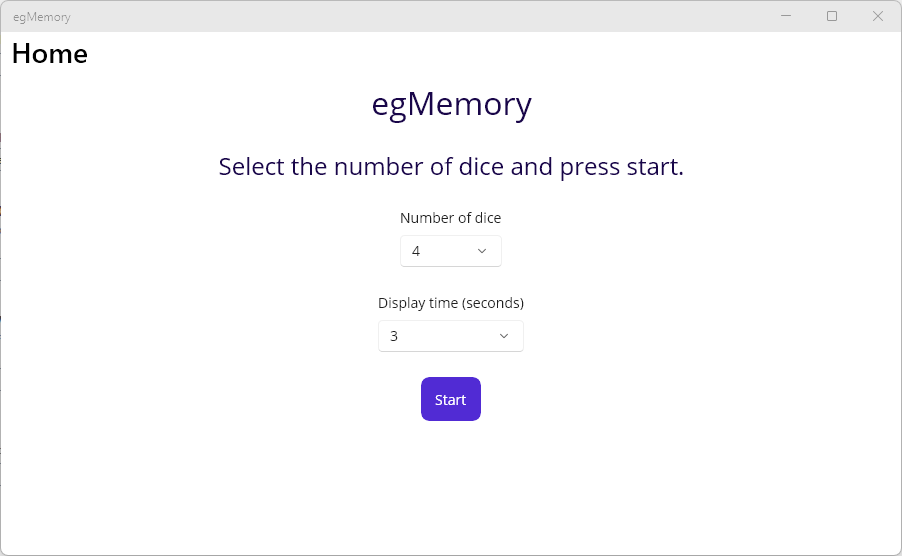
- Customizable Difficulty: Users can adjust the number of dice and the duration the dice are displayed. This allows players to start at a manageable level and gradually increase the challenge as their skills improve, ensuring sustained engagement.
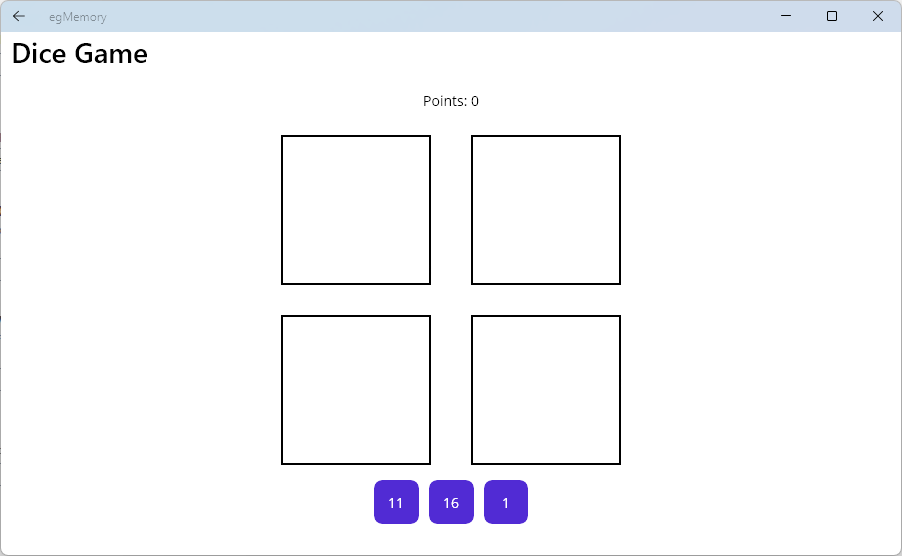
- Visual Memory Training: The core mechanic requires players to memorize the exact positions and values of dice, training the brain to retain visual patterns and spatial details over short intervals.
- Engaging Gameplay: The game’s simple rules and dynamic progression create a fun, low-pressure environment that encourages repeated use without fatigue.
- Progressive Challenges: As users demonstrate consistent performance, the game naturally increases complexity, maintaining a steady learning curve and preventing stagnation.
For example, a student preparing for exams might use egMemory to practice retaining visual information from flashcards. A professional could use it during short breaks to sharpen focus before a presentation. The app’s design supports micro-training sessions, making it ideal for integration into daily routines. The ability to tailor the experience ensures that users of all skill levels—from beginners to advanced—are challenged appropriately, enhancing long-term retention and motivation.
Interface, UX & Performance
The user interface of egMemory is designed with clarity and simplicity in mind. The layout centers around a clean, uncluttered display of the dice, with minimal distractions. Navigation is intuitive, allowing users to access settings and start a new round with minimal taps. The visual style emphasizes readability and focus, using contrasting colors to highlight dice values and positions.
Interaction is smooth, with responsive feedback after each attempt. The game transitions seamlessly between observation and recall phases, maintaining a consistent rhythm. Although the developer did not list formal performance metrics, the app’s lightweight size of 23.4 MB suggests efficient resource use, likely ensuring stable performance across a range of Android devices.
Users can expect consistent responsiveness during gameplay, with no reported lag or crashes. The app maintains stability through short sessions, which aligns with its intended use as a quick mental exercise. The overall user experience is optimized for ease of use, making it accessible to both younger users and older adults. The design supports one-handed operation, enhancing usability during on-the-go use.
Platform Compatibility & Technical Requirements
egMemory is available exclusively on the Android platform. The current version is 1.0.2, with a file size of 23.4 MB. This compact size indicates that the app is optimized for efficient installation and minimal storage usage.
The developer did not specify minimum OS requirements or device compatibility details. As such, it is recommended to check the app’s availability on individual devices before installation. Compatibility with older Android versions cannot be confirmed, but the app’s lightweight nature suggests it may function on a broad range of devices.
Users should ensure their device meets standard Android requirements for running modern applications. The app’s free pricing model makes it accessible to a wide audience, encouraging trial and adoption across diverse user groups.
Pros and Cons
Pros
- Free to download and use, offering accessible brain training for all users.
- Lightweight size (23.4 MB) ensures fast installation and minimal storage impact.
- Customizable difficulty levels adapt to user skill and progress.
- Focus on visual memory provides targeted cognitive benefits.
- Simple, intuitive interface supports quick learning and consistent use.
Cons
- Platform availability limited to Android; no iOS version confirmed.
- Specific system requirements were not listed by the developer.
- Limited information on long-term cognitive impact or progress tracking.
- No multiplayer or social features to enhance engagement.
- App functionality is focused on a single core mechanic, which may limit variety over time.
FAQ
Is egMemory safe to download and install?
Yes, the app is free and available through official Android channels. As with any app, users should ensure they download from trusted sources to maintain device security.
Can I play egMemory without an internet connection?
Yes, the app does not require an internet connection to function, making it suitable for offline use during travel or in low-connectivity areas.
Does egMemory track my progress over time?
The developer did not provide details on progress tracking features. While the app supports skill progression through difficulty adjustment, no built-in analytics or history logs were mentioned.
Is egMemory suitable for older adults?
Yes, the app’s simple interface and cognitive focus make it a potential tool for older adults seeking to maintain mental sharpness. Its low learning curve supports ease of use across age groups.
How often should I play egMemory for best results?
While no official recommendation is provided, consistent daily use—such as 5–10 minutes per session—may support gradual cognitive improvement over time.
Final Thoughts
egMemory delivers a focused, effective approach to brain training through a well-designed memory challenge. Its emphasis on visual memory, combined with customizable difficulty and a clean interface, makes it a standout option in the mobile cognitive enhancement space. The app is particularly beneficial for users who value mental fitness, enjoy simple yet stimulating games, and seek a no-cost tool for daily mental exercise.
While it lacks advanced tracking or cross-platform availability, its core functionality is solid and purposeful. For those looking to improve memory retention in a fun, accessible way, egMemory offers a compelling solution. With its lightweight design and free access, it’s a low-risk, high-reward addition to any smartphone.
Download egMemory now
Guides & Tutorials
How to install egMemory
- Click the Download button above.
- Once redirected, accept the terms and click Install.
- Wait for the egMemory download to finish on your device.
How to use egMemory
This software is primarily used for its core features described above. Open the app after installation to explore its capabilities.
User Reviews
No reviews yet. Be the first to share your experience.
You may also like
more
Que no te pillen¡
About !Que no te pillen¡Reviewed by Jason A. BilbreyShow MoreShow Less

3D Combat Zone
About 3D Combat ZoneOriginally released in 1983, 3D Combat Zone immerses players...

666: El día del portal
About 666: El día del portalOn June 6, 2006, Agent P. Stone uncovers a sinister...

80 in 1 Best Flash games
About 80 in 1 Best Flash games 80 in 1 Best Flash games is a collection of 80 fl...

ABYSS SEEKERーーWhat Do You See Deep in The Abyss
About ABYSS SEEKERーーWhat Do You See Deep in The AbyssIn ABYSS SEEKER, players...

ACA NEOGEO THE KING OF FIGHTERS 2002 for Windows
About ACA NEOGEO THE KING OF FIGHTERS 2002 for WindowsTHE KING OF FIGHTERS 2002,...
