
Download Endoftext – AI Prompt Engineering Tool, Free Trial, Secure Editing
Overview
Endoftext | AI Prompt Editor is a cloud‑native, subscription‑based platform that targets developers, data scientists, and content creators who need to craft high‑quality prompts for large language models (LLMs). Prompt engineering is often the most time‑consuming part of an AI project because it requires trial‑and‑error, careful token budgeting, and constant monitoring for ambiguous language. Endoftext solves these pain points by providing real‑time, AI‑driven suggestions, automated rewriting, and on‑the‑fly test‑case generation. The web‑based workspace lets users create, validate, and optimize prompts within seconds instead of hours, dramatically shortening the iteration loop. Its built‑in error‑detection engine scans each prompt for token overflow, vague phrasing, or logical contradictions, and instantly flags issues before the prompt reaches production. While a free tier grants limited prompt generations and test cases each month, power users can upgrade to unlock unlimited projects, priority support, and deeper integrations with the most popular LLM providers such as OpenAI’s ChatGPT, Anthropic’s Claude, and HuggingFace’s Transformers. Endoftext also offers a secure cloud environment with end‑to‑end encryption, GDPR compliance, and regular security audits, ensuring that proprietary prompt data stays confidential. In short, Endoftext acts as a one‑stop shop for prompt quality assurance, helping teams reduce development cycles, improve model reliability, and accelerate the delivery of AI‑powered products.
Key Features
- Intelligent Prompt Suggestions: Real‑time AI recommendations that adapt to the selected model and use‑case, cutting brainstorming time by up to 60 %.
- Automated Prompt Rewriting: One‑click rephrase, simplify, or expand prompts while preserving original intent and token count.
- Test‑Case Generation: Automatically produce diverse input‑output pairs for each prompt, enabling thorough validation across edge cases.
- Error Detection & Correction: Built‑in parser flags token limits, ambiguous language, and logical gaps before deployment.
- Multi‑Model Compatibility: Native support for OpenAI, Anthropic Claude, HuggingFace, Cohere, and custom OpenAI‑compatible endpoints.
- Unlimited Project Management: Organize prompts into folders, tag them, and share read‑only links with teammates.
- Version History & Rollback: Track every edit and revert to previous iterations with a single click.
- Collaborative Editing: Real‑time co‑authoring for distributed teams, complete with comment threads and change logs.
- Export & Import Options: Export prompts in JSON, CSV, or Markdown; import existing libraries to jump‑start new projects.
- Secure Cloud Hosting: End‑to‑end encryption, GDPR/CCPA compliance, ISO 27001‑certified data centers, and optional data‑logging opt‑out.
Installation, Usage & Compatibility
Getting Started – No Download Required
Endoftext is delivered as a fully hosted web application, so there is nothing to install on your local machine. Simply visit https://endoftext.ai, click “Sign Up,” and choose between the free trial or a paid plan. After email verification, you’ll be taken to a clean dashboard where you can immediately create a new project.
Step‑by‑Step Workflow
- Create a Project: Click “New Project,” give it a meaningful name (e.g., “Customer Support Bot”), and select the target LLM from the dropdown.
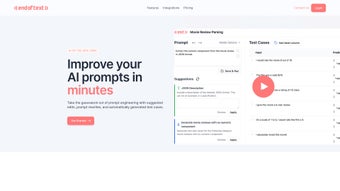
- Add a Prompt: Use the rich‑text editor to type or paste your initial prompt. The sidebar instantly shows AI‑generated suggestions and highlights potential issues.
- Run Optimization: Press “Optimize” to receive three alternative phrasings, each scored by predicted effectiveness.
- Generate Test Cases: Choose “Generate Tests,” set the desired number of cases (up to 10 in the free tier, unlimited in Pro), and let Endoftext create realistic input‑output scenarios.
- Validate & Iterate: Review the test results, edit the prompt, and re‑run the optimizer until the desired performance is achieved.
- Deploy or Export: Export the final prompt in JSON for API integration, or copy a ready‑to‑use code snippet for immediate deployment.
Cross‑Platform Compatibility (itemprop="operatingSystem")
Because Endoftext runs in the browser, it works on any modern operating system that supports recent versions of Chrome, Edge, Firefox, or Safari. Supported platforms include:
- Windows 10/11
- macOS Monterey and later
- Linux distributions with GTK/Qt desktop environments
- Android 8.0+ (via Chrome or native WebView)
- iOS 13+ (via Safari or Chrome)
For users who prefer a native feel, Endoftext also offers an Electron‑based desktop wrapper for Windows, macOS, and Linux, which launches the same cloud‑hosted interface in a dedicated window.
Pros and Cons
Pros
- AI‑driven suggestions cut prompt‑tuning time dramatically.
- Broad LLM support out‑of‑the‑box, including custom endpoints.
- Unlimited projects and version history in paid plans.
- Real‑time collaborative editing for remote teams.
- Secure, GDPR‑compliant cloud storage with optional logging opt‑out.
- Multiple export formats simplify integration with existing pipelines.
Cons
- Free tier limits prompt generations and test‑case creation, which may frustrate hobbyists.
- Web‑only interface can feel less snappy than native IDE plugins.
- Monthly subscription ($19.99) could be a barrier for very small startups.
- Advanced features such as custom model adapters require higher‑tier plans.
Frequently Asked Questions
Can I use Endoftext with my own private LLM?
Yes. Endoftext provides a custom endpoint option where you can configure the API URL, authentication token, and model parameters for any self‑hosted LLM that follows the OpenAI‑compatible schema.
Is there a free trial, and what are its limitations?
A 14‑day free trial is available. During the trial you can create up to three projects, generate a maximum of 20 prompts, and run 10 test cases per prompt. After the trial, you’ll need to upgrade to continue unlimited usage.
How does Endoftext ensure data privacy?
All data is encrypted at rest and in transit using AES‑256 and TLS 1.3. The platform complies with GDPR, CCPA, and ISO 27001 standards. You can also opt‑out of data logging for extra confidentiality.
What subscription plans are offered?
Endoftext provides three plans: Free (limited), Pro ($19.99 / month) with unlimited prompts and test cases, and Enterprise (custom pricing) with on‑premise deployment, SLA support, and dedicated account management.
Can I integrate Endoftext into my CI/CD pipeline?
Absolutely. Endoftext provides a RESTful API and a CLI wrapper that can be invoked from build scripts to automatically validate prompts before deployment.
Conclusion & Call to Action
Endoftext | AI Prompt Editor fills a critical gap in the LLM development workflow by turning prompt crafting from an art into a systematic, data‑driven process. Its combination of intelligent suggestions, automated test‑case generation, and seamless multi‑model compatibility helps developers shave days off the iteration cycle, leading to faster releases and higher‑quality AI experiences. While the free tier is modest, the Pro subscription delivers strong value for teams that rely on prompt engineering as a core component of their product stack. If you’re serious about building reliable, high‑performing AI applications—whether for chatbots, content generation, or complex reasoning tasks—giving Endoftext a try is a logical next step.
Start your free trial today and see how automated prompt optimization can transform your AI workflow.
Endoftext delivers a polished, user‑friendly environment for prompt engineering. Its strengths lie in real‑time AI suggestions, robust test‑case generation, and seamless integration with the most popular LLM APIs. The only drawbacks are the limited free tier and the subscription cost for power users. Overall, it earns a solid 4.5/5 rating for its impact on developer productivity and model reliability.


.png)




