

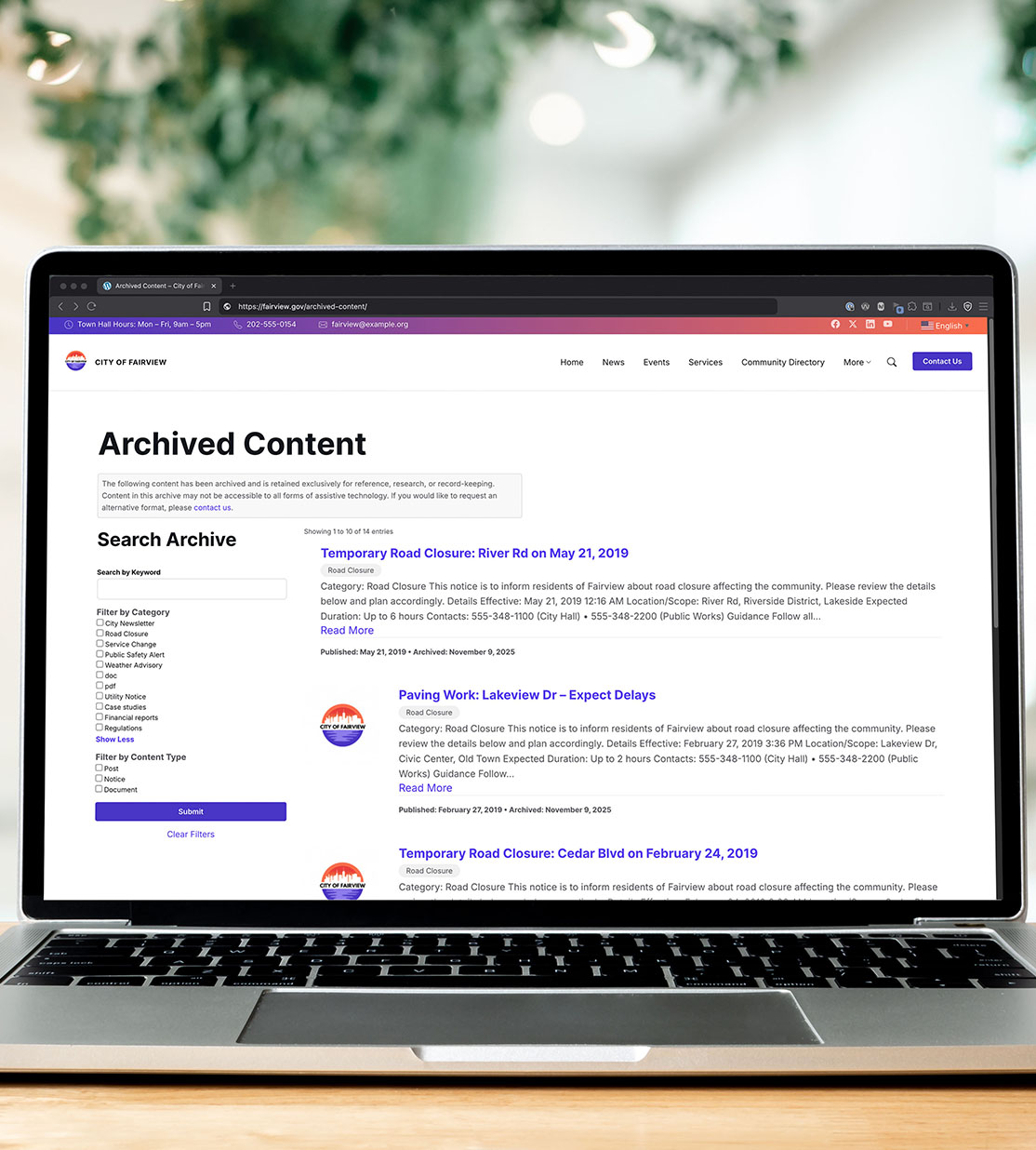
WordPress Archive Plugin
Save time and money on remediation while keeping content available to the public.
-
Maintain Transparency and Records
Preserve historical or required public information in a clearly labelled and dedicated area on your website.
-
Meet Accessibility Exception Requirements
Creates a separate section as required for legal exceptions (such as the archived web content definition under ADA Title II).
-
Save Time & Money on Accessibility Remediation
Focus remediation on active content only. Archived content won’t appear in Accessibility Checker reports.
-
Declutter Active Content
Move old content out of high-visibility areas so your main site feels fresh and relevant.
-
Protect SEO Value
Automatically creates 301 redirects when content is archived. No lost traffic, no broken links.
-
Easy, Code-Free Setup
One-click archiving that maintains taxonomy terms. Blocks and shortcodes help you build a searchable archive in minutes.
How ArchiveWP Works
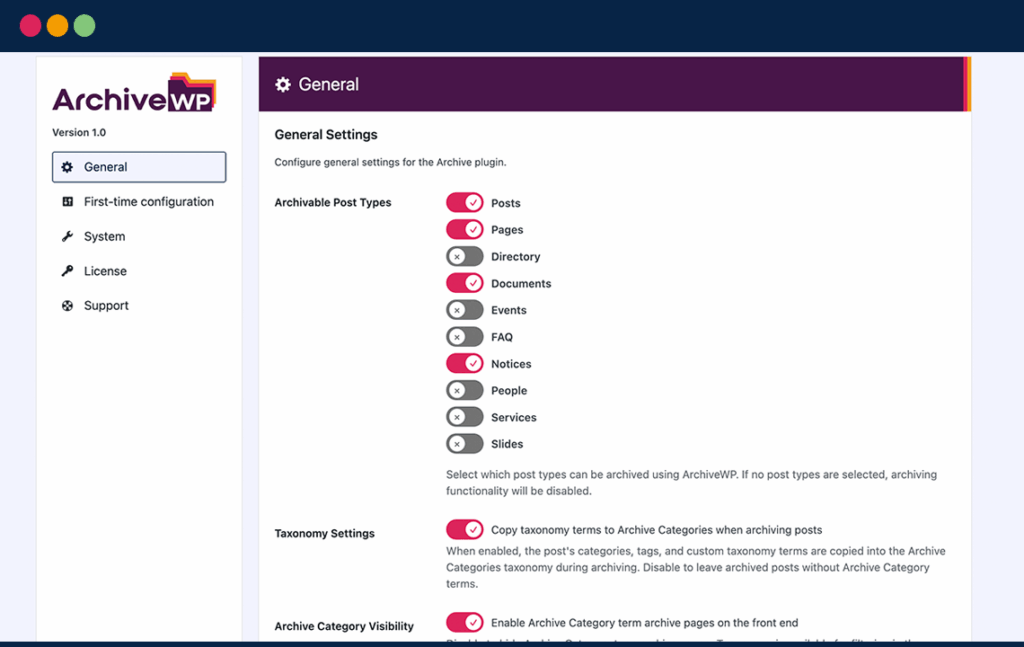
Easy to Configure Settings
- Choose post types available to archive.
- Copying taxonomy terms to archive categories.
- Automatic redirects from original URLs to archived content.
- Write custom disclaimer text.
Quickly Build a Searchable Archive
- WordPress blocks and shortcodes to create searchable archive pages.
- Keyword search and filters for category and previous post type.
- Easily choose information to show for posts: featured images, content, meta, and more.
- Matches your theme styles out of the box.

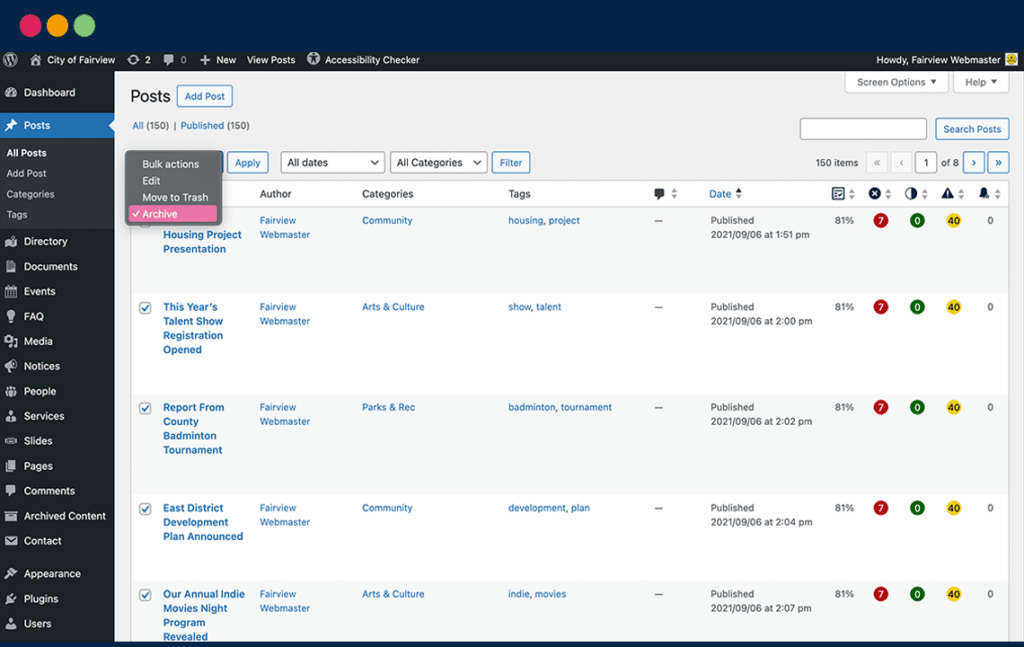
Archive Posts in a Few Clicks
- Move content into the archive using bulk edit or with a button on individual posts.
- Taxonomy terms preserved and redirects automatically created (based on settings).
- Easily restore archived posts if needed.
Content Stays Available with a Clear Disclaimer
- Content is still published and available to the public as needed.
- The post URL is changed to include
/archived-content/so all archived posts are siloed in the site structure. - A clear disclaimer tells website visitors the content is archived and when it was archived.


More Actionable Accessibility Reports
- Archived content can be excluded from Accessibility Checker reports.
- Clearer accessibility reports focused only on recent and key content.
- Get a better understanding of which content needs to be remediated.
Start Building Your Archive Today
All plans are 30% off for Black Friday/Cyber Monday.
1 Site
$59/year
- 1 site license
- Archive unlimited posts
- 1 year of software updates
- Personalized email support
5 Sites
$159/year
- 5 site licenses
- Archive unlimited posts
- 1 year of software updates
- Personalized email support
25 Sites
$299/year
- 25 site licenses
- Archive unlimited posts
- 1 year of software updates
- Personalized email support
Unlimited
$399/year
- Use on unlimited sites
- Archive unlimited posts
- 1 year of software updates
- Personalized email support

30-Day 100% Money Back Guarantee
You are fully protected by our 100% Money Back Guarantee. If you are not fully satisfied, contact us within 30 days with an explanation of the issue and we will happily refund 100% of your money.
All pricing is in USD. You can change plans or cancel your account at any time.
Not sure if ArchiveWP is right for you? Contact sales for answers to any questions.
Frequently Asked Questions
ArchiveWP doesn’t have a free version, but we do have a demo available if you want to try before you buy. We also have a 30-day refund policy so you can buy with confidence.
Yes, ArchiveWP works well with Accessibility Checker. We created this plugin for our own remediation projects and to assist clients in removing legacy content from accessibility reports.
In Accessibility Checker settings, ensure that “archived content” is not selected for scanning. As you move content into the archive, ArchiveWP will automatically remove stored accessibility issues and remove them from site-wide reports.
We recommend disabling the term archives for Archive Categories and using these categories only for filtering on the central archive page. Disabling term archives will ensure they are not included in Accessibility Checker taxonomy reports.
Yes. ArchiveWP licenses automatically renew after one year so you don’t lose access to archiving features, support, and software updates. You can easily disable auto-renewal or cancel your subscription in your Equalize Digital Account.
Yes, you can deactivate any currently registered site(s) on the License Keys page of your account dashboard. After deactivation, you will be able to activate the license on a new site.
Equalize Digital provides email support on plugin usage and features for all users. Users with an active plan may open a support ticket anytime.
Software support is limited to assisting with the use of the plugin, including information about its functionality and troubleshooting.
You are more than welcome to request a refund within 30 days of your original purchase date. Please view our full terms and conditions for more details on our refund policy.
Yes! You can upgrade, downgrade, or cancel plans at any time through your My Equalize Digital account. When upgrading from a smaller to a larger paid plan, customers receive a one-time prorated credit towards their upgrade cost. This ensures that no value is lost from the previous (original) purchase.
ArchiveWP is coded in accordance with WordPress Coding Standards and accessibility best practices. The front-end blocks, shortcodes, and WordPress admin settings pages have been tested for conformance to Web Content Accessibility Guidelines (WCAG) 2.1 AA. Accessibility testing was completed on a website using the Twenty Twenty-Five theme.
The plugin was tested with Accessibility Checker, accessibility testing browser extensions, keyboard testing techniques, and both the NVDA and VoiceOver screen readers.
ArchiveWP is accessibility-ready. This means that:
- The admin settings pages are fully accessible, except for any issues that may be introduced by WordPress core. You can easily set up and configure ArchiveWP with a screen reader.
- The front-end components of ArchiveWP are not opinionated in their styles and will adopt the design of your theme. ArchiveWP will not add accessibility problems to your website, but if there are accessibility problems in your theme (such as missing link underlines, poor color contrast, etc.) these issues will likely also be present in ArchiveWP’s components.
ArchiveWP will not fix accessibility issues on your website. To ensure your website is fully accessible, test it with a tool like Accessibility Checker and consider having it audited by an accessibility professional.
Equalize Digital is not a law firm, and we cannot provide legal advice. If you plan to move old content into an archive instead of remediating it, you may still need to provide an accessible alternative upon request.
Laws and regulations around the world have different compliance deadlines, definitions for content that can be archived without remediation, and requirements for how archives are handled. Please consult with an attorney to ensure your archive complies with all applicable laws.
 Spanish
 French
 German
 Italian