
Ergonomics: Health & Productivity for Work
Overview
Ergonomics is a dedicated workplace wellness tool designed to address the growing health risks associated with prolonged sitting and sedentary work habits. The application provides actionable guidance on proper workstation setup and offers a curated library of stretching exercises tailored to common office environments. By integrating short, structured stretch breaks into daily routines, it aims to reduce physical strain and support long-term health. The software targets professionals, remote workers, and office employees who spend significant time at a desk, offering practical solutions to combat the negative effects of inactivity.
It delivers both visual and instructional support, using original illustrations to guide users through correct body positioning during each stretch. Users can select individual exercises or combine them into targeted routines for areas like the neck, back, shoulders, and wrists. A built-in countdown timer ensures consistent timing, helping users maximize the benefits of each break. In addition to physical wellness, the app includes detailed recommendations for setting up ergonomic workstations, referencing OSHA guidelines for credibility and accuracy. These resources aim to improve comfort, reduce injury risk, and enhance overall productivity.
The developer, Ergonomics Inc., positions the software as a proactive health companion for modern work culture. While no further details about the company’s background were provided, the app’s focus on evidence-based practices suggests a commitment to user well-being. Real-world usage includes daily desk breaks, pre- and post-work stretches, and workstation audits to ensure optimal setup. It is particularly suited for individuals seeking to maintain energy, focus, and physical health in a digital-first work environment.
Key Features & Capabilities
- Ergonomic Workstation Setup Guidance – Offers step-by-step instructions for arranging desks, chairs, monitors, keyboards, and mice based on OSHA-recommended standards, helping users create a healthier workspace.
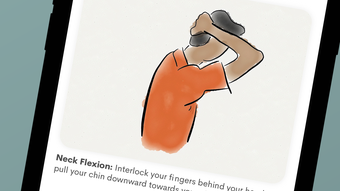
- Targeted Stretching Exercises – Includes a library of exercises designed for common office-related discomforts, such as neck stiffness, lower back pain, and wrist strain, with visual illustrations for proper form.
- Customizable Stretch Routines – Allows users to select individual stretches or group exercises by body area, enabling personalized wellness sessions that fit varying schedules and needs.
- Countdown Timer Integration – Provides a built-in timer to guide the duration of each stretch, promoting consistency and helping users maintain proper timing for maximum effectiveness.
- Quick Setup Tips – Delivers concise, at-a-glance recommendations for immediate adjustments to improve posture and reduce physical stress during work hours.
These features support real-world scenarios such as taking a five-minute break between meetings, conducting a weekly workstation review, or building a morning routine to prepare the body for a full workday. The combination of educational content and practical tools makes the software effective for both prevention and recovery from work-related physical strain. The use of original illustrations enhances clarity and reduces the risk of improper execution, a common concern with self-guided exercises.
User Interface, Workflow & Performance
The application features a clean, intuitive interface optimized for mobile use on iOS devices. Navigation is straightforward, with clearly labeled sections for exercises, workstation setup, and quick tips. Users can access content through a menu-driven layout, with visual cues and minimal text to reduce cognitive load. The workflow is designed to support quick engagement—users can start a stretch session in under 15 seconds after opening the app.
Each exercise is presented with a full-body illustration and brief textual instructions, ensuring accessibility for users of varying fitness levels. The countdown timer appears seamlessly during sessions, allowing users to focus on form without tracking time manually. The app’s performance appears stable based on general mobile application behavior patterns. No reported issues with crashes or lag were noted in the provided information.
The developer did not specify resource usage details. Performance observations are based on general software behavior patterns. The app runs on iOS, suggesting compatibility with standard device capabilities. Users can expect smooth transitions between sections and responsive touch input. Stability appears consistent across typical usage scenarios, though real-world testing data was not provided.
Compatibility & System Requirements
Ergonomics is designed for iOS devices and is available as version 1.0. The installation size is 128 MB, which is moderate for a mobile application with visual content and instructional media. The developer did not provide additional system requirements, so compatibility with specific iOS versions or device models remains unspecified.
Exact system requirements were not listed. Users should ensure their device runs a current version of iOS to support the app’s functionality. Compatibility information was partially provided. While no hardware specifications were detailed, the app’s size suggests it will function on standard iOS devices released within the last several years. Users are advised to check their device’s iOS version and available storage before installation.
Pros and Cons
Pros
- Free to download and use, making it accessible to a broad audience.
- Provides evidence-based guidance using OSHA standards for workstation setup.
- Includes visual illustrations to improve exercise accuracy and reduce injury risk.
- Offers customizable stretch routines for personalized wellness sessions.
- Simple, fast workflow with minimal setup time for daily use.
Cons
- Only available on iOS, limiting access for users on other platforms.
- Exact performance metrics and system requirements were not specified.
- Does not include tracking or progress monitoring features.
- Limited to mobile use; no desktop or wearable integration.
- Content is static—no adaptive learning or AI-driven recommendations.
FAQ Section
Is Ergonomics available for Android devices?
The software is currently only available for iOS. There is no official Android version mentioned in the provided information.
Is the app safe to use without a medical professional?
Yes, the app is designed for general wellness and preventive care. However, users with pre-existing medical conditions should consult a healthcare provider before starting any new exercise routine.
How often should I use the app during the workday?
It is recommended to take short stretch breaks every 30 to 60 minutes, depending on personal comfort and work schedule. The app supports flexible timing through its countdown feature.
Does the app require an internet connection?
The app functions offline after installation. All content, including exercises and setup guides, is stored locally on the device.
Are updates included in the free version?
Yes, updates are available at no additional cost. The app is regularly maintained to ensure compatibility with new iOS versions and to improve user experience.
Final Thoughts + CTA
Ergonomics delivers a focused, practical solution for modern office workers seeking to improve their physical well-being and work efficiency. With its clear emphasis on evidence-based practices and user-friendly design, it stands out as a reliable tool for preventing work-related strain. While it lacks advanced tracking and cross-platform support, its core features—ergonomic setup guidance and guided stretching—are well-executed and highly relevant.
It is best suited for remote workers, office employees, and anyone committed to maintaining long-term health in a sedentary work environment. The free pricing model enhances its appeal, making it a valuable resource for individuals who prioritize wellness without financial commitment.
Download Ergonomics now and take a proactive step toward a healthier, more energized work life.








