

Descripción
Nota importante
Este plugin es una copia de URL de actualización de Velvet Blues. Dado que el plugin «Velvet Blues Update URLS» no se mantiene activamente y no se ha probado con la última versión de WordPress, decidimos mantenerlo y seguir mejorando.
Entonces, si ya estás usando el plugin «Velvet Blues Update URLS», simplemente descarga este plugin y comienza a usarlo.
Si cambias tu web de WordPress a un nuevo nombre de dominio, encontrarás que los enlaces internos a las páginas y las referencias a las imágenes no se actualizan. En cambio, estos enlaces y referencias apuntarán a tu antiguo nombre de dominio. Este plugin corrige ese problema al ayudarte a cambiar las URLs y enlaces antiguos en tu web.
Características
- Los usuarios pueden optar por actualizar los enlaces incrustados en el contenido, los extractos o los campos personalizados
- Los usuarios pueden elegir si actualizar los enlaces para los adjuntos
- Ver cuántos elementos fueron actualizados
Time-saving features available in the Pro version
- View exactly what changed during a search/replace
- Backup and import the database while running a search/replace
- Priority email support from the developer of the plugin
- Save or load custom profiles for quickly repeating a search/replace in the future
- Premium Support and updates for 1 year
Spread The Love ❤️
If you like Update URLs, please leave a five stars ⭐⭐⭐⭐⭐ and also spread the word about it via Facebook and Twitter. That helps fellow website owners assess Update URLs easily and benefit from it!
What’s Next
If you like this plugin then consider checking out our other solutions:
URL Shortify – Simple, Powerful and Easy URL Shortener Plugin For WordPress.
URL Shortify helps you beautify, manage, and share any URL on or off of your WordPress website. Create links that look how you want using your domain name! It’s a Simple, Easy & Elegant self hosted alternative to Bitly, TinyURL, Cuttly, Pretty Links, URL Shortener By My Theme Shop, Rebrandly, BL.Link, Short.io, and many other SaaS URL Shortener services.
Social Linkz – Lightweight and fast social media sharing plugin
Easily place social share icon on your posts, pages etc..
Utilitify – Potencia tu sitio WordPress con el paquete de utilidades de WordPress
Es un plugin sencillo y limpio que te ayuda a personalizar la configuración de tu WordPress de una forma muy elegante.
Logify is a comprehensive logging and monitoring plugin for WordPress that helps you keep track of various activities and events on your website. It provides detailed logs of user actions, system events, and errors, allowing you to monitor and troubleshoot your site effectively.
Magic Link is a passwordless authentication plugin for WordPress that allows users to log in securely via email links. It eliminates the need for traditional passwords, enhancing both security and user convenience.
With Magic Link, users simply enter their email address, receive a unique login link, and gain instant access to their accounts. This plugin is perfect for improving user experience while maintaining strong security standards.
Capturas
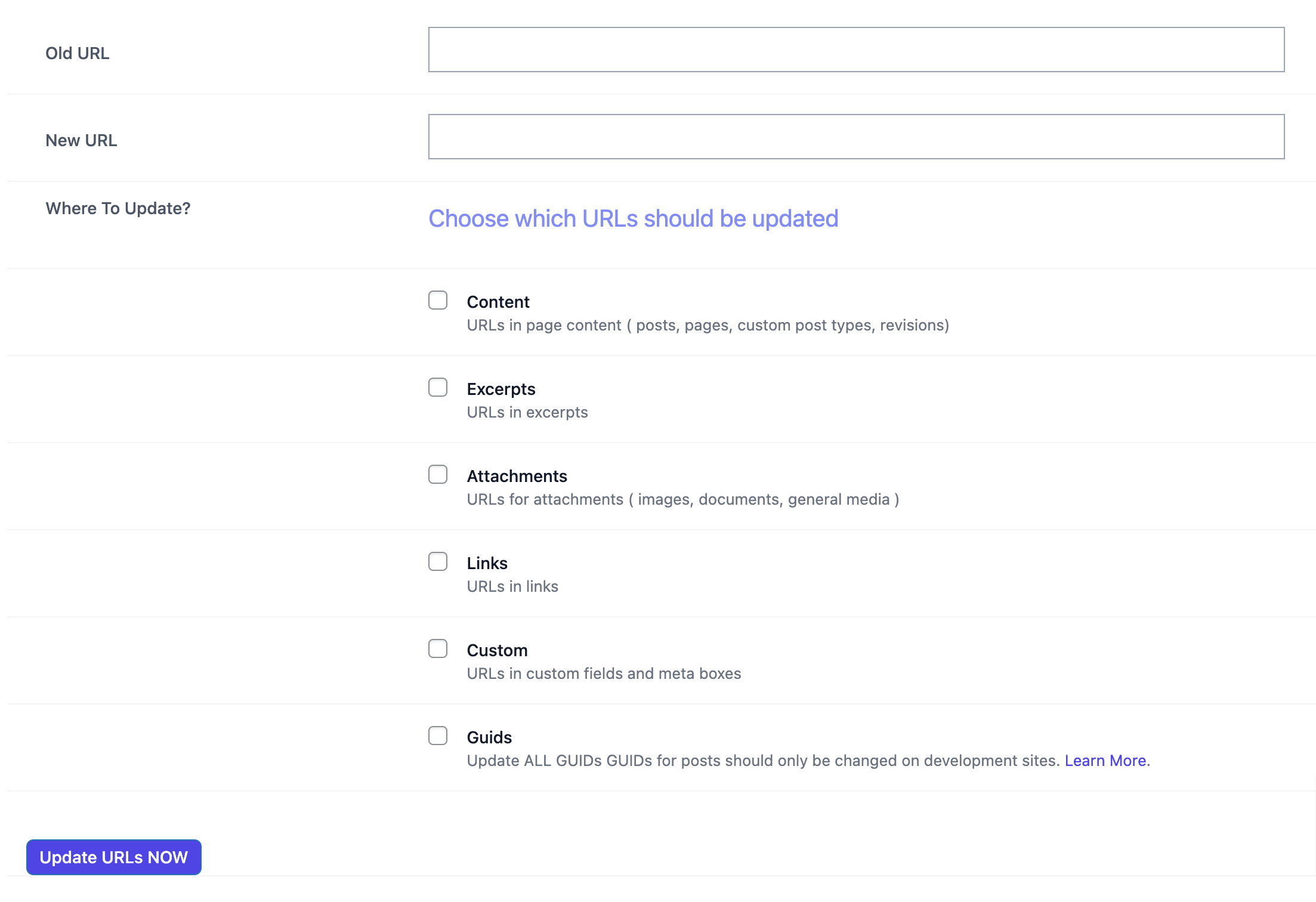
La pantalla de administración para el plugin.

Instalación
La manera fácil..
- Go to WordPress Dashboard. Locate Plugins -> Add New
- Buscar el plugin Update Urls usando la opción de búsqueda
- Find the plugin and click Install Now button
- After installation, click on Activate Plugin link to activate the plugin.
La manera difícil..
- Descargar el plugin update-urls.zip
- Go to WordPress Dashboard. Locate Plugins -> Add New
- Click on the Upload Plugin link from the top
- Subir el archivo update-urls.zip descargado y haz clic en instalar ahora
- After installation, click on Activate Plugin link to activate the plugin.
Uso:
Usar este plugin es muy sencillo. Una vez que se haya activado, ve a Herramientas -> Actualizar las URLs y sigue las instrucciones. Ten en cuenta: los cambios son irreversibles. Si no has usado este plugin antes, haz una copia de seguridad de tu web antes de continuar.
FAQ
-
¿Por qué no se actualizan mis URLs?
-
Las URLs solo se reemplazan cuando se encuentra una coincidencia exacta. Asegúrate de haber introducido la URL correcta y haz clic en enviar. (Nota: La coincidencia distingue entre mayúsculas y minúsculas).
-
¿Por qué veo el mensaje «No tienes suficientes permisos para acceder a esta página»?
-
Asegúrate de que el plugin está activado y que eres un usuario de nivel de administrador.
Reseñas


Colaboradores y desarrolladores
«Update URLs – Forma rápida y sencilla de buscar enlaces antiguos y sustituirlos por enlaces nuevos en WordPress» es un software de código abierto. Las siguientes personas han colaborado con este plugin.
Colaboradores

«Update URLs – Forma rápida y sencilla de buscar enlaces antiguos y sustituirlos por enlaces nuevos en WordPress» está traducido en 5 idiomas. Gracias a los traductores por sus contribuciones.
¿Interesado en el desarrollo?
Revisa el código , echa un vistazo al repositorio SVN o suscríbete al registro de desarrollo por RSS.
Registro de cambios
1.3.0
- Update: UX Improvements
- Translation: Update .POT file
1.2.15
- Update: UX Improvements
- Translation: Update .POT file
1.2.14
- Update: WordPress 6.8.2 compatibility check.
1.2.13
- Update: WordPress 6.8.1 compatibility check.
1.2.12
- Update: WordPress 6.7.2 compatibility check.
1.2.11
- Fix: Undefined constant error.
1.2.10
- Update: WordPress 6.6.2 compatibility check.
- Update: Improve UI / UX.
1.2.9
- Fix: UI / UX Improvements.
1.2.8
- Update: WordPress 6.6.1 compatibility check.
- Update: Improve UI / UX.
- Update: .POT file
1.2.7.1
- Update: Small bug fix.
- Update: WordPress 6.5.2 compatibility check.
1.2.6
- Fix: Remove unused JS & CSS files.
1.2.5
- Update: WordPress 6.4.2 compatibility check.
- Fix: Deprecated: Creation of dynamic property is deprecated issue.
1.2.4
- Update: WordPress 6.3 compatibility check.
1.2.3
- Fix: Checkbox enable/ disable issue.
1.2.2
- New: Improve UI/ UX of admin screen.
- Update: WordPress 6.2.2 compatibility check.
- Update: Minor bug fixes.
- Update: Update .POT file.
1.2.1
- Update: Minor bug fixes.
1.2
- New: UI/ UX enhancements.
1.1
- Update: WordPress 6.2 compatibility check.
1.0.4.1
- Actualización: Comprobación de compatibilidad con WordPress 6.1.1.
1.0.4
- Actualización: Corregido el enlace.
- Actualización: Actualizar el icono y banner.
1.0.3
- Actualización: Comprobación de compatibilidad con WordPress 6.0
1.0.2
- Corrección: Corrección de fallos menores.
1.0.1
- Actualizar «readme.txt»
1.0.0
- Versión inicial
- Esta versión es una copia de Velvet Blues Update URLS.
