
Download eXe – Free Open‑Source eLearning XHTML Editor
Overview of eXe
eXe (eLearning XHTML editor) is a free, open‑source authoring tool that empowers teachers, scholars, and instructional designers to create rich, standards‑compliant learning materials without writing a single line of HTML or XML. Developed in New Zealand as a community‑driven response to the scarcity of user‑friendly e‑learning software, eXe combines a simple drag‑and‑drop interface with powerful “iDevices” – pre‑built interactive components such as multiple‑choice quizzes, reading passages, case studies, RSS feeds, image galleries, and more. By abstracting the complexities of web markup, eXe enables educators to focus on pedagogy rather than code, while still producing exportable XHTML that can be imported directly into popular Learning Management Systems (LMS) like Moodle, Sakai, or Blackboard. The tool also supports seamless integration with Microsoft Word, allowing users to paste formatted text and preserve styling. Whether you are building a single lesson or a full‑scale course, eXe offers a lightweight yet extensible environment that accelerates content creation, encourages reuse, and promotes accessibility through built‑in stylesheet options.
Key Features
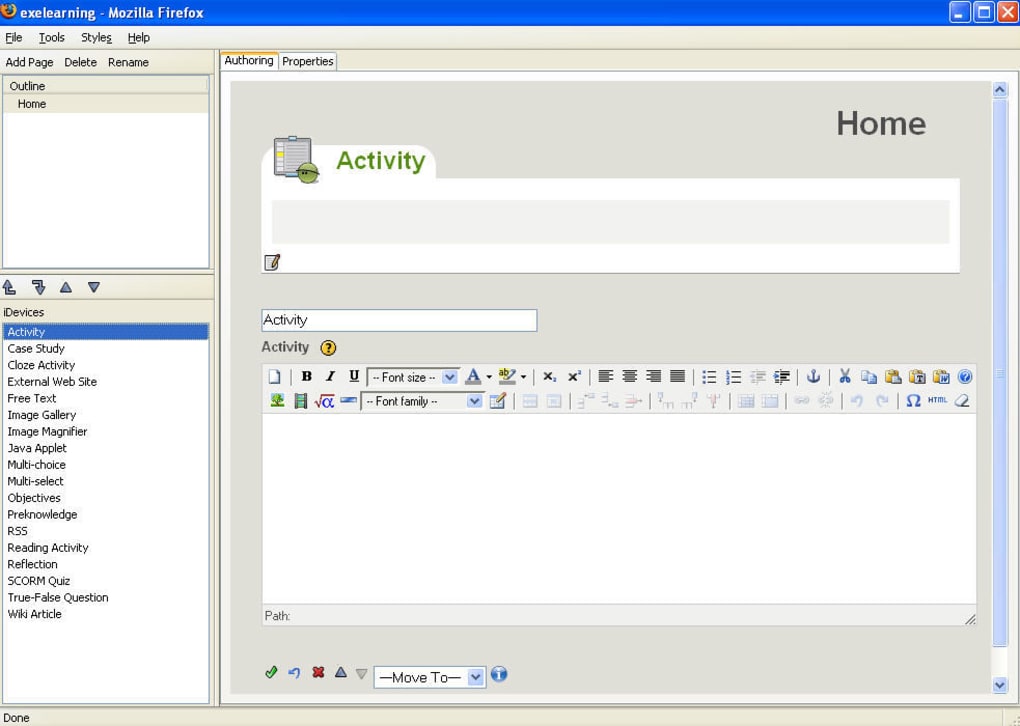
- Intuitive iDevice library – quizzes, activities, multimedia embeds, and RSS/news feeds.
- One‑click export to SCORM, IMS, or plain XHTML for LMS compatibility.
- Built‑in image gallery and media manager for easy visual integration.
- Multiple stylesheet themes to ensure responsive, accessible design.
- Copy‑paste support from Microsoft Word, preserving formatting.
- Open‑source license – free to download, modify, and redistribute.
- Cross‑platform availability for Windows, macOS, and Linux.
- Automatic generation of navigation menus, table of contents, and breadcrumbs.
- Extensible plug‑in architecture for community‑contributed enhancements.
Installation & Usage Instructions
Getting started with eXe is straightforward. First, visit the official project website and click the “Download” button that matches your operating system. The installer is a small executable (eXe‑installer.exe for Windows, .dmg for macOS, and .tar.gz for Linux) and does not require any additional dependencies. After the download completes, run the installer and follow the on‑screen prompts – the wizard will create a desktop shortcut and place the application files in a dedicated folder.
Once installed, launch eXe by double‑clicking the shortcut or executing eXe.exe (Windows) / eXe (macOS/Linux). The first time you open the program, you will be greeted by a welcome tour that explains the main workspace: the Project Explorer on the left, the Content Canvas in the center, and the Properties panel on the right. To create a new course, select “File → New Project,” give your course a title, and choose a default stylesheet. You can then start adding iDevices by clicking the “Add iDevice” button; each iDevice opens a dialog where you can input text, upload images, define quiz questions, or embed external web resources.
After assembling your content, preview the course using the built‑in browser preview – this shows exactly how the final XHTML will render. When you are satisfied, export the project via “File → Export.” Choose the desired package format: SCORM for LMS upload, IMS for interoperability, or plain XHTML for static web publishing. The exported files are ready to be uploaded to any LMS or hosted on a web server, and the process requires no additional conversion steps.
eXe runs on Windows 7 and newer, macOS 10.12 or later, and most modern Linux distributions (Ubuntu, Fedora, Debian). The application is built with Python and wxWidgets, ensuring a consistent experience across platforms.
Pros and Cons
Advantages
- Free and open‑source: No licensing fees, and you can modify the source code.
- User‑friendly interface: Ideal for educators with limited technical background.
- Rich iDevice library: Quickly add quizzes, multimedia, and interactive activities.
- Cross‑platform support: Works on Windows, macOS, and Linux.
- Direct LMS export: Generates SCORM/IMS packages compatible with Moodle, Blackboard, etc.
- Accessible output: Produces standards‑compliant XHTML that meets accessibility guidelines.
Limitations
- Limited advanced styling: Custom CSS requires manual editing outside the UI.
- Steeper learning curve for advanced iDevices: Some complex activities need careful configuration.
- No native cloud collaboration: Files are stored locally; version control must be managed externally.
- Interface looks dated: The UI design has not been modernized compared to commercial alternatives.
Overall, eXe delivers a compelling blend of simplicity and power for educators who need to produce interactive e‑learning content quickly and affordably. While the UI may feel a bit nostalgic, the robust iDevice library and seamless LMS export make it a valuable addition to any instructional designer’s toolkit.
Frequently Asked Questions
Is eXe really free or are there hidden costs?
eXe is released under the GNU GPL v3 license, which means it is completely free to download, use, and modify. There are no subscription fees, and the community provides updates at no charge.
Can I import content created in Microsoft Word?
Yes. eXe’s text editor supports copy‑and‑paste from Word while preserving most formatting, headings, and lists. After pasting, you can further refine the styling using the built‑in stylesheet options.
Which Learning Management Systems are compatible with eXe exports?
eXe can generate SCORM 1.2 and IMS‑CP packages that are accepted by Moodle, Blackboard, Canvas, Sakai, and most other LMS platforms that support these standards.
Is there a mobile version of eXe?
Currently, eXe is a desktop‑only application. However, the XHTML output is fully responsive, so learners can view the published courses on any mobile browser.
How do I get support if I encounter a bug?
The eXe community maintains an active forum and a GitHub repository where users can report issues, request features, and receive assistance from developers and fellow educators.
Ready to transform your teaching materials into interactive, web‑ready courses? Download eXe today and start building engaging e‑learning experiences without writing a single line of code.








