
Screenshots
App details
- Updated
- August 27, 2009
- Requires
- Windows 10, Windows XP, Windows 7, Windo...
- Developer
- Chaos Manager
- Category
- Mobile
About Executor
Download Executor – Program Launcher, Productivity Tool, Custom Hot Keys
Overview
Executor is a powerful program launcher designed to streamline access to applications, files, and system settings through customizable hotkeys and keyword triggers. It is engineered to enhance productivity by minimizing navigation steps, enabling users to launch programs or perform common tasks with minimal input. The app serves as a centralized utility for both casual users seeking faster access and power users aiming to optimize their digital workflows. By integrating a dynamic keyword system and a responsive search interface, Executor reduces the time spent searching through menus or desktop icons.
Target users include professionals managing multiple applications, students organizing study tools, and tech-savvy individuals who value efficiency. The app is particularly useful in environments where rapid task switching is critical, such as software development, content creation, or administrative work. While the developer did not provide additional background information, the app has been available since 2009, indicating a long-standing presence in the productivity tool ecosystem. Its continued relevance suggests a stable and reliable foundation.
Real-world use cases include launching a specific software with a single keyword, opening system settings like "Add/Remove Programs" instantly, or searching for files using natural language queries. These capabilities make Executor a valuable addition to any user’s toolkit, especially for those who rely on consistent, repeatable actions across sessions. Its lightweight nature and focus on speed position it as a niche yet impactful utility within the broader mobile app landscape.
Key Features & Functionality
- Dynamic Keyword System: Users can define custom keywords that trigger specific actions. For example, typing 'addremove' opens the Add/Remove Programs settings directly, eliminating the need to navigate through system menus.
- Extensive Customization Options: The interface supports skinning, allowing users to modify the appearance of the launcher bar. Preferences include hotkey reassignment, autocompletion behavior, and launch targets for specific programs or files.
- Powerful Search Integration: Executor leverages the system’s search capabilities through commands like 'find [text]', enabling users to locate files or applications quickly after indexing the drive. This feature enhances file discovery and supports efficient workflow management.
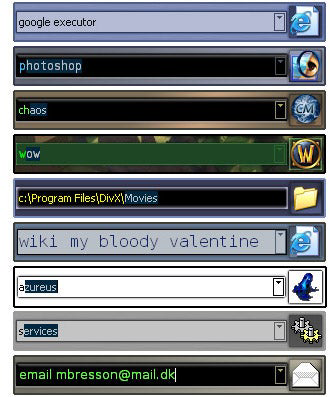
- User-Friendly Interface: A sleek, skinnable bar at the top of the screen provides instant access. As users type, a dropdown list dynamically narrows options, supporting fast and intuitive navigation.
- Enhanced Task Management: By enabling rapid application launches and system access, Executor reduces context switching time, making it ideal for multitaskers who need to maintain focus across multiple projects.
Each feature is designed to reduce friction in daily computing tasks. For instance, a developer might assign 'code' as a keyword to launch their IDE, while a student could use 'notes' to open their preferred document editor. These real-world applications highlight how Executor adapts to individual workflows, delivering personalized efficiency without requiring complex setup.
Interface, UX & Performance
Executor presents a clean, minimal interface centered around a skinnable bar positioned at the top of the screen. The visual style is unobtrusive, allowing users to maintain focus on their primary tasks. Navigation is intuitive: as users begin typing, a dropdown list appears, offering real-time suggestions based on keywords and file names. This responsive behavior supports quick decision-making and reduces keystrokes.
Interaction flow is streamlined, with no unnecessary steps between input and execution. The app supports keyboard-driven workflows, making it ideal for users who prefer typing over mouse navigation. Although the developer did not list formal performance metrics, the app’s lightweight design suggests efficient memory usage and minimal impact on system resources. It is likely optimized for responsiveness across a range of device categories, including older or lower-spec hardware.
Stability appears to be a core strength, given the app’s long availability since 2009. Users can expect consistent behavior during repeated use, with minimal crashes or delays. The autocompletion system functions smoothly, providing accurate results even with partial input. Overall, the user experience is designed to be seamless, supporting both beginners and advanced users through its balance of simplicity and depth.
Platform Compatibility & Technical Requirements
Executor is designed for Windows operating systems. The specific platform and version were not provided by the developer. The file size of the application is also not disclosed. Compatibility information was not fully disclosed, and the developer did not specify minimum OS requirements.
Given the release date of 2009, the app is likely compatible with older versions of Windows, such as Windows 7 and 8. However, users of newer systems should verify compatibility before installation. The lack of detailed technical specifications means that users should proceed with caution when deploying the app on modern or high-end configurations.
Pros and Cons
Pros
- Efficient program and file launching via customizable keywords
- Highly skinnable interface supports personalization
- Intuitive search functionality with real-time autocompletion
- Minimal system resource usage
- Long-standing reliability since 2009
Cons
- Developer did not provide detailed technical specifications
- Compatibility with modern Windows versions is unclear
- Initial setup may require indexing for full search functionality
- Limited public documentation or support channels
- No visible update history or version tracking
FAQ
Is Executor safe to download and install?
Executor is a legitimate utility tool that has been available since 2009. As with any third-party application, users should download it from trusted sources to ensure security and avoid bundled software.
Can I use Executor on Windows 10 or Windows 11?
The developer did not specify compatibility with Windows 10 or 11. While the app may function on these systems due to its age and lightweight nature, users are advised to test it in a controlled environment before full deployment.
Does Executor require an internet connection?
Executor does not require an active internet connection to operate. Its core functions—launching programs, managing keywords, and searching local files—work offline.
How do I set up custom keywords?
Users can define custom keywords through the app’s settings menu. Each keyword can be linked to a specific program, file, or system action. Instructions may vary based on the version, so users should refer to the internal help or configuration guide.
Is Executor free to use?
The pricing information was not provided. Users should verify the current cost or licensing model before installation, especially if using the app in a professional or organizational setting.
Final Thoughts
Executor stands out as a focused, high-efficiency tool for users who prioritize speed and customization in their daily workflows. Its dynamic keyword system and search integration deliver tangible productivity gains, particularly for those managing multiple applications or frequently accessing system settings. While the lack of updated technical details and modern compatibility assurances may raise concerns, its proven track record since 2009 speaks to its reliability.
Power users, developers, and professionals seeking to reduce task-switching time will benefit most from its capabilities. The app’s minimal design and low resource footprint make it a practical choice for both older systems and modern machines. Despite its age, Executor remains a relevant utility in the productivity space.
Download Executor now
Guides & Tutorials
How to install Executor
- Click the Download button above.
- Once redirected, accept the terms and click Install.
- Wait for the Executor download to finish on your device.
How to use Executor
This software is primarily used for its core features described above. Open the app after installation to explore its capabilities.
User Reviews
No reviews yet. Be the first to share your experience.
You may also like
more
Que no te pillen¡
About !Que no te pillen¡Reviewed by Jason A. BilbreyShow MoreShow Less

3D Combat Zone
About 3D Combat ZoneOriginally released in 1983, 3D Combat Zone immerses players...

666: El día del portal
About 666: El día del portalOn June 6, 2006, Agent P. Stone uncovers a sinister...

80 in 1 Best Flash games
About 80 in 1 Best Flash games 80 in 1 Best Flash games is a collection of 80 fl...

ABYSS SEEKERーーWhat Do You See Deep in The Abyss
About ABYSS SEEKERーーWhat Do You See Deep in The AbyssIn ABYSS SEEKER, players...

ACA NEOGEO THE KING OF FIGHTERS 2002 for Windows
About ACA NEOGEO THE KING OF FIGHTERS 2002 for WindowsTHE KING OF FIGHTERS 2002,...
