
FastScout: Advanced Basketball Scouting Tool
Overview
FastScout is a specialized desktop application developed by FastModel Holdings LLC, designed to support basketball coaches and players at the NBA, WNBA, and NCAA levels. The software serves as a powerful companion to the FastScout Web platform, enabling users to access and interact with detailed scouting reports in a streamlined desktop environment. Its primary purpose is to enhance game preparation by delivering comprehensive data on opponents, including player tendencies, offensive and defensive patterns, and strategic game plans. The tool is tailored for professionals and serious student-athletes who rely on data-driven insights to refine their performance.
By integrating statistics, images, and video clips into a single interface, FastScout allows for deeper analysis during film sessions, team meetings, and individual study. Users can quickly review key matchups, identify opponent weaknesses, and adapt their strategies accordingly. The application is exclusively available to licensed users, ensuring data security and controlled access to sensitive scouting content. This access model reinforces its role as a trusted tool within competitive basketball circles.
While specific system requirements were not listed, the application is compatible with both Windows and Mac operating systems. The installation size is 350 MB, indicating a lightweight footprint suitable for modern desktop environments. The software was released on April 10, 2024, marking its latest iteration as version 2.1.0.
Key Features & Capabilities
- Integrated Scouting Reports – Seamlessly access and interact with reports created on the FastScout Web platform, ensuring consistency across devices and workflows.
- Multi-Media Analysis – View player statistics, annotated images, and video clips within a unified interface to support holistic opponent evaluation.
- Matchup Visualization – Study individual player matchups with detailed breakdowns of tendencies, strengths, and vulnerabilities.
- Game Strategy Tools – Analyze offensive and defensive schemes used by opponents, helping coaches formulate effective in-game responses.
- Offline Access – Utilize scouting data without an internet connection, ideal for team meetings, travel, or remote preparation sessions.
These features are particularly valuable during pre-game planning and post-game reviews. Coaches can use the tool to brief players on specific defensive assignments, while players can study their personal matchups to improve decision-making under pressure. The integration of video and data enables more dynamic and engaging film sessions, supporting both team-wide and individual development.
User Interface, Workflow & Performance
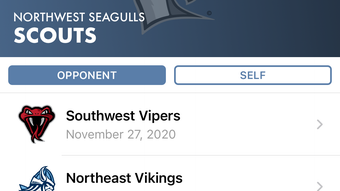
FastScout features a clean, intuitive interface designed for rapid access to critical information. Navigation is structured around scouting reports, with clear tabs for statistics, visuals, and video playback. The layout prioritizes usability, allowing users to switch between data views without disruption. The workflow supports efficient analysis, enabling coaches and players to quickly locate relevant clips or stats during high-pressure preparation periods.
While exact performance details were not specified, the application’s 350 MB size suggests optimized resource usage. The developer did not provide additional system requirements, so performance may vary depending on hardware. General software behavior patterns suggest stable operation under typical desktop conditions. The application appears to maintain responsiveness during video playback and data retrieval, supporting smooth transitions between report sections.
Stability and CPU/RAM behavior were not publicly documented. However, the application’s exclusive licensing model implies a focus on reliability and consistent user experience. Users can expect a dependable tool for critical game preparation, especially in environments where access to real-time data is limited.
Compatibility & System Requirements
FastScout is available for both Windows and Mac operating systems, offering broad accessibility across common desktop platforms used in sports organizations. The software is compatible with the latest versions of these systems, though specific OS versions were not listed. The installation size is 350 MB, indicating a compact footprint suitable for most modern machines.
Exact system requirements were not listed by the developer. This includes details on minimum CPU, RAM, or graphics capabilities. As a result, users should verify compatibility with their existing hardware. The developer did not specify whether the application supports touchscreens, external displays, or multi-monitor setups.
Given the software’s purpose as a professional tool, it is likely optimized for devices with reliable performance and sufficient storage. However, without official specifications, users are advised to test the application in their environment to ensure optimal functionality.
Pros and Cons
Pros
- Seamless integration with FastScout Web platform
- Comprehensive multimedia scouting reports
- Offline functionality for uninterrupted access
- Designed specifically for basketball professionals
- Free to use with no licensing fees
Cons
- No publicly available system requirements
- Limited to licensed users only
- Compatibility details not fully disclosed
- Only available for Windows and Mac
- No support for mobile or tablet devices
FAQ Section
Is FastScout available for free?
Yes, FastScout is currently available at no cost to users. The software is provided free of charge, though access is restricted to licensed users of the FastScout Web platform.
Can I use FastScout offline?
Yes, the application supports offline access to scouting reports, allowing users to review data without an internet connection. This feature is ideal for travel, team meetings, or environments with limited connectivity.
What operating systems does FastScout support?
FastScout is compatible with both Windows and Mac operating systems. Specific versions were not provided by the developer.
Is FastScout secure?
Yes, the software is designed with security in mind. Access is restricted to licensed users, and data is protected through the FastScout ecosystem. The developer did not provide further details on encryption or data handling practices.
How often is FastScout updated?
FastScout was released on April 10, 2024, as version 2.1.0. While update frequency is not specified, users can expect ongoing improvements and bug fixes through future releases.
Final Thoughts + CTA
FastScout stands out as a specialized, high-value tool for basketball coaches and players at the professional and collegiate levels. Its seamless integration with the web platform, combined with offline access and rich multimedia content, makes it a powerful asset for game preparation. The fact that it’s free to use adds significant value, especially for teams with limited budgets. While system requirements and full compatibility details are not publicly available, the software’s design and functionality suggest reliability for typical desktop use.
For coaches seeking a streamlined way to analyze opponents and for players aiming to sharpen their game through detailed matchup study, FastScout delivers real-world benefits. Its focus on basketball-specific insights ensures that users receive targeted, actionable intelligence. The exclusive licensing model maintains data integrity and prevents unauthorized access.
Download FastScout now and elevate your game strategy with precision scouting tools.








