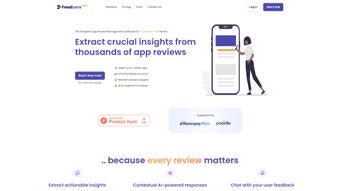

Download FeedLens – AI‑Powered App Review Management Tool
Overview
FeedLens is an AI‑driven app review management platform designed for product teams that put customers first. In today’s fast‑paced app ecosystems, hundreds of user reviews pour in daily across the Apple App Store, Google Play, and other marketplaces. Manually sifting through that flood of feedback is time‑consuming and error‑prone. FeedLens solves this problem by automatically extracting key insights, summarizing sentiment, and surfacing actionable items—all from a single, web‑based dashboard. The platform not only helps you respond to user comments quickly but also equips you with competitive intelligence by analysing rival apps’ reviews. Integration with popular ticketing and collaboration tools such as Freshdesk, Jira, Slack, and Microsoft Teams means that the insights you gain can be turned into tickets, tasks, or direct messages without leaving your existing workflow. Whether you are an indie developer juggling a single app or a growing company managing a suite of products, FeedLens scales with your needs through flexible subscription tiers. Its custom‑trained AI chatbot can answer product‑related questions in real time, reducing the load on support staff and boosting user satisfaction. Comprehensive analytics—displayed through intuitive charts, heatmaps, and exportable CSV/Excel files—enable deep dive analyses, trend spotting, and data‑driven roadmap decisions. In short, FeedLens transforms raw user reviews into a strategic asset, helping you listen, act, and stay ahead of the competition.
Key Features & AI Advantages
- Automated Sentiment Analysis: FeedLens leverages natural‑language processing (NLP) to detect positive, neutral, and negative tones across thousands of reviews in seconds.
- Insight Summarization: The platform condenses long review threads into bite‑size bullet points, highlighting recurring bugs, feature requests, and praise.
- AI‑Powered Chatbot: A custom‑trained assistant can answer user queries directly on review platforms, reducing manual response time and increasing satisfaction scores.
- Ticketing System Integration: Seamlessly push flagged reviews into Freshdesk, Jira, Zendesk, or Asana, turning feedback into actionable tickets.
- Slack & Teams Alerts: Real‑time notifications keep your team aware of emerging issues or trending praise without opening the dashboard.
- Competitor Review Mining: FeedLens monitors competitor apps, extracting their strengths and weaknesses to inform your own product strategy.
- Customizable Dashboards: Drag‑and‑drop widgets let you build visual reports that focus on the metrics that matter most to your business.
- Data Export & API Access: Export raw data in CSV, Excel, or JSON formats, or connect via API to feed insights into BI tools like Power BI or Tableau.
- Multi‑Language Support: Built‑in translation layers allow you to understand reviews written in dozens of languages, expanding your global reach.
- Security & Compliance: End‑to‑end encryption, GDPR‑ready data handling, and role‑based access controls keep your review data safe.
Why AI Makes a Difference
Traditional review monitoring relies on manual tagging, keyword searches, and occasional sentiment checks. These methods are not only labor‑intensive but also miss subtle nuances—sarcasm, context‑specific jargon, or emerging slang—that can skew results. FeedLens’s AI engine, trained on millions of app‑store reviews, recognizes these subtleties, providing a more accurate sentiment score. The AI also continuously learns from your own team’s labeling, improving relevance over time. This adaptive learning loop means the platform becomes more precise the longer you use it, turning raw feedback into a living knowledge base. Moreover, the AI chatbot’s ability to engage directly with reviewers on platforms like Google Play or the App Store reduces the average response time from hours (or days) to minutes, a critical factor in maintaining a high star rating. By automating repetitive tasks, the AI frees up product managers, support engineers, and community managers to focus on strategic initiatives such as feature planning and market positioning.
Installation, Setup & Compatibility
Getting Started in Minutes
Because FeedLens is a cloud‑native SaaS solution, there is no traditional “installation” process on your local machine. Getting started is as simple as signing up on the official website, verifying your email address, and choosing a subscription plan that matches your team size. After logging in, the onboarding wizard guides you through the following steps:
- Connect Your App Stores: Use OAuth to link your Apple Developer and Google Play Console accounts. FeedLens pulls review data automatically, updating every 15 minutes for live monitoring.
- Integrate Ticketing & Communication Tools: Select the services you already use—Freshdesk, Jira, Slack, Microsoft Teams, or others—and grant FeedLens permission to create tickets or send messages.
- Configure AI Preferences: Choose the depth of analysis (basic sentiment vs. deep topic modeling), enable the chatbot, and set language preferences for multilingual review handling.
- Set Up Alert Rules: Define thresholds for negative sentiment spikes, keyword triggers (e.g., “crash”, “payment”), or competitor activity, and decide whether alerts go to email, Slack, or both.
- Invite Team Members: Assign roles (Admin, Analyst, Viewer) to control who can edit settings, view dashboards, or export data.
Operating System & Browser Support
FeedLens runs entirely in the browser, making it compatible with any modern operating system—Windows 10/11, macOS Monterey and later, Linux distributions, as well as mobile browsers on iOS and Android. The platform is optimized for Chrome, Edge, Firefox, and Safari, with responsive design that adapts to tablets and smartphones. While the core experience is web‑based, an optional native desktop client (available for Windows and macOS) offers offline caching for quick data access when you’re on the go. The client syncs automatically once an internet connection is restored, ensuring your analytics stay up‑to‑date.
Security & Access Management
Security is baked into every layer of FeedLens. All data in transit is protected by TLS 1.3 encryption, and at rest it is stored in encrypted databases hosted on ISO‑27001‑certified cloud infrastructure. Role‑based access control (RBAC) lets you limit what each team member can see or modify. Two‑factor authentication (2FA) is mandatory for admin accounts, and single‑sign‑on (SSO) via SAML 2.0 is supported for enterprises that use Azure AD, Okta, or similar identity providers. Regular penetration testing and automated vulnerability scans keep the platform compliant with GDPR, CCPA, and other data‑privacy regulations.
Pros & Cons
What Users Love About FeedLens
- AI‑driven sentiment analysis provides highly accurate insights without manual tagging.
- Seamless integration with popular ticketing and communication tools streamlines workflow.
- Competitor review monitoring offers a strategic advantage for product road‑mapping.
- Multi‑language support expands visibility into global user bases.
- Customizable dashboards and export options make data analysis flexible.
- Robust security features and compliance certifications give peace of mind.
Areas for Improvement
- Pricing may be steep for solo developers or very small teams; a freemium tier would broaden adoption.
- Initial AI model training can take a few days to fine‑tune for niche domains.
- While the web UI is intuitive, the native desktop client is still in beta and may have occasional sync glitches.
- Advanced users may desire deeper API customization beyond the standard endpoints.
- Export formats are currently limited to CSV, Excel, and JSON; direct integration with BI platforms requires additional setup.
FAQ & Final Verdict
Is FeedLens a free tool?
FeedLens offers a 14‑day free trial that includes full feature access. After the trial, you must choose a paid subscription plan. There is currently no permanent free tier, but the trial allows you to evaluate ROI before committing.
Which app stores does FeedLens support?
FeedLens integrates with Apple App Store, Google Play Store, Amazon Appstore, and can also pull reviews from third‑party marketplaces via API connectors.
Can I export review data for offline analysis?
Yes. FeedLens provides CSV, Excel, and JSON export options. You can also schedule automatic exports to an SFTP server or a cloud storage bucket (Google Drive, Dropbox, OneDrive).
How does the AI chatbot respond to user reviews?
The chatbot uses a custom‑trained language model that references your product documentation and knowledge base. It can answer common questions, direct users to help articles, or hand off to a human agent when needed. Responses are posted directly on the review platform, preserving the conversation context.
Is my data secure and GDPR compliant?
FeedLens complies with GDPR, CCPA, and ISO‑27001 standards. All data is encrypted in transit (TLS 1.3) and at rest. Role‑based access, 2FA, and optional SSO further protect your information.
Final Verdict
For product teams that need to turn a flood of app‑store reviews into strategic insight, FeedLens stands out as a comprehensive, AI‑enhanced solution. Its ability to summarize sentiment, automate ticket creation, and even converse with users directly on review platforms shortens response cycles and improves overall user satisfaction. While the price point may be a hurdle for solo developers, the depth of analytics, competitive intelligence, and security features make it a solid investment for growing companies and enterprises. If you’re looking to streamline review management, boost your app rating, and stay ahead of market trends, download FeedLens today and let AI do the heavy lifting for you.



.png)




