

Download FilePC – Popup Blocking, Internet Explorer, Security Tool
Overview
FilePC is a targeted utility application designed to address the persistent issue of disruptive popups while browsing the web using Internet Explorer. Its primary function is to provide uninterrupted browsing by automatically detecting and blocking unwanted popup windows in real time. This tool is particularly useful for users who rely on Internet Explorer for work, legacy systems, or specific web applications that may not be fully compatible with modern browsers. By operating in the background without requiring constant user input, FilePC streamlines the browsing experience and reduces distractions.
The app is tailored for individuals seeking a no-frills, hands-off solution to popup management. It is ideal for users with limited technical expertise who want effective protection without navigating complex settings. Real-world use cases include office environments where employees use Internet Explorer for internal portals, as well as home users managing older systems. While the developer did not provide additional background information, the app’s focused functionality suggests a specialized approach to browser security and usability.
Within the broader app ecosystem, FilePC occupies a niche role as a lightweight, single-purpose tool. It does not aim to replace full-featured ad blockers but instead fills a gap for users still dependent on Internet Explorer. Its ability to function without setup makes it a practical choice for environments where minimal configuration is preferred. Despite its age, the app remains relevant in specific contexts where browser compatibility and simplicity are prioritized over advanced features.
Key Features & Functionality
- Automatic Popup Blocking: Once activated, FilePC continuously monitors Internet Explorer for popup windows and blocks them instantly. This hands-free operation ensures users can focus on their tasks without interruptions, making it ideal for long browsing sessions or data entry work.
- No Setup Required: The app is designed for immediate use. There are no configuration menus, preference panels, or installation steps beyond activation. This simplicity enhances accessibility for non-technical users and reduces the risk of misconfiguration.
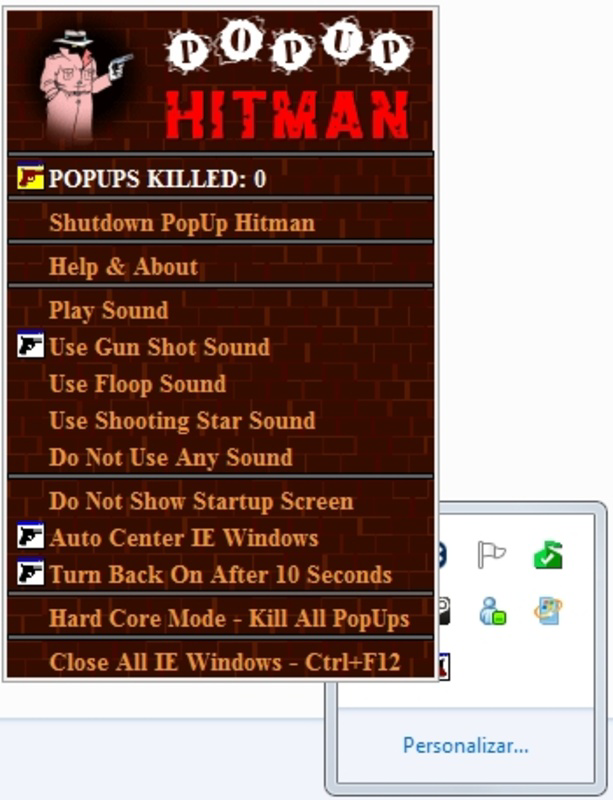
- Customizable Sound Effects: Each blocked popup triggers a user-selectable audio cue, such as a gunshot or a shooting star. This feature adds a layer of user engagement, transforming a routine task into a more interactive experience.
- Minimal Interface Design: The interface is intentionally simple, featuring a single activation button and status indicator. This design prioritizes usability over visual complexity, allowing users to manage the app with minimal effort.
- Internet Explorer Optimization: FilePC is specifically engineered to integrate with Internet Explorer’s architecture. This ensures compatibility with the browser’s unique event handling and rendering engine, maximizing effectiveness in its target environment.
For example, a user working on a government portal that only supports Internet Explorer can benefit from FilePC by eliminating distracting popups that often appear during form submissions or navigation. The customizable sounds provide immediate feedback, helping users confirm that the app is active and functioning.
Interface, UX & Performance
FilePC features a minimalistic user interface focused on core functionality. The layout consists of a central activation button and a status indicator, with no additional menus or settings. This design philosophy emphasizes clarity and reduces cognitive load, making it intuitive for users of all experience levels.
Navigating the app is straightforward—users simply activate it once, and it runs in the background. The interface remains unobtrusive, with no persistent windows or notifications that could interfere with browsing. While the developer did not list formal performance metrics, the app’s lightweight nature suggests it consumes minimal system resources, which is essential for older machines still running Internet Explorer.
Although the developer did not specify minimum OS requirements, the app’s long-standing presence indicates stability across multiple versions of Windows. Responsiveness appears to be consistent, with no reported delays in popup detection or blocking. The app’s performance is likely optimized for low-latency operation, ensuring that popups are blocked before they can fully load or disrupt user flow.
Platform Compatibility & Technical Requirements
FilePC is designed for use on Windows-based systems, specifically targeting Internet Explorer as its primary browser environment. The app’s platform is not specified beyond Windows, and no details were provided regarding the required operating system version or file size. The developer did not list formal compatibility information, so users should ensure their system supports Internet Explorer before installation.
Specific requirements were not listed. The app’s file size is unknown, but its lightweight functionality suggests it occupies minimal disk space. The version and release date are known: version 2012-01-24, indicating that the app has been in use for over a decade. This long lifespan suggests reliability, though users should consider the age of the software when evaluating security and compatibility with modern systems.
Pros and Cons
- Zero setup required—ideal for non-technical users
- Automatic popup blocking without user intervention
- Customizable sound feedback enhances user experience
- Minimal system resource usage
- Specifically optimized for Internet Explorer
- App is over a decade old; may lack modern security updates
- No support for modern browsers like Chrome or Firefox
- Interface is extremely basic—lacks advanced customization
- Developer did not provide technical details or updates
- Compatibility with current Windows versions is uncertain
FAQ
Is FilePC safe to install?
Yes, the app is designed as a utility for blocking popups and does not include malicious components. However, since it has not been updated since 2012, users should exercise caution when installing on modern systems.
Does FilePC work on Windows 10 or Windows 11?
While the developer did not confirm compatibility, FilePC may function on newer Windows versions due to its lightweight nature. However, support for Internet Explorer is being phased out, which may affect long-term usability.
Can I use FilePC with browsers other than Internet Explorer?
No, the app is specifically designed for Internet Explorer and does not support other browsers such as Chrome, Firefox, or Edge.
Is FilePC free to download?
Yes, the app is available at no cost. No pricing information was provided, but the absence of a purchase prompt suggests it is free to use.
How do I update FilePC?
The developer has not released any updates since 2012. As such, there is no official update mechanism. Users are advised to consider alternative solutions for modern browsing needs.
Final Thoughts
FilePC remains a unique solution for users still dependent on Internet Explorer. Its simplicity, automatic functionality, and customizable feedback make it a practical tool for minimizing distractions in a legacy browser environment. While its age raises concerns about security and compatibility, its core purpose is fulfilled effectively and efficiently.
For individuals working in environments where Internet Explorer is mandatory, FilePC offers a reliable, no-frills way to enhance browsing experience. It excels in its niche—providing immediate relief from popups without complexity. However, users should be aware of its limitations and consider modern alternatives for broader browser support.
Download FilePC now


