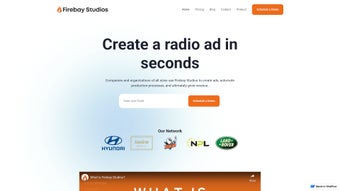

Download Firebay Studios – AI‑Powered Podcast Production Tool for Creators
Overview
Firebay Studios is a cloud‑native, AI‑driven platform that reimagines the entire podcast creation workflow from the moment an idea is born to the instant an episode reaches listeners worldwide. The service combines a state‑of‑the‑art text‑to‑speech engine with a suite of production utilities, allowing creators to generate scripts, synthesize voices, edit audio, host episodes, and track performance—all without leaving the browser. Designed for a diverse audience that includes business marketers, educators, gamers, and independent podcasters, Firebay offers multilingual support for 28 languages, a range of voice styles (male, female, neutral, and expressive tones), and the ability to blend multiple voices into a single narrative. Its built‑in analytics dashboard provides real‑time insight into downloads, listener demographics, and engagement patterns, empowering creators to refine content strategy on the fly. Security is baked in: all data is encrypted at rest and in transit, and the platform complies with GDPR and CCPA standards. Whether you’re producing a weekly interview series, an educational module, an audiobook excerpt, or dynamic NPC dialogue for a live‑streamed game, Firebay Studios delivers a secure, scalable, and cost‑effective solution that removes technical barriers and lets you focus on storytelling.
Key Features and Capabilities
- AI Voice Generator: Produce natural‑sounding speech in 28 languages with selectable genders, regional accents, and emotional tones, all rendered in high‑fidelity audio.
- Dynamic NPC Dialogue: Create immersive, context‑aware gaming conversations that adapt in real time to player actions, perfect for live streams and interactive narratives.
- Real‑Time Narration: Convert scripts into spoken audio instantly, allowing rapid content turnover for news briefs, daily updates, or live commentary.
- Script Generation Assistant: An AI‑powered writer that drafts episode outlines, interview questions, or educational modules based on a brief prompt.
- Integrated Podcast Hosting & Analytics: Secure cloud hosting, automatic RSS feed creation, and detailed listener metrics (downloads, retention, geography).
- Multi‑Voice Editing Suite: Blend several voice profiles in a single episode, add background music, insert sound effects, and fine‑tune pacing with a visual waveform editor.
- Ethical AI Controls: Content filters, usage policies, and watermarking options to prevent deep‑fake misuse and ensure compliance with platform guidelines.
- Flexible Pricing Plans: Tiered subscriptions for freelancers, small teams, and enterprises, each including a credit pool for voice generation.
- Cross‑Platform Browser Access: Fully functional on Windows, macOS, Linux, Android, and iOS browsers—no downloads or installations required.
- Robust API & Webhook Support: RESTful endpoints for batch voice generation, CI/CD integration, and event‑driven notifications (e.g., rendering complete, episode published).
These features are thoughtfully integrated to eliminate the need for multiple disjointed tools. For example, a creator can start with the AI Script Writer, immediately hand the output to the Text‑to‑Speech module, edit the resulting waveform, and publish the final episode—all within a single, cohesive dashboard. The platform also supports export in MP3, WAV, or AAC formats, making it easy to share files with external services or embed them directly into websites. By centralizing the entire workflow, Firebay Studios reduces both production time and overall cost, delivering a professional‑grade podcast experience even for users with limited technical expertise.
Installation & Usage Instructions
Firebay Studios is intentionally frictionless: because it is cloud‑native, there is no traditional installation process—only a secure sign‑up and a modern web browser. This section walks you through the entire onboarding journey, from creating an account to publishing your first episode.
Step‑by‑Step Setup
- Create an Account: Visit firebaystudios.com and click “Sign Up.” Register using an email address or single‑sign‑on via Google, Microsoft, or Apple ID.
- Select a Plan: Choose between the 14‑day free trial, the Creator tier (ideal for freelancers), the Team tier (for small groups), or the Enterprise tier (for large organizations). All plans include a credit pool for voice generation.
- Configure Your Workspace: After logging in, the onboarding wizard guides you through setting your default language, preferred voice style, and default output format (MP3, WAV, or AAC).
- Generate a Script: Navigate to the “AI Script Writer” tab. Enter a brief topic description, select a tone (conversational, formal, energetic), and let the model produce a full episode outline with timestamps and segment suggestions.
- Convert to Audio: Drag the script into the “Text‑to‑Speech” module. Choose a voice, adjust speed, pitch, and emphasis, then click “Render.” The engine processes the request in seconds and presents a preview player.
- Edit & Layer: Split the script into sections for multiple speakers, assign distinct voices, and use the built‑in wave editor to trim silences, add background music, or insert sound effects. The editor supports drag‑and‑drop arrangement for intuitive timeline control.
- Publish & Promote: Click “Publish” to upload the episode to Firebay’s secure hosting. The platform automatically generates an RSS feed, embeddable player, and social sharing links. One‑click distribution to Spotify, Apple Podcasts, Google Podcasts, and Anchor is also available.
- Monitor Performance: The analytics pane displays downloads, listener demographics, retention curves, and episode‑by‑episode engagement. Use these insights to refine future scripts, voice selections, and promotion strategies.
- Automation for Power Users: Access the “Developer Tools” section for API keys, documentation, and sample code. You can automate batch voice generation, trigger real‑time narration during live game sessions, or integrate with CI/CD pipelines for large‑scale audiobook production.
Support resources include video tutorials, a searchable knowledge base, and a vibrant community forum where creators share templates, voice presets, and workflow tips. If you encounter any issues, a 24/7 live chat and ticketing system is available to ensure quick resolution.
Compatibility, Pros & Cons, and Frequently Asked Questions
Firebay Studios runs entirely in modern web browsers, making it compatible with Windows 10/11, macOS Catalina and later, Linux distributions (Ubuntu, Fedora, etc.), as well as mobile browsers on Android 9+ and iOS 13+. Because all processing occurs on Firebay’s secure servers, there are no heavy CPU or GPU requirements on the client side, ensuring a smooth experience on everything from high‑end workstations to modest Chromebooks.
Pros
- Instant, high‑quality voice synthesis without needing local hardware.
- Extensive language and accent library, ideal for global audiences.
- All‑in‑one workflow—script generation, audio rendering, hosting, and analytics.
- Scalable pricing that fits freelancers to large enterprises.
- Robust API and webhook support for automation and custom integrations.
- Ethical AI safeguards reduce misuse risk and ensure compliance.
- Secure, encrypted storage and GDPR/CCPA compliance.
- Cross‑platform accessibility—no downloads or installations required.
Cons
- Requires an internet connection; offline work is not possible.
- Advanced audio editing tools are less feature‑rich than dedicated DAWs.
- Higher‑tier plans can become costly for very high‑volume producers.
- Custom voice creation (branding a unique voice) is limited to Enterprise plans.
- Free trial includes a limited credit pool, which may run out quickly for large projects.
Frequently Asked Questions
Can I use my own custom voice with Firebay Studios?
Custom voice creation is available on the Enterprise tier. You can upload a voice dataset, and Firebay’s AI will generate a proprietary voice model that is exclusive to your brand.
Is there a free version or trial period?
Yes, Firebay Studios offers a 14‑day free trial with a limited credit pool for voice rendering. This allows you to test all core features before committing to a paid plan.
How secure is my audio content on the platform?
All uploads and generated audio are encrypted at rest and in transit using AES‑256 and TLS 1.3. Firebay also adheres to GDPR and CCPA regulations, giving you control over data retention and deletion.
Can I integrate Firebay Studios with my existing podcast hosting service?
Absolutely. Firebay provides an export option (MP3/WAV) and direct RSS feed integration, so you can push episodes to platforms like Libsyn, Anchor, or your self‑hosted server.
What languages and accents are supported?
The AI engine supports 28 languages, including English (US, UK, AU), Spanish (EU, LATAM), Mandarin, Hindi, French, German, Portuguese, Japanese, Korean, and many more regional accents.
Conclusion & Call to Action
Firebay Studios stands out as a versatile, AI‑powered solution that removes the technical barriers traditionally associated with podcast production. Its combination of real‑time narration, multilingual voice synthesis, script generation, integrated hosting, and robust analytics makes it a one‑stop shop for creators who value speed, quality, and ethical AI practices. While the reliance on an internet connection and the absence of deep audio editing tools may be a drawback for some power users, the overall value proposition—especially for multilingual and educational content—remains compelling. If you’re looking to accelerate your audio workflow, expand your reach into new languages, or experiment with dynamic NPC dialogue for gaming streams, Firebay Studios offers a secure, scalable, and cost‑effective platform to bring your ideas to life.
Ready to transform your podcasting process? Start your free trial today and experience AI‑driven audio creation without the hassle.



.png)




