
Download Flash Notes – AI‑Powered Flashcard Learning Tool for Students & Professionals
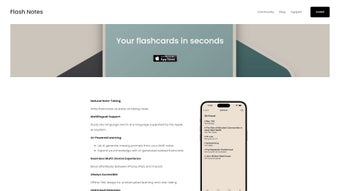
Flash Notes is an innovative, web‑based learning platform crafted for advanced learners who want to transform raw lecture notes, research papers, or personal study outlines into powerful, adaptive flashcards within seconds. Powered by a state‑of‑the‑art transformer language model, the application parses user‑generated content, automatically extracts key concepts, definitions, and relationships, and builds question‑answer pairs that align with proven spaced‑repetition principles. The adaptive engine continuously monitors recall accuracy and intelligently adjusts review intervals, ensuring that each learner spends more time reinforcing weak areas while efficiently breezing through mastered material. Multi‑device synchronization, built on Conflict‑free Replicated Data Types (CRDT), guarantees that every edit made on an iPhone, iPad, Mac, or Windows browser propagates instantly across all linked devices without conflict. All data resides in the user’s private iCloud Drive, encrypted end‑to‑end, so no third‑party server ever sees the study material. In short, Flash Notes blends cutting‑edge AI, privacy‑first cloud syncing, and evidence‑based learning science into a single, user‑centric tool that maximizes study efficiency, reduces manual card creation time, and safeguards personal information. Whether you are preparing for university exams, professional certifications, or simply pursuing lifelong learning, Flash Notes offers a streamlined, secure, and intelligent study workflow that adapts to your unique learning curve.Key Features That Differentiate Flash Notes
- AI‑Driven Flashcard Generation: Paste or upload raw notes in .docx, .pdf, or plain‑text formats, and the AI instantly identifies headings, bullet points, and important terminology to generate ready‑to‑study flashcards.
- Adaptive Spaced‑Repetition Engine: The algorithm records each answer’s correctness and latency, then dynamically recalculates optimal review intervals for each card, boosting long‑term retention.
- CRDT‑Based Real‑Time Sync: Edits made on any supported device are merged in real time, eliminating version conflicts and ensuring a single source of truth across iPhone, iPad, Mac, and Windows browsers.
- iCloud‑Backed End‑to‑End Encryption: All decks are stored in the user’s iCloud Drive, encrypted at rest and in transit, so only devices signed into the same Apple ID can decrypt the content.
- Rich Media Integration: Attach images, diagrams, screenshots, or voice recordings to individual cards, catering to visual, auditory, and kinesthetic learners.
- Multiple Study Modes: Choose from classic flashcard review, timed quizzes, mixed‑mode sessions that blend text, audio, and images, or a focused “Learn‑New‑Cards” mode for first‑time exposure.
- Export & Import Flexibility: Export decks as CSV, Anki (.apkg), or PDF for offline review; import existing decks to merge with AI‑generated cards, preserving previous work.
- Progress Analytics Dashboard: Visual charts display daily study time, retention percentages, upcoming review load, and historical performance trends.
- Offline Access: Once a deck is synced, it remains fully functional without an internet connection, perfect for travel or low‑bandwidth environments.
- Free Core Version with Optional Premium Add‑Ons: All essential features are available at no cost; premium subscriptions unlock advanced analytics, team collaboration, and custom branding.
Installation, Setup, and Compatibility Overview
Flash Notes is delivered as a Progressive Web Application (PWA), meaning the installation process is swift, platform‑agnostic, and does not require navigating traditional app stores. Follow the steps below to get started and ensure optimal performance across devices.
- Create or Sign In to an iCloud Account: If you do not already have an iCloud account, visit iCloud.com or open Settings on any Apple device, select “Sign in with Apple,” and follow the prompts. This account serves as the secure vault for all your flashcard decks.
- Open the Web App: Launch your preferred modern browser—Safari, Chrome, Edge, or Firefox—and navigate to https://flashnotes.app. The site automatically detects your operating system and displays an “Add to Home Screen” banner for iOS/macOS users.
- Add to Home Screen (Optional but Recommended): On iOS or iPadOS, tap the share icon and select “Add to Home Screen.” On Android, choose “Install” from the Chrome address bar. On desktop, drag the lock icon to your dock or use the browser’s “Install app” feature.
- Grant iCloud Permissions: The first launch prompts you to allow Flash Notes to access iCloud Drive. Approve this request; the app will create a dedicated “FlashNotes” folder for secure storage.
- Import Your Existing Notes: Click “New Deck,” then either paste text directly, drag‑and‑drop files (.docx, .pdf, .txt), or select a folder of notes. The AI begins parsing instantly, highlighting key terms and structuring cards.
- Review and Edit Generated Cards: A preview pane shows each card’s front (question) and back (answer). You can edit wording, merge duplicate cards, or delete irrelevant ones before confirming the deck.
- Start a Study Session: Choose a study mode, set a daily goal (e.g., 30 minutes or 50 cards), and let the adaptive algorithm guide you through the material. Answers are recorded, and the spaced‑repetition schedule updates in real time.
- Sync Across All Devices: Open Flash Notes on any other device logged into the same iCloud account. All decks, progress, and analytics sync instantly thanks to CRDT technology.
- Enable Offline Mode: In Settings, toggle “Offline Mode” to cache the current deck locally. This ensures uninterrupted review when traveling or in areas with limited connectivity.
- Consider Premium Features (Optional): If you need deeper analytics, team sharing, or custom study paths, navigate to the “Premium” tab and select a subscription plan. The core app remains free and fully functional.
Supported Platforms & System Requirements:
- iOS 14+ (iPhone, iPad) – Full feature set with native iCloud sync.
- macOS 11+ (Catalina, Big Sur, Monterey, Ventura) – Desktop‑optimized UI with keyboard shortcuts.
- Windows 10/11 – Access via any modern browser; iCloud sync requires the “iCloud for Windows” client.
- Android 9+ – Web view only; iCloud sync works through the iCloud web portal.
- Minimum hardware: 2 GB RAM, 200 MB free disk space, modern processor capable of ES2020 JavaScript.
Pros, Cons, Frequently Asked Questions, and Conclusion
Pros
- Instant AI conversion of notes saves hours of manual flashcard creation.
- Adaptive spaced‑repetition algorithm personalizes review intervals for maximum retention.
- End‑to‑end encryption via iCloud ensures data privacy and security.
- CRDT‑based real‑time sync eliminates conflicts across all devices.
- Free core version provides all essential learning tools without hidden fees.
- Rich media support accommodates visual, auditory, and kinesthetic learning styles.
- Offline mode guarantees uninterrupted study sessions.
- Multiple export formats simplify migration to other platforms.
- Intuitive, responsive UI works well for both tech‑savvy and novice users.
- Regular AI model updates improve concept extraction accuracy over time.
Cons
- Full native experience is limited to the Apple ecosystem; Windows users rely on the browser version.
- Premium analytics and team collaboration require a subscription.
- AI parsing may occasionally misinterpret highly specialized jargon without manual correction.
- Initial AI processing can be CPU‑intensive on older hardware.
- No built‑in calendar integration for automated study reminders.
Frequently Asked Questions
Is Flash Notes really free?
Yes. The core application—including AI flashcard generation, adaptive spaced‑repetition, and iCloud sync—is completely free. Premium add‑ons such as advanced analytics and team collaboration are optional and available via subscription.
How does the AI understand my notes?
Flash Notes uses a transformer‑based language model trained on large educational corpora. It detects headings, bullet points, definitions, and relationships, then creates question‑answer pairs that reflect the underlying concepts.
Can I use Flash Notes on Windows?
Absolutely. While the richest experience is on iOS/macOS, the web version runs on any modern Windows browser. To enable iCloud sync, install the “iCloud for Windows” client and sign in with the same Apple ID.
What happens to my data if I delete my iCloud account?
All flashcards are stored in your iCloud Drive. Deleting the iCloud account permanently removes the stored data. We recommend exporting your decks (CSV or PDF) before discontinuing the account.
How secure is my study material?
Flash Notes never stores data on third‑party servers. All information is encrypted at rest and in transit using iCloud’s end‑to‑end encryption. Only devices signed into your Apple ID can decrypt and display the content.
Conclusion – Boost Your Study Efficiency Today
Flash Notes bridges cutting‑edge AI technology with evidence‑based learning science, delivering a tool that transforms raw notes into a personalized, adaptive flashcard system. The instant card generation eliminates tedious manual work, while the adaptive spaced‑repetition engine ensures each study session is optimized for long‑term memory retention. Real‑time CRDT sync and iCloud‑backed encryption give you confidence that your data is both always available and securely protected. Whether you’re a university student, a professional preparing for certification, or a lifelong learner tackling complex subjects, Flash Notes offers a faster, smarter, and more secure way to study. Because the core features are free and privacy‑first, there’s no barrier to trying it out. Visit flashnotes.app, add the app to your devices, and experience a new level of study efficiency.
Flash Notes delivers on its promise of AI‑driven flashcard creation while maintaining a user‑friendly interface and top‑tier privacy. The adaptive spaced‑repetition engine feels genuinely personalized, and the seamless iCloud sync makes switching between iPhone and Mac a breeze. Minor drawbacks, such as limited Windows native features, are outweighed by the robust free core offering. Overall, a highly recommended tool for anyone serious about efficient, modern learning.



.png)




