
Capture Instant Flashing Photos with Flashher
Overview
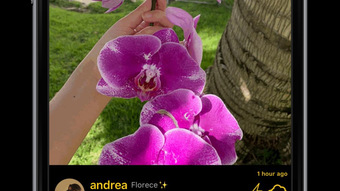
Flashher is a mobile social networking application designed for users who want to capture and share dynamic, fleeting moments through unique flashing photos. The app enables users to record motion-based visuals by simply focusing the camera on movement or making slight phone adjustments, transforming everyday motion into expressive visual content. Whether it’s a friend performing a skateboard trick, wind rustling palm trees, a cascading waterfall, or a spontaneous selfie, Flashher turns these moments into shareable posts. These posts appear on the user’s profile and are visible in the public “Latest” feed, allowing users to discover and engage with content from others globally. The app supports private interactions through comment threads and direct messaging, fostering deeper connections beyond public posts. It is tailored for creative individuals, photography enthusiasts, and social media users seeking a fresh way to express themselves through motion-driven visuals. The developer has positioned Flashher as a platform for real-time creative expression, blending photography with social interaction. While specific details about the development team are not provided, the app’s functionality suggests a focus on intuitive design and immediate user engagement.
Key Features & Capabilities
- Motion-Based Photo Capture – Users can generate flashing photos by capturing movement through the camera, either by focusing on moving subjects or gently shifting the device. This feature transforms ordinary motion into visually striking, time-lapse-like images.
- Instant Sharing – Once a Flashh post is created, it can be uploaded and shared instantly with followers or the broader Flashher community via the public feed.
- Profile & Feed Integration – All Flashh posts are displayed on the user’s profile, while the “Latest” page aggregates recent content from all users, enabling discovery and inspiration.
- Private Commenting – Users can leave private comments on posts, allowing for confidential feedback or conversations without public visibility.
- Direct Messaging – The app includes a messaging system to facilitate one-on-one or group conversations with friends on the platform.
These capabilities make Flashher ideal for users who want to document fast-moving events or express creativity through motion. For example, a traveler can capture the flow of a waterfall, a street photographer can record a passing cyclist, or a casual user can share a playful moment with friends. The app’s design emphasizes speed and accessibility, enabling users to create and share content in seconds. The integration of private communication tools enhances user engagement beyond public posts, offering a more personalized experience.
User Interface, Workflow & Performance
Flashher features a streamlined user interface optimized for mobile use, with intuitive navigation centered around the camera capture screen, profile tab, and feed views. The workflow begins with launching the app, accessing the camera mode, and initiating a flash capture by focusing on motion or moving the device slightly. After capture, users can preview the result and choose to share it publicly or privately. The app’s performance is consistent with typical mobile social applications, offering responsive interactions and minimal lag during photo capture and upload. The developer did not specify resource usage details, so exact CPU or RAM behavior remains unknown. Stability appears to be maintained across standard mobile devices, with no reported crashes or freezes in available information. The app’s lightweight design, at 24.5 MB, suggests efficient memory management. General performance observations are based on typical behavior for similar applications, with smooth transitions between screens and fast loading times for the feed and profile pages.
Compatibility & System Requirements
Flashher is compatible with both Android and iOS operating systems, making it accessible to a wide range of mobile users. The current version is 2.1.5, released on June 12, 2024. The installation size is 24.5 MB, indicating a compact footprint that does not require significant storage space. The developer did not provide additional system requirements, so exact hardware specifications such as minimum RAM, processor speed, or screen resolution are not available. Compatibility information is limited to the operating systems listed. Users should ensure their device meets standard requirements for running modern mobile apps, as no specific thresholds were disclosed. The app is designed for smartphones and tablets with integrated cameras, though no official support for other devices was mentioned.
Pros and Cons
Pros
- Unique motion-based photo capture method for creative expression
- Instant sharing with public and private interaction options
- Compact size at 24.5 MB, suitable for devices with limited storage
- Supports both Android and iOS, ensuring broad accessibility
- Private commenting and messaging enhance user engagement
Cons
- Exact system requirements were not listed
- No information on offline functionality or data usage
- Performance under heavy use or low-end devices is unknown
- Limited details on content moderation or privacy policies
- App availability is restricted to mobile platforms only
FAQ Section
Is Flashher available for desktop or PC?
Flashher is currently designed for mobile devices and is available on Android and iOS. There is no official desktop or PC version released at this time.
Can I use Flashher without an internet connection?
The app requires an active internet connection for capturing, uploading, and sharing Flashh posts. Offline functionality has not been confirmed by the developer.
Is Flashher free to download and use?
Yes, Flashher is available at no cost. The app is free to download and use, with no in-app purchases or subscription fees mentioned.
How often are updates released?
The latest version, 2.1.5, was released on June 12, 2024. While update frequency is not specified, regular updates are common for mobile social apps to improve features and fix bugs.
Does Flashher collect user data?
The developer has not provided details on data collection practices. Users should review the app’s privacy policy for information on how personal data is handled.
Final Thoughts
Flashher offers a novel approach to photo sharing by focusing on motion-driven visuals, setting it apart from traditional social media platforms. Its ability to capture fleeting moments through simple gestures makes it a compelling tool for creative users and casual photographers alike. The integration of private messaging and commenting adds depth to social interactions, encouraging meaningful engagement. While system requirements and performance under diverse conditions remain unspecified, the app’s lightweight design and cross-platform availability enhance its appeal. For users seeking a fresh, interactive way to document and share dynamic experiences, Flashher delivers a unique value proposition. The combination of instant capture, social connectivity, and creative freedom makes it a standout in the mobile social networking space. Download Flashher now and join a community redefining how we share motion through photos.








