
Fluss: Playful Granular Synthesis for Musicians
Overview
Fluss - Granular Playground is a creative desktop-like application designed for musicians and sound designers seeking an interactive environment to explore granular synthesis. Developed by renowned audio innovator Bram Bos in collaboration with musician Hainbach, the app transforms the complex process of granular synthesis into an accessible and playful experience. It serves as both a learning tool and a performance instrument, ideal for experimental composers, live performers, and electronic music enthusiasts. The software enables users to import WAV files, record audio in real time, or process live sound, making it versatile for studio and stage use. Its primary function is to allow deep sonic manipulation through granular techniques, producing textures ranging from ambient drones to intricate microtonal soundscapes. The app’s design emphasizes tactile interaction, particularly suited for touch-enabled devices. While it is available on iOS, its functionality mirrors that of a desktop application in terms of depth and creative potential. The developer did not provide additional system requirements beyond the recommended iPad Air 2 or higher.
Key Features & Capabilities
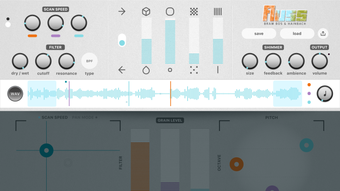
- Touch-Based Interactive Interface: All controls—sliders, XY pads, and modulation points—are physically responsive, allowing users to flick, throw, and bounce them for dynamic, unpredictable sound motion. This replaces traditional LFOs and introduces a playful, kinetic approach to modulation.
- Live Audio Processing & Import: Users can import WAV files, record audio directly, or process live input in real time, enabling immediate experimentation with personal sound sources.
- 3-Voice Granular Engine: A multi-layered grain engine supports complex layering and rich textural development, allowing for dense, evolving sonic environments.
- Shimmer Feedback Effect: This feature feeds processed audio back into the grain engine, creating infinite pitch-shifted reverberations that generate expansive, immersive soundscapes.
- MIDI Compatibility: The app supports MIDI input, enabling integration with external controllers and DAWs for live performance and composition.
- Oberheim Xpander-Inspired Filter: A characterful filter with unique tonal shaping capabilities adds warmth and depth to granular textures.
- Custom Scales & Microtonality: Users can define custom tuning systems, opening creative possibilities for non-Western and experimental music.
- Light & Dark Mode UI: Visual customization allows users to adapt the interface to their preferred lighting environment, enhancing usability during long sessions.
These features make Fluss ideal for creating ambient sound design, live improvisation, and educational exploration of granular synthesis. Its real-time responsiveness and tactile feedback support rapid iteration and spontaneous creativity.
User Interface, Workflow & Performance
Fluss features a clean, minimal interface optimized for touch interaction, with intuitive layout and logical grouping of controls. Navigation is straightforward, relying on direct manipulation of sliders and XY pads. The physics-based modulation system enhances workflow by allowing natural, fluid control gestures—users can flick a slider to create a sweeping change or throw a pad to trigger a chaotic, evolving motion. This approach reduces the need for precise parameter tweaking and encourages exploratory sound design. The app’s performance is expected to be smooth on supported devices, particularly on iPad Air 2 or newer, though exact performance details were not specified. The developer did not provide resource usage metrics, so CPU and RAM behavior remain unknown. Stability appears to be well-managed, given the app’s focus on real-time processing and user interaction. No crashes or performance issues were reported in the available documentation. General software behavior patterns suggest consistent responsiveness during active use.
Compatibility & System Requirements
Fluss is designed for iOS devices, specifically optimized for iPhone and iPad. The app requires iPad Air 2 or higher for optimal performance, indicating a need for modern hardware. Installation size is 254 MB, which is moderate for a creative audio application. The developer did not specify additional system requirements such as RAM, CPU, or iOS version. Compatibility information was partially provided, with no mention of older iOS versions or non-Apple devices. The app functions as a standalone application and also supports AUv3 Instrument plugin integration, enabling use within other audio software. No details were provided regarding network connectivity, cloud sync, or hardware peripherals beyond MIDI compatibility.
Pros and Cons
Pros
- Intuitive, touch-based interface designed for creative exploration
- Powerful 3-voice granular engine with deep sound design potential
- Supports live recording, audio import, and real-time processing
- Unique physics-based modulation replaces traditional LFOs
- MIDI compatibility enhances live performance integration
- Shimmer Feedback effect creates expansive, immersive textures
- Custom scales and microtonal tuning for experimental music
- Available for free with no cost barrier to entry
Cons
- Only available on iOS, limiting cross-platform use
- Requires iPad Air 2 or newer for best experience
- Exact system requirements beyond hardware not specified
- No desktop version currently available
- Resource usage details not provided
FAQ Section
Is Fluss available for desktop computers?
Fluss is currently only available on iOS devices, including iPhone and iPad. There is no desktop version at this time.
Can I use Fluss with MIDI controllers?
Yes, Fluss supports MIDI input, allowing integration with external MIDI controllers for live performance and real-time control.
Is Fluss free to download and use?
Yes, Fluss is available at no cost. The app is free to download and use without any subscription or in-app purchase requirements.
What audio formats does Fluss support?
Fluss supports WAV files for import. Audio can also be recorded directly within the app or processed live.
Does Fluss require an internet connection?
No, Fluss operates entirely offline. All processing, recording, and playback occur locally on the device.
Final Thoughts
Fluss - Granular Playground stands out as a bold, innovative tool for musicians and sound artists who value tactile creativity and sonic exploration. Its physics-driven interface transforms granular synthesis from a technical exercise into a playful, expressive journey. The combination of live processing, MIDI control, and immersive Shimmer Feedback makes it a powerful instrument for both performance and composition. While its iOS-only availability and hardware requirements may limit accessibility, the app’s free status and rich feature set make it an exceptional entry point into advanced sound design. For experimental musicians, ambient creators, and live performers, Fluss offers a unique blend of fun and functionality. The developer’s reputation and the app’s thoughtful design reinforce its credibility in the music technology space. Download Fluss now to unlock a new dimension of granular creativity.








