
Organize and embellish your folders
Developed by Sordum, a software company that produces tons of web solutions, like Mouse Settings Changer, comes up with a personalization tool for desktop devices. Folder Painter enables you to quickly change the icons and colors of the folders on your computer. It is a unique and exciting way to organize your folders in Windows Explorer. From the default yellow folder color, you change it to various colors. With this, you can easily identify your folders. This app is already available for Windows 11 too.
Top Recommended Alternative
Change the color of your folder
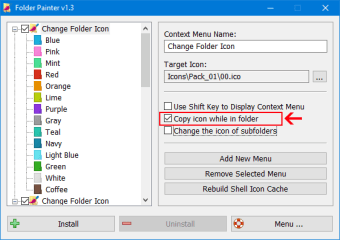
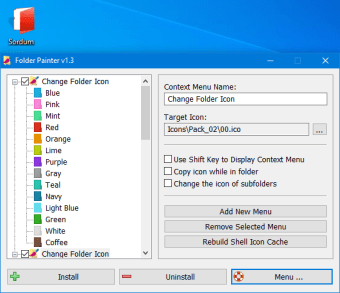
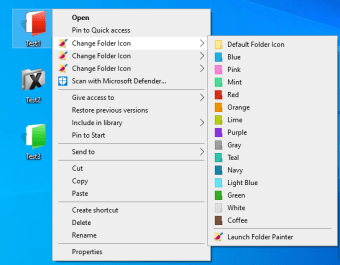
With this tool, you can instantly change the color of a specific folder. It doesn't have an interface but, you can access it in the context menu by right-clicking a folder. You will see a simple and straightforward prompt that's divided into two panes. The left pane displays the folder icon that you can select, and under it are the color and design previews, while the right pane is where you can customize some icon settings.
By default, there are three icon packages available. However, you can download up to 21 packs in total. You can also enable multiple context menus by selecting and installing all three of them in the Explorer's shell. This is because Windows can only support 16 items per menu. Each menu encompasses one icon pack. You can customize its title in the Context Menu Name field and name each other differently for easy identification.
After the icon setting and installation, you can change the color of any of your folders. To do it, right-click the folder you've chosen and then hover your mouse to your preferred menu. From there, you will select the pigment and design you want that specific folder to have. To revert to the original icon, you will do the same steps. However, this time, you will pick the Use default folder icon in the context menu.
Handy and easy-to-use
As Windows OS doesn't offer an option to customize your folders, Folder Painter is a great catch. It does not only give style to your display screen, but it also aids you in identifying the folder you were looking for with ease. Furthermore, all the colors and designs can are tailored to your liking.











.png)