Ekran görüntüleri
Uygulama ayrıntıları
- Sürüm
- 1.1.2
- Boyut
- 353.84 KB
- Güncellendi
- September 25, 2024
- Geliştirici
- www.stefanvd.net
- Kategori
- Extension
Font Size Decrease Extension for Chrome hakkında
Yüksek DPI Ekranlar için Tek Tıkla Metin Yakınlaştırma
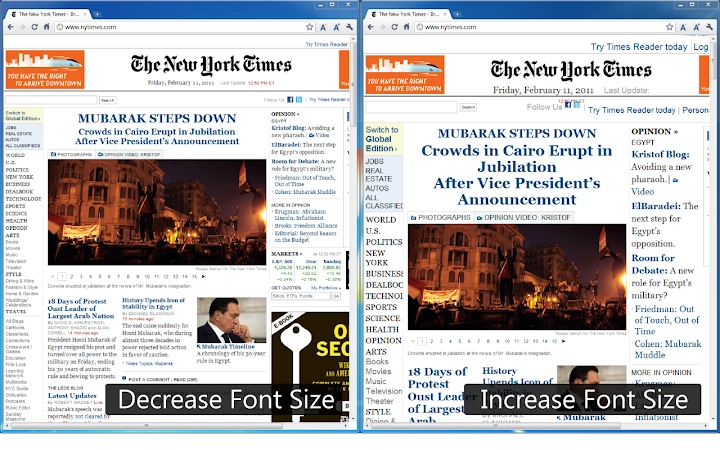
The Accessibility: Zoom Text Only extension is designed to simplify web readability, particularly on high DPI displays. It enables users to reduce the font size of any webpage with a single click, addressing common challenges associated with overly large text that can disrupt reading flow and layout. This tool is especially useful for professionals and individuals working with high-resolution monitors where default browser text scaling may not provide optimal clarity or comfort.
Target users include those who experience visual strain from large on-screen text, remote workers using high-DPI laptops or desktops, and individuals seeking improved web accessibility without altering the entire page layout. The extension operates directly within the Chrome browser, making it a lightweight solution for immediate text adjustments. It does not modify page structure or images, preserving design integrity while focusing solely on text size.
Real-world scenarios include reading dense technical documentation, navigating content-heavy websites, or using web-based tools where default font scaling is too aggressive. The tool supports seamless integration into daily workflows, offering a quick fix for visual discomfort without requiring complex configuration.
Ana Özellikler ve Yetkinlikler
- Tek tıklama ile yazı tipi küçültme – Instantly decrease text size on any webpage with a single button press, eliminating the need for manual browser settings.
- Hedef odaklı metin yakınlaştırma – Adjusts only the text content, leaving images, layouts, and other elements unchanged, ensuring visual consistency.
- Yüksek DPI optimizasyonu – Specifically designed for high-resolution screens, helping maintain readability and usability across modern displays.
- Chrome tarayıcı entegrasyonu – Runs directly within Chrome, requiring no additional setup or downloads beyond the extension installation.
- Minimum sistem etkisi – With a file size of just 128 KB, the extension is lightweight and does not significantly affect browser performance.
Users can apply the feature while reading online articles, reviewing web-based reports, or working with content-heavy platforms. The ability to revert changes instantly ensures flexibility during browsing sessions. This functionality is particularly beneficial for users who frequently switch between different web applications and require consistent text sizing across environments.
Kullanıcı Arayüzü, İş Akışı ve Performans
The interface is minimal and unobtrusive, featuring a single button that integrates into the browser toolbar. Clicking this button triggers the font size reduction without requiring additional menus or configuration steps. Navigation is intuitive, with no learning curve for first-time users.
Workflow efficiency is high, as the tool eliminates the need to adjust browser-wide zoom levels or modify site-specific settings. The extension operates in real time, applying changes instantly upon activation. No reloads or refreshes are required, allowing for smooth, uninterrupted browsing.
The developer did not specify resource usage details. Performance observations are based on general software behavior patterns. The extension is designed to be lightweight, and with a size of 128 KB, it is expected to have minimal impact on CPU and RAM usage. Stability appears to be maintained through consistent functionality across sessions, though no formal testing data was provided.
Uyumluluk ve Sistem Gereksinimleri
The extension is compatible with Windows and Mac operating systems, supporting Chrome browsers on both platforms. It is available as a desktop application within the Chrome environment, making it accessible to users across different hardware setups.
Installation size is 128 KB, indicating a small footprint. The developer did not specify exact system requirements. Compatibility information was partially provided, with no mention of older Chrome versions or alternative browsers. No additional hardware dependencies were indicated.
Artılar ve Eksiler
Artılar
- Anında okunabilirlik iyileştirmeleri için tek tıklama ile yazı tipi küçültme
- Metin boyutunu ayarlarken düzen ve görsel bütünlüğünü korur
- Yüksek DPI ekranlar ve modern görüntüler için optimize edilmiştir
- Minimum dosya boyutu ve sistem etkisiyle hafiftir
- Kurulum gerektirmeyen basit ve sezgisel arayüz
Eksiler
- Sadece Chrome tarayıcıları için mevcut, çapraz tarayıcı kullanımını sınırlıyor
- Küçültme seviyesini özelleştirme veya tercihleri kaydetme seçeneği yok
- Chrome dışındaki diğer tarayıcıları desteklemez
- İşlevsellik yalnızca metin ölçeklendirmesiyle sınırlıdır
- Kesin performans ölçümleri sağlanmamıştır
SSS Bölümü
Accessibility: Zoom Text Only Mac ve Windows ile uyumlu mu?
Evet, uzantı Chrome tarayıcısı içinde kullanıldığında hem Windows hem de Mac işletim sistemleriyle uyumludur.
Bu aracı çevrim dışı kullanabilir miyim?
Evet, kurulduktan sonra uzantı internet bağlantısı olmadan çalışır, çünkü tarayıcı içinde yerel olarak çalışır.
Yazılım ücretsiz mi?
Evet, uzantı ücretsiz olarak sunulmaktadır. Abonelik ücreti veya gizli masraf yoktur.
Uzantıyı nasıl güncellerim?
Güncellemeler Chrome Web Mağazası tarafından otomatik olarak yönetilir. Yeni bir sürüm yayınlandığında uzantı güncellenir.
Uzantı özel izinler gerektiriyor mu?
Uzantı, web sayfalarına erişmek ve içeriği değiştirmek için temel izinler ister. Bu, sayfa görüntüsünü değiştiren tarayıcı uzantıları için standarttır.
Son Düşünceler + CTA
Accessibility: Zoom Text Only, yüksek DPI ekranlarda aşırı büyük metinle mücadele eden kullanıcılar için odaklanmış ve verimli bir çözüm sunar. Tek tıklama işlevi, hafif tasarımı ve Chrome entegrasyonu, hem profesyoneller hem de günlük kullanıcılar için değerli bir araç haline getirir. Özellik seti kasıtlı olarak dar olsa da, bu özgüllük kullanılabilirliği ve güvenilirliği artırır.
Web okunabilirliğini düzenleri bozmadan basit ve güvenli bir şekilde artırmak isteyen herkes için bu uzantı pratik bir seçimdir. Kendi nişinde üstün performans gösterir ve sıfır kurulumla anında değer sunar.
Accessibility: Zoom Text Only'ı şimdi indirin
Kılavuzlar ve eğitimler
Font Size Decrease Extension for Chrome nasıl yüklenir
- Yukarıdaki İndir düğmesine tıklayın.
- Yönlendirildikten sonra şartları kabul edin ve Yükle’ye tıklayın.
- Font Size Decrease Extension for Chrome indirmesinin cihazınızda tamamlanmasını bekleyin.
Font Size Decrease Extension for Chrome nasıl kullanılır
Bu yazılım temel olarak yukarıda açıklanan ana özellikleri için kullanılır. Yüklemeden sonra uygulamayı açarak yeteneklerini keşfedin.
Kullanıcı yorumları
Henüz inceleme yok. Deneyiminizi ilk paylaşan siz olun.
Bunları da beğenebilirsiniz
daha fazla
BannedList Highlighter Extension for Chrome
A Chrome extension that automatically highlights entries from John Rentoul's boo...

Bring It Back Extension for Chrome
It is an extension developed to revive the "Discuss" button which disappeared fr...

Clicky for Slack Extension for Chrome
#Clicky for Slack is the fastest and easiest way to share your current tab to an...

wrap Extension for Chrome
Reverting Tumblr’s awful design choices, one at a time. Up to date, despite old...

heriff_v2 Extension for Chrome
Before you install:1. $heriff is not intended for user under the age of 13.2. Fr...

Cards View' Filter for Trello Extension for Chrome
Adds buttons for filtering cards by list in Trello's Cards view.Changelog:1.0 (2...
