
Download Fun Morph – Image Transformation, Photo Morphing, Creative Tool
Overview
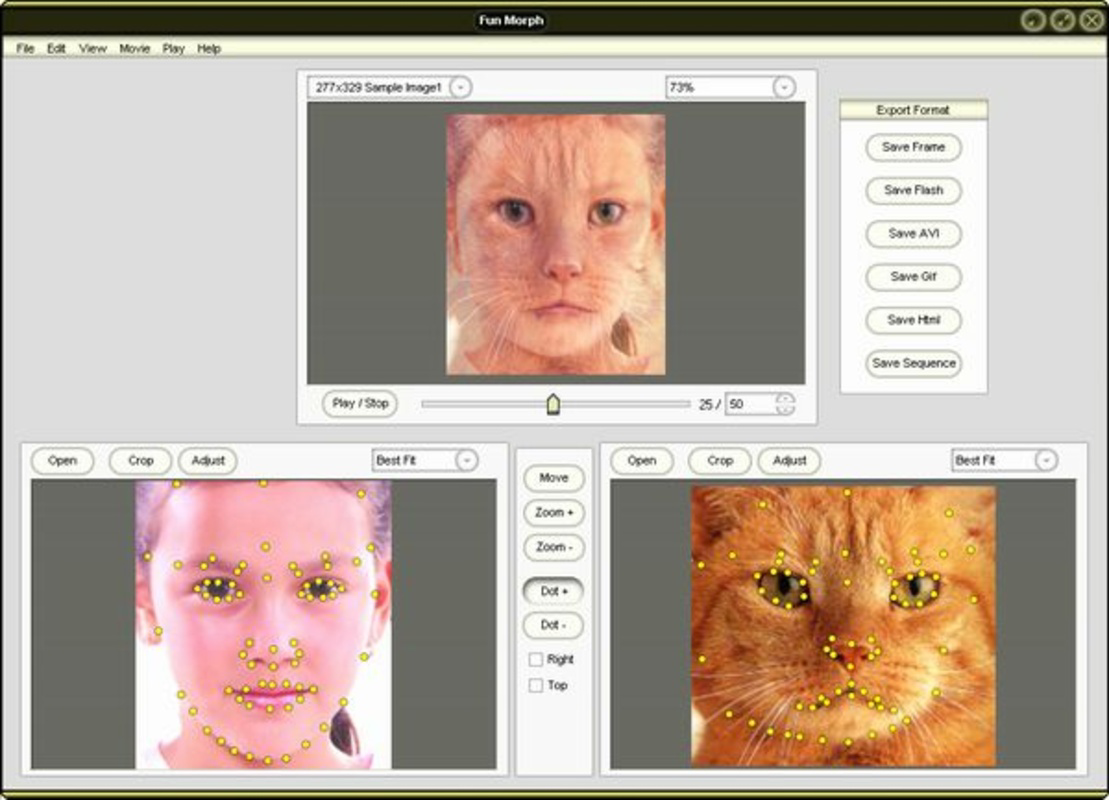
Fun Morph is a mobile application designed to transform two static photographs into a dynamic morphing sequence, capturing the visual evolution from one image to another. This tool is ideal for users interested in digital art, visual storytelling, or playful image manipulation. By selecting two images and marking corresponding key points—such as facial features or structural elements—the app generates a smooth transition that illustrates transformation over time or imaginative change. Its primary purpose is to simplify the complex process of morphing, making it accessible to casual users and hobbyists without requiring advanced technical knowledge.
The application targets individuals who enjoy creative expression through photography, educators demonstrating visual change, or social media users seeking unique content. While the developer's background is not specified, the app's long-standing presence since its release in 2007 suggests a stable, well-tested foundation. Fun Morph fits into the mobile productivity and creative utility ecosystem by offering a compact, focused tool for image transformation. It serves as a lightweight yet powerful solution for users who want to experiment with visual effects without the complexity of full video editing software.
Key Features & Functionality
- Intuitive Interface: The app features a user-friendly layout that enables quick navigation and immediate access to core tools. Users can load images, mark keypoints, and initiate morphing with minimal steps, reducing the learning curve for beginners.
- Keypoint Marking System: Users can precisely identify corresponding points on both images—such as the corners of eyes, the tip of the nose, or mouth outlines. This functionality ensures that the morphing process maintains structural integrity and visual coherence.
- Multi-Format Support: Fun Morph accepts various input and output file formats, allowing users to work with images from different sources and export results in formats compatible with social media, websites, or presentations.
- Image Resizing Options: The app includes tools to adjust image dimensions, ensuring both photos align properly before morphing, which improves the final output quality and visual consistency.
- Multiple Export Formats: Final creations can be saved as AVI, GIF, or SWF files, providing flexibility for sharing across platforms or embedding in digital content.
For example, a user might transform a childhood photo into a current portrait, creating a nostalgic animation. Another might morph a cat into a dog, producing a whimsical video for entertainment. These real-world applications highlight the app’s versatility and creative potential.
Interface, UX & Performance
The interface of Fun Morph is designed with simplicity and functionality in mind. Users are presented with a clean layout that prioritizes image loading, keypoint placement, and export options. Navigation is linear and predictable, guiding users through each stage of the morphing process without unnecessary distractions. The visual style emphasizes usability over ornamentation, ensuring that tools are clearly labeled and accessible.
Although the developer did not list formal performance metrics, the app appears optimized for smooth operation across a range of device categories. It maintains responsiveness during image processing, with minimal lag during keypoint adjustments and transitions. Stability is expected given the app’s long history, though specific compatibility details were not disclosed. The app likely performs efficiently on devices with standard processing capabilities, though users should expect variations based on hardware.
Platform Compatibility & Technical Requirements
Fun Morph is available on Android, supporting the latest version of the operating system. The application size is 15.2 MB, making it a lightweight download suitable for devices with limited storage. The developer did not specify minimum OS requirements or hardware specifications, so users should ensure their device meets general Android standards for app installation and operation. Compatibility with iOS was not confirmed, and no information was provided regarding APK availability or third-party distribution.
Pros and Cons
Pros
- Simple, intuitive interface suitable for beginners and experienced users
- Supports multiple image formats for both input and output
- Allows precise keypoint marking for realistic morphing effects
- Offers flexible export options including GIF, AVI, and SWF
- Lightweight size (15.2 MB) ideal for mobile devices
Cons
- Developer did not provide detailed system requirements or compatibility information
- No official information on iOS availability or cross-platform support
- Specific performance benchmarks or optimization details were not disclosed
- Outdated release date (2007) raises questions about current maintenance and updates
- Limited documentation or user guides provided within the app
FAQ
Is Fun Morph available for iOS?
The developer did not confirm iOS compatibility. The app is currently known to be available on Android.
Can I use Fun Morph without an internet connection?
Yes, the app functions offline. All processing and editing occur locally on the device.
What file formats does Fun Morph support?
The app supports common image formats for input and allows export in AVI, GIF, and SWF formats.
How do I update Fun Morph?
Updates are typically available through the official Android app store. Users should check for updates in their app manager.
Is Fun Morph secure to download and install?
As a long-standing app with a consistent release history, Fun Morph is considered safe when downloaded from official sources.
Final Thoughts
Fun Morph stands out as a specialized yet powerful tool for users who value creative image transformation on mobile devices. Its straightforward interface and focus on morphing effects make it an excellent choice for hobbyists, educators, and content creators seeking to produce engaging visual content. While the app’s age may raise concerns about ongoing support, its core functionality remains relevant and effective. With multi-format export and intuitive keypoint marking, it delivers strong value for its lightweight footprint. For anyone looking to experiment with digital art or create memorable visual stories, Fun Morph offers a reliable and accessible solution.
Download Fun Morph now


