
Download GBoost – Gaming Performance Optimization, System Resource Management, One-Click Boost
Overview
GBoost is a performance-focused application designed to enhance gaming experiences by streamlining system resources through automated optimization. The app targets users who seek improved frame rates, reduced lag, and smoother gameplay by managing background processes that consume CPU, RAM, and disk resources. It is particularly useful for gamers using Windows-based systems who want to maximize their machine’s capabilities during gameplay without manual configuration. The app simplifies the process of system tuning, making it accessible even to users with limited technical expertise.
By focusing on real-time resource allocation, GBoost addresses common performance bottlenecks such as high memory usage, background app interference, and inefficient process management. It enables users to dedicate more system power to active games, potentially improving responsiveness and visual stability. This makes it a relevant tool in the broader ecosystem of PC gaming utilities, especially for those running games that demand high performance.
Although the developer did not provide additional technical details about their background or company, the app has been available since January 24, 2011, indicating a long-standing presence in the performance optimization space. Its continued relevance suggests consistent functionality and user value over time. The application is positioned as a utility tool for both casual and competitive gamers who prioritize smooth, uninterrupted gameplay.
Key Features & Functionality
- One-Click Optimization: A single click on the red button triggers a system-wide process cleanup, closing non-essential applications to free up memory and CPU resources. This feature is ideal for users seeking immediate performance gains without navigating complex settings.
- Automatic Process Management: The app identifies and terminates background processes that are not required during gameplay, ensuring that system resources are prioritized for the active game.
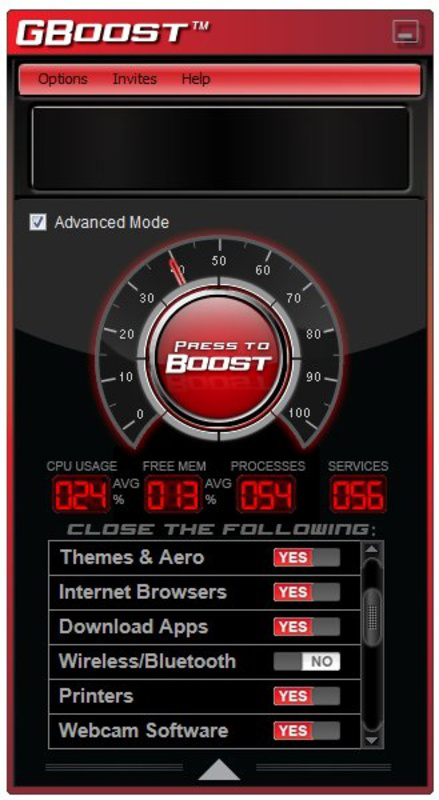
- Advanced Mode for Custom Control: Power users can access a more detailed interface to manually select which processes to close or retain, allowing for tailored optimization based on individual workflows and software preferences.
- User-Friendly Interface: The design emphasizes simplicity and clarity, with a minimalistic layout that avoids overwhelming users with technical jargon or cluttered menus.
- Enhanced Gameplay Experience: By reducing system load, GBoost helps users achieve higher frame rates and lower input latency, contributing to a more immersive and responsive gaming session.
For example, a user playing a graphically intensive title like Cyberpunk 2077 could activate GBoost before launching the game to close unnecessary startup programs, browser tabs, and system services. This action may help maintain consistent frame rates and reduce stuttering during gameplay. Similarly, a competitive esports player might use the advanced mode to keep specific communication tools running while shutting down all other non-essential processes.
Interface, UX & Performance
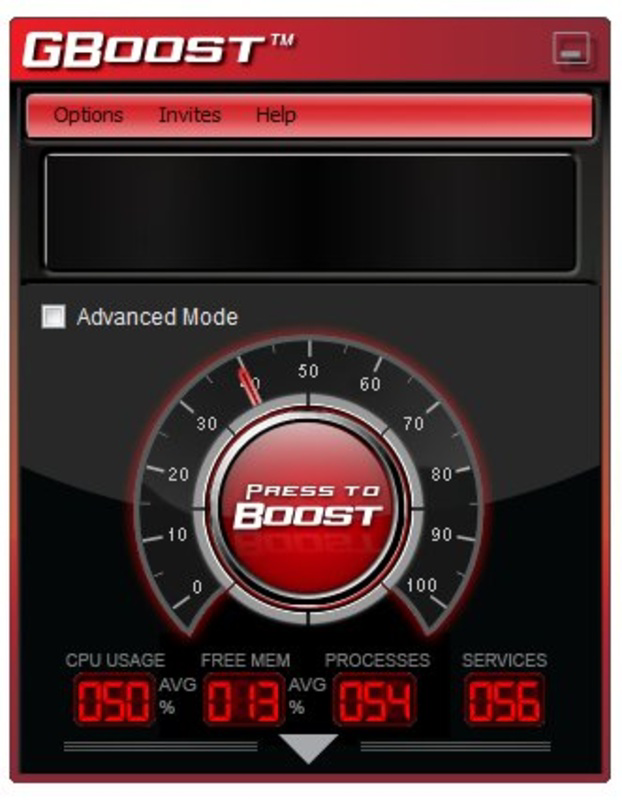
GBoost features a clean, minimalistic interface focused on core functionality. The layout centers around a prominent red button for one-click optimization, with secondary controls accessible through a simple menu. Navigation is intuitive, allowing users to quickly access the main functions without requiring prior experience with system optimization tools.
The user experience is streamlined to minimize friction—users can initiate a boost with a single tap or click, and the app provides immediate feedback on the process status. Visual indicators may show resource improvements, though specific metrics were not disclosed in the provided information.
Although the developer did not list formal performance metrics or benchmark data, the app is designed to operate efficiently in real-time. It is expected to run smoothly on standard Windows systems, though specific device compatibility details were not provided. Responsiveness and stability appear to be prioritized, given the app’s long-standing presence and focus on seamless user interaction.
Platform Compatibility & Technical Requirements
GBoost is available for Windows-based systems. The app’s platform is specified as Windows, though the exact operating system version was not listed. The file size of the application is provided, but specific technical requirements such as minimum RAM, processor speed, or disk space were not disclosed.
The developer did not specify minimum OS requirements, nor did they provide information about hardware compatibility beyond general system support. Users should ensure their system meets standard Windows requirements for running third-party applications. The app’s version and release date are available, with the latest version released on January 24, 2011.
Pros and Cons
Pros
- Simple one-click optimization ideal for non-technical users.
- Automated process management reduces system load during gaming.
- Advanced mode offers customization for experienced users.
- Minimalistic interface enhances usability and reduces learning curve.
- Designed specifically to improve gaming performance and responsiveness.
Cons
- Specific performance benchmarks or measurable results were not provided.
- Compatibility with modern Windows versions was not explicitly confirmed.
- Developer did not disclose detailed system requirements or technical specs.
- No information on update frequency or long-term maintenance.
- Limited visual feedback on resource changes post-optimization.
FAQ
Is GBoost safe to use?
Yes, GBoost is designed to close non-essential background processes only. It does not modify system files or registry entries, reducing the risk of system instability. However, users should exercise caution when using advanced settings to avoid closing critical system services.
Can I use GBoost on older versions of Windows?
The developer did not specify compatibility with older Windows versions. While the app has been available since 2011, it may not be fully optimized for modern systems without verification.
Does GBoost require an internet connection?
Based on available information, GBoost does not appear to require an internet connection to function. It operates locally on the device, managing system processes without external dependencies.
How often should I use GBoost during gaming sessions?
Users can run GBoost before launching a game or during breaks to maintain optimal performance. There is no restriction on frequency, but it is recommended to avoid overuse during active gameplay to prevent unintended process closures.
Is GBoost free to download and use?
The app’s pricing information was not provided. Users should refer to official sources for current pricing and licensing details.
Final Thoughts + CTA
GBoost stands out as a focused, no-frills tool for gamers seeking to enhance their PC’s performance with minimal effort. Its one-click optimization and customizable advanced mode cater to both beginners and experienced users, offering a balance between simplicity and control. While detailed technical specifications and modern compatibility details are not available, the app’s enduring presence suggests reliability and consistent functionality.
For anyone looking to squeeze more performance out of their gaming rig without diving into complex system tweaks, GBoost provides a practical solution. It is especially valuable for users who play resource-heavy games and want a straightforward way to reduce lag and improve frame rates.
Download GBoost now


