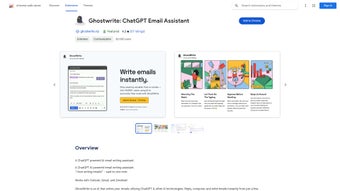

Download Ghostwrite – AI Email Writing Assistant for Chrome
Overview
Ghostwrite is a cutting‑edge, AI‑driven email writing assistant built as a Chrome extension. Powered by OpenAI’s ChatGPT, it turns short prompts, bullet points, or even a single keyword into polished, professional emails in seconds. The core promise of Ghostwrite is to eliminate the mental friction of drafting messages, letting users focus on the strategic part of communication instead of wrestling with grammar, tone, or structure. Whether you are a sales professional chasing leads, a customer‑support agent handling tickets, or a busy executive juggling dozens of threads, Ghostwrite streamlines the entire workflow. It not only generates complete drafts but also offers real‑time grammar and spelling checks, ensuring every outbound message meets a high standard of correctness. One of the most compelling features is the ability to save AI‑generated templates, which can be reused across campaigns or recurring conversations, guaranteeing consistency and saving valuable time. Additionally, Ghostwrite’s “single‑click reply” function can transform a concise idea into a full‑length response, cutting down the average email handling time by up to 70 %. The extension is lightweight, updates automatically through the Chrome Web Store, and respects user privacy by processing data locally whenever possible. In short, Ghostwrite delivers a comprehensive suite of AI tools that boost productivity, reduce writer’s block, and make email management a frictionless experience.
Key Features
- AI‑Generated Drafts from Minimal Input: Write a phrase like “follow up on proposal” and let Ghostwrite create a complete, context‑aware email.
- Tone Customization: Choose from formal, friendly, or conversational tones to match your brand voice.
- Grammar & Spelling Corrections: Real‑time suggestions keep your messages error‑free without extra effort.
- Template Library: Save, organize, and reuse AI‑crafted email templates for newsletters, outreach, or internal updates.
- One‑Click Full‑Length Replies: Turn a bullet list of points into a polished response with a single click.
- Seamless Chrome Integration: Access Ghostwrite directly from the Gmail compose window or any web‑based email client.
- Secure Data Handling: The extension processes prompts locally when possible and adheres to strict privacy standards.
- Automatic Updates: New features and improvements are delivered automatically via the Chrome Web Store.
- Multi‑Language Support: Draft emails in English, Spanish, French, and several other major languages.
- Performance Dashboard: Track time saved, email volume, and template usage to measure productivity gains.
Installation, Usage & Compatibility
Getting started with Ghostwrite is designed to be as frictionless as the tool itself. First, open the Chrome Web Store and search for “Ghostwrite – AI Email Assistant.” Click “Add to Chrome,” confirm the permissions, and the extension icon will appear next to the address bar. The installation process typically takes less than a minute, and the extension is ready to use immediately—no additional software or account creation is required, though linking a free OpenAI API key can unlock higher‑capacity models for power users.
Once installed, open Gmail (or any web‑based email client). You’ll notice a new Ghostwrite button inside the compose window. Clicking it opens a small sidebar where you can type a short prompt, select the desired tone, and optionally attach bullet points. Ghostwrite then generates a draft in the main editor area, which you can edit further or send as‑is. For template creation, compose an email using the AI, then click “Save as Template.” The template appears in the Ghostwrite library, ready to be inserted into future messages with a single click.
Ghostwrite is optimized for the latest versions of Google Chrome on Windows 10/11, macOS 12+, and Linux distributions that support Chrome. Because it runs entirely within the browser, there are no separate system requirements beyond a stable internet connection for the AI model queries. The extension respects Chrome’s sandboxing, meaning it cannot access files on your computer unless you explicitly grant permission, reinforcing security for sensitive business communications.
Supported Operating Systems: Windows, macOS, Linux (via Chrome). The extension is not available for mobile browsers, but a companion web app is planned for future releases.
Pros, Cons, FAQ & Conclusion
Pros
- Drastically reduces time spent drafting emails.
- AI-generated content maintains a professional tone.
- Built‑in grammar and spelling correction.
- Reusable template library improves brand consistency.
- Free core version with optional paid upgrade for higher‑capacity AI.
Cons
- Requires an internet connection for AI processing.
- Advanced features (e.g., larger language models) need an API key or subscription.
- Currently limited to Chrome; no native support for Firefox or Edge.
Frequently Asked Questions
Is Ghostwrite free to use?
Ghostwrite offers a fully functional free tier that includes basic email generation, grammar checks, and template saving. Premium features such as larger language models and higher usage limits are available through a subscription.
Can Ghostwrite access my private email content?
Ghostwrite processes only the text you explicitly submit in the sidebar. It does not scan your inbox or read existing emails unless you copy them into the prompt. All data transmission is encrypted, and the extension follows Chrome’s privacy policies.
How does Ghostwrite handle different languages?
The AI model behind Ghostwrite supports multiple languages, including English, Spanish, French, German, and Portuguese. You can select the desired language in the sidebar before generating the draft.
What browsers are compatible with Ghostwrite?
Currently, Ghostwrite is available only for Google Chrome on desktop platforms. A beta version for Microsoft Edge (Chromium‑based) is under development.
Can I customize the AI’s writing style?
Yes. Ghostwrite lets you choose from predefined tones (formal, friendly, conversational) and also offers a “custom tone” slider where you can fine‑tune formality, enthusiasm, and brevity.
Conclusion & Call to Action
In an era where every second counts, Ghostwrite delivers a tangible productivity boost for anyone who spends a significant portion of their day in email. By turning vague ideas into polished messages, handling grammar automatically, and allowing you to reuse proven templates, the extension eliminates the most common friction points in digital communication. While the free tier already offers a robust set of tools, power users can upgrade for even faster, more nuanced AI responses. If you’re looking to streamline your inbox, improve email quality, and free up mental bandwidth for higher‑value tasks, Ghostwrite is a smart, secure, and easy‑to‑install solution. Download Ghostwrite today and experience the future of email writing.
Overall Rating: ★★★★★
Ghostwrite excels at turning brief prompts into professional emails, offering a seamless Chrome experience. The grammar engine is reliable, and the template library saves hours each week. Minor drawbacks include the need for an internet connection and limited browser support, but these are outweighed by the productivity gains.



.png)




