


Local-first data management layer for AI workflows — save and search memories, documents, and relational data owned entirely by you.
flashquery.ai/open · Plugins & demos · MCP Tool Guide · Architecture · Deployment · Contributing
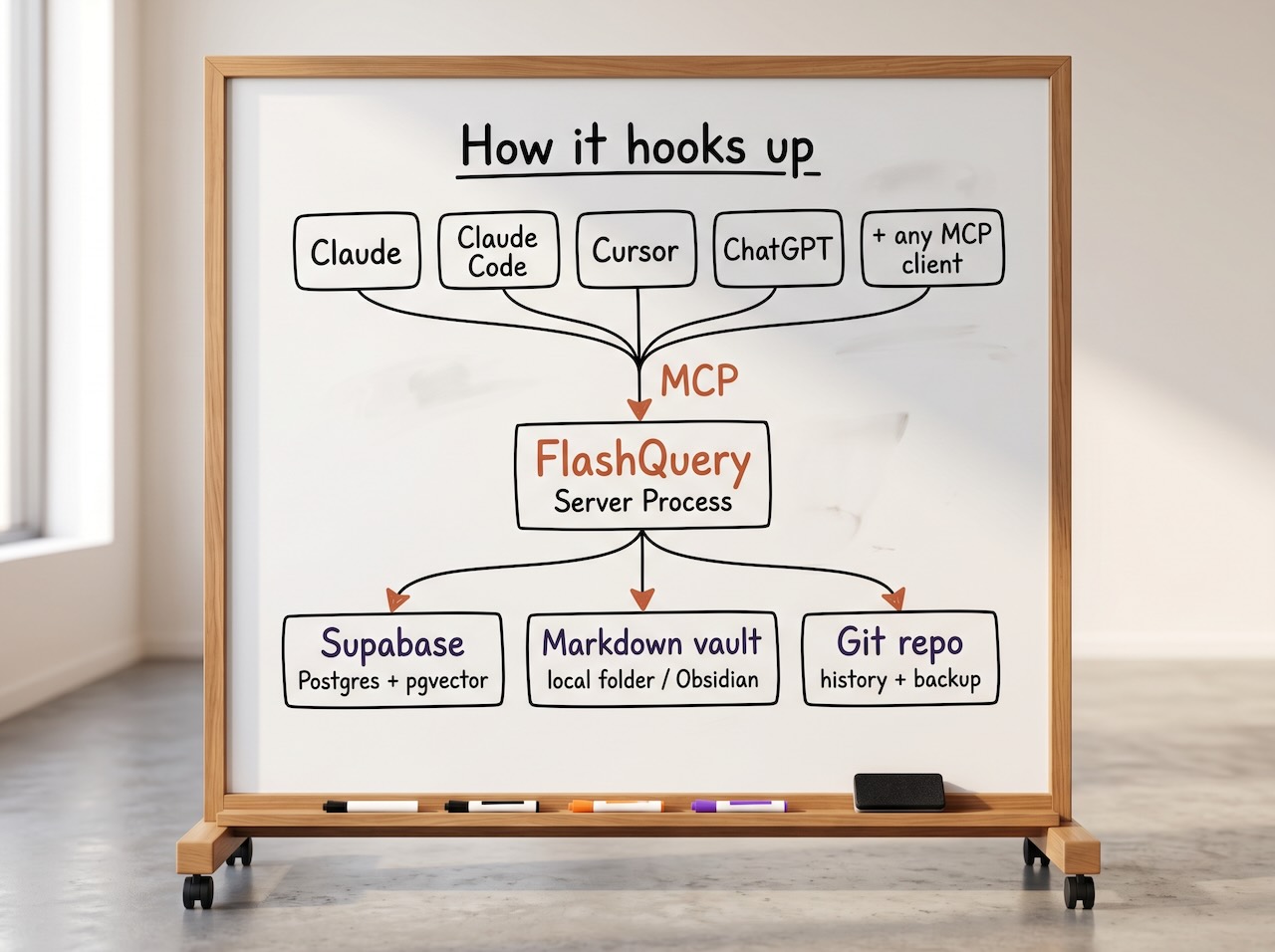
FlashQuery is a persistent data layer for AI workflows. It sits between AI tools (Claude, Cursor, ChatGPT) and your data, managing four things:
- Memories — semantic, searchable summaries of conversations, indexed with vector embeddings.
- Documents — markdown files in a vault you own and can version in Obsidian.
- Relational records — structured data in your Supabase instance (via plugins).
- LLM delegation — cost-tracked
call_modelcalls through configured models and purposes, including document reference hydration and FlashQuery-managed tool loops.
Every interaction an AI has with FlashQuery is logged and searchable. When Claude asks for "memories about the project," FlashQuery retrieves relevant stored summaries using vector search. When it creates a new meeting note, the note is saved both to your vault (as markdown) and indexed in the database. You own all of it — no vendor lock-in, no training on your data.
FlashQuery exposes its tools via MCP (Model Context Protocol), Anthropic's open standard for connecting AI assistants to external data and services. Any MCP-capable client — Claude Code, Claude Desktop, Cursor — can connect to it. Think of it as "Obsidian for AI workflows": local, yours, composable.
This walks you from git clone to FlashQuery tools available inside Claude Code. Takes about 5 minutes.
You need:
- Node.js 20+ and git
- A database — pick one:
- Supabase Cloud — free project at supabase.com, nothing to install
- Bundled Docker stack — Docker Desktop (or Engine + Compose) is all you need; FlashQuery's setup can provision Supabase for you automatically
- Existing self-hosted Supabase — if you already run one
- An embedding/LLM provider for semantic search and language features. Semantic search can use any configured embedding model from any supported provider; the example config defaults to local Ollama, and OpenAI/OpenRouter-compatible providers can be configured by editing the
llm:providers, models, and purposes inflashquery.yml.
Node.js 18: Will install and start FlashQuery but
npm installshows anEBADENGINEwarning andsupabase-jslogs a runtime deprecation notice. Node 20 LTS is required for supported operation.
git clone https://github.com/FlashQuery/flashquery.git
cd flashquery
npm installnpm run setupThe interactive script asks a handful of questions and writes these files:
| File | Purpose |
|---|---|
.env |
Secrets, URLs, vault path, instance identity — gitignored, per-install |
flashquery.yml |
Structural config and defaults — safe to read and commit |
.env.test |
Test credentials synced from .env — gitignored, used by npm run test:integration |
docker/.env.docker |
Generated only when you choose the bundled Docker stack; used by full-stack Docker |
The first question picks your Supabase backend:
- Supabase Cloud — project at supabase.com. Fastest path. Prompts for your URL, service role key, and database connection string.
- Existing self-hosted — a Supabase instance you already run. Same prompts.
- Bundled Docker stack — generates all secrets and wires up Supabase locally. Requires Docker Desktop or Docker Engine + Compose.
For Supabase Cloud or an external self-hosted database, DATABASE_URL must use a direct Postgres endpoint or a session-capable/session-mode pooler. FlashQuery verifies session-scoped advisory locks at startup and exits with clear guidance if the URL points at a transaction-mode pooler.
npm run setup is safe to re-run at any time. Existing values become defaults; it warns before letting you change sensitive routing values such as the database URL or instance ID, and it preserves generated secrets such as MCP_AUTH_SECRET unless you rotate them yourself.
Supabase Cloud or self-hosted (options 1 and 2):
npm run devBundled Docker stack (option 3 — starts Supabase and FlashQuery together):
make up
# Wait ~20 seconds for all services to be healthy, then verify:
make logs
In both cases you'll see FlashQuery ready. in the output when the server is up.
./setup/setup-claude-mcp.shThe script reads MCP_AUTH_SECRET from .env, fetches a bearer token from the running server, and calls claude mcp add for you. Once it succeeds, restart Claude Code.
Verify the registration:
claude mcp listYou should see flashquery listed with the MCP URL. FlashQuery tools are now available in every Claude Code session.
Token note: Startup logs show a masked token (
Bearer eyJhbGci***) for confirmation only. The full usable secret isMCP_AUTH_SECRETin.envand is accepted directly as a Bearer token by all FlashQuery endpoints.
Four ways to run, depending on what you already have:
# A — Docker full local stack: Supabase + FlashQuery are in the one docker compose file (easiest)
make up

# B — Dev mode: Supabase in Docker, FlashQuery on the host with hot reload
make db-up && npm run dev

# C — FlashQuery in Docker, Supabase external or cloud
make fq-up

# D — No Docker: FlashQuery on the host, Supabase Cloud or existing self-hosted
npm run dev
Run make help to see all available targets. For production deployment (reverse proxy, TLS, systemd/launchd, backups): docs/DEPLOYMENT.md.
FlashQuery uses streamable-http transport by default, listening on http://localhost:3100/mcp.
For the complete current host-visible MCP tool surface, tool inputs, response envelopes, and examples, see docs/FlashQuery MCP Tool Guide.md.
./setup/setup-claude-mcp.shSee docs/CLAUDE-CODE-SETUP.md for custom host/port, manual registration steps, and troubleshooting.
Claude Desktop supports both transport modes. Choose based on your setup:
| Mode | When to use |
|---|---|
| stdio | FlashQuery runs only while Claude Desktop is open; simplest setup |
| streamable-http | FlashQuery runs as a persistent server; share one instance across multiple clients |
Config file locations:
- macOS:
~/Library/Application Support/Claude/claude_desktop_config.json - Windows:
%APPDATA%\Claude\claude_desktop_config.json
Option A — stdio (Claude Desktop spawns FlashQuery as a subprocess):
{
  "mcpServers": {
    "flashquery": {
      "command": "node",
      "args": [
        "/absolute/path/to/flashquery/dist/index.js",
        "start",
        "--config",
        "/absolute/path/to/flashquery/flashquery.yml",
        "--transport",
        "stdio"
      ]
    }
  }
}
The --transport stdio flag overrides whatever transport is set in flashquery.yml, so the same config file works for all clients.
Important — .env file location: Claude Desktop spawns processes from its own working directory, not your project directory. Place a .env file in the same directory as flashquery.yml — the loader picks it up automatically.
Option B — streamable-http (FlashQuery runs as a persistent server; Claude Desktop connects via mcp-remote):
Start FlashQuery first: npm run dev or node dist/index.js start --config ./flashquery.yml
Claude Desktop does not natively speak HTTP MCP, so use the mcp-remote bridge:
{
  "mcpServers": {
    "flashquery": {
      "command": "npx",
      "args": [
        "mcp-remote",
        "http://localhost:3100/mcp"
      ]
    }
  }
}
npx mcp-remote downloads and runs the bridge automatically on first use. See docs/DEPLOYMENT.md for running FlashQuery as a persistent server and auth configuration.
Tool approvals: The first time each FlashQuery tool is called, Claude Desktop will prompt for approval. Click Always allow to permanently approve that tool — you only need to do this once per tool.
FlashQuery doesn't terminate TLS or route by host header. To expose it at a public URL, put it behind Caddy, nginx, or Cloudflare Tunnel. Disable response buffering in the proxy so streamable-http's server-sent events reach clients in real time. See docs/DEPLOYMENT.md for worked Caddy, nginx, and Cloudflare Tunnel examples.
Config is split across two files deliberately:
.env— everything that varies per install: secrets, URLs, vault path, instance identity. Gitignored.flashquery.yml— structural config and defaults. References.envvia${VAR}. Safe to commit.
If you chose the bundled Docker stack, there's also docker/.env.docker. Full-stack Docker uses that file as its source of truth for both Supabase orchestration values (Postgres password, JWT secret, anon/service-role keys) and the environment passed into the FlashQuery container. The root .env remains the source of truth when FlashQuery runs locally, when you use make fq-up, or when you use make db-up.
See .env.example, docker/.env.docker.example, and flashquery.example.yml for all available values with inline documentation.
The llm: section in flashquery.yml is split into providers, models, and purposes. Providers define where requests go, models define the model aliases FlashQuery can call, and purposes define why a model is being called, including fallback chains and optional template tools. See docs/LLM Providers Models and Purposes.md for the full guide.
For CI or scripted installs, pass a pre-filled answers file to skip all prompts:
npm run setup -- --answers-file /path/to/answers.envThe file is KEY=value format (lines starting with # are ignored). Any key omitted falls back to its default. Example for Supabase Cloud:
SUPABASE_CHOICE=1          # 1=Cloud  2=self-hosted  3=bundled Docker
SUPABASE_URL=https://xxx.supabase.co
SUPABASE_SERVICE_ROLE_KEY=...
DATABASE_URL=postgresql://postgres:...@db.xxx.supabase.co:5432/postgres
INSTANCE_NAME=My FlashQuery
VAULT_PATH=./vault
OLLAMA_URL=http://localhost:11434  # example local provider endpoint
# OPENAI_API_KEY=sk-...            # only needed if your llm.providers use it
LOG_LEVEL=info
Use a direct Postgres URL or a session-mode/session-capable pooler for DATABASE_URL. Transaction-mode pooler URLs fail startup because FlashQuery cannot prove session-scoped advisory locks are stable across checked-out Postgres sessions.
Symlinks in vault — FlashQuery does not follow symbolic links. Symlinks are skipped during scanning; original files sync normally. Symlink handling is unreliable on network filesystems (NFS, SMB) and in containers, so this is deliberate.
Multiple instances on the same vault — Session-scoped Postgres advisory locks coordinate shared document, plugin, and record writes when locking.enabled is true, but they require a direct or session-capable DATABASE_URL. If locking.enabled is false, FlashQuery uses in-process locking only; separate FlashQuery processes can race on document writes, plugin reconciliation, and unregister_plugin cleanup. Advisory locks do not make the vault a fully multi-writer filesystem. One primary writer per vault is recommended; run additional instances only when you understand the lock boundaries.
Plugin table consistency — Plugin tables reference documents by fqc_id. In rare cases (external file edits that strip frontmatter) references can be temporarily orphaned. Run flashquery scan to recover. File watcher recovery is a roadmap item.
For technical details on all three: ARCHITECTURE.md § Plugin Propagation Design.
Using FlashQuery
- flashquery-plugins — Claude skills and demo apps that showcase what FlashQuery can do
docs/FlashQuery MCP Tool Guide.md— current MCP tool contracts, input options, response envelopes, examples, and migration notesdocs/Document Reference System.md— passing documents, sections, and templates into delegated model callsdocs/LLM Providers Models and Purposes.md— configuring model providers, aliases, purposes, fallbacks, and template toolsdocs/CLAUDE-CODE-SETUP.md— Claude Code registration, token management, troubleshootingdocs/SECURITY-TOKENS.md— bearer token internals and lifetime configuration
Operating FlashQuery
docs/DEPLOYMENT.md— reverse proxy, TLS, systemd/launchd, backups, loggingdocs/ARCHITECTURE.md— system design, data flow, the four deployment paths
Contributing
CONTRIBUTING.md— development setup, test commands, PR guidelinestests/scenarios/README.md— scenario testing frameworkCHANGELOG.md— release history
npm run setup            # Interactive first-time setup (generates .env, flashquery.yml, and .env.test)
npm run dev              # Development: run TypeScript directly via tsx, hot-reloads on file changes
npm run dev:test         # Same as dev but using .env.test credentials (manual integration testing)
npm run build            # Compile TypeScript to dist/ via tsup (required before npm run start)
npm run start # Production: run the compiled dist/ binary — same behavior as dev, no hot reload; use for PM2/systemdnpm test # Unit tests (fast, no external deps)
npm run test:watch # Unit tests in watch mode
npm run test:integration # Integration tests (requires Supabase via .env.test)
npm run test:e2e # End-to-end tests (spawns FlashQuery as subprocess)
npm run test:benchmark # Performance benchmarks (vault discovery, search throughput)
npm run test:docker-smoke # Full Docker stack smoke test (requires Docker)The tests/scenarios/ directory contains a higher-level test suite: directed tests in Python (directed/) and YAML-driven integration tests (integration/), run by a Python runner script. See tests/scenarios/README.md.
npm run lint             # ESLint — zero warnings policy
npm run format           # Auto-format with Prettier
npm run format:check     # Check formatting without writing
Docker operations use make from the repo root. Run make help to see all targets.
Full stack (Postgres + Supabase services + FlashQuery):
make up        # Start in background
make down      # Stop
make restart   # Restart all containers
make logs      # Tail all logs
make status    # Show container health and ports
make build     # Build FlashQuery image
make rebuild   # Force rebuild with no cache
make shell     # Open a shell in the FlashQuery container
make clean     # Stop and remove all volumes  ⚠ wipes data
FlashQuery only (connect to external/cloud Supabase):
make fq-up      # Start in background
make fq-down    # Stop
make fq-logs    # Tail logs
make fq-status  # Show container status
make fq-build   # Build image
make fq-rebuild # Force rebuild with no cache
make fq-shell   # Open a shell in the container
make fq-watch   # Start in foreground (logs stream to terminal)
Database only (Postgres + pgvector; FlashQuery runs locally via npm run dev):
make db-up     # Start in background
make db-down   # Stop
make db-logs   # Tail logs
make db-status # Show container status