Opezy is an assistant designed to help small business owners make data-driven decisions and manage various business operations efficiently. This project demonstrates the implementation of Opezy for a Mexican restaurant, showcasing its capabilities in sales analysis, inventory management, customer feedback analysis, marketing strategy generation, and expense monitoring.
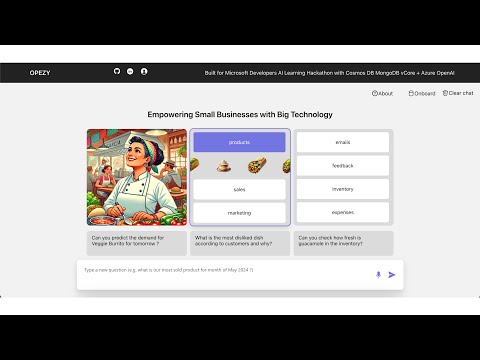
-
Sales Analysis:
- Analyze sales trends.
- Identify best-selling and underperforming products.
-
Inventory Management:
- Monitor inventory freshness using GPT-4 vision.
- Make informed restocking decisions.
-
Customer Feedback Analysis:
- Collect and analyze customer feedback.
- Improve products and services based on insights.
-
Marketing Strategy Generation:
- Generate marketing strategies.
- Create promotional content for social media.
-
Expense Monitoring:
- Detect anomalies in expenses.
- Prevent fraud and manage costs effectively.
-
Automated Communications:
- Automate sending marketing emails.
- Manage customer communications seamlessly.
- Azure OpenAI: For intelligent data analysis and natural language processing.
- Azure Cosmos DB for MongoDB: For storing sales, inventory, customer feedback, expense data, and vector embeddings.
- LangChain: For developing conversational agents and integrating various tools.
- React: For building the user interface.
- Backend: Handles data processing, analysis, and communication with Azure services.
- Frontend: Provides a user interface for interacting with Opezy, including a help section and onboarding process.
To generate data
cd randomdataloaders
run these to generate random data- Sales Database: Tracks all sales transactions, allowing detailed sales analysis.
- Inventory Database: Manages inventory levels and monitors the freshness of products.
- Feedback Database: Collects and analyzes customer feedback to improve products and services.
- Expenses Database: Logs all business expenses and helps in detecting anomalies and managing costs.
- Product Database: Stores product information and ingredients.
- Customer Database: Stores information about customers and their emails.
- Node.js
- MongoDB
- Azure Subscription
- Azure Cosmos DB for MongoDB
- Azure OpenAI
-
Clone the repository:
git clone https://github.com/yourusername/opezy.git cd opezy/backend -
Install dependencies:
pip install -r requirements.txt
-
Create a
.envfile with your Azure and MongoDB credentials check .envsample:DB_CONNECTION_STRING=<your_mongo_db_connection_string> AOAI_ENDPOINT=<your_azure_openai_endpoint> AOAI_KEY=<your_azure_openai_key>
-
Run the backend server:
uvicorn --host "0.0.0.0" --port 8000 app:app --reload
https://github.com/ankithreddypati/opezy-frontend
cd opezy-frontend
npm start
##Deployement
cd deploy
Open the azuredeploy.parameters.json file, then edit the mongoDbPassword to a password you wish to use for the MongoDB Admin User:
When the Azure Bicep template is deployed, this parameters file will be used to configure the Mongo DB Password and other parameters when provisioning the Azure resources.
Open a terminal window and log in to Azure using the following command:
Connect-AzAccountIf you have more than one subscription associated with your account, set the desired subscription using the following command:
Set-AzContext -SubscriptionId <subscription-id>New-AzResourceGroup -Name mongo-devguide-rg -Location 'eastus'Deploy the solution resources using the following command (this will take a few minutes to run):
New-AzResourceGroupDeployment -ResourceGroupName mongo-devguide-rg -TemplateFile .\azuredeploy.bicep -TemplateParameterFile .\azuredeploy.parameters.json -c- Help Section: Provides an overview of Opezy's features and how to use them.
- Onboarding Process: Allows users to integrate their data and start using Opezy.
-
Analyze Sales Trends:
- Ask Opezy: "Which products' sales are declining from January 2024 to March 2024?"
-
Monitor Inventory Freshness:
- Ask Opezy: "Can you check how fresh the bell peppers are from the inventory?"
-
Generate Marketing Strategy:
- Ask Opezy: "Give me a marketing strategy to sell more Veggie Burritos."
-
Detect Expense Anomalies:
- Ask Opezy: "Can you detect any anomalies in the expenses from December 2023 to May 2024?"
We welcome contributions to improve Opezy. To contribute, follow these steps:
- Fork the repository.
- Create a new branch (
git checkout -b feature-branch). - Make your changes and commit them (
git commit -m 'Add new feature'). - Push to the branch (
git push origin feature-branch). - Create a new Pull Request.
