
Screenshots
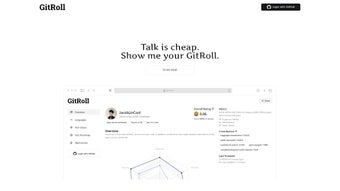
App details
- Updated
- April 29, 2025
- Requires
- Chrome
- License
- Full
- Developer
- gitroll
- Category
- Web Apps
About GitRoll
Download GitRoll – AI‑Powered Recruitment, Coding Portfolio Analyzer, Free & Secure Tool
Overview
GitRoll is redefining how technology talent is discovered, evaluated, and hired in today’s fast‑moving software market. By harnessing advanced artificial‑intelligence algorithms, the platform automatically scans a candidate’s public GitHub activity, aggregates commit history, pull‑request interactions, code‑review comments, and even the sentiment behind discussion threads. This raw data is then transformed into a polished, data‑driven coding portfolio that highlights both hard technical skills—such as code quality, language proficiency, architectural decisions, test coverage, and adherence to best practices—and soft interpersonal skills like teamwork, communication, mentorship, and conflict resolution. Traditional recruitment pipelines often rely on generic screening tests, résumé keywords, or subjective interview impressions, which can introduce bias and overlook high‑potential developers whose contributions live in open‑source projects. GitRoll eliminates these blind spots by providing a holistic, objective view of a developer’s real‑world work, enabling recruiters to spot hidden talent that can drive innovation for their organizations. For developers, the tool doubles as a personal showcase, turning everyday GitHub activity into a professional résumé that can be shared directly with potential employers, hiring managers, or even clients. Whether you are an HR professional seeking a fairer assessment method, a hiring manager looking to streamline candidate evaluation, or a developer eager to market your open‑source work, GitRoll delivers a secure, free‑to‑try solution that integrates seamlessly with existing recruitment workflows while respecting privacy and data ownership.
Key Features & Capabilities
GitRoll’s feature set is built around the principle of turning code contributions into actionable hiring insights. The platform combines machine‑learning models, natural‑language processing, and secure OAuth integration to deliver a comprehensive evaluation experience that scales from small startups to large enterprises. Below you will find a detailed breakdown of each core capability, followed by a concise bullet list that can be used for quick reference.
- AI‑Driven Code Quality Scoring: Machine‑learning models evaluate syntax, cyclomatic complexity, test coverage, documentation completeness, and adherence to language‑specific best practices, delivering an objective quality metric for each repository.
- Collaboration Insight Engine: Analyzes pull‑request reviews, issue discussions, and comment sentiment to surface a candidate’s teamwork, communication strengths, and mentorship activities.
- Automated Portfolio Generation: Within minutes, GitRoll creates a visually appealing, downloadable PDF and a web‑based portfolio that highlights project impact, contribution frequency, tech‑stack expertise, and key achievements.
- Bias‑Reduction Filters: The platform removes common recruiter bias by focusing solely on measurable contributions rather than educational background, years of experience, or self‑reported skill levels.
- Searchable Talent Database: Recruiters can query a curated pool of developers using filters such as programming language, framework, contribution volume, collaboration rating, and geographic location.
- Secure OAuth Integration: Connects directly to GitHub via secure OAuth, ensuring that only publicly available data is accessed unless the user explicitly grants private‑repo permission.
- Real‑Time Updates: Portfolios refresh automatically as new commits or pull‑requests are made, keeping candidate profiles current without manual intervention.
- Export & API Access: Export data in CSV or JSON formats and integrate with Applicant Tracking Systems (ATS) through a robust RESTful API, enabling seamless workflow automation.
- Multi‑Platform Dashboard: Accessible via modern web browsers on Windows, macOS, Linux, as well as mobile‑optimized views for Android and iOS devices.
- Free Core Tier & Premium Add‑Ons: The base version is free for unlimited candidate evaluations, while premium modules add deep analytics, custom model training, team collaboration, and priority support.
Together, these features empower hiring teams to make faster, data‑driven decisions while giving developers a professional showcase that works 24/7. The modular design also means organizations can start with the free tier and scale up to premium capabilities as their hiring volume grows, ensuring a cost‑effective path to modernizing talent acquisition.
Installation, Usage & Compatibility
Getting Started – No Traditional Software Installation Required
GitRoll is a cloud‑based SaaS solution, so there is no need to download or install client‑side software on your workstation. To begin, simply navigate to gitroll.com, click “Sign Up,” and authenticate using your GitHub account. The OAuth flow grants read‑only access to public repositories, preserving privacy while allowing the AI engine to pull the necessary data. For enterprises with strict security policies, GitRoll also offers an optional Docker‑based on‑premise container that can be deployed behind corporate firewalls. This container mirrors the cloud functionality but runs within your own infrastructure, giving you full control over data residency and network access.
Step‑by‑Step Workflow
- Create an Account: Register with an email address or use single sign‑on (SSO) via Google, Azure AD, or Okta for enterprise teams.
- Connect GitHub: Authorize the GitRoll app, selecting the repositories you wish to analyze (public by default; private repositories become available with a premium subscription).
- Define Evaluation Criteria: Choose from predefined scoring models or customize weightings for code quality, test coverage, collaboration metrics, and language‑specific standards.
- Run Analysis: Click “Generate Portfolio.” The AI processes the data and presents results in an interactive dashboard within 30–60 seconds for most accounts.
- Review & Share: Export the portfolio as a PDF, embed a shareable link, or push the JSON payload to your ATS via the API. You can also embed the live portfolio on personal websites or LinkedIn profiles.
- Iterate & Track Growth: As the candidate continues to commit, GitRoll automatically updates the portfolio, allowing recruiters to monitor skill development and engagement over time.
System Requirements & Operating System Support
Because GitRoll runs entirely in the browser, it supports all modern operating systems. It has been tested on Chrome (v90+), Firefox (v88+), Safari (v14+), and Edge (v91+). The responsive mobile view works on Android 8.0+ and iOS 13+. For the optional on‑premise Docker container, the host must run a 64‑bit Linux distribution with Docker Engine 20.10 or newer and allocate at least 2 GB of RAM to the container. No additional client‑side software, plugins, or extensions are required, making the tool instantly accessible to any recruiter or developer with an internet connection.
Pros, Cons, FAQ & Conclusion
Pros
- Provides an objective, data‑driven assessment of coding ability and collaboration skills.
- Highlights soft skills such as teamwork, mentorship, and communication through AI‑derived sentiment analysis.
- Free core tier removes cost barriers for small teams, startups, and individual developers.
- Real‑time portfolio updates keep candidate information current without manual effort.
- Secure OAuth integration respects privacy and never accesses private repositories without explicit permission.
- Robust API and export options enable seamless integration with existing ATS platforms and HR workflows.
- Multi‑platform, web‑based dashboard works on Windows, macOS, Linux, Android, and iOS.
Cons
- Relies on public GitHub activity; developers with limited open‑source contributions may have less comprehensive profiles.
- Advanced analytics (e.g., deep code‑review sentiment, custom model training) are locked behind premium subscriptions.
- Initial AI scoring models may require fine‑tuning for niche or emerging technology stacks.
- On‑premise deployment adds operational complexity and requires Docker expertise.
- Currently supports only GitHub; integration with Bitbucket or GitLab is planned but not yet available.
FAQ – Your GitRoll Questions Answered
How does GitRoll ensure candidate privacy?
GitRoll uses GitHub’s OAuth protocol, which only grants read‑only access to public repositories unless a user explicitly authorizes private‑repo access. No personal data beyond the GitHub username and public contributions is stored, and all data is encrypted both in transit and at rest.
Can I use GitRoll with Bitbucket or GitLab?
Currently, GitRoll’s native integration supports GitHub only. Roadmap plans include Bitbucket and GitLab connectors, but for now you can import data manually using the CSV export feature.
Is there a limit to how many candidates I can evaluate?
The free tier allows unlimited candidate evaluations with standard scoring. Premium plans introduce bulk‑import tools and higher API rate limits for large hiring drives.
How accurate is the AI code‑quality score?
The AI model has been trained on millions of open‑source projects and validated against industry benchmarks. While no automated metric can replace a thorough technical interview, the score reliably surfaces strong coding habits and flags potential risk areas.
What support options are available for enterprise customers?
Enterprise clients receive dedicated account managers, SLA‑backed response times, custom model training, and on‑premise deployment assistance. Support is available via email, live chat, and a private Slack channel.
Conclusion & Call to Action
GitRoll bridges the gap between raw GitHub activity and meaningful recruitment insights, turning everyday commits into a comprehensive, bias‑free coding portfolio. By providing an objective, data‑driven assessment of both technical and collaborative abilities, it empowers recruiters to discover hidden talent while giving developers a professional showcase that works around the clock. The free core version supplies enough power for small teams to start improving hiring outcomes immediately, and premium add‑ons scale seamlessly for enterprise needs. If you’re ready to modernize your talent acquisition process, reduce time‑to‑hire, and make smarter, data‑backed hiring decisions, GitRoll is the tool to try today. Click the button below to create your free account, connect your GitHub profile, and start generating AI‑backed portfolios in seconds.
Start Your Free GitRoll AccountOverall Rating: 4.5/5
Guides & Tutorials
How to install GitRoll
- Click the Download button above.
- Once redirected, accept the terms and click Install.
- Wait for the GitRoll download to finish on your device.
How to use GitRoll
This software is primarily used for its core features described above. Open the app after installation to explore its capabilities.
User Reviews
No reviews yet. Be the first to share your experience.
You may also like
more
3D AI Studio
3D AI Studio Overview 3D AI Studio is a web-based AI-powered tool developed by S...

3D textures by Polycam
Generate Realistic 3D Textures Effortlessly 3D Textures by Polycam is an innovat...

3DAiLY
Customizable 3D Modeling Tool: 3DAiLY 3DAiLY is an online platform that harnesse...

3DFY
Revolutionizing 3D Model Creation: 3DFY Review 3DFY is an AI-powered service, de...

AI Dungeon
AI Dungeon: Deep Learning Text Adventure AI Dungeon is an artificial intelligenc...

Alpha3D
A subscription-based program for Web apps, by alpha3d. Alpha3D is a subscription...
