
Download GMTech – AI Model Comparison Tool, Free Trial, Secure Web App
Overview
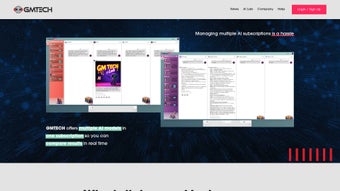
GMTech is a subscription‑based, cloud‑hosted platform that brings together the most popular AI language models and image generators under one unified dashboard. In a market flooded with standalone services such as OpenAI’s GPT‑4, Google’s PaLM, Meta’s LLaMA, Anthropic’s Claude, Stable Diffusion, and DALL·E, users often waste valuable time juggling separate accounts, API keys, and inconsistent user interfaces. GMTech solves this problem by offering a single, secure web app where you can load API credentials from any provider, switch between models instantly, and compare their outputs side‑by‑side. The application preserves conversational context, so a text prompt that leads to a generated image can be followed by additional queries without losing the original thread. Real‑time analytics display token consumption, latency, and cost per request for each model, enabling data‑driven decisions on budgeting and performance. Whether you are a researcher drafting a paper, a startup evaluating cost‑effective AI options, or a creative professional prototyping concepts, GMTech streamlines the workflow, reduces operational friction, and provides the insights needed to choose the right model for every use case. The platform is continuously updated with the latest model releases, ensuring you never fall behind the rapid pace of AI innovation.
Core Features
- Unified Dashboard: Access OpenAI, Google, Meta, Anthropic, Stability AI, and other providers from a single, responsive interface.
- Side‑by‑Side Comparison: Simultaneously view responses, token usage, latency, and pricing in a split‑screen layout.
- Image Generation Integration: Switch fluidly between text models and image generators such as Stable Diffusion and DALL·E without leaving the workspace.
- Contextual Continuity: Preserve conversation history across model switches, allowing seamless text‑to‑image and image‑to‑text workflows.
- Real‑Time Analytics Panel: Track token consumption, cost per request, and response times with live charts and downloadable CSV reports.
- Custom Prompt Library: Save, tag, and reuse prompts across projects, with version control for collaborative teams.
- Secure Subscription Management: Tiered pricing plans, PCI‑DSS compliant payment processing, and encrypted API key storage.
- Programmable API Access: Embed GMTech’s comparison engine into your own applications via RESTful endpoints.
- Collaborative Workspaces: Invite teammates, assign roles, comment on outputs, and export comparison boards as PDF or Markdown.
- Automatic Model Updates: New model versions and providers are added server‑side, guaranteeing you always work with the most current technology.
Installation & Quick Start Guide
Because GMTech is delivered as a web application, there is no traditional software download or local installation required. You simply need an internet‑connected device and a modern browser (Chrome, Edge, Firefox, or Safari). Follow these steps to get up and running in under five minutes:
- Create Your Account: Navigate to the GMTech homepage, click “Start Free Trial,” and complete the sign‑up form with a valid email address and a strong password. Verify the account via the confirmation email.
- Choose a Subscription Tier: Select the “Researcher” (monthly) or “Enterprise” (annual) plan. Both options include a 14‑day trial with unrestricted access to all features.
- Link Provider API Keys: After logging in, open the “Providers” tab and paste your API credentials for OpenAI, Google Cloud, Anthropic, Stability AI, or any other supported service. Keys are encrypted with AES‑256 before storage.
- Set Up a Comparison Board: Click “New Board,” give it a descriptive name, and drag the desired models into the board. Arrange the order to match your evaluation priorities.
- Enter and Dispatch Prompts: Type a prompt in the central input field. GMTech sends the request to all selected models simultaneously and displays each response in its own panel.
- Generate Visual Content: Switch any panel to an image generator. The same prompt (or a refined version) can be used to produce visuals, while the system retains the text conversation context for follow‑up queries.
- Analyze and Export Results: Use the analytics pane to compare latency, token usage, and cost. Export the full comparison as CSV, PDF, or Markdown for documentation.
- Collaborate with Your Team: Invite colleagues via email, set edit or view permissions, and comment directly on model outputs to streamline feedback loops.
- Manage Your Subscription: From the account settings, you can upgrade, downgrade, or cancel at any time. Cancellations take effect at the end of the current billing cycle.
All updates, security patches, and new model integrations are applied automatically on the server side, meaning you never need to download a new version or worry about compatibility issues.
Compatibility & System Requirements
GMTech is a browser‑based SaaS solution, so it runs on any operating system that supports a modern web browser. Officially supported environments include:
- Windows 10, 11 (Edge, Chrome, Firefox)
- macOS Monterey and later (Safari, Chrome, Firefox)
- Linux distributions with recent Chromium or Firefox builds
- ChromeOS devices
- Android 8.0+ and iOS 13+ tablets and smartphones (via mobile browsers)
Because all processing occurs in the cloud, there are no heavy CPU or GPU requirements on the client side. A stable broadband connection (minimum 5 Mbps) ensures smooth real‑time updates and low‑latency model responses. For optimal experience, we recommend using the latest version of Chrome or Edge, as they provide the best support for WebSockets and secure TLS connections used by GMTech.
Pros, Cons, Frequently Asked Questions & Conclusion
Pros and Cons
- Pros:
- All‑in‑one dashboard eliminates the need for multiple logins and separate UI learning curves.
- Real‑time cost, latency, and token analytics empower precise budgeting and performance tuning.
- Contextual continuity across text and image models streamlines creative and research workflows.
- Encrypted API key storage and GDPR‑compliant data handling ensure strong security and privacy.
- Collaborative workspaces accelerate team projects and simplify result sharing.
- Cons:
- Subscription pricing may be a barrier for solo hobbyists after the free trial expires.
- Reliance on external provider APIs means occasional downtime is outside GMTech’s control.
- Advanced features such as API access and unlimited boards are limited to higher‑tier plans.
- While the web app is responsive, very low‑bandwidth connections can affect real‑time analytics refresh rates.
Frequently Asked Questions
-
Is there a completely free version of GMTech?
GMTech offers a 14‑day free trial with full feature access and no credit‑card requirement. After the trial, you must choose a paid subscription to continue using the platform.
-
Which browsers are officially supported?
The platform works best on the latest versions of Chrome, Edge, Firefox, and Safari. All major browsers that support WebSockets and TLS 1.2+ are compatible.
-
Can I import my own API keys for every provider?
Yes. GMTech lets you add API keys from OpenAI, Google Cloud, Anthropic, Stability AI, and any other supported service. Keys are stored encrypted and never shared with third parties.
-
How does GMTech handle data privacy and retention?
All user data, prompts, and generated content are encrypted at rest and in transit. Prompt history is automatically purged after 30 days unless you explicitly save it to your personal library. The service complies with GDPR, CCPA, and other major privacy regulations.
-
What happens if a model returns inappropriate or biased content?
GMTech includes a built‑in moderation filter that flags potentially harmful output. Flagged responses are highlighted, and you can provide feedback to improve future moderation. The filter can be toggled on or off per board.
In summary, GMTech fills a critical niche in the AI ecosystem by consolidating multiple language and image models into a single, secure, and highly analytical environment. Its side‑by‑side comparison view, contextual continuity, and robust analytics make it an indispensable tool for researchers, developers, and creative teams alike. While the subscription cost may be a consideration for individual hobbyists, the productivity gains, cost‑visibility, and collaborative features deliver clear value for professional users. Ready to simplify your AI workflow? Start your free trial today and experience the power of unified AI model comparison.
GMTech delivers a polished, secure, and highly functional platform for AI model comparison. Its strengths lie in the seamless switching between text and image generators and the depth of analytics provided. While the subscription price may be a hurdle for some, the productivity gains make it a worthwhile investment for serious developers and researchers.



.png)




