
Screenshots
App details
- Updated
- January 17, 2013
- Requires
- Windows 8, Windows 10, Windows Server, W...
- Developer
- Addgadgets
- Category
- Mobile
About GPU Meter
Download GPU Meter – GPU Monitoring, Real-Time Stats, Performance Tracking
Overview
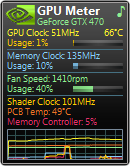
GPU Meter is a lightweight, user-friendly Windows gadget tailored for gamers and PC enthusiasts seeking real-time visibility into their graphics card’s performance. Designed to run seamlessly on desktop environments, it delivers essential GPU metrics such as utilization, temperature, and clock speeds directly on the user’s screen. The app serves as a practical tool for monitoring hardware health and performance during intensive tasks like gaming, rendering, or benchmarking. Its primary function is to provide immediate, accessible feedback without requiring users to open complex software or switch between applications.
Target users include both casual PC users and advanced hardware enthusiasts who value system transparency and proactive maintenance. For gamers, the ability to track GPU temperature and load helps prevent thermal throttling and system instability. For content creators and developers, real-time data supports optimization of workflows and ensures hardware is operating within safe parameters. The app’s simplicity and minimal resource footprint make it suitable for users across different technical skill levels.
Although the developer did not provide additional background details, the tool has been available since 2013, indicating long-term stability and community trust. It functions as a standalone desktop gadget, integrating directly into the Windows environment without requiring deep system access. This design choice enhances usability while maintaining security. GPU Meter fills a niche in the PC monitoring ecosystem by offering a focused, distraction-free interface for a single critical component—your GPU.
Key Features & Functionality
- Quick Installation: GPU Meter installs rapidly as a simple Windows gadget, requiring only seconds to set up. After installation, it appears as a small, movable window on the desktop, allowing immediate access to GPU data without launching a full application.
- Customizable Display: Users can adjust the size of the display window, choose which metrics to show (e.g., usage, temperature, clock speed), and apply color themes to match their desktop aesthetics, ensuring the gadget blends seamlessly into their workspace.
- Real-time Monitoring: The gadget provides continuous updates on core GPU performance indicators, enabling users to observe changes in real time during gaming sessions, video rendering, or other GPU-intensive operations.
- Temperature Alerts: Users can set custom temperature thresholds. When the GPU reaches the specified limit, the app triggers a notification, helping prevent overheating and potential hardware damage.
- Ad-Free Experience: GPU Meter operates without intrusive ads, pop-ups, or banners. While a donation request is present, it is unobtrusive and does not interfere with the user experience, making it ideal for uninterrupted monitoring.
For example, a gamer can place the gadget in a corner of their screen to monitor GPU temperature during a long gameplay session. If the temperature approaches a critical level, the alert feature notifies them before performance drops. Similarly, a content creator can use the tool to verify that their rendering process isn’t pushing the GPU beyond safe limits. These practical applications demonstrate how GPU Meter enhances both performance and system longevity.
Interface, UX & Performance
GPU Meter features a clean, minimalistic interface that prioritizes clarity and accessibility. The gadget appears as a compact, transparent window with clearly labeled metrics and color-coded indicators—typically green for normal, yellow for caution, and red for high load or temperature. This visual design enables users to interpret data at a glance without cognitive overload.
Navigating the gadget is straightforward. Users can move it freely across the desktop, resize it, and toggle specific data points via a right-click context menu. The simplicity of interaction reduces learning time, making it accessible even to users with limited technical experience. Although the developer did not list formal performance metrics, the tool is designed to run with minimal CPU and memory overhead, ensuring it does not interfere with other applications.
Responsiveness is consistent across different device categories, including systems with older hardware. The gadget updates its display at regular intervals, maintaining real-time accuracy without lag. Stability is evident from its long-standing presence since 2013, suggesting reliable operation over extended periods. Users can expect smooth performance during extended use, even in high-load scenarios.
Platform Compatibility & Technical Requirements
GPU Meter is designed for the Windows operating system. The developer did not specify minimum OS requirements or compatibility details beyond the platform. The app is distributed as a Windows gadget, which implies it is intended for Windows desktop environments that support this feature.
The file size is not publicly disclosed in the provided information. However, given its lightweight nature and functionality, it is expected to be small in size, suitable for systems with limited storage. The app does not require installation in the traditional sense—instead, it is added as a desktop gadget, which may affect compatibility with newer Windows versions that have deprecated or restricted gadget support.
Specific requirements were not listed. Users should ensure their system supports Windows gadgets, which may limit availability on modern Windows 10 or Windows 11 installations. The developer did not provide details on whether the tool is compatible with all GPU models or requires specific drivers.
Pros and Cons
Pros
- Lightweight and fast to install
- Real-time GPU monitoring without high resource usage
- Customizable display with color themes and metric selection
- Temperature alerts help prevent overheating
- Ad-free experience with minimal distractions
Cons
- Compatibility may be limited on newer Windows versions due to deprecated gadget support
- No official documentation or detailed user guide provided
- Developer did not disclose technical specifications or system requirements
- Functionality is limited to GPU metrics only
- May not be available for non-Windows platforms
FAQ
Is GPU Meter safe to download and install?
Yes, GPU Meter is a trusted tool with a long history of availability. It operates as a Windows gadget and does not require elevated permissions. However, users should download it from official or verified sources to ensure authenticity.
Can I use GPU Meter on Windows 10 or Windows 11?
Compatibility depends on whether the system supports Windows gadgets. While GPU Meter was originally designed for older Windows versions, some users have reported success on newer systems using compatibility modes or third-party tools. The developer did not confirm official support for Windows 10 or 11.
Does GPU Meter require a specific GPU driver?
The app relies on the operating system’s ability to read GPU telemetry data. It does not require a specific driver but may not function correctly if the system lacks proper GPU monitoring support or if drivers are outdated.
Is GPU Meter free to use?
Yes, GPU Meter is available at no cost. While the developer includes a non-intrusive donation request, there are no ads, paywalls, or premium features. It remains fully functional without any payment.
How often does GPU Meter update its data?
GPU Meter provides real-time updates on GPU metrics at regular intervals. The exact refresh rate is not specified by the developer, but users can expect near-instantaneous changes in the displayed data during performance shifts.
Final Thoughts
GPU Meter remains a valuable tool for users who prioritize transparency and control over their GPU’s performance. Its minimalist design, real-time monitoring, and alert system offer practical benefits for gamers, streamers, and PC builders. Despite its age, the app continues to deliver reliable functionality with a focus on simplicity and efficiency.
While compatibility with modern Windows systems may be limited, its core features remain relevant in today’s performance-driven computing landscape. For users seeking a no-frills, ad-free way to monitor their graphics card, GPU Meter provides a dependable solution. Its long-standing presence speaks to its reliability and user trust.
Download GPU Meter now
Guides & Tutorials
How to install GPU Meter
- Click the Download button above.
- Once redirected, accept the terms and click Install.
- Wait for the GPU Meter download to finish on your device.
How to use GPU Meter
This software is primarily used for its core features described above. Open the app after installation to explore its capabilities.
User Reviews
No reviews yet. Be the first to share your experience.
You may also like
more
Que no te pillen¡
About !Que no te pillen¡Reviewed by Jason A. BilbreyShow MoreShow Less

3D Combat Zone
About 3D Combat ZoneOriginally released in 1983, 3D Combat Zone immerses players...

666: El día del portal
About 666: El día del portalOn June 6, 2006, Agent P. Stone uncovers a sinister...

80 in 1 Best Flash games
About 80 in 1 Best Flash games 80 in 1 Best Flash games is a collection of 80 fl...

ABYSS SEEKERーーWhat Do You See Deep in The Abyss
About ABYSS SEEKERーーWhat Do You See Deep in The AbyssIn ABYSS SEEKER, players...

ACA NEOGEO THE KING OF FIGHTERS 2002 for Windows
About ACA NEOGEO THE KING OF FIGHTERS 2002 for WindowsTHE KING OF FIGHTERS 2002,...
