Bumble-B and an ADC with OpenGL make an oscilloscope February 22, 2010
Posted by GuySoft in Crictor, diy, Electronics, Hamakor, ITU, linux, open source, programming, python.Tags: bumbleb, diy, Electronics, linux, open source, OpenGL, programming, python
4 comments

Hi all,
During my small semester break I managed to connect my Bumble-b chip to an analog-digital converter (ADC).
With this I can read voltage changes and send the information to the computer to plot live.
Here is a demonstration video:
How its all connected
Pidgin and X-chat plugins to execute a command on new messages February 14, 2010
Posted by GuySoft in Crictor, Hamakor, ITU, linux, open source, programming, python.Tags: open source, pidgin, programming, python, source code, x-chat
28 comments

 Hi all,
A while ago, when I coded message alert plugins for pidgin and X-chat so each time I get a new message my bumble-b LED display would flash, so I thought I might release the code here for people to use.
Both plugins will execute a command of your choice when receiving a new message.
Thanks to Simo Mattila who wrote the base code for the pidgin plugin 🙂
- Source code for the pidgin plugin
- You will have to follow the README file and compile the plugin. Then place the created .so file in ~/.purple/plugins/ .
- In the plugin menu there would be a configuration window to set the command.
- Source code for the X-chat plugin
- You will have to set the command inside the python file. Then copy it to ~/.xchat2/
- The X-chat plugin also is able to return the name of the user that sent the message.
Here is a video of the X-chat plugin in action:
I hope to find more time to posts the things I am doing, but as usual, university takes up all my time. Stay tuned
Nokia N810 Running OLPC Sugar May 1, 2009
Posted by GuySoft in Crictor, Hamakor, ITU, linux, Maemo, olpc, open source, python.Tags: arm, debian, Maemo, Nokia, olpc, sugar
11 comments
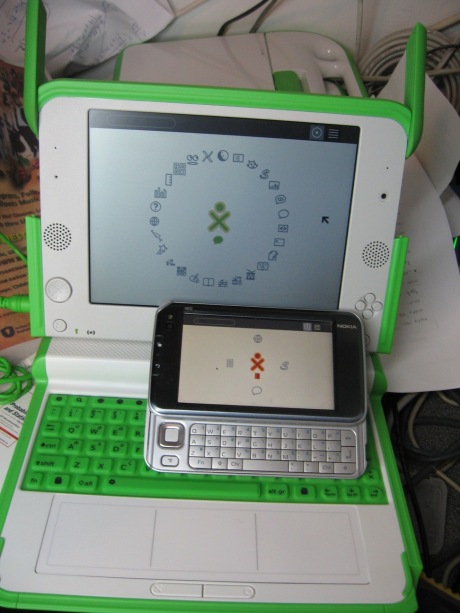
- Sugar running on the Nokia N810
Hey all,
This past week I managed to do something quite interesting. I got sugar, running on my Nokia N810, compiled for armel.
The trick that made it work was thanks to easy Debian chroot, that got me access to installing sugar without a few good hours of compilation for arm (and I did that before).
Touchscreen is cool!
The first thing that I found pretty neat was running sugar on a touchscreen device. It really felt better, since most people that I let play with my XO and flip its screen 180 degrees naturally try touching the screen, expecting it had a touchscreen. Sugar was actually quite good with it on the Nokia.
A script to Slice, Encode and Upload videos to Youtube April 17, 2008
Posted by GuySoft in Crictor, Hamakor, linux, open source, podcast, programming, python.Tags: code, python, script, youtube, zulo
3 comments
In the past few days, I wrote a script that will take basically any video file, chop it to equal parts under 10 minutes, and upload the result to youtube.
The effect is that I can publish all of my video podcast to youtube, without the long and painful chopping and uploading of files via a browser.
I based the uploading on a perl script from catonmat. I wrote my extension in python.
Here is a link to the sourcecode (under GPL license)
I would love to receive feedback, and improvments.
PSP Enc – Encoding video for PSP / ipod under linux GUI November 27, 2007
Posted by GuySoft in Crictor, Hamakor, ipod, linux, open source, podcast, programming, psp, python, wxpython.Tags: encoding, ffmpeg, podcast, psp, python, wxpython
2 comments
Hello all,
I am starting to work on the first Israeli video podcast, and we are now trying to figure out what format to publish it under. While pondering about this, I wrote a graphical program that will let you convert Video files for PSP format. And it should also run on iPods (however the screen resolution is specifically for PSP).

The program uses a command I found somewhere (you can see it in the code). The GUI is written in wxpython, which I just started learning not long ago. It is really useful for these small apps.
The requirements to get this working are:
- python
- ffmpeg
- python-wxgtk2.6
To run it just type:
python pspenc.py


 Guysoft's Weblog
