Truss violin – I deigned, 3D printed and built a violin and I am releasing it open source August 18, 2023
Posted by GuySoft in open source, violin.Tags: 3D Printers, open electroncs, open source, violin
add a comment
Hey all,
In the past years I have had an ongoing project – I wanted an ultra-light modifiable electric violin. And finally I can share it with you.
This violin, weighs with all the parts on just 500 grams, which is the same as my acoustic violin. Moreover, the center of mass is close to the player making the violin feel lighter than an acoustic when playing.
This is made possible by an innovation I came up with, and have not seen anyone else do – The violin uses a truss like the one in a guitar neck, letting you balance the weight of the strings and tune the neck. This means that the violin can be printed with just a 15% infill making it ultra light (pegboard box at 20%).
I am not planning to start a violin-building business, so I see no reason to keep this to myself and I am releasing it. I ask you to give me some attribution, and consider releasing your design too. And perhaps a violin 🙂
This is the end result

The design

I made the design with the help of several mechanical engineers that I want to thank – Tal Reindel, Michael Lev-Ari Layoush, Itai Meshorer, and Don Corson. Also want to take the opportunity to thank Yair Grinberg, Oleh Shevchuk. It’s also based on the ElVioin v2 which is under the Creative Commons – Attribution – Share Alike license. So you can use it, share it, modify it and even sell it. But our particular design must also be released under the same license.
You can download the design files here.
(more…)Fedigroup – group system for the Fediverse August 7, 2023
Posted by GuySoft in open source, programming, python.Tags: fediverse, open source, programming, python
add a comment
Hey all,

The past year I’ve been playing pretty active on federated social networks. This led me to try and write a federated social network group system. Although this group system is far from being complete since Fedigroup is currently in pre-alpha level. I think it is worth sharing what I have learned, and also explain a bit why, if you met me during the past three years. I’ve been going about federated social networks.
You are also welcome to join a server I maintain here, Hayu.sh is the second largest Hebrew-speaking instance.
What is a federated social network?
A federation in servers means everyone can run their own server which is autonomous. And it can communicate with other servers too. Creating a large network. The first protocol on the internet is actually federated too – email.
There is no one central email server, or single email software. In social networks this means that you join a server, and follow and interact with everyone else. Even though your server could be, like in my case, hosted in your own home, with you owning all the data. You can also join a any other server, and switch between them.
For Hebrew speakers, I gave a small TED lecture about it, which is hosted on a federated video server. You can watch it here (Hebrew).
The Fediverse is the servers using the a W3C Standard that does just that
What made the Fediverse possible is the standard that was passed to describe it. The protocol is called ActivityPub 2.0. And it lets social networks share status messages (notes), shares (boosts) and favorites across different servers. It was created by a group of people who cared, not large companies. Despite some of them being members of the W3C. Its also worth mentioning that one of the major adopters of the ActivityPub 2.0 protocol was Mastodon, a type of social network server, which resembles twitter. And that really help gain critical mass.
Why didn’t I hear about this?
I was asked this by other developers and power users. It makes people dismiss the Fediverse as a passing or niche thing.
Unlike Facebook, Twitter even if you’re been avoiding social networks, their marketing will reach you, your news channel, municipality and country are likely using them. Their existence depends on it that you use and browse on their site. However, in the Fediverse does not have a business model that demands it. Or a marketing team. Its just people. You are welcome to join, but no ones income depends on it.
The Fediverse is growing though, by word-of-mouth, or text-in-blog. Recently even celebrities and others. The latest are the BBC, PNAS, George Takei, Neil Gaiman, Stephen Fry and the European Commission.
(more…)Pi Imager – community managed fork of rpi-imager March 23, 2022
Posted by GuySoft in open source, programming.Tags: cpp, open source, qt, Raspberry Pi
add a comment

Hey all,
I have started to maintain a fork of rpi-imager called Pi Imager. The main goal of it is to have a place to host images for anyone who wants their images downloaded and flashed with a single tool. There are already 7 extra distributions you can flash on the unofficial imager and I hope with this post this number will grow.
The changes to the official imager are:
- There is an unofficial category that has images you can’t get on the official imager. You can submit a pull request to this repository and add yours.
- Everything is automatic. You can fork it, make your own commits, and you have a working build system –
- Every new commit to pi-imager builds a new build for Windows, Mac and Linux, ready to use
- When you ask to add a new image and the pull request is accepted, it’s added to the global list automatically
- There is a feature to disable username change that can be set on the distribution side. It broke stuff in OctoPi (currently in main branch).
- Appimage support for Linux (fixes this issue)
- Trademark and colors have been removed as requested by RaspberryPi, it’s purple now!
BackupFriend – Self-hosted backup to your RaspberryPi with a history and UI! July 19, 2021
Posted by GuySoft in open source, programming, python, wxpython.Tags: backupfriend, howto, open source, programming, python, self-hosted
4 comments

Atribution: Icon by: Freepik
Hey all,
I am releasing today something I’ve been working on the past year. It stared with a friend that had a requirement to do off-site backups of his work for his insurance, but BackupFriend has became a full blown backup solution.
The idea is you get a RaspberryPi and plug a harddrive to it, put it at your friends, family or just in your house and backup up to it using a desktop client that should have the feel like Dropbox/Google Drive/etc. You also get history! The RaspberryPi can also be changed to a remote server (instructions here). This guide focuses on self-hosted instructions, because I think its strange all backup solutions out there require you to pay rent for your own data.
Using a 4TB drive for under $100 and a Pi, you can get much more storage which is not ephemeral.
The desktop client has been tested on both Linux, MacOS and Windows.
Also, many thanks to Pull Request Community that featured BackupFriend as a project to work on, that helped get a few PRs on-board.
What you will need
- A Raspberry Pi, preferably 4B because of the USB3
- Note: Raspsberrypi can be replaced with a server (instructions here).
- A home network with a computer running Linux, MacOS or Windows, which you will be backing up from
- An external hard drive that can connect to the Pi (I use a 4TB WD My Passport drive, you can also just use a thumb drive for testing).
How to install on a Pi
(more…)How to build a telegram-controlled sous vide using CraftBeerPiOS October 1, 2018
Posted by GuySoft in Electronics, open source, python.Tags: cooking, food, open source, raspberrypi, telegram
4 comments

Sous vide pot with temperature sensor
Hey all,
So I’ve been cooking sous vide a few months now, with a sous vide I built myself. Its connected to a RaspberryPi and can be controlled via the web or telegram.
No soldering required!
Flash a ready made image to the Pi!
Bill of materials
- Slow cooker (crockpot) with a ‘high’ option. You can get them second hand, they are pretty cheap. Make sure it has no digital control.
- Raspberry Pi, even version 1 should work – also an SD card and power supply for the Pi.
- Pi Plate prototype board. Make sure you get one that matches your Raspberry Pi footprint if you are re-using an old Pi.
- Solid state relay that can handle mains
- Power cables
- Data cable to connect the relay to the Pi
- Power socket and power connector for your country – get locally so it fits your country standard.
- Water resistant temperature sensor DS1820 x2 – Get a spare one so you can measure the temperature difference and make sure your sous vide is uniformly heated.
- Important – 3D printed enclosure for raspberrypi (Raspberry Pi 1) and enclosure for the relay – you are mixing water and electricity in a kitchen, don’t be an idiot.
Assembly
New violin makers community August 27, 2018
Posted by GuySoft in music, open source.Tags: 3D Printers, community, discorse, open source, violin
add a comment

violinmakers.org logo
Hey all,
So I was going to post here about a violin I 3D printed and built, and then realised that this is a community waiting to happen. So I created a discourse forum called violinmakers.org. A place for people to share knowledge on how to build electric violin cellos and anything in between.
Electric violins today are usually heavier than their acoustic counterparts, 3D printing and carbon fibre makes it possible to print lighter violins with complex parts. Instead of spending a lot of time carving them in to heavy wood. The need is growing since nearly all music today is amplified.
The challenge is, that while modern instruments have been developing effects and new sounds, acoustic violins have been acoustic for the past 400 years. The years perfected acoustic violins, but this specialisation does not fully translate to electric violins, furthermore it makes it hard to top the rich sound of an acoustic. After all it takes more than a decade of practice to become an “ok” violin luthier.
Recently we achieved the ability to rapid prototype, plus we can learn from other instruments, such as electric guitars. Which have been creating amazing sound modelling techniques. With them I hope we can create new instruments. This is why I created the community.
There is already quite a long list of designs out there, shared in thingiverse mostly, but with little documentation on how to build them, and there is a lack of tests with pickups.
Pickups are am issue
Today, all available violins in the market use a piezo based pickup, this is because piezo pickups sense sound, they are mechanical. They were naturally chosen because they deliver a more acoustic sound, called electro-acoustic. Electric guitars use magnetic pickups, which have a more clear signal from the strings, but loose the acoustic sounds, which is compensated with amps and pedals. I have been playing with those too on violins, it might work. I know it was tested and abandoned around early 2000’s, but things have changed since. There are many more ways to experiment.
I hope that this forum will grow to be a larger community. At the moment I am the only one posting stuff, but I can already see traffic.
Comments, threads and more are welcome, and encouraged in the forum here, because the traffic should go there.
RealtimePi – out of the box real-time RaspberryPi Raspbian October 9, 2017
Posted by GuySoft in linux, open source, programming.Tags: CustomPiOS, open source, Raspberry Pi, raspbian
44 comments

RealtimePi logo
Hey all,
So it started as a curiosity, and it looks like its working. I made a Raspbian-based distro that ships with a realtime kernel called RealtimePi. You can download the latest here. It’s open source, sources are here.
A realtime system means its deterministic, it means you should know how long things take to run. They way to do is is to apply a patch to the linux kernel that makes it non-preemptible. To explain – Preemption is the act of temporarily interrupting a task being carried out by a computer system, without requiring its cooperation, and with the intention of resuming the task later.
This is useful for building hardware and robotics, low latency audio and other gpio because there are no surprises when it comes to timing. It seems like something good to try out with the RaspberryPi, because of the GPIO and IOT capabilities.
Bundled with CustomPiOS you can build your customized realtime-kernel device.
Features
- Both armv6 and arm v7 are supported! Aka all versions of RaspberryPi to date!
- 4.9.52-rt37-v7 with PREEMPT kernel
- Easy way to set up the network using realtimepi_wpa_supplicant.txt in the boot partition
Steps to install
- Download the image here
- Unzip and flash it to an SD card (small enough to fit a 2GB card)
- Open newly flashed image and edit two files, one for the wifi, and one for the bot token:
- Put in realtimepi-wpa-supplicant.txt your wifi address (skip if using Ethernet cable). Here is how it should look:
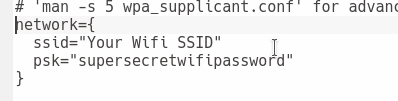
You can test the realtime kernel is enabled, by running in the commandline
uname -a
You should see something like this, note PREEMPT RT which indicates its realtime:
Linux realtimepi 4.9.52-rt37 #1 PREEMPT RT Fri Oct 6 22:29:28 UTC 2017 armv6l GNU/Linux
The line should look a little different for armv7
I am not an expert with actually building realtime systems, so input on how it preforms, and examples would be appreciated!
How to reuse your old Raspberry Pi as a Telegram-controlled Alarm Clock – AlarmPi August 14, 2017
Posted by GuySoft in diy, Electronics, open source, programming, python, Uncategorized.Tags: CustomPiOS, open source, raspsberrypi, release, telegram
add a comment

RaspberryPi alarm clock
Hey all,
So do you have a RaspberryPi not doing anything at home? Got that 2GB class 4 SD card that you just don’t know what to do with it? Well this guide is for you! It will let you turn your Pi in to an IOT alarm clock, no code, no complicated commands, just flash, edit two text files and you are good to go. The alarm clock is controlled from Telegram, so you can set it and turn it off from your smartphone. I find that usually using my phone wakes me up. So it’s useful for me. You can also edit the alarm and use any mp3 file you want.
The code is all available in github. AlarmBot is the Telegram Bot. An AlarmPi is the distro (built with CustomPiOS yet again). (more…)
ElectricSheepPi – Use your spare RaspberryPi to run evolving digital art! July 18, 2017
Posted by GuySoft in open source, programming.Tags: CustomPiOS, open source, programming, Raspberry Pi, raspbian
add a comment

Electric Sheep running on a Raspberry Pi
Hey all,
So its been a while since I had time to release something fun. After developing CustomPiOS I thought I might write something to demonstrate how easy it is to make your own RaspberryPi distribution with it. So I made one that runs Electric Sheep on boot. Its called ElectricSheepPi.
Electric Sheep is a collaborative abstract artwork that keeps evolving as you vote for “sheep”. So it makes nice visuals and is great to play on a spare screen and Pi. Raspberrypi 2 works, Raspberrypi 3 is recommended for smooth visuals. You can see examples of the visuals on youtube.
To run it
- Download the image
- Flash it like any distro
- set up wifi, set your wifi settings with the file electricsheep-network.txt or electricsheep-wpa-supplicant.txt.
- Plug to HDMI display, internet and boot
Its easy to write a custom distro with CustomPiOS!
To write I had to write a module for CustomPiOS, it was just 32 lines mostly copied from the electric sheep install manual. To make stuff start on boot I used the gui module which lets you start any gui application full screen at boot, that’s 2 lines in the config file.
Thank you Doc’s Tech for hosting the image yet again!
OctoPi version 0.6 – Control your 3D printer securely over the internet August 26, 2013
Posted by GuySoft in diy, Electronics, Hamakor, ITU, linux, open source, programming.Tags: linux, OctoPi, open source, Raspberry Pi, raspbian
27 comments

OctoPi new logo
Hey all,
OctoPi has got a lot of support, and it has been great to see people are adopting it.
I have released a new version of OctoPi, which has the following new features:
- Support for both Raspberry Pi camera and webcam. Depending on which you plug to the Pi (Thanks to Gina)
- New version of OctoPrint with ACL support
- OctoPrint now runs on HTTPS using HAProxy, allowing secure connection to your printer over the internet
Also, we had to change the logo due to it being the Raspberry Pi foundation trademark. Thanks for everyone on the google plus discussion (especially Janina).
Source code and project management is on github here
I will note it was pretty nice get in to this release PiCam support, since I have no camera it required collaboration of both Gina and me, meaning we have a distro now that probably can cope with more hardware than you would have in your average personal configuration.
Also thanks Matvin for the storage, and we also have another mirror lined up in case of a overload, which happened last time.
Enjoy everyone,
Guy


 Guysoft's Weblog
