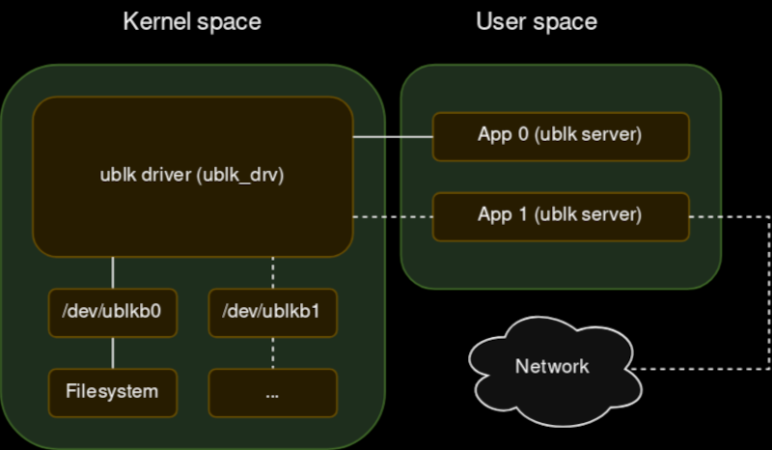
Your new project really could use a block device for Linux. File systems are easy to do with FUSE, but that’s sometimes too high-level. But a block driver can be tough to write and debug, especially since bugs in the kernel’s space can be catastrophic. [Jiri Pospisil] suggestsUblk, a framework for writing block devices in user space. This works using the io_uring facility in recent kernels.
This opens the block device field up. You can use any language you want (we’ve seen FUSE used with some very strange languages). You can use libraries that would not work in the kernel. Debugging is simple, and crashing is a minor inconvenience.
Another advantage? Your driver won’t depend on the kernel code. There is a kernel driver, of course, named ublk_drv, but that’s not your code. That’s what your code talks to.
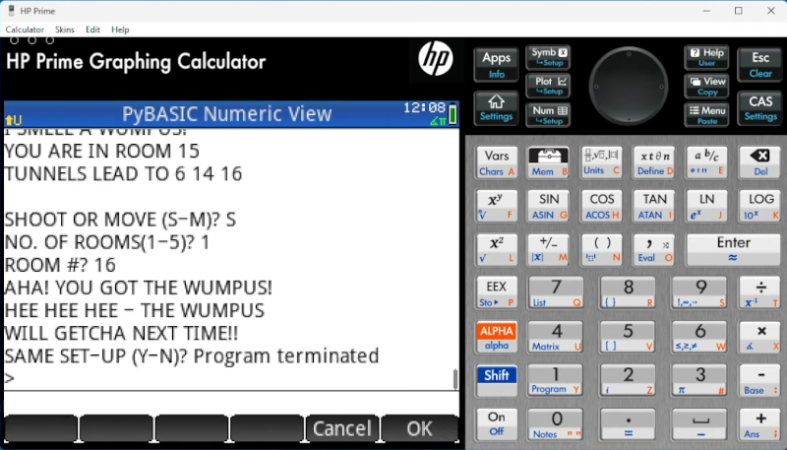
We are always amused that we can run emulations or virtual copies of yesterday’s computers on our modern computers. In fact, there is so much power at your command now that you can run, say, a DOS emulator on a Windows virtual machine under Linux, even though the resulting DOS prompt would probably still perform better than an old 4.77 MHz PC. Remember when you could get calculators that ran BASIC? Well, [Calculator Clique] shows off BASIC running on a decidedly modern HP Prime calculator. The trick? It’s running under Python. Check it out in the video below.
Think about it. The HP Prime has an ARM processor inside. In addition to its normal programming system, it has Micropython as an option. So that’s one interpreter. Then PyBasic has a nice classic Basic interpreter that runs on Python. We’ve even ported it to one or two of the Hackaday Superconference badges.
An important aspect in software engineering is the ability to distinguish between premature, unnecessary, and necessary optimizations. A strong case can be made that the initial design benefits massively from optimizations that prevent well-known issues later on, while unnecessary optimizations are those simply do not make any significant difference either way. Meanwhile ‘premature’ optimizations are harder to define, with Knuth’s often quoted-out-of-context statement about these being ‘the root of all evil’ causing significant confusion.
We can find Donald Knuth’s full quote deep in the 1974 articleStructured Programming with go to Statements, which at the time was a contentious optimization topic. On page 268, along with the cited quote, we see that it’s a reference to making presumed optimizations without understanding their effect, and without a clear picture of which parts of the program really take up most processing time. Definitely sound advice.
And unlike back in the 1970s we have today many easy ways to analyze application performance and to quantize bottlenecks. This makes it rather inexcusable to spend more time today vilifying the goto statement than to optimize one’s code with simple techniques like zero-copy and binary message formats.
The cache hierarchy of the 2008 Intel Nehalem x86 architecture. (Source: Intel)
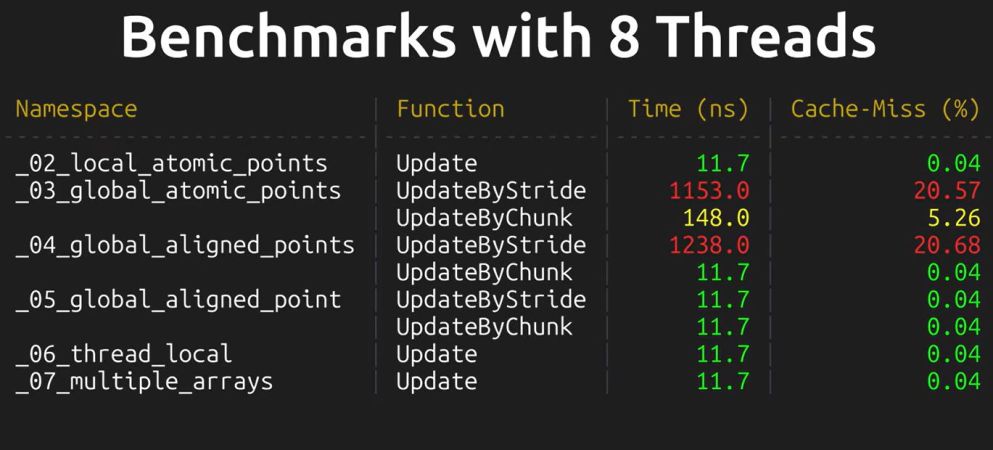
Writing good, performant code depends strongly on an understanding of the underlying hardware. This is especially the case in scenarios like those involving embarrassingly parallel processing, which at first glance ought to be a cakewalk. With multiple threads doing their own thing without having to nag the other threads about anything it seems highly doubtful that even a novice could screw this up. Yet as [Keifer] details in a recent video on so-called false sharing, this is actually very easy, for a variety of reasons.
With a multi-core and/or multi-processor system each core has its own local cache that contains a reflection of the current values in system RAM. If any core modifies its cached data, this automatically invalidates the other cache lines, resulting in a cache miss for those cores and forcing a refresh from system RAM. This is the case even if the accessed data isn’t one that another core was going to use, with an obvious impact on performance. As cache lines are a contiguous block of data with a size and source alignment of 64 bytes on x86, it’s easy enough to get some kind of overlap here.
The worst case scenario as detailed and demonstrated using the Google Benchmark sample projects, involves a shared global data structure, with a recorded hundred times reduction in performance. Also noticeable is the impact on scaling performance, with the cache misses becoming more severe with more threads running.
A less obvious cause of performance loss here is due to memory alignment and how data fits in the cache lines. Making sure that your data is aligned in e.g. data structures can prevent more unwanted cache invalidation events. With most applications being multi-threaded these days, it’s a good thing to not only know how to diagnose false sharing issues, but also how to prevent them.
Named roo_display for unclear reasons, the library is Arduino-compatible, and suits a wide range of ESP32 boards out in the wild. It’s intended for use with common SPI-attached display controllers, like the ILI9341, SSD1327, ST7789, and more. It’s performance-oriented, without skimping on feature set. It’s got all kinds of fonts in different weights and sizes, and a tool for importing more. It can do all kinds of shapes if you want to manually draw your UI elements, or you can simply have it display JPEGs, PNGs, or raw image data from PROGMEM if you so desire. If you’re hoping to create a touch interface, it can handle that too. There’s even a companion library for doing more complex work under the name roo_windows.
If you’re looking to create a simple and responsive interface, this might be the library for you. Of course, there are others out there too, like the Adafruit GFX library which we’ve featured before. You could even go full VGA if you wanted, and end up with something that looks straight out of Windows 3.1. Meanwhile, if you’re cooking up your own graphics code for the popular microcontroller platform, you should probably let us know on the tipsline!
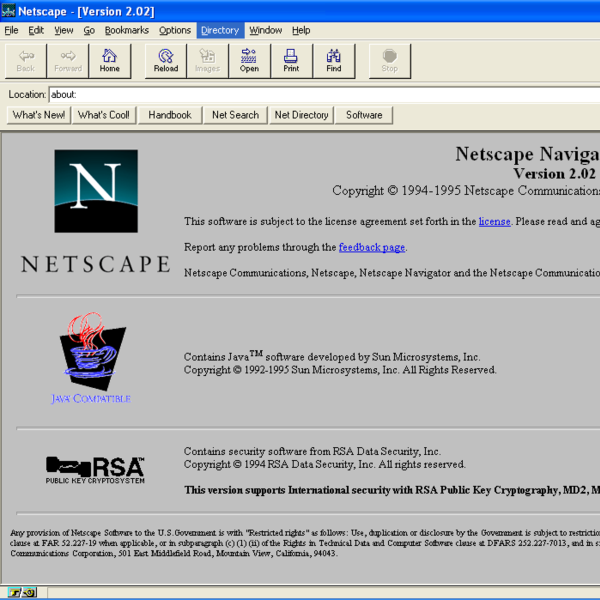
In today’s Chromed-up world it can be hard to remember an era where browsers could be extended with not just extensions, but also with plugins. Although for those of us who use traditional Netscape-based browsers like Pale Moon the use of plugins has never gone away, for the rest of the WWW’s users their choice has been limited to increasingly more restrictive browser extensions, with Google’s Manifest V3 taking the cake.
Although most browsers stopped supporting plugins due to “security concerns”, this did nothing to address the need for executing code in the browser faster than the sedate snail’s pace possible with JavaScript, or the convenience of not having to port native code to JavaScript in the first place. This led to various approaches that ultimately have culminated in the WebAssembly (WASM) standard, which comes with its own set of issues and security criticisms.
Other than Netscape’s Plugin API (NPAPI) being great for making even 1990s browsers ready for 2026, there are also very practical reasons why WASM and JavaScript-based approaches simply cannot do certain basic things.
[neos-builder] wrote in to let us know about their innovation: the HORUS Framework — Hybrid Optimized Robotics Unified System — a production-grade robotics framework built in Rust for real-time performance and memory safety.
This is a batteries included system which aims to have everything you might need available out of the box. [neos-builder] said their vision is to create a robotics framework that is “thick” as a whole (we can’t avoid this as the tools, drivers, etc. make it impossible to be slim and fit everyone’s needs), but modular by choice.
[neos-builder] goes on to say that HORUS aims to provide developers an interface where they can focus on writing algorithms and logic, not on setting up their environments and solving configuration issues and resolving DLL hell. With HORUS instead of writing one monolithic program, you build independent nodes, connected by topics, which are run by a scheduler. If you’d like to know more the documentation is extensive.
The list of features is far too long for us to repeat here, but one cool feature in addition to the real-time performance and modular design that jumped out at us was this system’s ability to process six million messages per second, sustained. That’s a lot of messages! Another neat feature is the system’s ability to “freeze” the environment, thereby assuring everyone on the team is using the same version of included components, no more “but it works on my machine!” And we should probably let you know that Python integration is a feature, connected by shared-memory inter-process communication (IPC).