Illustrated Kristina with an IBM Model M keyboard floating between her hands.

Keebin’ With Kristina: The One With The Ball-Joint Keyboard

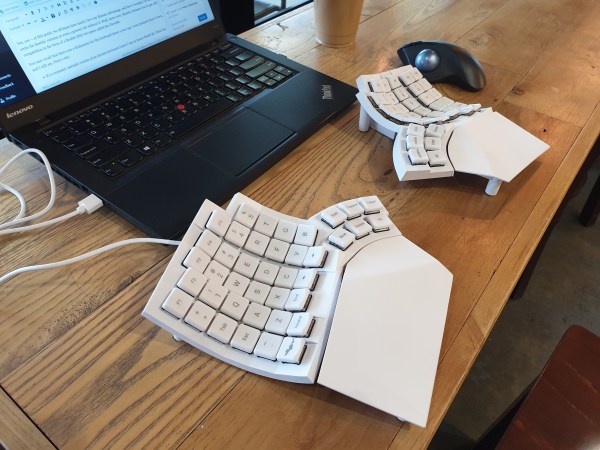
Get a handle on this bad boy! Okay, so those voids are really more for airing out your palms, I’d imagine, because palm sweat sure is real — you should see the pads of my Kinesis. This kind of looks like two sawed-off machine guns kissing, and I mean that in the best possible and non-violent way.

Image
Image by [ntc490] via reddit
So, [ntc490] has been on Team Special Keyboard for eight years now and decided it was time to design one. The goal was to make something semi-portable, super ergo, and as easy/cheap to build as possible, which, honestly, that sounds like one of those pick-two situations.

And yet, pricing (oh yeah, this is gonna be A Thing You Can Buy) will be around $115-155, depending upon whether you want the base kit, or the add-ons, too, minus switches and key caps.

So let’s get into the particulars here. As you can see, there are key wells and thumb clusters, inspired by other keyboards including your bog standard Maltrons, Kinesis Advantages and more modern, open-source takes like the Dactyl. [ntc490] loves the key well-thumb cluster combination, and I do, too (hello from the Glove80). And miraculously, the keys are hot-swappable via sockets.

Two hands rest on a joined split keyboard with keywells and tenting. The two halves are on ball joints and connect in the middle.
Image by [ntc490] via reddit
That novel tenting mechanism is adjustable, rugged, and portable. You can tent it near-vertical, lay it flat, or take it apart if you wish. The thing is modular for future expansion options such as wrist rests and displays.

Inside, you’d find direct wiring to the GPIOs, so I’m gonna guess that those are RP2040 clones in there. There’s no PCB, no diodes, no matrices to debug.

So please do go visit the thread if this keyboard appeals to you at this price point. I love it, but I would need more rows of keys, personally. The top reddit comment mentions this as well, and [ntc490] says that because the thing is modular, it can easily accommodate more keys in both the wells and the thumb clusters. I seriously want one of these. Just with a few more keys.

Continue reading “Keebin’ With Kristina: The One With The Ball-Joint Keyboard”
Image

Input Device Gets New Input Device

One of the nicest things about a trackpoint is that you don’t have to take your hands off the keyboard. One of the worst things about a trackpoint is its usual placement, which can force a weird hand position that can cause repetitive stress injury.

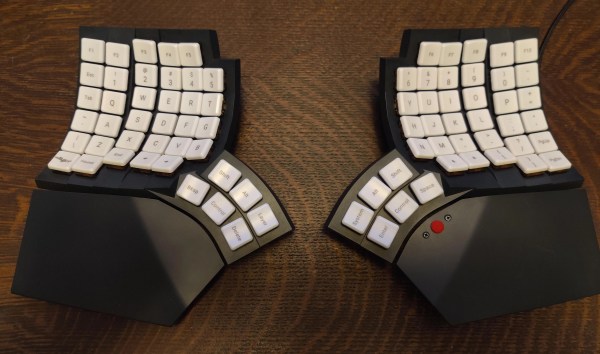
Image[notshitashi] has done an incredible job of adding a trackpoint to the Glove80 wireless split keyboard. It must have been really scary to drill holes in the palm rests of such a nice and not-cheap keyboard, but [notshitashi] soldiered on nonetheless, and the end result looks great.

Starting with a trackpoint module from Ali, [notshitashi] found that it didn’t fit the palm rest without being trimmed down, so they desoldered the business part from the main PCB and reattached it with wires. They had to go through a few of them to get it just right, but that’s the way it goes sometimes.

[notshitashi] calls this “a bit of a cheat and dirty hack” because the trackpoint module is wired and, therefore, a separate USB HID. Yes, the Glove80 has GPIO connectors in both halves, but the problem is that stock ZMK has yet to support pointing devices. We don’t care; this is quite the elegant hack anyway.

Want to jazz up your mechanical keyboard with a trackpoint? Here’s a handy guide. Or, you can perform a transplant.

Image

Glove80 Keyboard Sure Fits Like One

If you’re what one might call unlucky, there comes a point in your life when you need to switch to a keyboard that’s more ergonomic than your average rectangle. A little prevention goes a long way, though, and there’s no time like the present to go ergo. Why not? You have everything to gain, from long-lasting comfort to satisfying key presses.

The only problem is that most severely ergonomic keyboards just aren’t portable. At this point, we all know how much I love my Kinesis Advantage, and how I wouldn’t be able to write the Keebin’ column or even a grocery list without it. I have two now, and I take the ugly, yellowed, sticker-bombed one with me out into the world. But as much as I love it, I would really dig a a slimmed-down version that’s just as comfortable, perhaps more so. Well, move over, Kinesis, because you’ve got stiff competition in the form of a flexible little two-piece called the Glove80.

You may recall that there was a Kickstarter for this keyboard about a year ago. I was pumped about it then, and I still am. Here’s why:

Continue reading “Glove80 Keyboard Sure Fits Like One”