Image

This Unlikely Microsoft Prediction Might Just Hit The Mark

It’s fair to say that there are many people in our community who just love to dunk on Microsoft Windows. It’s an easy win, after all, the dominant player in the PC operating system market has a long history of dunking on free software, and let’s face it, today’s Windows doesn’t offer a good experience. But what might the future hold? [Mason] has an unexpected prediction: that Microsoft will eventually move towards offering a Windows-themed Linux distro instead of a descendant of today’s Windows.

The very idea is sure to cause mirth, but on a little sober reflection, it’s not such a crazy one. Windows 11 is slow and unfriendly, and increasingly it’s losing the position once enjoyed by its ancestors. The desktop (or laptop) PC is no longer the default computing experience, and what to do about that must be a big headache for the Redmond company. Even gaming, once a stronghold for Windows, is being lost to competitors such as Valve’s Steam OS, so it wouldn’t be outlandish for them to wonder whether the old embrace-and-extend strategy could be tried on the Linux desktop.

We do not possess a working crystal ball here at Hackaday, so we’ll hold off hailing a Microsoft desktop Linux. But we have to admit it’s not an impossible future, having seen Apple reinvent their OS in the past using BSD, and even Microsoft bring out a cloud Linux distro. If you can’t wait, you’ll have to make do with a Windows skin, WINE, and the .NET runtime on your current Linux box.
Image

Block Devices In User Space

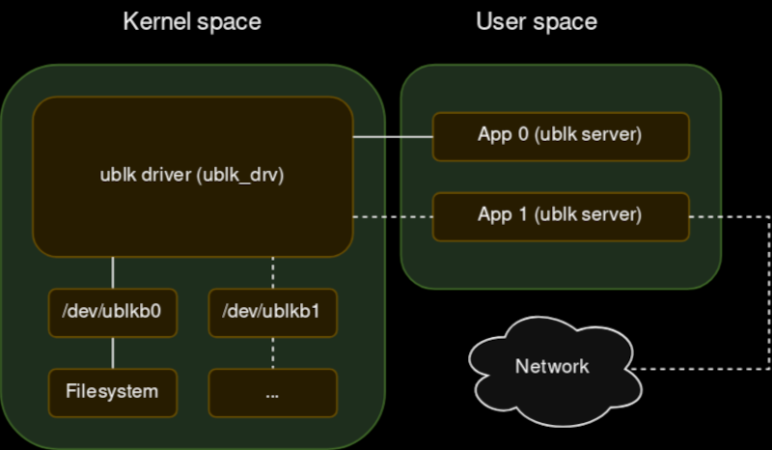
Your new project really could use a block device for Linux. File systems are easy to do with FUSE, but that’s sometimes too high-level. But a block driver can be tough to write and debug, especially since bugs in the kernel’s space can be catastrophic. [Jiri Pospisil] suggests Ublk, a framework for writing block devices in user space. This works using the io_uring facility in recent kernels.

This opens the block device field up. You can use any language you want (we’ve seen FUSE used with some very strange languages). You can use libraries that would not work in the kernel. Debugging is simple, and crashing is a minor inconvenience.

Another advantage? Your driver won’t depend on the kernel code. There is a kernel driver, of course, named ublk_drv, but that’s not your code. That’s what your code talks to.

Continue reading “Block Devices In User Space”

Image

The Windows Interface You Didn’t Like, For Linux

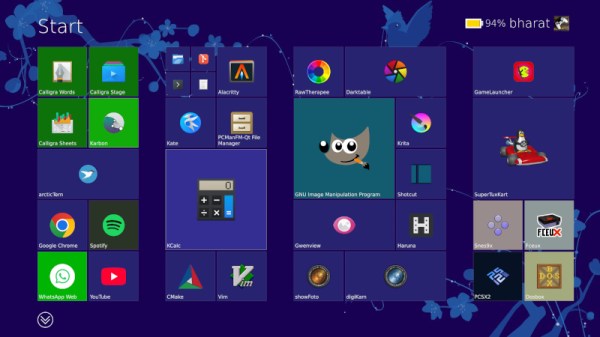
If you were asked to pick the most annoying of the various Microsoft Windows interfaces that have appeared over the years, there’s a reasonable chance that Windows 8’s Metro start screen and interface design language would make it your choice. In 2012 the software company abandoned their tried-and-tested desktop whose roots extended back to Windows 95 in favor of the colorful blocks it had created for its line of music players and mobile phones.

Consumers weren’t impressed and it was quickly shelved in subsequent versions, but should you wish to revisit Metro you can now get the experience on Linux. [er-bharat] has created Win8DE, a shell for Wayland window managers that brings the Metro interface — or something very like it — to the open source operating system.

We have to admire his chutzpah in bringing the most Microsoft of things to Linux, and for doing so with such a universally despised interface. But once the jibes about Windows 8 have stopped, we can oddly see a point here. The trouble with Metro was that it wasn’t a bad interface for a computer at all, in fact it was a truly great one. Unfortunately the computers it was and is great for are handheld and touchscreen devices where its large and easy to click blocks are an asset. Microsoft’s mistake was to assume that also made it great for a desktop machine, where it was anything but.

We can see that this desktop environment for Linux could really come into its own where the original did, such as for tablets or other touch interfaces. Sadly we expect the Windows 8 connection to kill it before it has a chance to catch on. Perhaps someone will install it on a machine with the Linux version of .net installed, and make a better Windows 8 than Windows 8 itself.

Image

A Linux Power User Puts SteamOS To Work

The line between a Linux user and a Linux power user is a bit gray, and a bit wide. Most people who install Linux already have more computer literacy than average, and the platform has long encouraged experimentation and construction in a way macOS and Windows generally aren’t designed for. Traditional Linux distributions often ask more of their users as well, requiring at least a passing familiarity with the terminal and the operating system’s internals especially once something inevitably breaks.

In recent years, however, a different design philosophy has been gaining ground. Immutable Linux distributions like Fedora Silverblue, openSUSE MicroOS, and NixOS dramatically reduce the chances an installation behaves erratically by making direct changes to the underlying system either impossible or irrelevant.

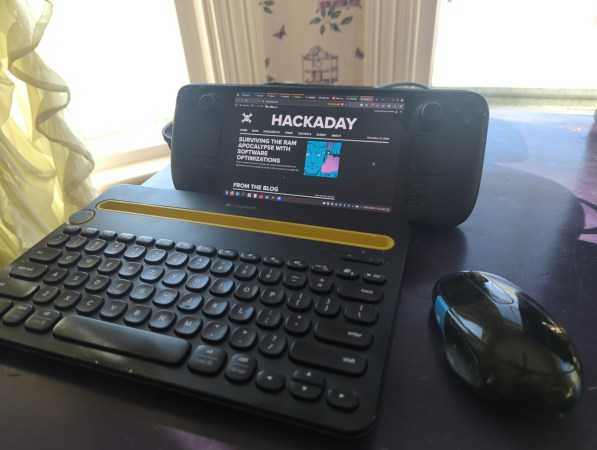
SteamOS fits squarely into this category as well. While it’s best known for its console-like gaming mode it also includes a fully featured Linux desktop, which is a major part of its appeal and the reason I bought a Steam Deck in the first place. For someone coming from Windows or macOS, this desktop provides a familiar, fully functional environment: web browsing, media playback, and other basic tools all work out of the box.

As a Linux power user encountering an immutable desktop for the first time, though, that desktop mode wasn’t quite what I expected. It handles these everyday tasks exceptionally well, but performing the home sysadmin chores that are second nature to me on a Debian system takes a very different mindset and a bit of effort. Continue reading “A Linux Power User Puts SteamOS To Work”

Image

Linux Fu: Yet Another Shell Script Trick

I’m going to go ahead and admit it: I really have too many tray icons. You know the ones. They sit on your taskbar, perhaps doing something in the background or, at least, giving you fingertip access to some service. You’d think that creating a custom tray icon would be hard, but on Linux, it can be surprisingly simple. Part of the reason is that the Freedesktop people created standards, so you don’t typically have to worry about how it works on KDE vs. GNOME or any of the other desktop environments. That’s a big win.

In fact, it is simple enough that you can even make your own tray icons with a lowly shell script. Well, of course, like most interesting shell scripts, you need some helper programs and, in this case, we’ll use YAD — which is “yet another dialog,” a derivative of Zenity. It’s a GTK program that may cause minor issues if you primarily use KDE, but they are nothing insurmountable.

The program is somewhat of a Swiss army knife. You can use it to make dialogs, file pickers, color selectors, printer dialogs, and even — in some versions — simple web browsers. We’ve seen plenty of tools to make pretty scripts, of course. However, the ability to quickly make good-looking taskbar icons is a big win compared to many other tools.

Docs

Depending on what you want to do, YAD will read things from a command line, a file, or standard input. There are dozens of options, and it is, honestly, fairly confusing. Luckily, [Ingemar Karlsson] wrote the Yad Guide, which is very digestible and full of examples.

Exactly what you need will depend on what you want to do. In my case, I want a tray icon that picks up the latest posts from my favorite website. You know. Hackaday?

Continue reading “Linux Fu: Yet Another Shell Script Trick”

Image

It’s Time To Make A Major Change To D-Bus On Linux

Although flying well under the radar of the average Linux user, D-Bus has been an integral part of Linux distributions for nearly two decades and counting. Rather than using faster point-to-point interprocess communication via a Unix socket or such, an IPC bus allows for IP communication in a bus-like manner for convenience reasons. D-Bus replaced a few existing IPC buses in the Gnome and KDE desktop environments and became since that time the de-facto standard. Which isn’t to say that D-Bus is well-designed or devoid of flaws, hence attracting the ire of people like [Vaxry] who recently wrote an article on why D-Bus should die and proposes using hyprwire instead.

The broader context is provided by [Brodie Robertson], whose video adds interesting details, such as that Arch Linux wrote its own D-Bus implementation rather than use the reference one. Then there’s CVE-2018-19358 pertaining to the security risk of using an unlocked keyring on D-Bus, as any application on said bus can read the contents. The response by the Gnome developers responsible for D-Bus was very Wayland-like in that they dismissed the CVE as ‘works as designed’.

One reason why the proposed hyperwire/hyprtavern IPC bus would be better is on account of having actual security permissions, real validation of messages and purportedly also solid documentation. Even after nearly twenty years the documentation for D-Bus consists mostly out of poorly documented code, lots of TODOs in ‘documentation’ files along with unfinished drafts. Although [Vaxry] isn’t expecting this hyprwire alternative to be picked up any time soon, it’s hoped that it’ll at least make some kind of improvement possible, rather than Linux limping on with D-Bus for another few decades.

Continue reading “It’s Time To Make A Major Change To D-Bus On Linux”

Image

Playing A Game Of Linux On Your Sony Playstation 2

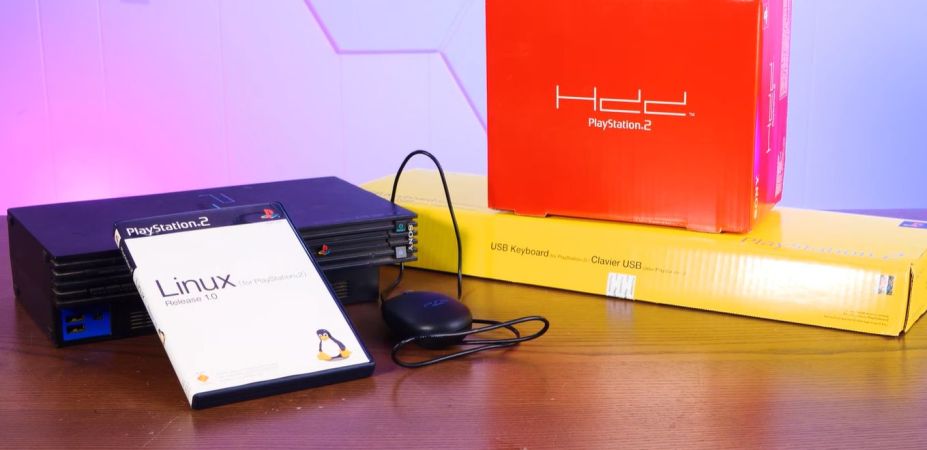
Until the 2000s, game consoles existed primarily to bring a bit of the gaming arcade experience to homes, providing graphical feats that the average home computer would struggle to emulate. By the 2000s this changed, along with the idea of running desktop applications on gaming console for some reason. Hence we got Linux for the PlayStation 2, targeting its MIPS R5900 CPU and custom GPU. Unlike these days where game consoles are reskinned gaming PCs, this required some real effort, as well as a veritable stack of accessories, as demonstrated by [Action Retro] in a recent video.

Linux on the PlayStation 2 was a bit of a rare beast, as it required not only the optional HDD and a compatible ‘fat’ PS2, but also an Ethernet adapter, VGA adapter and a dedicated 8 MB memory card along with a keyboard and mouse. PS2 Linux users were also not free to do what they wanted, with e.g. ripping PS2 game discs disallowed, but you could make your own games. All of which had to fit within the PS2’s meagre 32 MB of RAM.

Continue reading “Playing A Game Of Linux On Your Sony Playstation 2”