Image

A Petabyte NAS Using Consumer-Grade Parts

Self-hosting a few services on one’s own hardware is a great way to wrest some control over your online presence while learning a lot about computers, software, and networking. A common entry point is using an old computer or Raspberry Pi to get something like a small NAS, DNS-level adblocker, or home automation service online, but the hobby can quickly snowball to server-grade hardware in huge racks. [Dennis] is well beyond this point, with a rack-mounted NAS already up and running. This build expands his existing NAS to one which can host a petabyte of storage out of consumer-grade components.

The main reason for building this without relying too much on server-grade gear is that servers are generally designed to run in their own purpose-built rooms away from humans, and as a result don’t generally take much consideration for how loud that environment becomes. [Dennis] is building a lot of the components from scratch for this build including the case, the backplanes for the drives, and a backplane tester. With backplanes installed it’s time to hook up all of the data connections thanks to a few SAS expanders which provide all of the SATA connections for the 45 drives.

There are two power supplies here as well, although unlike a server solution these aren’t redundant and each only serves half the drives. This does keep it running quieter, along with a series of Noctua fans that cool the rest of the rack. The build finishes off with an LED strip which provides a quick visual status check for each of the drives in the bay. With that it’s ready for drives and to be connected to the network. It’s a ton of wiring and soldering, and great if you don’t want to use noisy server hardware. And, if you don’t need this much space or power, we’ve seen some NAS builds that are a bit on the smaller side as well.

Continue reading “A Petabyte NAS Using Consumer-Grade Parts”
Image

PC Fan Controller Works On Most Operating Systems

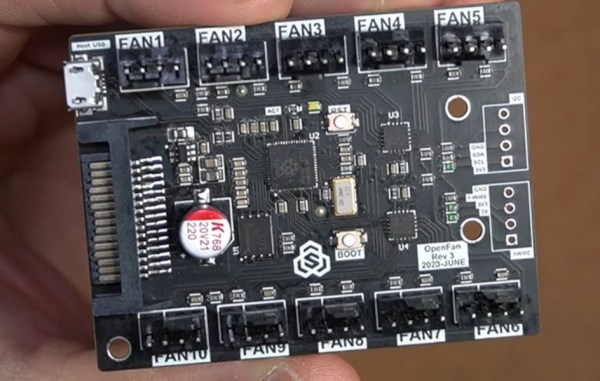
For better or worse, most drivers for PC-related hardware like RGB components and fan controllers are built for Windows and aren’t generally of the highest quality. They’re often proprietary and clunky, and even if they aren’t a total mess they generally won’t work on Linux machines at all, or even on a headless setup regardless of OS. This custom fan controller, on the other hand, eschews the operating system almost entirely in favor of an open source fan controller board that can be reached over a network instead.

The project’s creator, [Sasa Karanovic], experimented with fan splitters to solve his problems, but found that these wouldn’t be the ideal solution given the sheer number of fans he wanted in his various computers, especially in his network-attached storage machine. For that one he wanted ten fans, with control over them in custom groups that would behave in certain ways depending on what the computer was doing. His solution uses two EMC2305 five-fan controller chip which communicates over I2C on a custom PCB with a RP2040 at the center. This allows the hardware to communicate with USB to the host computer for updating firmware and controlling over the network. There’s also a 1-wire and I2C bus exposed in case any external sensors need to be integrated into this system as well. To get power for all of those fans, the board uses a SATA connector to get power from the computer’s power supply.

With the PCB built and all of the connections to the host computer made, the custom board is able to control up to 10 fans in any custom configuration without needing a monitor or a driver since it is accessible over the network through an API. It’s also open-source so any changes to the firmware or hardware can easily be made for most air-cooled PC situations. If you’re less concerned about the internal case temperature and more concerned about all the heat your PC is dumping into a living space, you might want to look into venting your PC outside instead.

Continue reading “PC Fan Controller Works On Most Operating Systems”