Hackaday Links Column Banner

Hackaday Links: January 18, 2026

Looking for a unique vacation spot? Have at least $10 million USD burning a hole in your pocket? If so, then you’re just the sort of customer the rather suspiciously named “GRU Space” is looking for. They’re currently taking non-refundable $1,000 deposits from individuals looking to stay at their currently non-existent hotel on the lunar surface. They don’t expect you’ll be able to check in until at least the early 2030s, and the $1K doesn’t actually guarantee you’ll be selected as one of the guests who will be required to cough up the final eight-figure ticket price before liftoff, but at least admission into the history books is free with your stay.

Mars One living units under regolith
This never happened.

The whole idea reminds us of Mars One, which promised to send the first group of colonists to the Red Planet by 2024. They went bankrupt in 2019 after collecting ~$100 deposits from more than 4,000 applicants, and we probably don’t have to tell you that they never actually shot anyone into space. Admittedly, the Moon is a far more attainable goal, and the commercial space industry has made enormous strides in the decade since Mars One started taking applications. But we’re still not holding our breath that GRU Space will be leaving any mints on pillows at one-sixth gravity.

Speaking of something which actually does have a chance of reaching the Moon on time — on Saturday, NASA rolled out the massive Space Launch System (SLS) rocket that will carry a crew of four towards our nearest celestial neighbor during the Artemis II mission. There’s still plenty of prep work to do, including a dress rehearsal that’s set to take place in the next couple of weeks, but we’re getting very close. Artemis II won’t actually land on the Moon, instead performing a lunar flyby, but it will still be the first time we’ve sent humans beyond Low Earth Orbit (LEO) since Apollo 17 in 1972. We can’t wait for some 4K Earthrise video.
Continue reading “Hackaday Links: January 18, 2026”

Image

Stay Online When The Power Goes Out With This Fiber Modem UPS Hack

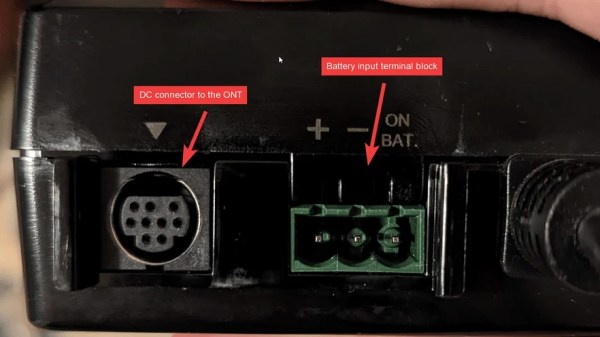
It’s desirable to have your Internet connection up at all times, particularly as it can take some time to get back online if you have a power interruption or similar. [Brink] had some issues with the power supply in their apartment, so they set about whipping up a backup power solution to keep their Verizon ONT fiber modem up and running in such events.

The I-211M-L modem is actually equipped to run on backup battery power, but by default, it will only keep phone service online. Data and television services are normally switched off when the mains supply goes out. Thankfully, a minor mod to the unit’s power cable shared by [mousehunt] enables it to keep data services online when running on backup power. Grounding a bunch of pins with a strip of foil is enough to do the job.

From there, it’s a simple matter of hooking up a stout 12 V battery to the modem via its backup power connector. [Brink] specified a nifty 12 V rechargeable lithium ion pack for the job, which is sold as a portable power unit for running LED strips. Some neat cabling to keep the battery charged later, and you’ve got a working UPS setup to keep the comms online.

Combined with a UPS to run the rest of your computers and networking equipment, this is a great solution to stay online during local power outages. We’ve featured some other great UPS hacks over the years, too, like these supercap UPSs for special cases. If you’ve got your own nifty power hacks, don’t hesitate to drop us a line!

Image

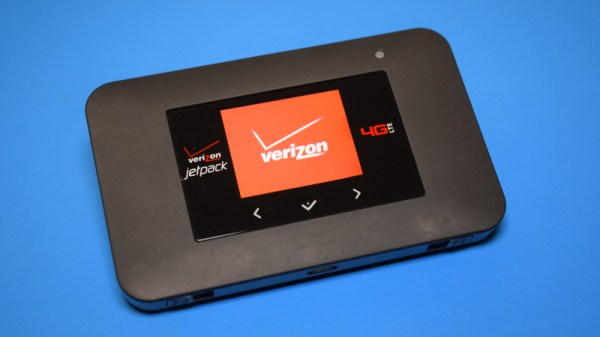
Teardown: Verizon AC791L Jetpack 4G Mobile Hotspot

The saying “time and tide wait for no man” is usually used as a verbal kick in the pants, a reminder that sometimes an opportunity must be seized quickly before it passes by. But it can also be interpreted as a warning about the perpetual march of time and how it impacts the world around us. In that case, we would do well to add cellular technology to the list of proverbial things that wait for no one. Do you need 5G? No. Do you want it? Probably not. But it’s here, so be a good consumer and dump all your 4G hardware in the name of technical progress.

This line of logic may explain how the Verizon-branded Netgear AC791L 4G “Jetpack” hotspot you see here, despite being in perfect working order, found itself in the trash. The onset of 5G must have been particularly quick for the previous owner, since they didn’t even bother to wipe their configuration information from the device. In the name of journalistic integrity I won’t divulge the previous owner’s identity; but I will say that their endearing choice of WPA2 key, iluvphysics, makes for a nice fit with our publication.

A quick check of eBay shows these devices, and ones like it, are in ample supply. At the time of this writing, there were more than 1,500 auctions matching the search term “Verizon jetpack”, with most of them going for between $20 and $50 USD. We like cheap and easily obtainable gadgets that can be hacked, but is there anything inside one of these hotspots that we can actually use? Let’s find out.

Continue reading “Teardown: Verizon AC791L Jetpack 4G Mobile Hotspot”

Dissecting A Firmware Image

dissecting-a-firmware-image

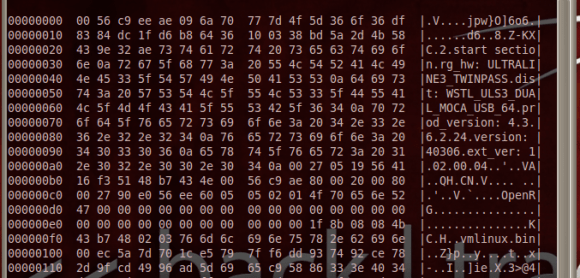
[Leland Flynn] did a great job of picking apart the firmware image for a Westell 9100EM FiOS router. Unfortunately he didn’t actually find the information he was looking for. But he’s not quite done poking around yet either. If you have never tried to make sense of an embedded Linux firmware image this serves as a great beginner’s example of how it’s done.

He was turned on to the project after port scanning his external IP and finding a random login prompt which he certainly didn’t set up. Some searching led him to believe this is some kind of back door for Verizon to push automatic firmware updates to his router. He figured why not see if he could yank the credentials and poke around inside of the machine?

He started by downloading the latest firmware upgrade. Running ‘hexdump’ and ‘strings’ gives him confirmation that the image is based on Linux. He’s then able to pick apart the package, getting at just the filesystem portion. His persistence takes him through extracting and decompressing three different filesystems. Even though he now has access to all of those files, broken symlinks meant a dead-end on his login search.

Unlocking Verizon Galaxy Note II And Galaxy S3

galaxy-note-II-verizon-unlock

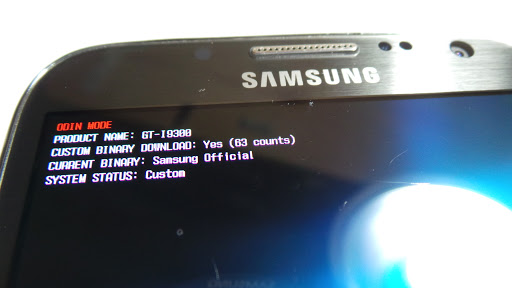
[Adam Outler] and friends have been hard at work unlocking the bootloader of some Verizon Android devices. His most recent adventure involves unlocking the Verizon branded Samsung Galaxy Note II.

You can’t run Cyanogenmod on a device that has a locked bootloader. This is presumably why it took no time at all for the XDA forum users with Verizon phones to raise enough money to put one of these puppies in [Adam’s] hands. He walks through the process he used to find the exploit in the video after the break. We’re not experts on the process, but apparently the .pit file used when flashing Odin is the entry point for the exploit. A bit of code has been injected into it which provides an opening to flash a replacement bootloader.

We mentioned the Galaxy S3 in the title. Apparently that has been unlocked as well but with one big hang-up. An over-the-air update could possibly brick the S3. To avoid this issue with the Galaxy Note II the original bootloader is patched and reflashed as part of the exploit.

Continue reading “Unlocking Verizon Galaxy Note II And Galaxy S3”

Use Droid Bionic As A Mobile Hotspot Without Paying Extra

Image

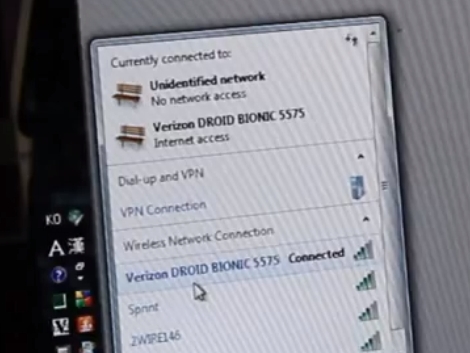
Apparently Verizon customers are expected to pay for a second data plan if they want to be allowed to use a cellphone as a mobile hotspot. This means one data plan for the phone, and a second for the tethering. [DroidBionicRoot] thinks this is a little silly since there is already a data cap on the phone’s plan. But he’s found a way around it if you don’t mind rooting the phone to enable free tethering.

Not surprisingly it’s a very simple alteration. The phone is already capable of tethering, to enable the feature without Verizon’s permission just edit one database value. In the video after the break, [DroidBionicRoot] starts the process with a rooted Droid Bionic handset. He purchases an app for $2.99 which allows him to edit SQL databases on the handset. From there he navigates to the ‘Settings Storage’ database and changes the ‘entitlement_check’ key value to 0. Reboot the phone and tethering is now unlocked.

Continue reading “Use Droid Bionic As A Mobile Hotspot Without Paying Extra”

WiFi On A Sprint Pixi

[youtube=http://www.youtube.com/watch?v=kpFYoT2lYU0]

The Sprint version of the Palm Pixi doesn’t have a WiFi option but the Verizon version (called the Palm Pixi Plus) does. The hardware is almost the same and [Gitit20] figured out how to do some hardware swapping to add WiFi. The radio board inside the phone is fairly easy to remove. Close inspection of the Sprint radio board shows some solder pads where a WiFi chip would go. The Verizon version has this chip, and moving that radio board into the Sprint phone will enable WiFi. This is strictly a hardware hack as the device identification (IMEA) is paired with the motherboard and not the radio board.

Now we want to see someone source that WiFi chip, solder onto the board, and enable it within the OS so that we don’t need a donor phone to make this work.

[Thanks Juan]