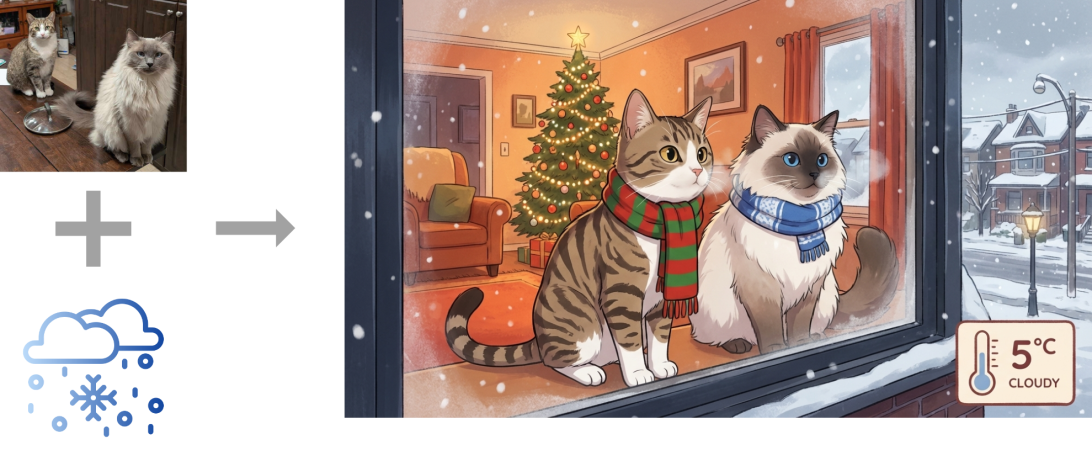
A photo of the cats and the generated image

The Cutest Weather Forecast On E-Ink And ESP32

There’s a famous book that starts: “It is a truth universally acknowledged that a man in possession of a good e-ink display, must be in want of a weather station.” — or something like that, anyway. We’re not English majors. We are, however, major fans of this feline-based e-ink weather display by [Jesse Ward-Bond]. It’s got everything: e-ink, cats, and AI.

Image
The generated image needs a little massaging to look nice on the Spectra6 e-ink display.

AI? Well, it might seem a bit gratuitous for a simple weather display, but [Jesse] wanted something a little more personalized and dynamic than just icons. With that in the design brief, he turned to Google’s Nano Banana API, feeding it the forecast and a description of his cats to automatically generate a cute scene to match the day’s weather.

That turned out to not be enough variety for the old monkey brain, so the superiority of silicon — specifically Gemini–was called upon to write unique daily prompts for Nano Banana using a random style from a list presumably generated by TinyLlama running on a C64. Okay, no, [Jesse] wrote the prompt for Gemini himself. It can’t be LLM’s all the way down, after all. Gemini is also picking the foreground, background, and activity the cats will be doing for maximum neophilia.

Aside from the parts that are obviously on Google servers, this is all integrated in [Jesse]’s Home Assistant server. That server stores the generated image until the ESP32 fetches it. He’s using a reTerminal board from SeedStudio that includes an ESP32-S3 and a Spectra6 colour e-ink display. That display leaves something to be desired in coloration, so on top of dithering the image to match the palette of the display, he’s also got a bit of color-correction in place to make it really pop.

If you’re interested in replicating this feline forecast, [Jesse] has shared the code on GitHub, but it comes with a warning: cuteness isn’t free. That is to say, the tokens for the API calls to generate these images aren’t free; [Jesse] estimates that when the sign-up bonus is used up, it should cost about fourteen cents a pop at current rates. Worth it? That’s a personal choice. Some might prefer saving their pennies and checking the forecast on something more physical, while others might prefer the retro touch only a CRT can provide. 
Image

Build Yourself A Graphing Weather Display

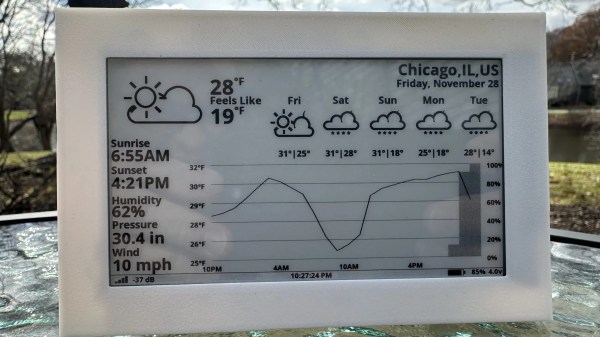
These days, Internet connectivity is ubiquitous, so you can look up live weather data on just about any device around you. Regardless, [Jozerworx] wanted a simple, clean, independent weather display, and came up with this simple design. 

The build is based on the Lilygo T5 EPD devboard, which combines an ESP32-S3 microcontroller with a nice 4.7-inch e-paper display. This display has the benefit that it only uses power when it’s being updated, making it particularly suitable to run off a battery for extended periods of time. Meanwhile, the ESP32 and its inbuilt Wi-Fi connectivity allow it to query the internet for updated weather forecasts. Weather data is sourced via the OpenWeather API, which [Jozerworx] notes comes with the caveat of requiring an API key. It’s a little fussy, but if you want good weather data, there are few easier ways to get it. The display shows a forecast for the next five days, while also showing graphs of ambient temperature and humidity along with useful information like the sunset and sunrise schedule.

Files are on Github for those eager to learn more. [Jozerworx] also notes that getting started with the display is particularly easy with the inclusion of a setup mode. This allows the display to act as a Wi-Fi access point with a web page that you use enter your home Wi-Fi connection details.

We’ve featured a great many charming weather displays over the years, too. If you’re working to plot, chart, or even predict the weather—don’t hesitate to show us your cool projects over on the tipsline!

Continue reading “Build Yourself A Graphing Weather Display”

ESPTimeCastVFD

ESP32 Invades Old TV Box: Forecast More Than Just Channels

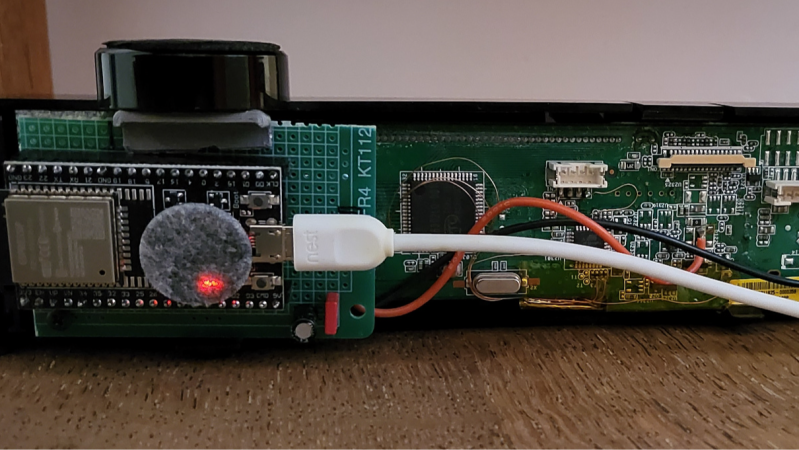
Obsolete hardware is all around us, and some of it has some pretty interesting tech buried within. One such device is an old Belgacom TV Box. Instead of using the ubiquitous LCD screen, it uses a VFD display for its user interface, and [Jean] has taken control of it with the ESPTimeCastVFD project.

Inside this box is a mix of two different 7-segment displays, which he uses to show the time and date, and 12 VFD displays, which are used to show weather data. To get the display working, the box was taken apart, and there were a few different areas [Jean] had to tap into: power for the soon-to-be-embedded ESP32-WROOM-32, as well as tying into the SPI lines to control the VFD. [Jean] also needed a 3.3V to 5V level shifter, and for this he used a 74LS125N dating all the way back to 1978.

The ESPTimeCast project, which we’ve featured here before, handles a lot of the time display and weather forecast shown on the front panel. However, [Jean] did have to add support for the VFD display, as well as adding wind speed to the display—as one of his uses for this is to judge the day’s suitability for flying RC planes. Once powered up, the ESP32 hosts a WiFi access point, allowing you to connect to it and set the configuration of the device, such as location, WiFi credentials, what displays you want to see, and many more. Thank you [Jean] for sending in your hack, saving this device from a landfill by turning it into a personalized display! Be sure to check out some of our other weather displays we’ve featured!

Continue reading “ESP32 Invades Old TV Box: Forecast More Than Just Channels”

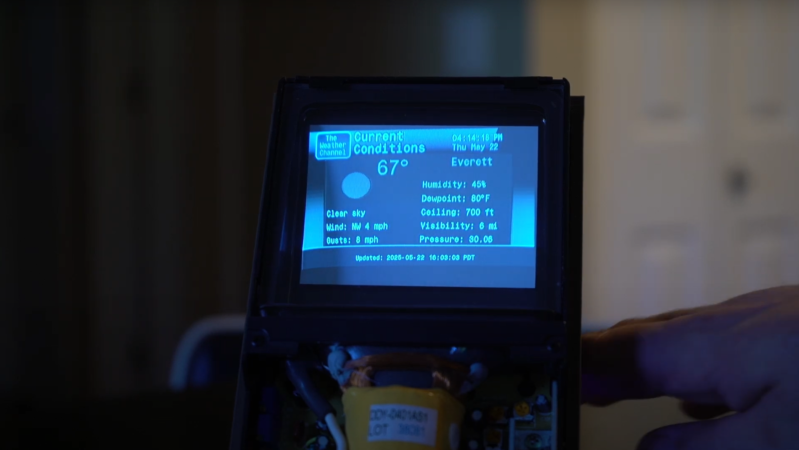
A weather forecast is shown on a blue monochrome cathode ray tube display. It is displaying current conditions, and displays a “The Weather Channel” graphic in the top left corner.

A CRT Display For Retro Weather Forecasting

It would be hard to find any electronics still in production which use CRT displays, but for some inscrutable reason it’s easy to find cheap 4-inch CRTs on AliExpress. Not that we’re complaining, of course. Especially when they get picked up for projects like this Retro CRT Weather Display from [Conrad Farnsworth], which recreates the interface of The Weather Channel’s WeatherStar 4000+ in a suitably 90s-styled format.

The CRT itself takes up most of the space in the enclosure, with the control electronics situated in the base behind the display driver. A Raspberry Pi Zero W provides the necessary processing power, and connects to the CRT through its composite video output.

ImageA custom PCB plugs into the GPIO header on the Raspberry Pi and provides some additional features, such as a rotary encoder for volume and brightness display, a control button, a serial UART interface, and a speaker driver. The design still has one or two caveats: it’s designed to powered by USB, but [Conrad] notes that it draws more current than USB 2.0 can provide, though USB-C should be able to keep up.

On the software side, a Python program displays a cycle of three slides: local weather, regional weather, and a radar display. For the local and regional weather display graphics, [Conrad] created a static background image containing most of the graphics, and the program only generated the dynamic components. For the radar display, the regional map’s outlines come from Natural Earth, and a Python program overlays radar data on them.

We’ve seen other attempts at recreating the unique style of the WeatherStar system, but nothing quite beats the real thing.
Continue reading “A CRT Display For Retro Weather Forecasting”

Image

Inkycal Makes Short Work Of E-Paper Dashboards

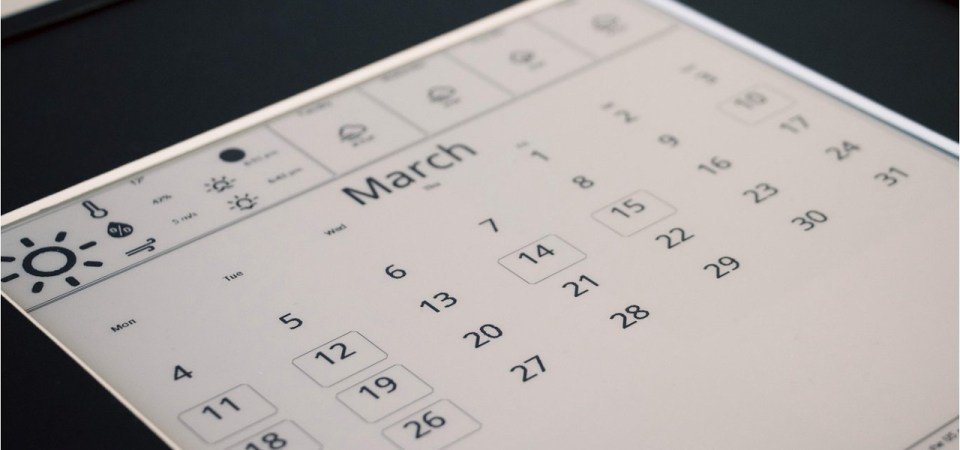
The e-paper “dashboard” is something we’ve seen plenty of times here at Hackaday. Use it to show your daily schedule, the news, weather, maybe the latest posts from your favorite hardware hacking website. Any information source that doesn’t need to be updated more than every hour or so is a perfect candidate. All you’ve got to do is write the necessary code to pull  down said data and turn it into a visually attractive display.

Well, that last part isn’t always so easy. There are plenty of folks who have no problem cobbling together a Raspberry Pi and one of the commercially available e-paper modules, but writing the software to turn it into a useful information center is another story entirely. Luckily, Inkycal is here to help.

ImageThis open source project uses Python to pull information from a wide variety of sources and turns it into an e-paper friendly dashboard. It works with Waveshare displays ranging from 4.2 inches all the way up to the massive 12 inch tricolor panels. While it could theoretically be deployed on any operating system running a modern version of Python, it’s primarily developed to be run under Linux and on the Raspberry Pi. All of the versions of the Pi are supported, so no need to spring for the latest and greatest model. In fact, the notoriously pokey Raspberry Pi Zero is their recommended platform thanks to its low power consumption.

With Inkycal on the Pi — they even provide a pre-configured SD card image — and the e-paper display hooked up, all you need to do is pick which sources you want to use from the web-based configuration page. Look ma, no code!

Not feeling like putting the hardware together either? Well, we might wonder how you’ve found yourself on Hackaday if that’s the case. But if you really would rather buy then build, you can get a pre-built Inkcal display right now on Tindie.

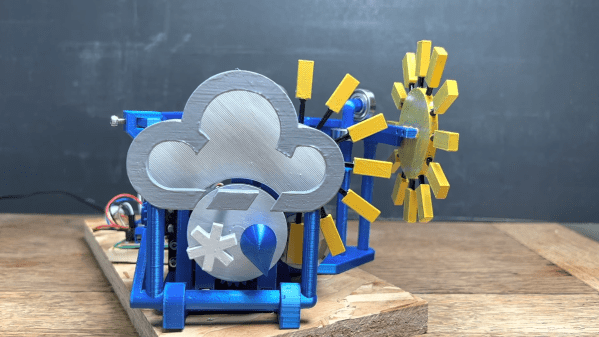
A 3D-printed mechanical system that moves weather symbols around

3D Printed Mechanical Contraption Shows Live Weather Forecast

“What’s the weather going to be like today?” is a question that’s near-permanently on the mind of those living in places like Britain, where brilliant sunshine can follow thick clouds, only to turn into drizzle an hour later. Nowadays you simply need to glance at your phone to know whether you need to pack an umbrella, but where’s the fun in that? Why not have a huge mechanical display to show you a summary of today’s weather?

As a fan of automatons and other contraptions filled with gears and pulleys, [Mike] decided to build just such a machine for his latest Mikey Makes video. It uses brightly coloured indicators inspired by the BBC’s famous “fluffy cloud” symbols that can show various combinations of sunshine, clouds, rain and snow. These symbols are moved around by dozens of gears, levers, swinging arms and other moving parts which were all 3D printed. We especially like the system that folds out rays of sunshine from behind the cloud; you can see it working in the video embedded below.

Live weather data is fetched through an open weather API by an Arduino MKR WiFi 1010. This then drives the mechanical system through a pair of motor driver ICs. The heavy work is performed by stepper motors and servos, while micro-switches and optical detectors determine the end point of each movement.

If you’re into weather displays, you’re in luck: we’ve featured many different styles over the years, including e-paper screens, analog gauges, split-flap displays and even a miniature recreation of the local weather.

Continue reading “3D Printed Mechanical Contraption Shows Live Weather Forecast”

Image

M5Paper Gets Open Source Weather Display Firmware

We know you like soldering irons, we’re quite fond of them ourselves. But the reality is, modular components and highly capable development boards allow the modern hardware hacker to get things done with far less solder smoke then ever before. In fact, sometimes all you need to finish your project is the right code.

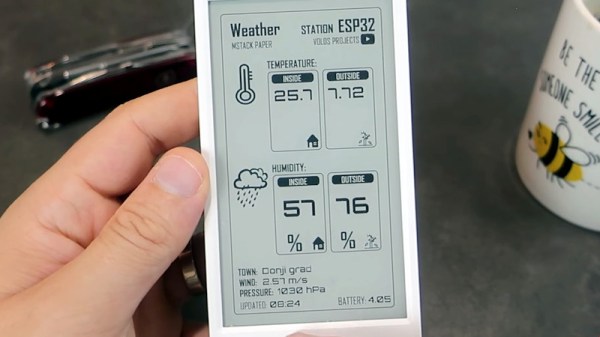
Case in point, check out the slick electronic paper weather display that [Danko Bertović] shows off in the latest Volos Projects video. While it certainly fits the description of a DIY project, he didn’t have to put any of the hardware together himself. The M5Paper is an ESP32 development kit designed around a crisp 4.7″, 960 x 540 e-paper panel that includes everything from environmental sensors to an internal 1150 mAh battery. To make your handheld e-paper dreams come true, the only thing you need to provide is the software.

The weather display code provided by [Danko] should certainly get you going in the right direction. Now don’t get us wrong, there’s certainly no shame in just flashing his code to the device and plunking it on your desk. It’s a gorgeous looking interface, and we all know that a sprinkling of open source code is often all it takes to make a standard consumer device extraordinary. But by using the code he’s provided as a launching point, you can take this turn-key device and really make it your own.

Continue reading “M5Paper Gets Open Source Weather Display Firmware”