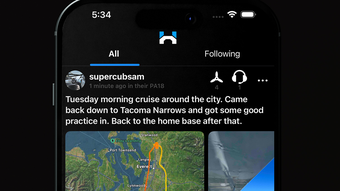

Share Flight Paths with the Aviation Community
Overview
Hangar is a specialized iOS application designed for aviation enthusiasts seeking to connect, share, and explore flight experiences through a dynamic digital platform. Built around the concept of flight path sharing, the app enables users to broadcast multi-leg flight routes using ADS-B technology, creating a real-time, community-driven aviation network. It serves as both a personal logbook alternative and a social hub where pilots can showcase their journeys, view profiles of other aviators, and discover new routes. The platform supports interaction through user profiles that display certificates, ratings, and preferred aircraft, fostering a sense of community and professional transparency.
Target users include private pilots, flight students, aviation hobbyists, and professionals who value connectivity and data sharing in the aviation space. The app’s integration of an extensive airport database with live weather updates and user-generated reviews adds practical utility beyond social interaction. This makes it valuable for pre-flight planning, route discovery, and community engagement. The developer has focused on creating a tool that blends real-world flight data with social networking features, tailored specifically for iOS users within the aviation ecosystem.
Hangar operates on a freemium model, offering core functionalities at no cost while providing Pro Accounts for enhanced access. The app’s release date was May 14, 2024, with version 2.3.4 currently available. While specific developer background details were not provided, the app’s focus on aviation-specific data and community-driven features suggests a targeted development approach.
Key Features & Capabilities
- Multi-leg Flight Path Sharing: Users can record and share complex flight itineraries across multiple segments using ADS-B signals, enabling detailed route visualization and community access.
- ADS-B Integration: The app leverages Automatic Dependent Surveillance-Broadcast technology to capture real-time flight data, ensuring accurate and reliable route tracking.
- Pilot Profiles: Each user maintains a profile displaying aviation credentials, ratings, and favorite aircraft, promoting transparency and peer recognition.
- Comprehensive Airport Database: Access to a curated list of airports with up-to-date weather conditions, user reviews, and operational details supports flight planning and situational awareness.
- Search & Discovery Tools: Users can search for other pilots by username or airports, facilitating connections and content discovery within the community.
- Free Core Features with Pro Upgrade Option: Essential tools like flight sharing, profile viewing, and airport data access are available at no cost, with additional features unlocked via subscription.
These capabilities make Hangar ideal for pilots who want to document and share their flights, compare routes, or engage with others in the aviation world. For example, a flight student might use the app to review routes flown by experienced pilots, while a private pilot could share a cross-country journey with friends. The combination of real-time data and social interaction enhances both learning and community bonding.
User Interface, Workflow & Performance
The user interface of Hangar is designed for intuitive navigation on iOS devices, featuring a clean layout with clearly labeled sections for flight sharing, profile viewing, and airport search. Navigation is streamlined through a bottom tab bar, allowing quick access to core functions such as the flight feed, user profiles, and the airport directory. The app’s workflow emphasizes simplicity: users can initiate a flight share with minimal steps, and the interface adapts dynamically to display flight paths, weather data, and user interactions.
Based on general software behavior patterns, Hangar likely maintains efficient performance during active flight tracking, though specific resource usage details were not specified. The app’s responsiveness during route visualization and profile loading appears to be optimized for mobile environments. Stability during extended use or frequent data updates has not been publicly documented, but the use of standard iOS frameworks suggests reliable operation under typical conditions.
The developer did not specify resource usage details, including CPU or RAM consumption. However, given the app’s reliance on real-time ADS-B data and map rendering, performance may vary depending on network connectivity and device capabilities. Users should expect smooth operation on modern iOS devices, but older models may experience delays in data refresh or map rendering.
Compatibility & System Requirements
Hangar is designed exclusively for iOS devices and requires version 2.3.4 of the application. The installation size is 258 MB, which reflects the inclusion of map data, flight tracking modules, and multimedia assets. The app is compatible with the latest iOS versions, though specific OS version requirements were not listed. The developer did not provide additional system requirements, including minimum processor speed, RAM, or storage capacity beyond the base file size.
Compatibility information was partially provided. Users are advised to ensure their device runs a current version of iOS to maintain optimal functionality. The app’s reliance on ADS-B signals means that access to real-time flight data depends on both the device’s hardware capabilities and network availability. The developer did not specify whether offline mode is supported or how data is cached.
Pros and Cons
Pros
- Free access to core flight sharing and profile viewing features
- Real-time multi-leg flight path sharing via ADS-B technology
- Integrated airport database with live weather and user reviews
- Strong focus on aviation community engagement and peer interaction
- Simple, intuitive interface optimized for iOS devices
- Pro Account option for advanced functionality without upfront cost
Cons
- Only available on iOS, limiting access for Android or desktop users
- Exact system requirements were not specified
- Performance under low network conditions or on older devices may vary
- Offline functionality details were not disclosed
- Pro features are not fully detailed in public documentation
FAQ Section
Is Hangar available for Android or desktop?
Hangar is currently designed exclusively for iOS devices. There is no official version available for Android or desktop platforms as of the latest release.
Is Hangar safe to use with personal flight data?
The app allows users to share flight paths and profiles, but the developer did not provide specific details on data encryption or privacy policies. Users should review the app’s terms of service and privacy settings before sharing sensitive information.
How often does Hangar update?
The app was last updated on May 14, 2024, with version 2.3.4. The developer has not disclosed a regular update schedule, but future updates are expected to include new features and performance improvements.
What type of license does Hangar use?
Hangar operates under a freemium model. Core features are free to use, while additional tools are available through a Pro Account subscription. The exact licensing terms for the Pro tier were not specified in public documentation.
Can I use Hangar without an internet connection?
The developer did not provide information on offline functionality. While some data may be cached locally, real-time flight sharing and weather updates require an active internet connection.
Final Thoughts + CTA
Hangar stands out as a purpose-built iOS application that successfully merges aviation data with social networking, offering a unique platform for flight enthusiasts to share, explore, and connect. Its integration of ADS-B technology, comprehensive airport database, and pilot profiles creates a rich ecosystem tailored for aviation professionals and hobbyists alike. While the app is limited to iOS and lacks detailed technical documentation, its core features are accessible and well-organized.
For pilots who value community interaction, route transparency, and real-time flight data, Hangar delivers a compelling experience. The freemium model ensures broad accessibility, while the Pro Account option supports continued development and feature expansion. The app’s focus on aviation-specific needs sets it apart from generic social platforms.
Download Hangar now to join a growing network of aviation enthusiasts and start sharing your flight journeys today.








