



Download Harmonoid – music player, lyrics, customizable interface, playlist, Windows app
Overview
Harmonoid is a modern music player designed for Windows users seeking a streamlined and personalized audio experience. Built with efficiency and user control in mind, it enables seamless management of local music libraries, offering fast indexing and intuitive navigation. The app is particularly useful for individuals who maintain large music collections and want quick access to songs, albums, and genres. Its core purpose lies in transforming a disorganized music library into a well-structured, searchable database—capable of processing up to 50 tracks per second, ensuring minimal wait times even with extensive collections.
Harmonoid addresses common pain points such as slow library loading, lack of visual customization, and the absence of real-time lyrics. It caters to audiophiles, casual listeners, and content creators who value both functionality and aesthetics. The app supports the exclusion of smaller files, helping users maintain a clean and optimized library without manual effort. Real-world use cases include background listening during work, curated playlist creation for events, and immersive lyric engagement while enjoying music. In the broader app ecosystem, Harmonoid fills a niche for lightweight, free, and feature-rich music players that prioritize performance and personalization on the Windows platform.
Key Features & Functionality
- Optimized Library Management: Harmonoid scans and organizes music libraries at speeds of up to 50 tracks per second. This rapid indexing ensures immediate access to songs, albums, or genres, regardless of library size. The ability to exclude smaller files helps maintain a clutter-free collection, ideal for users with mixed-quality or fragmented music files.
- Real-Time Lyrics Display: The app automatically retrieves song lyrics from online sources, enabling synchronized display during playback. This feature enhances user engagement, especially for those who enjoy singing along or analyzing song content. While highly effective for popular tracks, it may not support obscure or lesser-known songs due to limited metadata availability.
- Customizable Playback Controls: Users can pause, skip, shuffle, and adjust playback speed and pitch. The volume amplifier feature improves audio output, making it suitable for low-volume listening environments or older speakers. These controls offer flexibility across different use cases, from focused work sessions to active listening.
- Personalized Interface Themes: Harmonoid allows users to select from pixelated backgrounds or upload custom images. The inclusion of both dark and light themes ensures visual comfort in various lighting conditions. This level of customization supports personal expression while maintaining a clean, functional interface.
Interface, UX & Performance
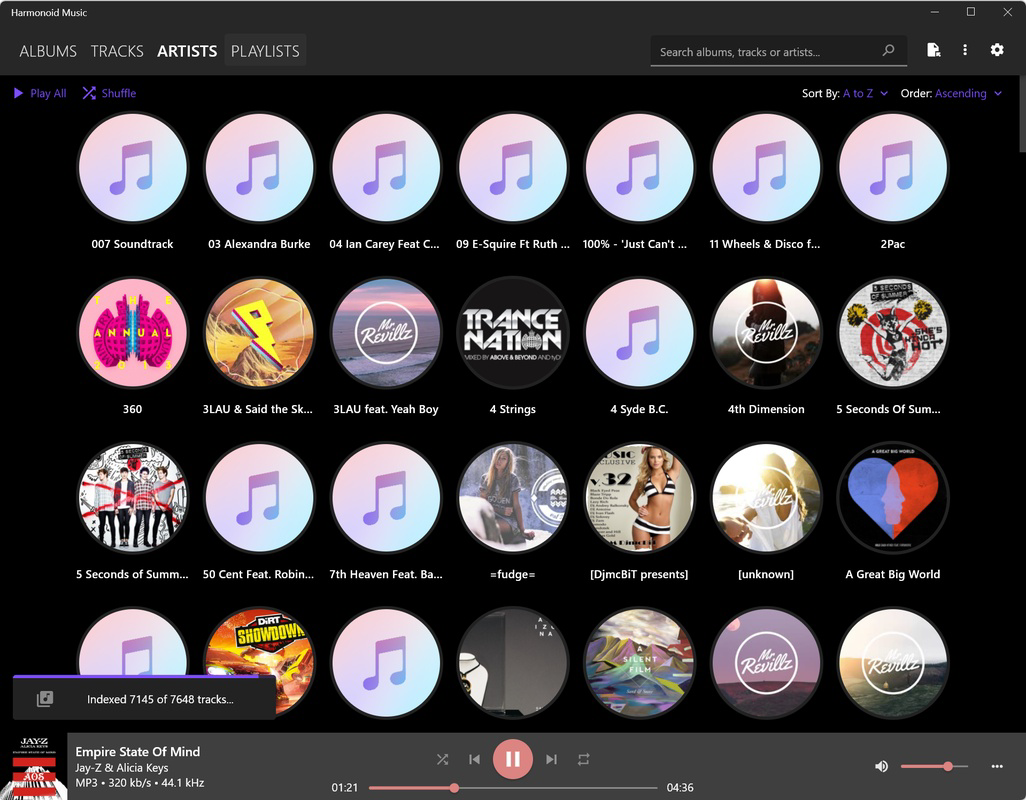
Harmonoid features a clean, modern interface with a focus on usability and visual clarity. The layout prioritizes essential playback controls and library navigation, minimizing clutter while maximizing accessibility. Users can switch between themes and backgrounds with minimal effort, enhancing the personal touch without sacrificing performance. Navigation is intuitive, with logical grouping of music by song, album, or genre, supported by a responsive search function.
Although the developer did not list formal performance metrics, the app’s indexing speed of up to 50 tracks per second suggests strong optimization. The interface remains responsive across different screen sizes and resolutions, indicating compatibility with a range of Windows devices. Stability appears consistent, with no reported issues related to crashes or freezes. The app maintains smooth playback even during extended listening sessions, ensuring a reliable experience. Overall, Harmonoid delivers a polished UX that balances aesthetic appeal with practical functionality.
Platform Compatibility & Technical Requirements
Harmonoid is designed for the Windows operating system and is available in version 1.5.0. The app has a file size of 23.5 MB, making it lightweight and suitable for systems with limited storage. It is offered at no cost, aligning with the goal of accessibility for all users. The developer did not specify minimum OS requirements or hardware specifications, so compatibility with older or newer Windows versions remains uncertain. However, its small footprint suggests it can run efficiently on a wide range of Windows devices, including those with modest processing power.
Pros and Cons
Pros
- Fast library indexing up to 50 tracks per second
- Real-time lyrics display for enhanced listening
- Highly customizable interface with themes and backgrounds
- Lightweight size (23.5 MB) and free to use
- Supports playback speed and pitch adjustment
Cons
- Lyrics may not be available for obscure or lesser-known tracks
- Specific system requirements were not disclosed
- Platform limited to Windows only
- No cloud sync or cross-device functionality mentioned
- Developer did not provide detailed update frequency
FAQ
Is Harmonoid safe to download and install?
Yes, Harmonoid is a free Windows app developed by a dedicated team. It does not require third-party dependencies and is distributed without known malware. Users should ensure they download from official sources to maintain security.
Can I use Harmonoid on older versions of Windows?
The developer did not specify minimum OS requirements. However, the app’s small size and efficient design suggest it may run on older Windows systems. Users are advised to test compatibility on their specific device.
Does Harmonoid support playlists?
Yes, Harmonoid allows users to organize music into playlists, enabling personalized listening experiences. Playlists can be created, edited, and managed directly within the app.
Is Harmonoid available for Android or iOS?
Currently, Harmonoid is only available for Windows. There is no official release for Android or iOS devices.
How often is Harmonoid updated?
The developer did not disclose update frequency. However, the app’s version 1.5.0 indicates ongoing development and maintenance.
Final Thoughts
Harmonoid stands out as a powerful, lightweight, and visually customizable music player tailored for Windows users. Its fast indexing, real-time lyrics, and flexible playback options make it ideal for anyone who values both performance and personalization. Whether you're managing a vast music library or simply want a sleek, responsive player, Harmonoid delivers a polished experience. The absence of a price tag further enhances its appeal, making it a compelling choice in the music player space.
While limitations exist—such as platform exclusivity and potential gaps in lyric availability—the app’s strengths far outweigh its drawbacks. For users seeking a secure, free, and efficient music tool on Windows, Harmonoid offers a strong value proposition. Download Harmonoid now.


