
Description
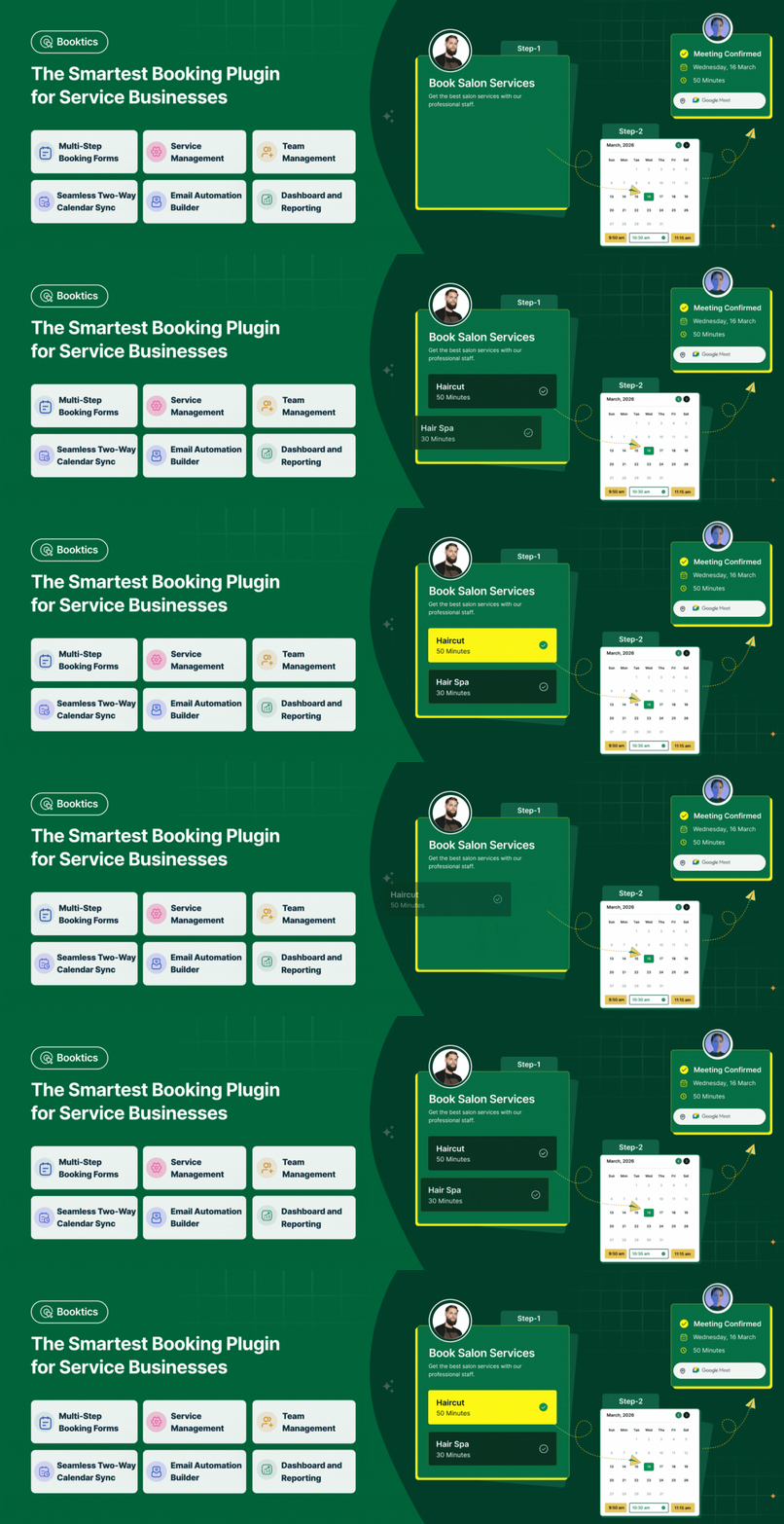
Introducing Booktics, the best free booking plugin for WordPress that makes appointment booking and service booking simple for any service-based business. It is easy to use, works fast, and helps you manage your booking calendar without stress.
Whether you run salons and spas, dental clinics, wellness centers, cleaning services, fitness training, tutoring, or home repair work — Booktics helps you manage your online booking flow and lets clients schedule appointments 24/7.
Booktics gives you everything you need to run a smooth calendar booking system:
– Unlimited service bookings
– Clean multi-step booking form
– Flexible durations with payments
– Fully customizable form for your services
– Email automation option for smooth workflow
– Simple calendar booking system that works on any device
➕ You can also connect Booktics with tools you already use. Sync your booking calendar with Google Calendar and Outlook, meet clients through Google Meet, manage contacts in FluentCRM, and collect payments with PayPal or Stripe.
📍 No matter what kind of service you run with Booktics, you can make online booking easy for both you and your clients. It is the most popular and feature-rich booking plugin for WordPress,anyone who wants a clear, simple, and reliable booking system.
More helpful links here to get started👇
Live demo|Documentation |Roadmaps |Tutorials
Need help setting up your booking calendar on your website? 👉 Let Us Know.
**👥 Who is Booktics Booking System For?**
Booktics is built for service-based businesses that depend on a clear and reliable appointment booking flow. It works for solo professionals, growing teams, and multi-location providers. With Booktics, you get a full booking system that keeps your schedule organized, removes manual work, and helps clients book services in minutes.
This makes Booktics one of the most practical choices for anyone looking for a service booking plugin for WordPress or a complete online booking plugin WordPress solution.
-
Salons & Spas Services – Helps salons and spas manage a high volume of service bookings with ease. Clients can check real-time availability, select their preferred service, and confirm their appointment in a clean booking calendar. It works well for haircuts, makeup, facials, massages, waxing, and more. Staff can track bookings, avoid overlaps, and stay updated through a simple calendar booking system..
-
Dental Clinics & Healthcare – Healthcare businesses often face scheduling errors and phone call overload. Booktics solves this by letting patients book dentist visits, health checkups, or therapy sessions online. The appointment scheduler ensures smooth timings, prevents double bookings, and gives clinics a clear view of their day. Patients also get a better experience because the whole process is quick and mobile-friendly.
-
Health & Wellness Centers – Therapists, physiotherapists, massage centers, and wellness studios can use Booktics to manage their daily and weekly scheduling needs. You can set session durations, buffer times, and booking limits to keep the workflow organized. Since Booktics works as a full WordPress booking plugin, you can handle one-on-one sessions, group classes, and follow-up appointments in one place.
-
Cleaning Services – Cleaning companies and home service teams need a simple way for customers to choose a date, time, and service type. Booktics makes this easy with flexible time slots and real-time availability. Customers can book home cleaning, office cleaning, or deep cleaning services using a clear online booking form. The built-in booking calendar helps service teams plan their routes and avoid schedule conflicts.
-
Fitness Trainers & Yoga Instructors – Cleaning companies and home service teams need a simple way for customers to choose a date, time, and service type. Booktics makes this easy with flexible time slots and real-time availability. Customers can book home cleaning, office cleaning, or deep cleaning services using a clear online booking form. The built-in booking calendar helps service teams plan their routes and avoid schedule conflicts.
-
Repair & Maintenance Providers – Cleaning companies and home service teams need a simple way for customers to choose a date, time, and service type. Booktics makes this easy with flexible time slots and real-time availability. Customers can book home cleaning, office cleaning, or deep cleaning services using a clear online booking form. The built-in booking calendar helps service teams plan their routes and avoid schedule conflicts.
-
Beauty & Personal Care – Makeup artists, nail artists, skincare professionals, and grooming experts often operate on tight schedules. Booktics lets customers pick available slots, book multiple services, and reschedule when needed. The organized booking calendar plugin for WordPress layout helps businesses manage peak hours without confusion.
✨ Booktics doesn’t stop there — it’s a complete service booking plugin for WordPress that supports all types of online bookings, appointments, classes, events, and sessions. With its clean interface, powerful features, and flexible calendar booking system, Booktics gives every service provider the tools needed to run a smooth booking workflow and offer a better client experience.
**🎉 Booktics Free Features That Save Your Time & Money**
Booktics Free gives you all the essential tools you need to run a service-based business without paying extra. You can manage appointments, customers, schedules, and daily tasks from one clean booking system. It works for solo providers and teams, making it a strong booking plugin for WordPress even in the free version.
Booking & Scheduling: Handle your day-to-day bookings with ease
Booktics helps your clients complete online booking 24/7 while you stay fully in control of your calendar. Its simple design reduces confusion and gives you a reliable booking calendar for daily operations.
- Online Booking – Let customers make appointment bookings directly on your website with real-time availability. This removes phone calls, messages, and the risk of double bookings. Your website becomes a full online booking plugin where clients can book anytime.
- Multi-Step Booking Form – A simple step-by-step flow guides customers through choosing a service, time slot, and confirming their booking. This reduces confusion and ensures a smooth booking process.
- Custom Time Slots – You can set flexible time slots based on your services. For example, 30-minute slots for quick consultations or 90-minute slots for therapy sessions.
- Buffer Time – Add extra time before or after each appointment. This helps with setup, cleaning, or shifting between clients. Buffer time also improves accuracy in your calendar booking system and prevents back-to-back overload.
- Booking Limits – Control how many bookings you accept per time slot or day. This prevents overbooking and keeps your workload manageable.
- Cancellation & Rescheduling – Clients can cancel or reschedule booking on their own, which saves you time and keeps your calendar up to date.
Service Management: Easily organize and manage your services
Booktics gives you one place to create and control all your offerings.
- Service Management – Add details like service name, duration, and price. For example, you can set up “Haircut – 30 minutes” or “Dental Checkup – 1 hour.”
- Service Categories – Group your services into categories (e.g., Hair, Skin, Wellness) so customers can find what they need faster.
- Customizable Design Layout (coming soon) – Soon you’ll be able to match the booking form’s look and feel to your brand, creating a professional appearance.
Team Management: Keep your staff schedules organized
If you work with a team, Booktics makes it easy to manage everyone’s availability.The booking system makes it easy to assign services, set working hours, and keep the booking calendar organized across all staff members. This is especially helpful for salons, clinics, wellness centers, fitness studios, and any business where multiple people handle appointments.
- Team Management – Assign services and manage working hours for each staff member. Perfect for salons, clinics, or gyms where multiple employees serve clients.
- Admin Panel & Team Member Panel – Each team member can log in to see and manage their own bookings, while the admin keeps overall control from a central dashboard.
Customer & Order Management: Deliver a personalized experience
Booktics helps you track your customers and their past bookings so you can build stronger relationships.
- Customer Management – Store client details like name, contact info, and service history. This helps you remember repeat clients and offer tailored service.
- Orders – Track booking and payment status from one dashboard. No need for messy spreadsheets.
- Booking Forms – Create forms to collect important details from customers during booking, such as special requests or notes.
Payments & Checkout: Accept secure online payments to streamline your business
Booktics gives you a smooth and secure way to collect payments during the online booking process. Whether you offer one-on-one appointments, group sessions, or service packages, you can let customers pay online or choose a manual payment method. This helps reduce no-shows, improves cash flow, and keeps your booking system organized.
- Stripe Integration – Accept credit cards, debit cards, and digital wallets like Apple Pay or Google Pay directly inside your appointment booking flow. Stripe ensures fast, safe, and reliable payments so clients can confirm their booking instantly. This creates a seamless checkout experience and works perfectly for any service booking plugin for WordPress.
- Local Payment Methods – Let customers choose offline or in-person payment if that fits your service flow.
- WooCommerce Support – Connect Booktics with WooCommerce to unlock more payment gateways and manage orders with advanced tools. WooCommerce helps you handle taxes, invoices, and additional checkout methods while keeping all reservations synced inside your calendar booking system. It’s a powerful option for businesses that want full control over their appointment scheduling and payments.
Reporting & Analytics: Get insights into how your business is doing
Booktics Free includes reporting tools to help you make data-driven decisions.
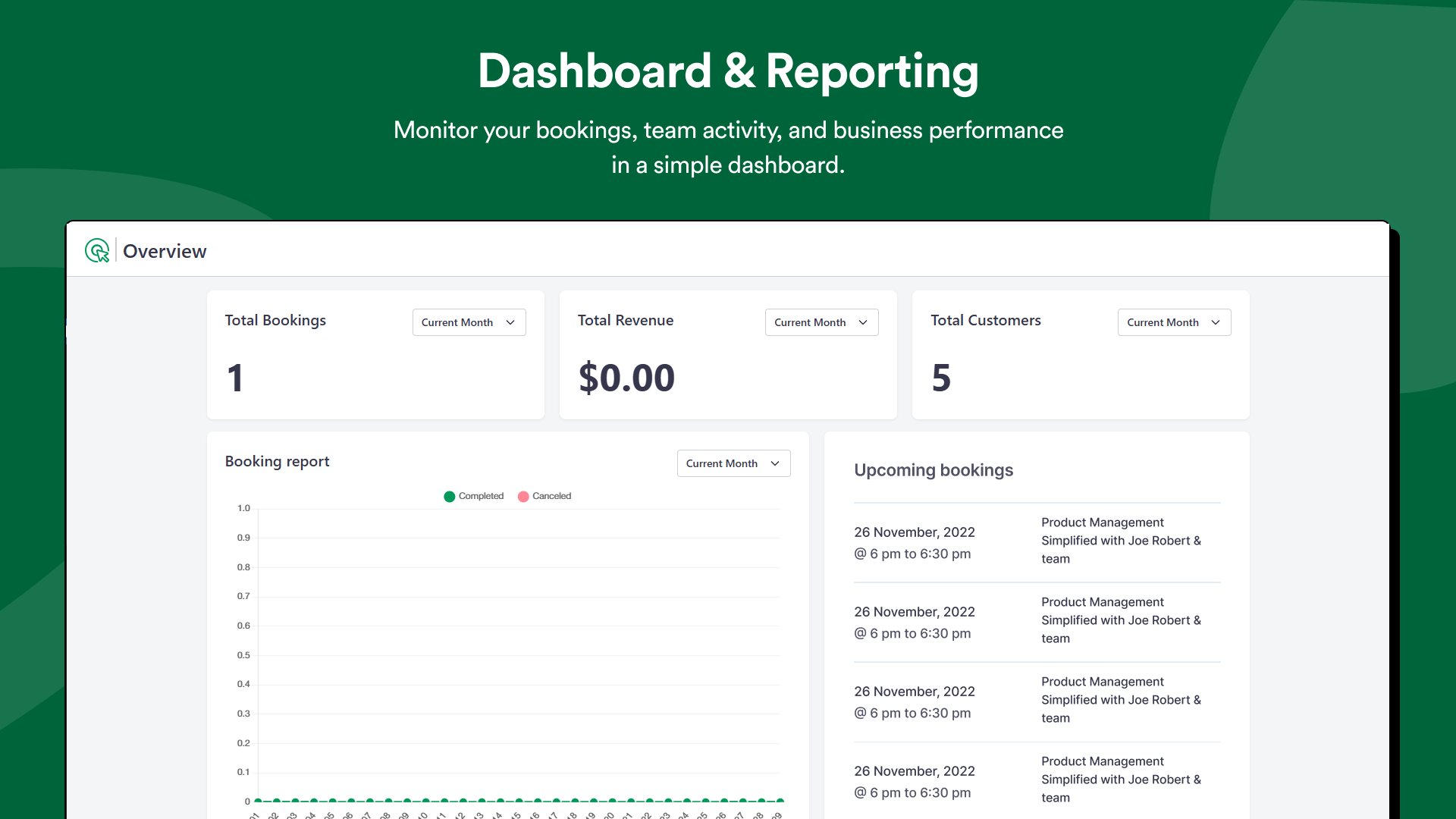
- Dashboard & Reporting – See all bookings, revenue, and customer data in one place.
- Upcoming Bookings – Get a clear list of what’s scheduled so you’re always prepared.
Notifications & Communication: Reduce no-shows and keep clients informed
Booktics Free helps you send automated updates so customers never forget their bookings.
- Email Notifications – Automatically send confirmations, reminders, and updates to both you and your customers. This improves communication and builds trust.
Advanced Calendar & Sync: Stay synced across all calendars and avoid conflicts
- Google Calendar Integration – Automatically sync bookings with Google Calendar in real time. This prevents double-booking and keeps you updated on the go.
- Calendar View – Drag-and-drop interface to move, edit, or manage bookings quickly. Easy for admins and team members to track all appointments at a glance.
Integrations & Automation: Connect Booktics to your favorite tools.
- FluentCRM Integration – Automatically sync customer details for marketing or follow-ups.
- Pabbly Integration (coming soon) – Automate workflows between apps.
- Zapier Integration (coming soon) – Connect Booktics to thousands of tools like Google Sheets, Slack, or Trello.
- Webhooks (coming soon) – Send booking data instantly to other platforms or custom apps.
**🚀 Booktics PRO: More Powerful with Advanced Booking Capabilities**
Booktics Pro includes everything from the free version and adds a full set of advanced features for businesses that want more control, flexibility, and a polished online booking experience. With upgraded service options, smarter workflows, and deeper integrations, Booktics Pro turns your site into a complete appointment scheduler and service scheduler built for professional service providers.
Advanced Service Management: Offer more options and flexibility to clients
- Extra Service – Let customers add extra services during the booking process. A salon can offer “Haircut + Hair Wash,” or a clinic can allow “Consultation + Lab Test” in one reservation. This boosts convenience for clients and improves upsell opportunities inside your service booking plugin for WordPress.
- Group Booking – Clients can book for multiple people at once (like families, teams, or groups). Perfect for yoga classes, fitness sessions, or workshops.
- Multiple Pricing Durations – Offer the same service with different lengths and prices. For instance, a therapist can offer a “30-min session” and a “60-min session” at different rates.
- Booking Custom Fields – Add extra fields to the booking form to collect more information (e.g., “Preferred Staff,” “Special Requirements,” or “Notes”). This gives you flexibility to tailor services to client needs.
Advanced Payments Method:Get paid instantly and securely
- PayPal Integration – Customers can pay instantly via PayPal during booking. It’s secure and widely trusted worldwide.
💡 With Pro, clients can book and pay in one seamless process, reducing cancellations and ensuring you get paid on time.
Booking Calendar Integration: Manage your bookings more easily
All these integrations make it easier to manage appointments, avoid time clashes, and keep your appointment scheduler and service scheduler updated in real time. This is especially useful for service providers who depend on external calendars every day.
- Outlook Calendar Integration – Connect your Outlook calendar to manage work and personal schedules together.
- Booktics with Directorist Integration – You can now link your Booktics booking services directly to your Directorist listings. This means that visitors browsing your directory can discover services and book them instantly.
With these integrations working together, Booktics becomes a complete booking calendar plugin for WordPress — keeping your schedules organized, your bookings synced, and your day-to-day planning much easier.
Team & Location Management: Manage larger teams and expand your business easily
- Team Member Panel (Advanced Controls) – Team members get their own panels to manage bookings more effectively. Admins can set permissions and manage multiple staff from one place.
- Location Management (coming soon) – If you operate in more than one location (e.g., different salon branches or clinic offices), Pro will let you manage bookings across locations smoothly.
✨ Final Words: Booktics Pro turns your booking system into a full business solution. You’ll not only manage appointments but also accept payments online, run group bookings, sync with Google/Outlook calendars, and scale across teams or locations.
Support and Documentation
📚 Simply visit our Documentation
💁 For any questions, ask them away on Booktics Support.
📝 Help us improve, input your valuable suggestions Booktics Roadmap
🙌 Join our All-Time Active Facebook Group
🎥 Learn actionable tutorials on Booktics YouTube Channel
So, why wait? 🚀 Get started in minutes – Just install, configure, and start accepting bookings
Now, What’s Next for You?
If you’re impressed with Booktics booking plugin, please check out our other awesome WordPress plugins:
📅 Eventin: All-in-one event management plugin for WordPress.
🍽️ WPCafe:Manage online Food Ordering, Restaurant Menu, Delivery, and Reservations.
📅 WP Timetics : AI-powered Appointment Scheduling plugin for WordPress
🎨 Poptics:Create Conversion-Driven Popups and convert your leads into sales.
If you’re curious, pay a visit to 👉 Arraytics to learn more about our expert solutions in WordPress bookings,scheduling, event management, restaurant reservation, food ordering and lots of marketing tips & tricks! to grow your business. 🎉
Screenshots
Dashboard and Reporting 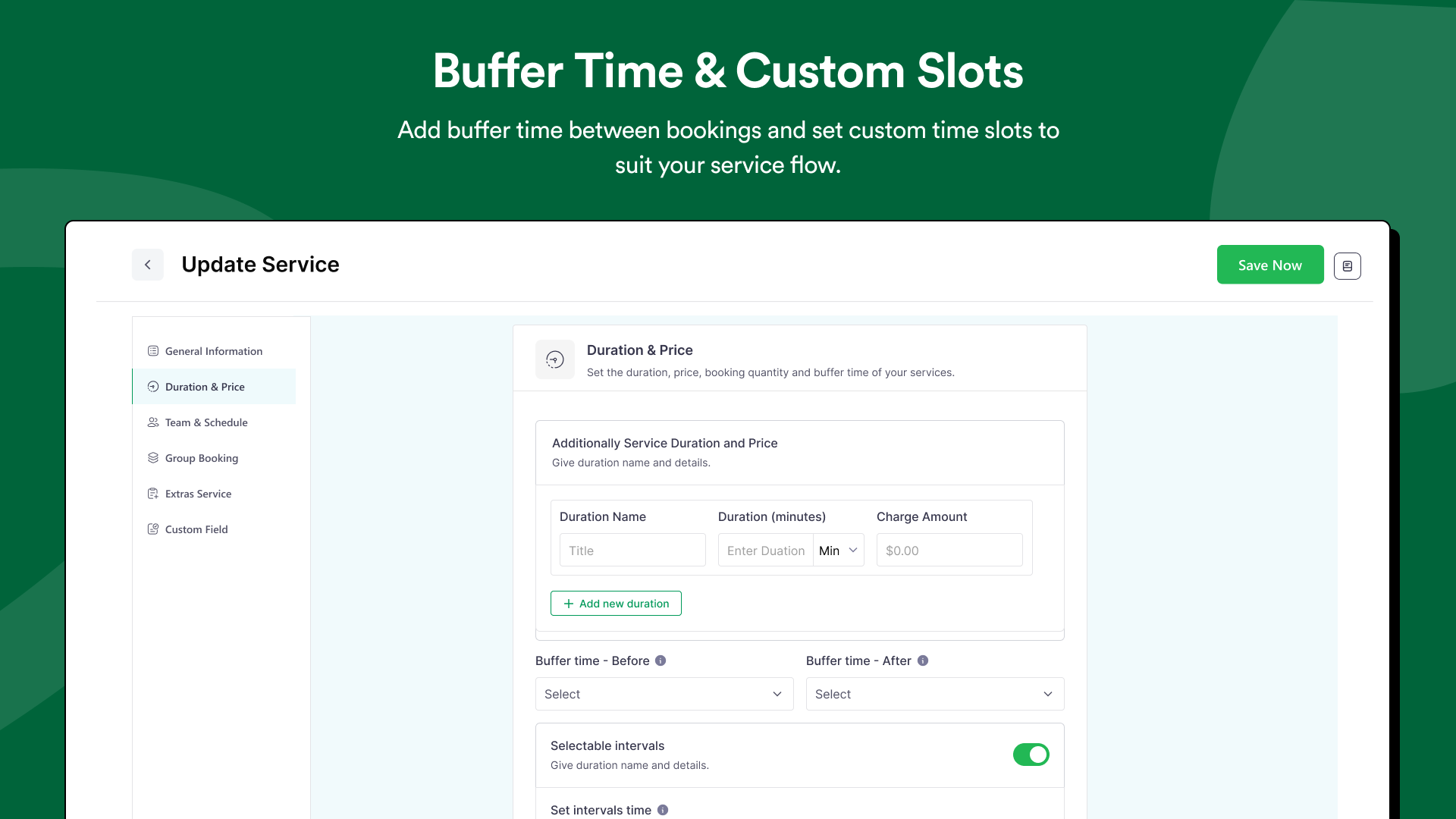
Buffer time and custom-slots 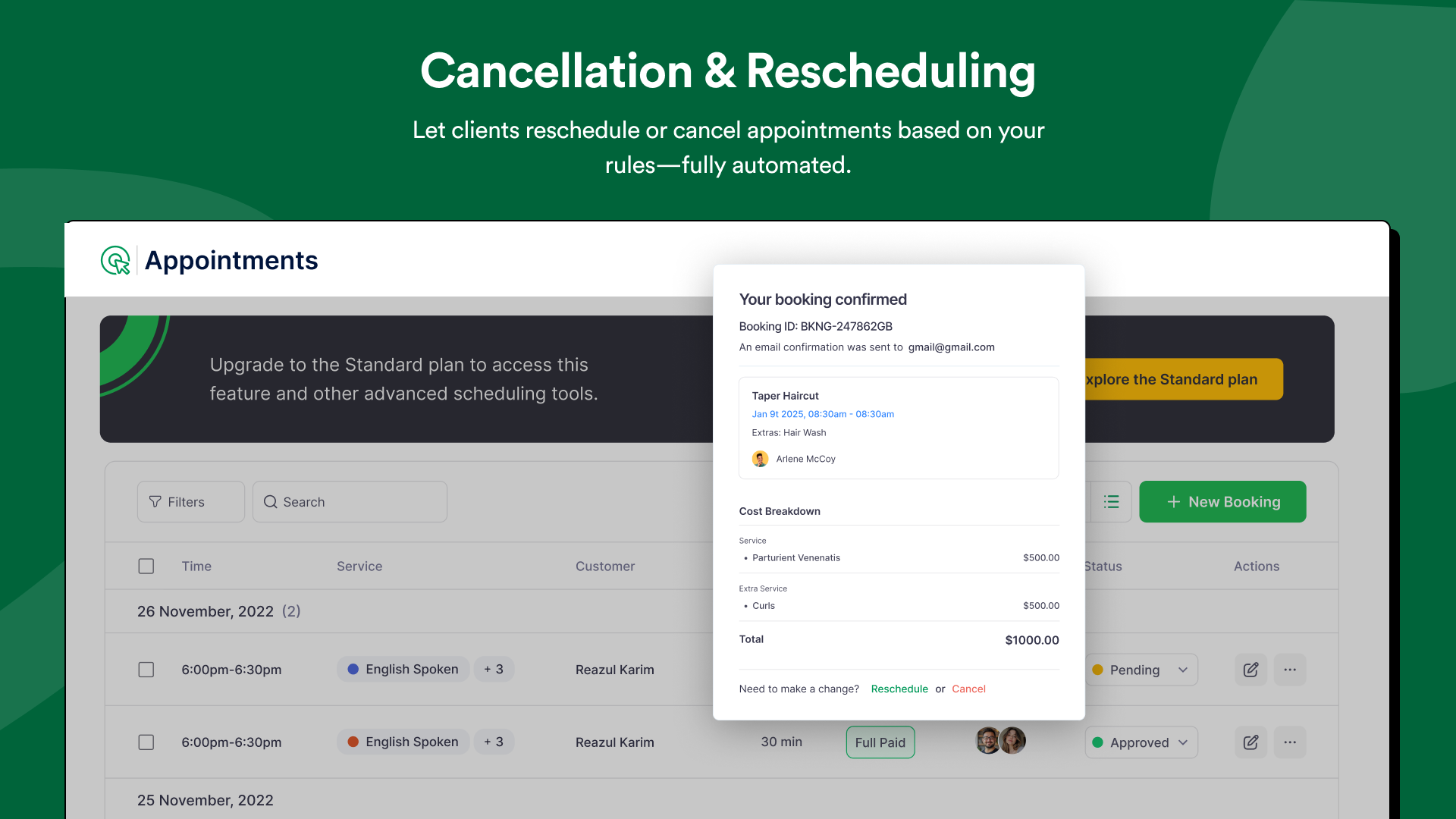
Cancellation and rescheduling 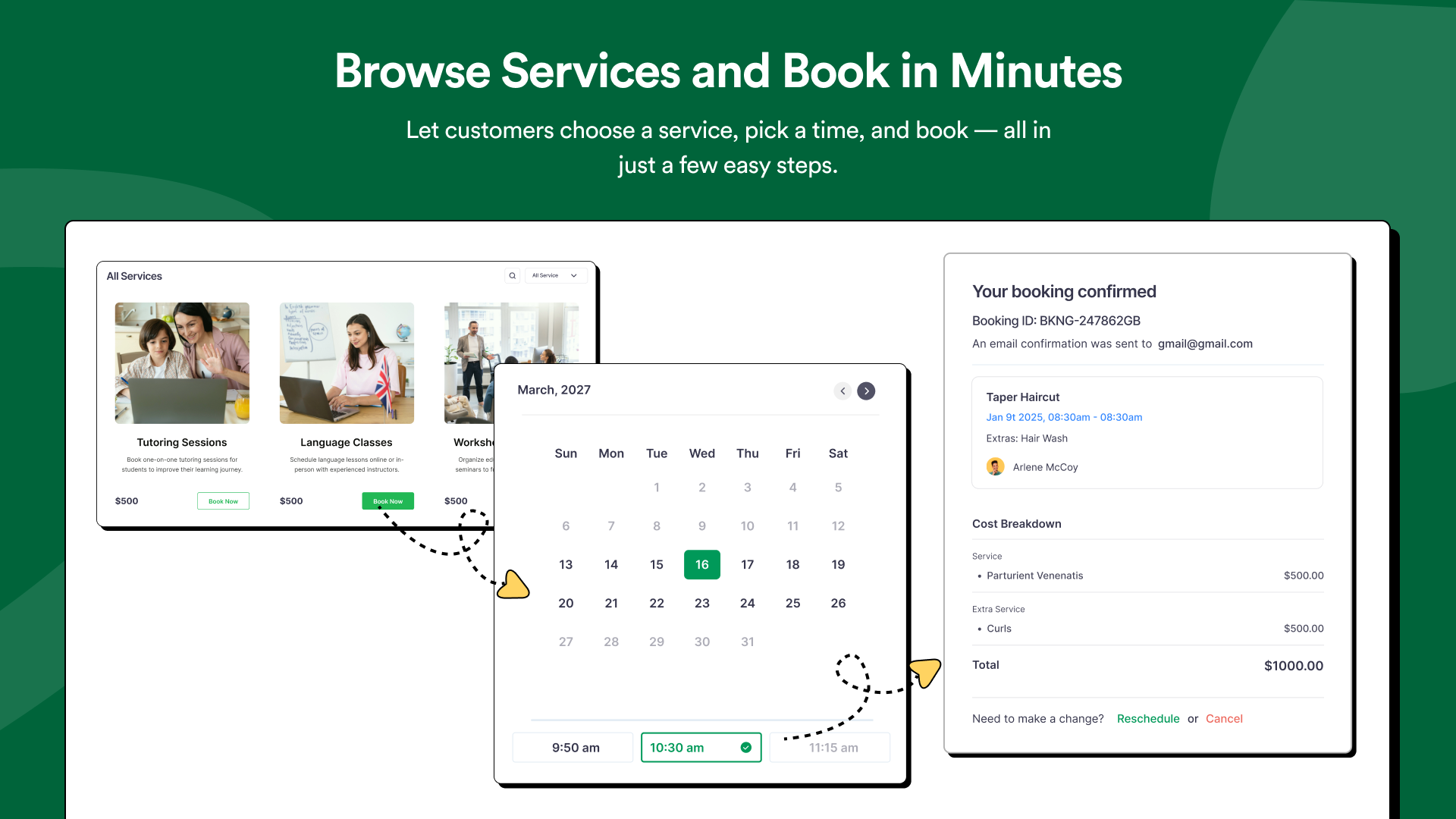
Browse services and book-in-minutes 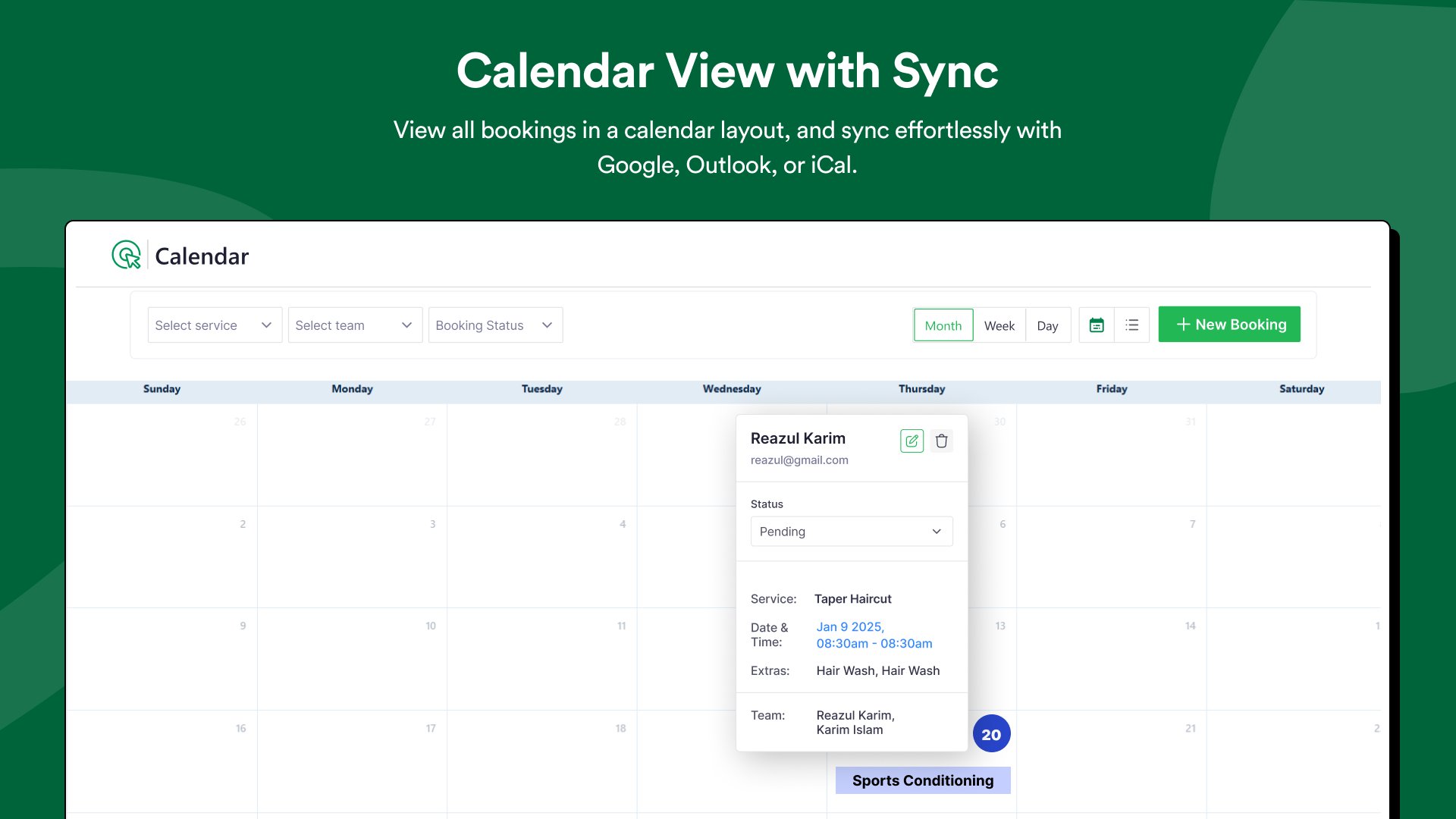
Calendar view with sync 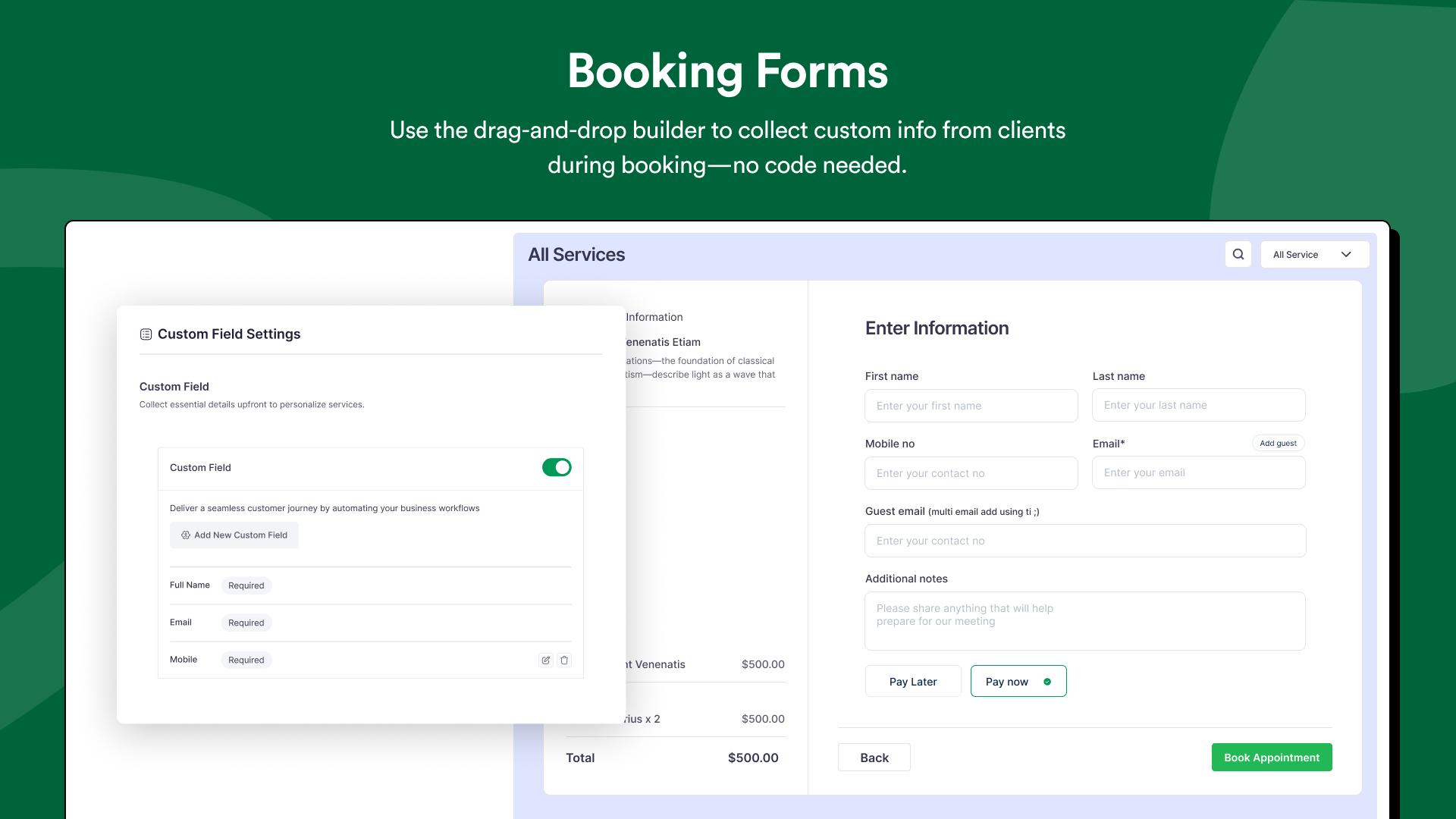
Custom booking forms 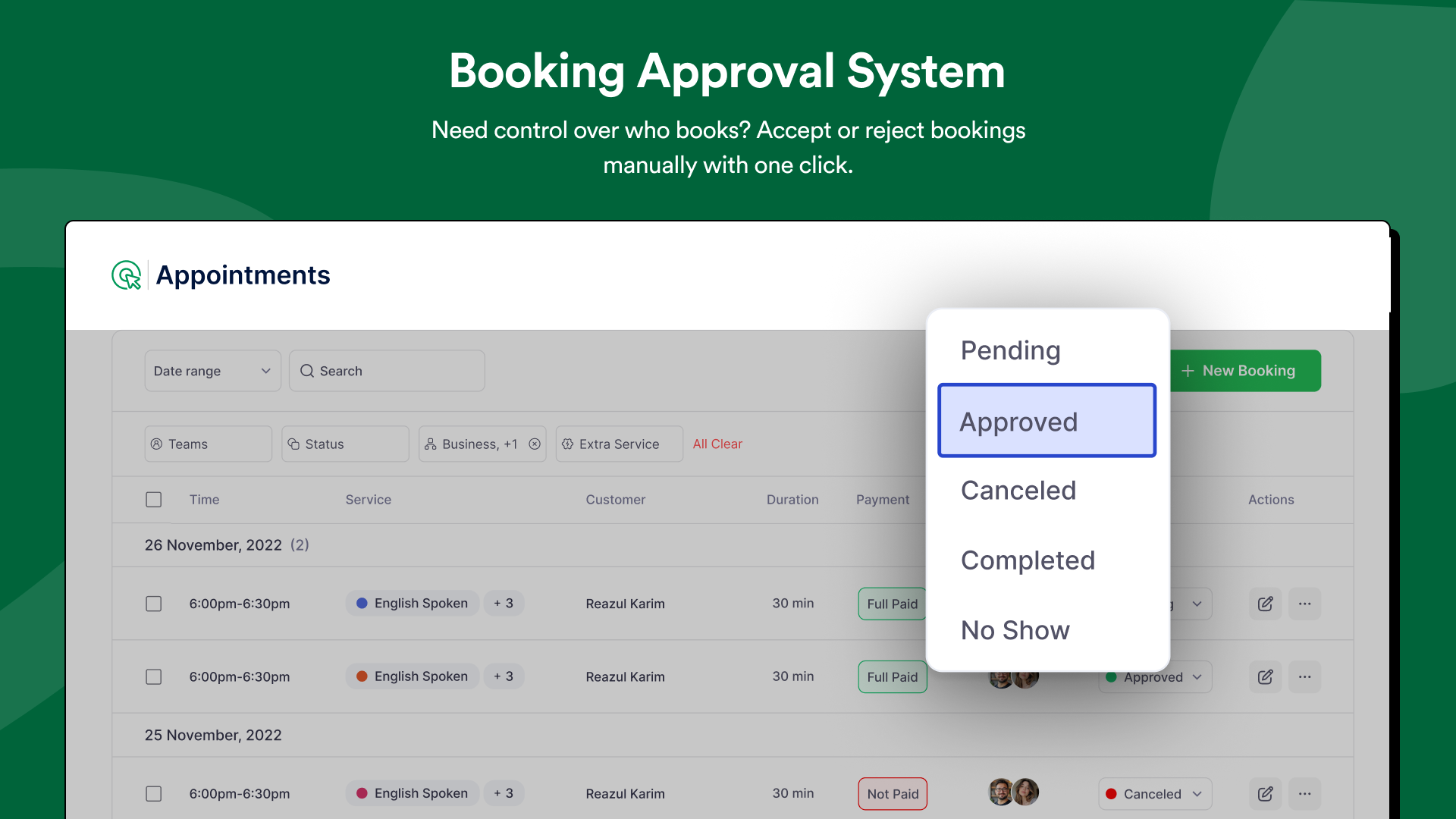
Booking approval system 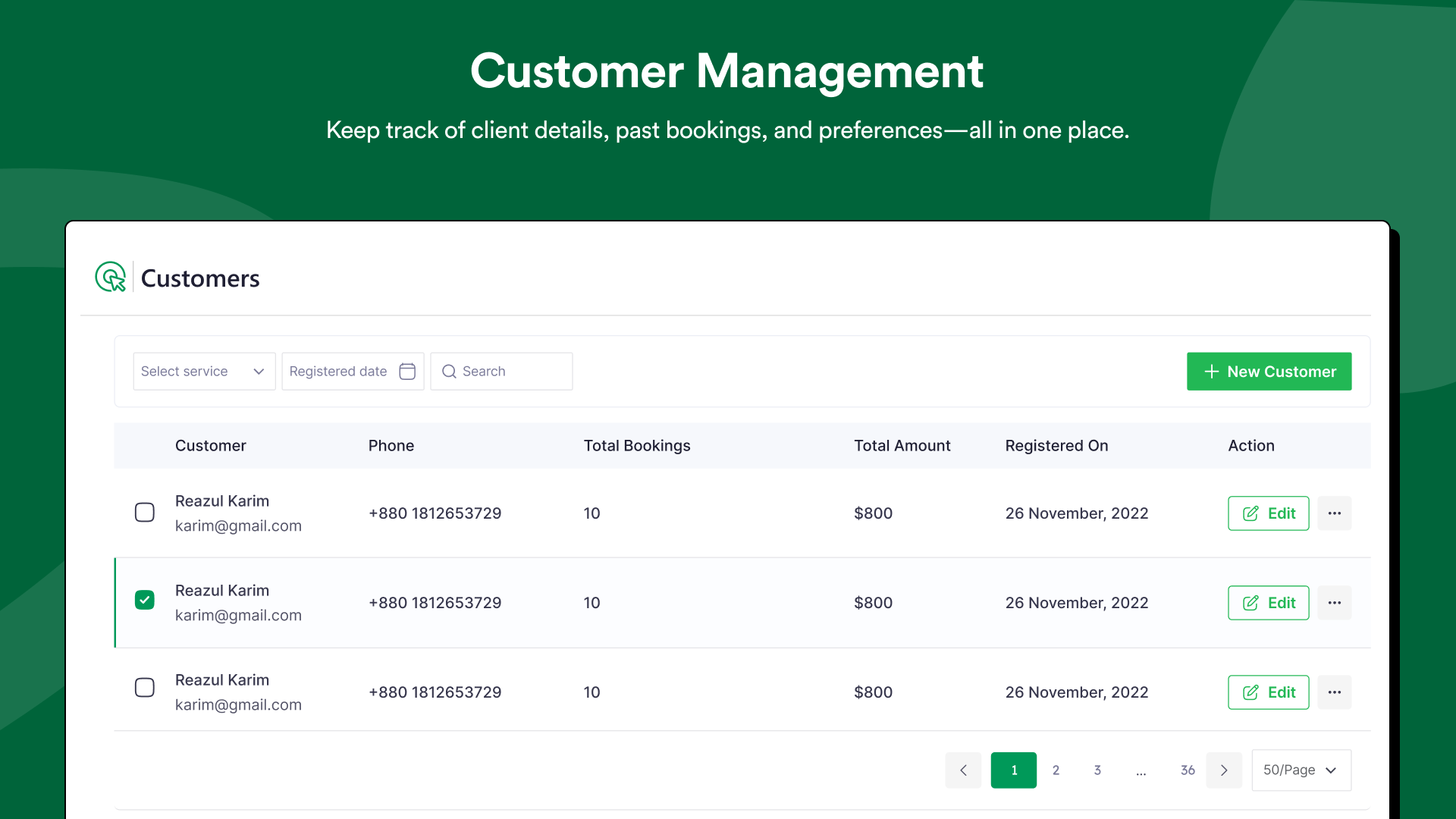
Customer management 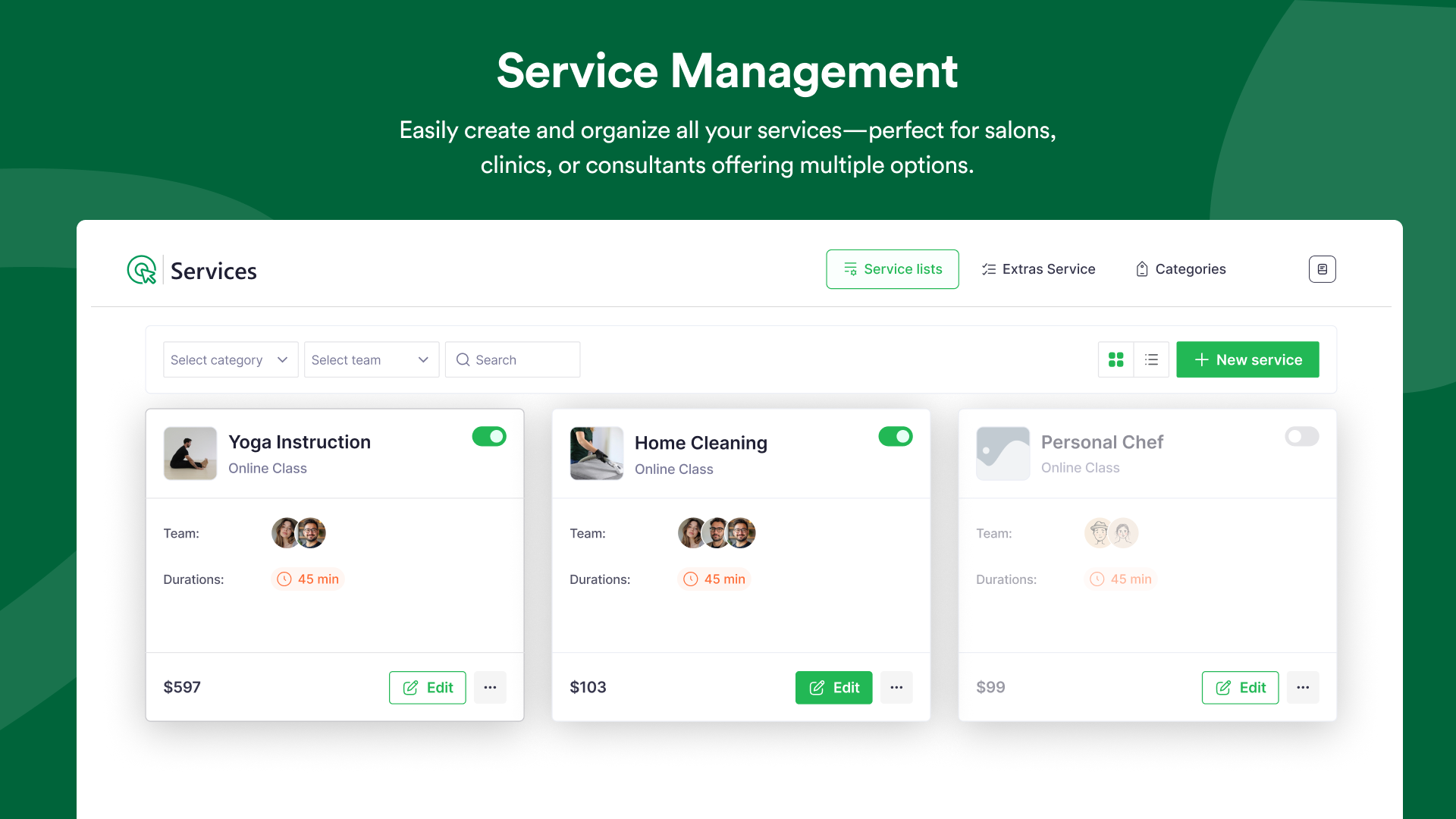
Service management 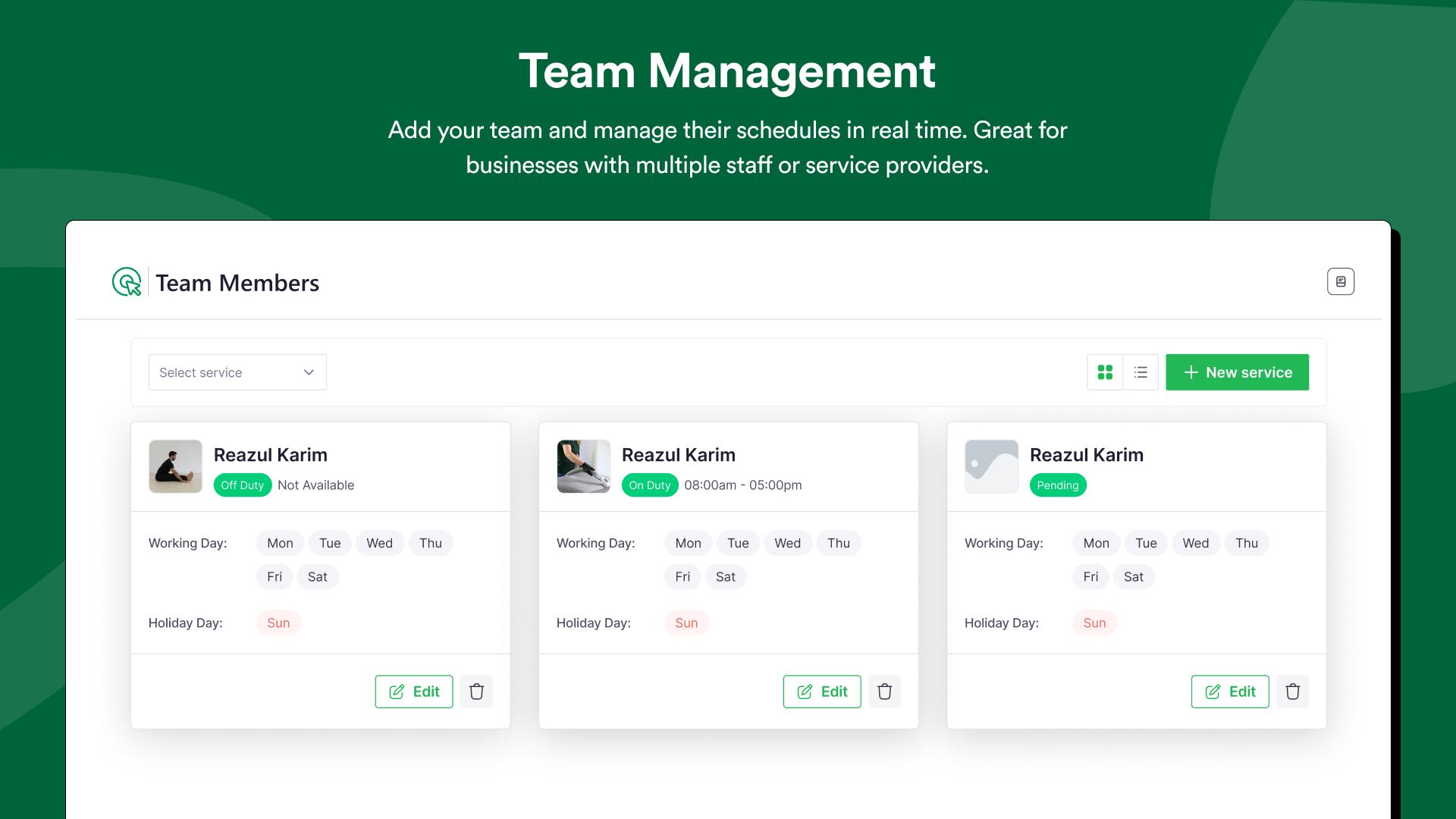
Team management 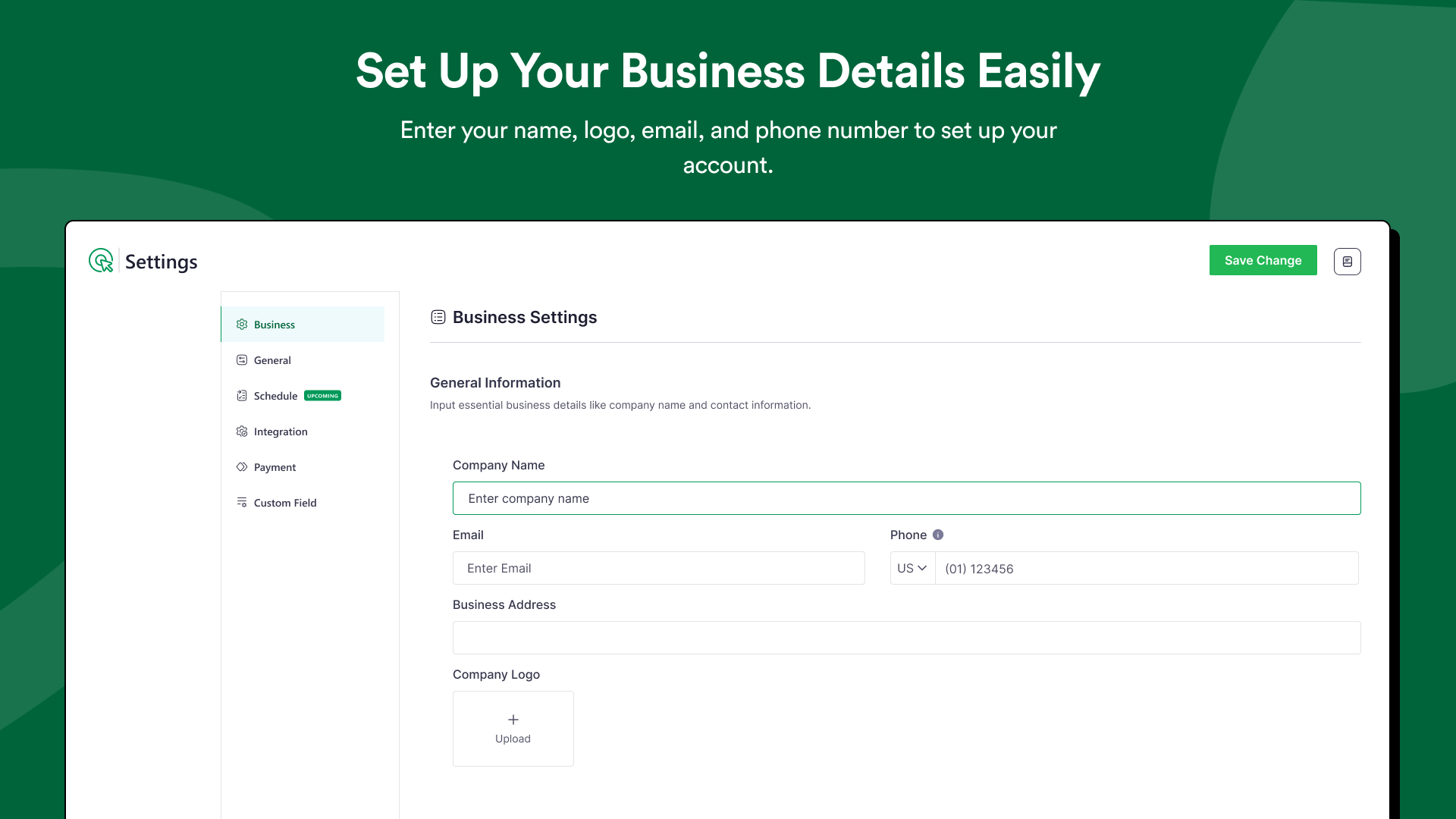
Set up your business details easily


Installation
- Upload the plugin files to the
/wp-content/plugins/bookticsdirectory, or install the plugin through the WordPress plugins screen directly. - Activate the plugin through the ‘Plugins’ screen in WordPress
- All Settings will be found in Admin sidebar -> Booktics
FAQ
-
Q: Can I accept online payments with Booktics booking system Free?
-
Yes. Booktics Free includes Stripe integration, allowing you to accept card payments, Apple Pay, and Google Pay directly through your online booking form. Payments connect smoothly with your appointment scheduler so each booking is confirmed instantly.
-
Q: Do I need coding skills to set up Booktics?
-
Not at all. Booktics is designed for everyone. You just install the plugin, set up your services, and your booking system is ready to go in minutes.
-
Q: What is the main benefit of using this Booktics booking calendar?
-
Booktics gives you a simple and reliable booking calendar that works for clinics, education centers, salons, spas, wellness providers, cleaning teams, fitness trainers, and more. It keeps all your appointments organized and helps clients book without confusion.
-
Q: Do I have to pay extra for add-ons?
-
There are no hidden fees, we promise! Booktics is the only WordPress booking plugin that provides premium add-ons completely free of charge.
-
Q: What kind of bookings can I manage?
-
You can manage service bookings, group bookings, and online appointment bookings. Booktics works as both an appointment scheduler and a service scheduler, making it flexible for many types of service-based businesses.
-
Q: Can customers cancel or reschedule their bookings?
-
Yes. Both Free and Pro let your clients reschedule or cancel bookings on their own, saving you time and reducing no-shows.
-
Q: Does Booktics support team members or staff management?
-
Yes. Booktics Free allows you to add and manage team members with their own booking schedules.
-
Q: Does Booktics work with Google Calendar?
-
Yes, users can sync with Google Calendar to avoid double bookings and manage their schedule more easily.
-
Q: Does Booktics support multi-language translation?
-
Yes, you can easily translate your Booktics booking forms using the Loco Translate plugin, making your services accessible to a wider audience.
Reviews


Contributors & Developers
“Booking Calendar for Appointments and Service Businesses – Booktics” is open source software. The following people have contributed to this plugin.
Contributors

Translate “Booking Calendar for Appointments and Service Businesses – Booktics” into your language.
Interested in development?
Browse the code, check out the SVN repository, or subscribe to the development log by RSS.
Changelog
1.0.14
(January 12, 2026)
– Fixed: Dependency optimization issue.
1.0.13
(January 6, 2026)
Fix: Fixed stripe payment issue for multiple currencies.
1.0.12
(December 18, 2025)
Tweak : Code adjustments to maintain compatibility
1.0.11
(November 09, 2025)
– Fix: Fixed error in service shortcode for emoji’s in description
1.0.10
(October 15, 2025)
– Tweak: User experience improvement
– Fix: Customers cancellation note not showing in admin panel
1.0.9
(September 30, 2025)
– Tweak: Stripe payment now usable with user provided secret and publishable keys.
– Fix: Google calendar auto log out issue.
– Fix: Database error when google calendar module is active.
– Fix: Deleting appointment doesn’t remove related appointment on google calendar.
– Fix: Service price not showing on successful order page.
– Fix: Dashboard not showing total revenue.
– Fix: Cancelling appointment not reducing total booking number.
– Fix: Team members being able to see all appointments in calendar page issue.
1.0.8
(Aug 10, 2025)
– Tweak: Emails can now be sent to team members.
– Fix: Navigation error for location page.
– Fix: Creating team member from admin panel.
– Fix: Appointment time format in email.
– Fix: Team member image update issue.
1.0.7
(Aug 25, 2025)
– New: Category-wise service booking from the frontend.
– New: Added category shortcode on the shortcode page.
– New: Enhanced layout with an eye-catching design.
– Tweak: Added PayPal filter in the order table for payment methods.
– Fix: Missing variable values in email automation.
– Fix: Issue with previewing services as admin.
– Fix: Incorrect status information displayed on the plugin page.
– Fix: Cost breakdown not showing for group bookings.
– Fix: Total booking count mismatch in the customer panel.
– Fix: Appointment duration not displaying correctly.
– Fix: Error when searching by customer.
– Fix: Calendar icon selection issue.
– Fix: Issues with displaying customer first and last names.
1.0.6
(Aug 14, 2025)
– Tweaked: Improved UX for custom holiday and schedule settings.
– Tweaked: Allow payment status updates from the edit order page.
– Fixed: Timeslot availability issue for custom schedules.
– Fixed: Blocking time slots based on service duration.
– Fixed: Appointment status change issue in admin panel.
– Fixed: Theme color change issue in general settings.
– Fixed: Order editing issue for changing customer data.
– Fixed: Multiple people being able to book the same time slot.
– Fixed: Team members unable to update their profile.
– Fixed: Customer name not displaying in the appointment and order tables.
– Fixed: Permalink editing issue.
– Fixed: Incorrect total duration calculation.
– Fixed: Appointment total service update issue.
– Fixed: Dashboard chart display issue.
1.0.5
- Tweak: Improved UI design for order edit sidebar
- Fix: “Add New Order” button not showing in admin
- Fix: Single order placement issue
- Fix: Order edit sidebar not opening in calendar appointments
- Fix: “Add to Calendar” not displaying correctly
- Fix: Order status update issue
- Fix: Order update functionality issue
- Fix: Free service bookings incorrectly showing payment methods
1.0.4
- New: Team member panel
- New: Buffer time support for appointments
- New: Default email automation for improved workflow
- New: Order creation from admin panel
- New: Support for using WordPress users as customers
- New: Google Meet Integration
- New: 2 Way Google Calendar Sync
- Tweak: Dashboard now displays only confirmed bookings
- Tweak: Updated design and toggles in Settings > Integration & Payment
- Tweak: Enhanced dashboard tooltips with more relevant details
- Tweak: Added advanced settings section for better service control
- Tweak: Improved flow for booking free services
- Tweak: Appointment editing enhancements
- Tweak: Updated email header and footer content
- Tweak: Dashboard restricted to confirmed bookings only
- Tweak: Refreshed module icons
- Tweak: Interval time now pulled from settings
- Tweak: Added user guide elements
- Tweak: Refined service interval time handling
- Tweak: Improved interval time tooltip descriptions
- Fix: Issue deleting single service
- Fix: Admin-side category creation and sync
- Fix: General stability improvements across multiple modules
- Fix: Appointment default status now respects settings
- Fix: Statuses blocking time slots now configurable from settings
- Fix: Admin-side customer creation
- Fix: Email header and footer not displaying in frontend previews
- Fix: Booking cancellation bug
- Fix: UI issues on fresh installations
- Fix: Email automation subject rendering
- Fix: Missing customer info in appointment view
- Fix: Customer data issue in dashboard’s upcoming bookings list
- Fix: UI bug in service booking cards
- Fix: Order cancellation status mismatch
- Fix: Order cancellation functionality
- Fix: Advanced settings not saving on service creation
- Fix: End time not displaying
- Fix: Custom holiday configuration
- Fix: Custom scheduling bugs
- Fix: Buffer time null value issue
- Fix: 500 error on invoice page
- Fix: Incorrect customer count in dashboard
- Fix: Calendar page error when Google Calendar module is active
- Fix: End time toggle now works from settings
1.0.3
- Fix: Miscellaneous bug fixes and enhancements
1.0.2
- Fix: Resolved multiple issues related to the booking process
- Fix: Fixed multisite support issue
- Fix: WordPress version compatibility issue
1.0.1
- New: Improved user interface with visual enhancements
- New: Introduced module-based architecture for better flexibility
- New: Added support for shortcode-based rendering
- Fix: Resolved various bugs and stability issues
1.0.0
- New: Integrated Booking Calendar module for improved scheduling visibility
- New: Added support for FluentCRM
- New: Introduced appointment editing functionality
- New: Added email automation for reschedule and cancellation notifications
- Tweak: Improved synchronization for Pro features
- Tweak: Upgraded the Service module for better usability
- Tweak: Added help/documentation button for easier access to support
- Fix: Resolved multiple issues related to the booking process
- Fix: Resolved multiple issues related to the admin site
0.0.2
- New: Added appointment and order creation in the admin panel
- New: Implemented all actions in the appointment table (delete, bulk delete, view, pagination, etc.)
- Tweak: Added layout and navigation to the service module
- Tweak: Added filters in the appointment module
- Tweak: Updated the appointment table view
- Fix: Fixed category selection issue when creating a new service
- Fix: Fixed avatar display issues in all table views
0.0.1
- Introduced a new dashboard to provide a comprehensive overview of key metrics
- Implemented category management for organizing services or products
- Added order management module for tracking and handling customer orders
- Integrated customer management functionality for better user handling
- Enabled preview feature for individual services before booking or purchase
- Integrated Stripe for secure and seamless online payment processing
0.0.0
-
Initial release
-
First version – enjoy seamless booking!
