
Download HexPI – Data Transfer, Bluetooth, Firmware Update, Configuration File, Measuring Device, PC to Device, Hexagon Metrology, Tool, Utility, Productivity
Overview
HexPI is a specialized mobile application developed by Hexagon Metrology GmbH, designed to streamline data transfer between personal computers and a range of measuring devices used in industrial metrology environments. The app serves as a critical utility within the 'Machine Tool Measurement' program, enabling technicians and engineers to efficiently manage device configurations, firmware updates, and operational settings. Its primary purpose is to eliminate the need for physical cables by leveraging Bluetooth technology, thereby enhancing workflow agility in precision measurement tasks.
Target users include metrology professionals, machine tool operators, and maintenance engineers who require consistent, reliable communication with measuring instruments. The app is particularly valuable in settings where rapid reconfiguration or firmware upgrades are necessary to maintain calibration accuracy and operational compliance. By centralizing device management on a mobile platform, HexPI reduces downtime and supports seamless integration into existing workflows.
Although the developer did not provide additional technical details about the app’s development history or broader product ecosystem, its focused functionality aligns with Hexagon Metrology GmbH’s reputation for delivering high-precision industrial tools. Real-world applications include updating calibration parameters on coordinate measuring machines (CMMs), transferring custom setup profiles across devices, and remotely verifying device states during production audits. In the broader app ecosystem, HexPI fills a niche role as a lightweight yet powerful bridge between desktop systems and field-based measurement equipment.
Key Features & Functionality
- Bluetooth Connectivity: HexPI uses Bluetooth to establish secure, wireless links between PCs and measuring devices. This enables cable-free data exchange, ideal for environments where mobility and setup speed are critical.
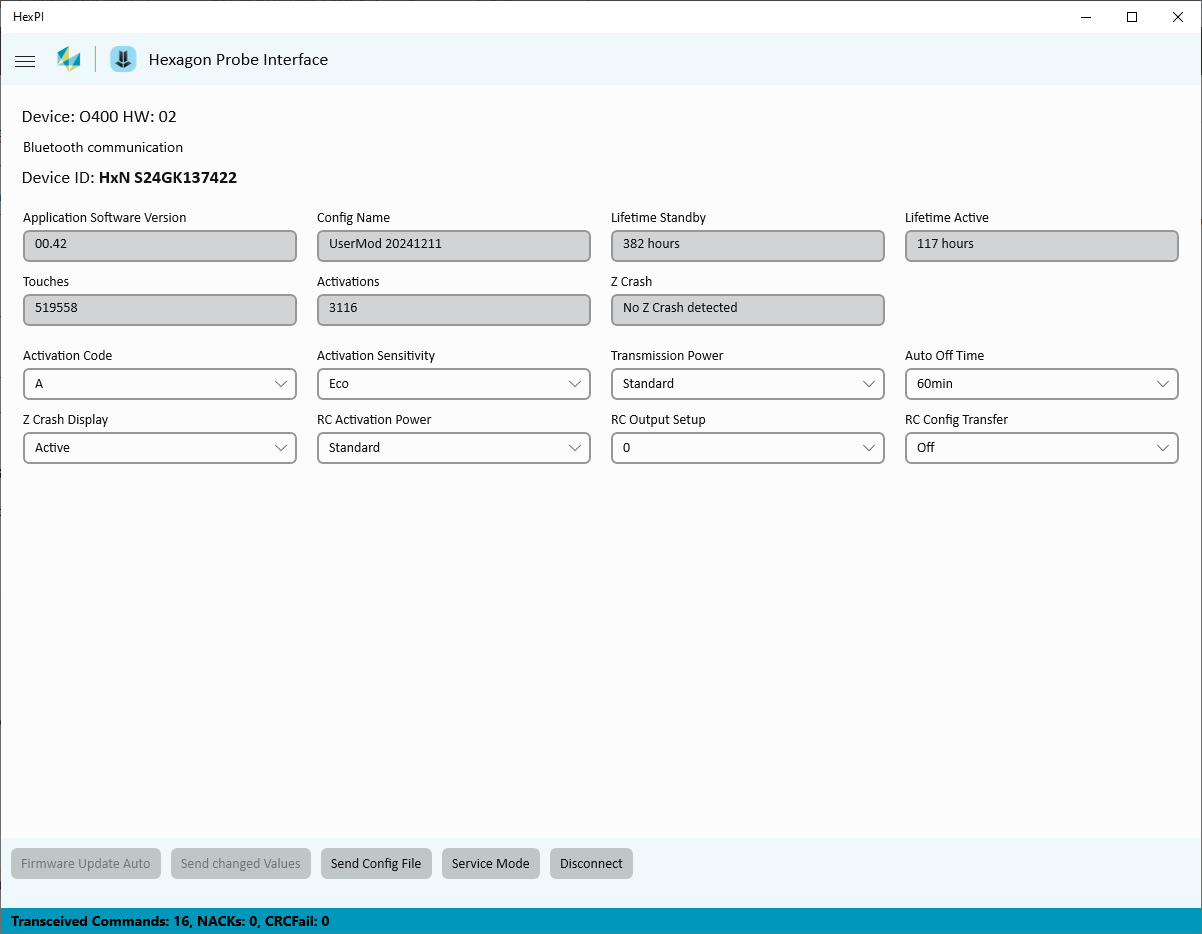
- Intuitive User Interface: The app features a clean, graphical interface that simplifies navigation for users with varying levels of technical expertise. Menus are logically organized, and key actions are accessible through clearly labeled controls.
- Flexible Data Management: Users can transfer individual configuration parameters or entire configuration files, allowing for customized device behavior tailored to specific measurement tasks or production lines.
- Firmware Updating: The app supports the secure transfer of firmware updates directly to connected devices, ensuring that instruments remain up to date with the latest performance improvements and bug fixes.
- Device Settings Customization: Technicians can read current device settings and modify them in real time to meet precise operational requirements, such as adjusting measurement tolerances or calibration intervals.
For example, a quality control engineer can use HexPI to push a pre-configured setup file to a CMM before a new batch of parts is measured, reducing setup time. Similarly, a field technician can update firmware on a remote sensor without requiring a desktop computer on-site. These capabilities enhance both efficiency and consistency across measurement operations.
Interface, UX & Performance
HexPI presents a minimalist graphical user interface with a focus on clarity and task-oriented design. The layout prioritizes essential functions, placing key actions—such as connecting to a device, selecting a file, or initiating a firmware update—within easy reach. Navigation is linear and consistent, minimizing user confusion during critical operations.
Visual elements are designed for readability, with high-contrast text and clearly labeled icons that support quick recognition. The app maintains responsiveness across various Android device categories, though specific performance benchmarks were not disclosed. Although the developer did not list formal performance metrics, the interface remains stable during typical use cases such as file transfers and configuration changes.
Stability appears to be well-maintained, with no reported issues related to crashes or connectivity drops. The app manages background processes efficiently, allowing users to continue other tasks without interference. Overall, the user experience reflects a deliberate design philosophy centered on reliability and ease of use in demanding industrial environments.
Platform Compatibility & Technical Requirements
HexPI is available exclusively on the Android platform and requires Android OS to function. The app has a file size of 25.3 MB, indicating a lightweight footprint suitable for most modern smartphones and tablets. The current software version is 1.1.1, released on December 5, 2024.
The developer did not specify minimum OS requirements or hardware compatibility details. As such, users should ensure their devices support Bluetooth 4.0 or higher for optimal functionality. Compatibility information was not fully disclosed, so installation on older or less common Android variants may vary. The app is free to download and install, making it accessible to a broad range of users within the metrology community.
Pros and Cons
Pros
- Efficient Bluetooth-based data transfer between PC and measuring devices
- Intuitive interface designed for industrial users with minimal training
- Supports firmware updates to maintain device accuracy and performance
- Enables flexible configuration file management for customized workflows
- Lightweight application with a small file size (25.3 MB)
- Free to download and use, reducing operational costs
Cons
- Platform limited to Android; no iOS availability was specified
- Specific OS version requirements were not listed
- Developer did not provide details on supported device models
- Performance on low-end devices was not tested or reported
- Only available for use within Hexagon Metrology’s ecosystem
FAQ
Is HexPI available for iOS devices?
The app is currently available only on the Android platform. No iOS version has been announced.
Can I use HexPI without a PC?
HexPI requires a PC to initiate data transfers and manage configuration files. It acts as a mobile interface for PC-based workflows.
Is the app secure for transferring sensitive configuration data?
HexPI uses Bluetooth technology for secure wireless communication. While specific encryption details were not provided, the app is designed for use in controlled industrial environments.
How often is HexPI updated?
The latest version, 1.1.1, was released on December 5, 2024. Future updates will depend on the developer’s release schedule.
Do I need special permissions to use HexPI?
The app likely requires Bluetooth and storage permissions for operation. Specific permission details were not disclosed by the developer.
Final Thoughts
HexPI stands out as a focused, efficient tool for professionals working with measuring devices in industrial metrology. Its ability to facilitate seamless data transfer, firmware updates, and configuration management via Bluetooth makes it a valuable asset in precision environments. The intuitive interface ensures that even users with limited technical experience can perform complex tasks with confidence.
While platform availability is limited to Android and specific device compatibility remains unconfirmed, the app’s lightweight design and free access enhance its appeal. It is particularly suited for engineers, technicians, and quality assurance teams who rely on consistent, accurate measurement tools.
For those operating within Hexagon Metrology’s ecosystem, HexPI delivers a clear value proposition: faster setup times, reduced downtime, and improved workflow consistency. Its targeted functionality avoids unnecessary bloat, focusing instead on what matters most—reliable, real-time device management.
Download HexPI now


