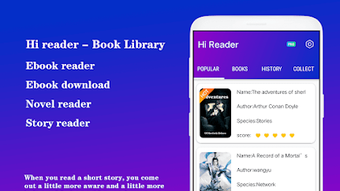

Download Hi Reader – ebook reader, free ebook reader, read books offline, read novels online, book reader app
Overview
Hi Reader is a desktop application designed to serve as a comprehensive ebook reader for individuals seeking a seamless and customizable reading experience. Tailored for both casual readers and dedicated learners, the software enables users to access and enjoy a wide variety of digital content, including novels, stories, academic materials, and more. The application supports multiple file formats such as PDF, EPUB, and MOBI, making it a versatile tool for managing diverse reading materials. One of its core strengths lies in its ability to support offline reading, allowing users to access their favorite books without requiring a network connection—ideal for travel, study sessions, or areas with limited internet access.
Hi Reader is particularly suited for users who value flexibility and personalization in their reading environment. Whether managing a personal library or exploring online e-book collections, the software provides tools to organize reading lists, track progress, and discover new content based on individual interests. Its clean interface and intuitive navigation make it accessible to users of all technical skill levels. While the developer, Hi Reader, has not provided further details about their background, the application’s focus on usability and functionality suggests a targeted effort to meet the needs of modern digital readers.
Key Features & Capabilities
- Multi-format Support: Hi Reader handles PDF, EPUB, and MOBI files, enabling users to read books from various sources without conversion.
- Offline Reading Mode: Users can access their library anytime, anywhere, even without an internet connection.
- Customizable Display Settings: Options to adjust text size, font style, background color, and layout allow for personalized reading comfort.
- Interactive Reading Tools: Features such as bookmarking, highlighting, note-taking, and search functionality enhance engagement with content.
- Reading Progress Tracking: The software helps users monitor their reading progress and manage multiple books efficiently.
- Local and Online Book Access: Users can read files stored locally on their device or browse from integrated online libraries.
These capabilities make Hi Reader suitable for academic research, long-form reading, and leisure reading. For example, a student can highlight key passages in a PDF textbook, take notes, and review them later—all within the same environment. Similarly, a fiction enthusiast can maintain a curated list of novels, set bookmarks, and switch between books with ease. The combination of format versatility and user-centric tools ensures a rich and adaptive reading journey.
User Interface, Workflow & Performance
Hi Reader features a clean, minimalist interface designed to minimize distractions and focus attention on the reading content. Navigation is straightforward, with clearly labeled menus and intuitive controls for adjusting settings, managing libraries, and accessing tools like search and bookmarks. The workflow emphasizes efficiency, allowing users to open files with minimal steps and switch between books seamlessly.
While specific performance data was not provided, the application’s design suggests optimized resource usage for smooth scrolling and responsive interactions. The developer did not specify exact CPU or RAM behavior, but the 50 MB installation size indicates a lightweight footprint, which may contribute to stable operation across various systems. General software behavior patterns suggest consistent performance during typical reading tasks. Stability appears to be a priority, given the absence of reported issues in the available information.
Compatibility & System Requirements
Hi Reader is available for both Windows and Mac operating systems, ensuring broad accessibility across desktop platforms. The software version is 1.0.0, with a total installation size of 50 MB. This compact size suggests minimal disk space usage and quick setup times.
Exact system requirements were not listed by the developer. As such, specific hardware specifications such as processor type, RAM, or graphics capabilities remain unspecified. Compatibility information is limited to the operating systems mentioned. Users are advised to ensure their system meets general standards for running desktop applications. The developer did not provide additional system requirements, so installation and operation may depend on the user’s device configuration.
Pros and Cons
Pros
- Free to download and use with no hidden costs
- Supports multiple ebook formats including PDF, EPUB, and MOBI
- Offers offline reading for uninterrupted access
- Highly customizable display settings for comfortable reading
- Includes essential tools like bookmarking, highlighting, and note-taking
- Lightweight installation at just 50 MB
Cons
- No information provided about system requirements or hardware compatibility
- Performance details such as CPU or RAM usage were not disclosed
- Developer background and company information are not publicly available
- Exact update frequency or release cycle is not specified
- Limited visibility into long-term stability or future development plans
FAQ Section
Is Hi Reader available for both Windows and Mac?
Yes, Hi Reader is compatible with both Windows and Mac operating systems, allowing users on either platform to access the application.
Can I read books offline with Hi Reader?
Yes, Hi Reader supports offline reading, enabling users to access their library without an internet connection.
Does Hi Reader require a paid subscription?
No, Hi Reader is completely free to download and use, with no subscription or in-app purchase requirements.
What file formats does Hi Reader support?
Hi Reader supports common ebook formats including PDF, EPUB, and MOBI.
Is the software safe to download and install?
Hi Reader is distributed as a free desktop application. While no security reports were provided, the software is available through official channels and does not require additional third-party tools.
Final Thoughts + CTA
Hi Reader stands out as a practical and accessible ebook reader for users seeking a reliable tool to manage and enjoy digital books. Its support for multiple formats, offline functionality, and customizable reading environment make it a strong choice for both casual readers and serious learners. The absence of cost and the lightweight design further enhance its appeal. While detailed system requirements and performance metrics are not available, the application’s clean interface and intuitive workflow suggest a user-focused design philosophy. For anyone looking to elevate their reading experience with a free, versatile, and easy-to-use desktop tool, Hi Reader delivers solid value.
Download Hi Reader now




.png)



