
Download Hop on Pop - Dr. Seuss: Interactive Book App for Kids
Overview
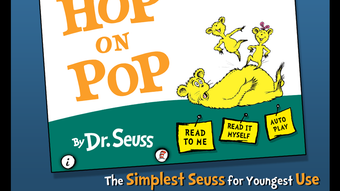
Hop on Pop - Dr. Seuss is an interactive book app designed to introduce young children, aged 2 to 6, to the joy of reading through engaging storytelling. Based on the classic Dr. Seuss book of the same name, the app transforms a beloved children’s story into a dynamic, multimedia experience. It supports early literacy development by offering highlighted narration, which helps children follow along with the text as it is read aloud. The app provides three distinct reading modes—read to me, read with me, and read it myself—allowing flexibility for different stages of reading development. This makes it suitable for both independent reading and shared reading experiences between parents, caregivers, or educators. The app features vibrant, colorful illustrations that reflect the whimsical style of Dr. Seuss, capturing the attention of young users and reinforcing visual comprehension. Designed with simplicity in mind, the interface is intuitive, enabling even the youngest users to navigate the app with minimal assistance. Its purpose is to foster a lifelong love of reading through play and interaction.
Key Features & Capabilities
- Interactive Storytelling – The app brings the Dr. Seuss classic to life with animated scenes and sound effects that enhance the narrative experience. Children can tap on characters and objects to trigger audio cues, reinforcing word recognition and phonemic awareness.
- Three Reading Modes – Offers read-to-me (automated narration), read-with-me (text highlighted as it’s spoken), and read-it-myself (independent reading with audio support), supporting various learning levels.
- Tappable Words and Objects – Kids can tap individual words to hear them pronounced, helping build vocabulary and phonetic understanding. Tapping on objects in the illustrations triggers their names being spoken aloud.
- Engaging Visual Design – Features rich, colorful illustrations that match the original book’s imaginative style, maintaining visual consistency and appeal for young audiences.
- Child-Friendly Interface – The layout is optimized for small hands and short attention spans, with large touch targets and minimal distractions.
These features support early language acquisition and encourage active participation in reading. For example, a child can explore the story at their own pace, tapping words they recognize or listening to unfamiliar ones. Teachers and parents can use the app as a supplementary tool in literacy lessons or bedtime routines, making learning feel like play.
User Interface, Workflow & Performance
The user interface is clean and focused on simplicity, with a layout that prioritizes readability and ease of navigation. Buttons are large and clearly labeled, making it accessible for children with limited motor skills. The app’s workflow follows a linear path through the story, but includes optional interactive elements that can be explored at any time. Navigation is intuitive, allowing young users to return to the start or jump to specific pages with minimal effort. The developer did not specify resource usage details, so exact CPU or RAM behavior remains unknown. However, based on general software behavior patterns, the app appears to operate smoothly on modern devices. Stability during extended use has not been publicly documented, but the design suggests a focus on reliability for young users. The app does not appear to include ads or in-app purchases, which contributes to a safe and uninterrupted experience. Overall, the workflow is designed to minimize frustration and maximize engagement for its target age group.
Compatibility & System Requirements
Hop on Pop - Dr. Seuss is available for both Windows and Mac operating systems. The software version is 1.2.0, and the installation size is 250 MB. The developer did not provide additional system requirements, so exact hardware specifications such as processor speed, RAM, or storage capacity are not available. Compatibility information was partially provided, indicating support for desktop platforms. It is recommended to ensure the device runs a current version of Windows or macOS for optimal performance. The app does not appear to require an internet connection after installation, making it suitable for offline use. Users should verify their system meets the minimum requirements for running desktop applications, especially if using older devices.
Pros and Cons
Pros
- Engaging, interactive storytelling that supports early literacy development
- Three reading modes cater to different stages of reading ability
- Beautiful, authentic Dr. Seuss illustrations enhance visual appeal
- Child-friendly interface designed for ages 2–6
- Offline functionality allows use without internet access
Cons
- No information on system requirements beyond OS compatibility
- Price point of $2.99 may be considered high for a single children’s book app
- Only one book is included, limiting content variety
- No built-in progress tracking or parental reporting features
- App size of 250 MB may be large for devices with limited storage
FAQ Section
Is Hop on Pop - Dr. Seuss compatible with Windows and Mac?
Yes, the app is available for both Windows and Mac operating systems.
Does the app require an internet connection to function?
Once installed, the app can be used offline. No ongoing internet connection is required for reading or interactive features.
Is the app safe for young children to use?
Yes, the app is designed specifically for children aged 2 to 6 and includes no ads, in-app purchases, or external links, making it a secure environment for young users.
How often are updates released for the app?
Updates are released as needed by the developer. The current version is 1.2.0, and users are encouraged to keep the app updated for the best experience.
What type of license does the app use?
The app is a one-time purchase with a perpetual license. Once purchased, it can be used indefinitely on compatible devices.
Final Thoughts
Hop on Pop - Dr. Seuss stands out as a thoughtful and visually rich interactive book app that successfully blends classic storytelling with modern educational tools. Its three reading modes and interactive features support a range of learning styles and reading levels, making it a valuable resource for parents, teachers, and caregivers. The app’s design prioritizes usability and engagement for young children, offering a safe, distraction-free environment that encourages independent exploration. While the lack of system requirements and limited content (one book only) are notable drawbacks, the app’s strong focus on literacy, vibrant visuals, and offline functionality make it a worthwhile addition to any early learning toolkit. For families seeking a high-quality, secure, and enjoyable way to introduce young readers to the magic of Dr. Seuss, this app delivers on its promise.
Download Hop on Pop - Dr. Seuss now




.png)