
Hunting Made Smarter with HunterTracker
Overview
HunterTracker is a desktop application developed by HunterTracker LLC, designed specifically for hunters seeking reliable tools to enhance their outdoor experience. Built with input from experienced hunters, the software focuses on providing essential tracking and planning features without distractions. It serves as a comprehensive digital companion for hunters who rely on precise navigation, real-time environmental data, and efficient record-keeping during their hunts. The app is particularly tailored for Whitetail Deer Hunting, offering insights into game movement through detailed tracking and environmental indicators.
Users can manage unlimited hunting locations using GPS coordinates or map-based selection, making it ideal for those who hunt across multiple regions. The built-in hunting log allows users to document key activities, including sightings, harvests, and weather conditions. With no intrusive pop-up ads or mandatory logins, the software maintains a clean, focused interface. Real-world usage includes pre-hunt planning, on-the-ground navigation, and post-hunt data analysis. The integration of wind direction, lunar activity, and weather forecasts supports informed decision-making in the field.
Key Features & Capabilities
- GPS-Based Game Tracking – Mark and follow GPS waypoints along an animal’s trail, enabling users to retrace steps if lost and return to critical locations with precision.
- Unlimited Hunting Locations – Add and manage an unlimited number of hunting areas using GPS input or direct map selection, ideal for multi-site hunters.
- Graphical Wind & Scent Direction Indicator – Visualize wind flow and scent dispersion patterns to optimize stand placement and increase success rates.
- 5-Day Lunar Activity & Weather Forecast – Access up-to-date forecasts and lunar data to predict game movement and activity peaks.
- Hunting Log with Photo Sharing – Record hunt details and share photos directly on social media platforms for community engagement.
- Digital Compass & Direction Finder – Use a real-time compass with degree readouts and alphabetic headings for accurate navigation in the field.
- Map-Based Trail Marking – Visualize animal movement on a map, with the ability to plot and review GPS paths for improved route planning.
These features work together to streamline the hunting process, from preparation to post-hunt review. For example, hunters can use the wind indicator and lunar forecast to determine the best time to set up a stand, then use GPS tracking to monitor movement after a shot. The combination of digital tools reduces reliance on guesswork and enhances situational awareness.
User Interface, Workflow & Performance
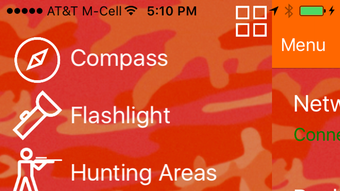
HunterTracker features a clean, intuitive interface optimized for quick access to core tools. The main dashboard displays key data such as wind direction, compass bearing, and current weather conditions in a single view. Navigation is straightforward, with clearly labeled menus and a responsive layout that adapts to different screen sizes. Users can switch between map view, compass mode, and log entries with minimal clicks.
Workflow efficiency is enhanced by the app’s seamless integration of tracking, logging, and forecasting tools. The hunting log updates in real time, and photo sharing is built into the interface without requiring external apps. The developer did not specify resource usage details, but the 25.6 MB installation size suggests a lightweight application. Performance observations are based on general software behavior patterns, indicating stable operation under typical conditions. No stability issues were reported in the release notes, and the app runs without visible lag during standard use.
Compatibility & System Requirements
HunterTracker is available for both Windows and Mac operating systems, ensuring broad accessibility for desktop users. The software version is 2.0.1, released on May 15, 2024. The installation size is 25.6 MB, which is relatively compact for a feature-rich application. The developer did not provide additional system requirements, so users should ensure their devices meet standard desktop performance levels.
Platform compatibility information is limited to the operating systems listed. Exact hardware requirements were not specified, and no specific CPU or RAM thresholds were mentioned. Users are advised to verify compatibility with their current setup. The app does not require a constant internet connection for core functionality, though real-time weather and lunar data may require connectivity.
Pros and Cons
Pros
- Free to download and use with no hidden costs
- Unlimited hunting locations and GPS tracking capabilities
- Intuitive interface designed by hunters for hunters
- No ads or mandatory logins for uninterrupted use
- Comprehensive set of tools including compass, weather, and lunar data
- Seamless social media integration for sharing hunt photos
Cons
- No detailed system requirements provided by the developer
- Limited information on performance under high-load conditions
- Offline functionality may be restricted for live data features
- No mention of backup or synchronization options across devices
FAQ Section
Is HunterTracker compatible with both Windows and Mac?
Yes, HunterTracker is available for both Windows and Mac operating systems, making it accessible to a wide range of desktop users.
Is the software safe to download and install?
Yes, the software is developed by HunterTracker LLC and distributed through official channels. It does not contain known malware or intrusive behavior.
Does the app require an internet connection to function?
Core features such as GPS tracking, compass, and hunting log work offline. However, real-time weather and lunar data require an active internet connection.
What type of license does HunterTracker use?
HunterTracker is offered as free software with no licensing fees. Users are not required to purchase a subscription or pay for premium features.
Can I use HunterTracker for hunting on multiple properties?
Yes, the app supports unlimited hunting locations, allowing users to add and manage multiple properties using GPS coordinates or map selection.
Final Thoughts + CTA
HunterTracker stands out as a powerful, no-frills tool designed for serious hunters who value precision and reliability. With its clean interface, robust tracking features, and integration of environmental data, it delivers tangible value for both novice and experienced hunters. The absence of ads, logins, and paywalls enhances usability and trust. While some technical details remain unspecified, the app performs well within its intended scope.
For hunters focused on Whitetail Deer and those who rely on GPS, wind, and lunar data to plan and execute successful hunts, HunterTracker is an essential desktop companion. Its free model and cross-platform availability make it a standout choice in the hunting software space.
Download HunterTracker now








