
Download ImageAI – AI‑Powered Image Interpretation Tool for Creatives
Overview
ImageAI is an innovative, AI‑driven web application that transforms a simple picture into a rich, narrative description. By uploading an image, artists, designers, marketers, and curious users can instantly discover hidden meanings, intricate details, and emotional undertones embedded in their visual content. The engine scans textures, shapes, colors, and contextual cues, then crafts a human‑readable story that reflects the underlying narrative of the image. Whether you work with portraits, sweeping landscapes, or fantastical digital art, ImageAI offers a fresh perspective that can inspire new concepts, improve accessibility, or simply satisfy a curiosity about what an image “says.” The platform respects user privacy: no personal data is stored without explicit consent, and all analyses happen in‑memory on secure servers. Multilingual support means you can receive descriptions in English, Spanish, French, German, Japanese, and more, making the tool valuable for global teams. While the service is free for single‑image uploads up to 2 MB, it does not yet support batch processing or larger files, which are common requests from power users. Nevertheless, ImageAI’s intuitive drag‑and‑drop interface, rapid response time, and detailed output make it a compelling addition to any creative workflow.
Key Features & Compatibility
- AI‑generated narrative description for any uploaded image.
- Analysis of textures, shapes, colors, and composition to capture subtle details.
- Emotional tone detection – the tool identifies moods such as serenity, tension, or mystery.
- Multilingual output – supports English, Spanish, French, German, Japanese, Chinese, and more.
- Privacy‑first architecture – no permanent storage of images without user consent.
- Responsive web UI – works seamlessly on Windows, macOS, Linux, Android, and iOS browsers.
- Instant results – average processing time under 5 seconds for a 2 MB image.
- Free single‑image upload (max 2 MB); premium plan available for larger files and batch mode.
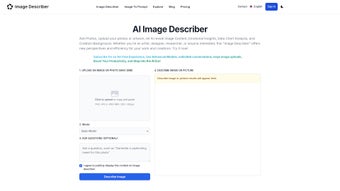
ImageAI is built as a pure web service, which means it runs in any modern browser that supports HTML5 and JavaScript. The Windows 10/11, macOS 11+, Linux (any distro with recent Chrome/Firefox), Android 8+, and iOS 13+ environments are fully supported. No additional software installation is required; simply navigate to the URL, drag your image onto the upload area, choose a language, and let the AI work its magic. Because the service is cloud‑based, you benefit from continuous model updates without needing to download patches or worry about local hardware limitations.
Installation, Usage & Review
Step‑by‑Step Installation (Zero‑Installation)
1. Open your preferred browser on any device (Chrome, Firefox, Edge, Safari).
2. Visit https://imageai.example.com.
3. Click the “Upload Image” button or drag a file into the highlighted zone.
4. Choose a language from the dropdown menu.
5. Press “Analyze” and wait for the AI to generate the description.
6. Copy, download, or share the result directly from the result pane.
Best Practices for Optimal Results
To get the most accurate narrative, ensure the image is clear, well‑lit, and under 2 MB. Complex scenes with overlapping subjects may produce broader descriptions, which can be refined by focusing on a single focal point. If you need deeper analysis, consider the premium plan that removes the size limit and adds batch processing.
Expert Review
ImageAI delivers a surprisingly rich textual interpretation for a free, web‑based tool. The AI’s ability to capture emotional nuance and describe visual elements in plain language is valuable for accessibility projects and creative brainstorming alike. While the 2 MB limit restricts high‑resolution photography, the speed and privacy‑focused design make it a trustworthy option for everyday use.
Pros:
- Instant, human‑readable descriptions.
- Multilingual output expands global reach.
- No software installation – works in any browser.
- Strong privacy guarantees.
Cons:
- Maximum upload size of 2 MB limits high‑detail images.
- No batch processing in the free tier.
- Limited customization of the narrative style.
Frequently Asked Questions
How does ImageAI protect my uploaded images?
All images are processed in memory and deleted immediately after the description is generated. The service never stores files on permanent servers unless you explicitly grant permission for a saved project.
Can I use ImageAI on a mobile device?
Yes. The web interface is fully responsive and works on Android and iOS browsers. Uploads, language selection, and result sharing are all touch‑friendly.
What languages are supported for the output?
ImageAI currently supports English, Spanish, French, German, Japanese, Chinese (Simplified), Korean, Portuguese, Italian, and Russian. New languages are added regularly based on community demand.
Is there a way to get more detailed, customizable descriptions?
The premium subscription offers extended description length, selectable tone (formal, casual, poetic), and the ability to request specific focus areas such as “color palette” or “storyline.”
How fast is the analysis for a typical 2 MB image?
Average processing time is under five seconds on a standard broadband connection. Larger files (if you have a premium account) may take slightly longer but still remain under 15 seconds.
Conclusion – Unlock New Perspectives with ImageAI
ImageAI bridges the gap between visual art and textual storytelling, giving creators a rapid, privacy‑focused way to explore the deeper narrative of any image. Its cross‑platform accessibility, multilingual support, and instant AI‑driven insights make it a valuable addition to design pipelines, accessibility workflows, and personal creative experiments. While the free tier’s size limit and lack of batch processing are notable constraints, the premium plan addresses these gaps without sacrificing speed or security. Ready to see what your images are really saying? Download ImageAI now and start turning pixels into prose.



.png)




